The Adliberum Engine (ADLENGINE)

Liam Twose

Released
Jun 23, 2017
Platforms
Windows
Last updated
Wishlist on SteamAdd it on the Steam store page. Opens in a new tab.

Updates & announcements

20 posts
  1. Developer post

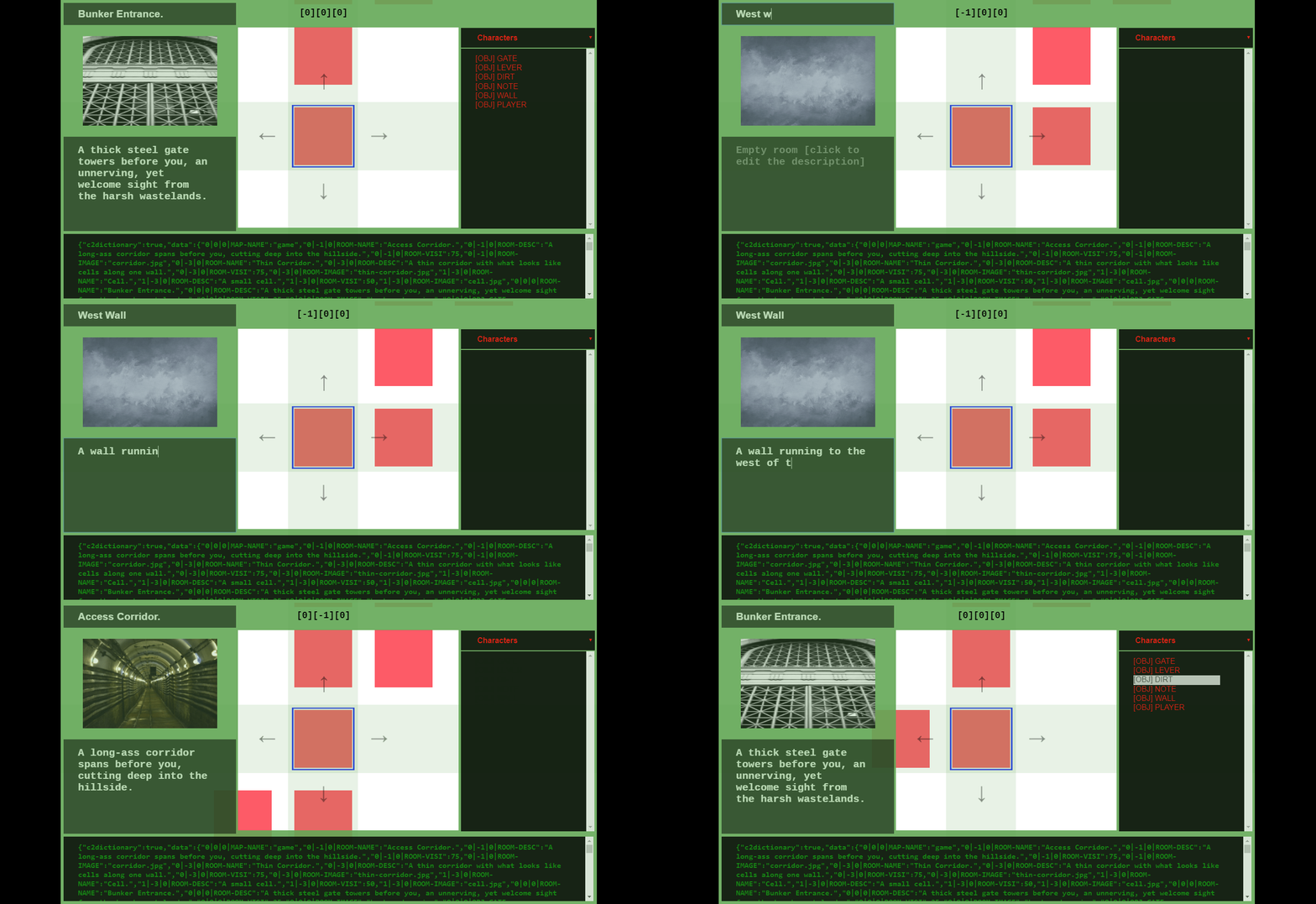
    Early look at new in-built Map Editor...

    As part of the bid to get adlengine out of early access we're working on an official in-built suite of tools to aid development using #adlengine in-line with bringing it to a more learnable state. Starting with a dedicated map editor which will allow you to quickly lay down the f

  2. Developer post

    ADLENGINE v1.1.61.5d

    Major changes are afoot. Rendering Text Changes Rendering text is now handled using text areas instead of static text objects, which will soon be added to theme controls, these allow for greater control of text, neater rendering and the ability to scroll back through previous tex

  3. Developer post

    In the meantime...

    Whilst we're busy rewriting adlengine... I will continue to work on the original Adliberum Engine and aim to get it out of Steam Early Access in 2019. Notably: emphasis will be placed on locking down the core elements, providing a friendlier experience with menus etc, better docu

  4. Developer post

    Show and tell.

    Created or creating something using adlengine? I'd love to see it! Share your creations!

  5. Developer post

    The future of Adliberum Engine

    Apologies for the really long period of down time, life unfortunately has a real nasty habit of getting in the way at times. Looking forward to a kinder, more productive 2019. Plus with the original software I used to create it no longer being updated and the knock on effect is t

  6. Developer post

    ADLENGINE: Using The In Built Editor

    The in-built editor in #adlengine grants greater control of your levels and makes scripting easier. Check out the quick guide for using the editor at If you need any assistance, I will do my best to help. ~ Liam

  7. Developer post

    ADLENGINE: Using The In Built Editor

    The in-built editor in #adlengine grants greater control of your levels and makes scripting easier. Check out the quick guide for using the editor at If you need any assistance, I will do my best to help. ~ Liam

  8. Developer post

    1.1.60.7 - CYOA / THEME / ADVANCED FILTER COMMANDS

    Updates in 1.1.60.7 // NEW CHOOSE YOUR ADVENTURE FUNCTIONALITY // You enable CYOA mode per room. Which gives 1-4 choice buttons. room is cyoa You can turn on / off choices using cyoa 1 is on / off cyoa 2 is on / off cyoa 3 is on / off cyoa 4 is on / off To set the text of a choic

  9. Developer post

    1.1.60.7 - CYOA / THEME / ADVANCED FILTER COMMANDS

    Updates in 1.1.60.7 // NEW CHOOSE YOUR ADVENTURE FUNCTIONALITY // You enable CYOA mode per room. Which gives 1-4 choice buttons. room is cyoa You can turn on / off choices using cyoa 1 is on / off cyoa 2 is on / off cyoa 3 is on / off cyoa 4 is on / off To set the text of a choic

  10. Developer post

    1.1.60.6 - NEW ACCESSIBILITY COMMANDS + SCREEN READER

    In this version we have enabled a tonne of accessibility functions. Made minor improvements to the inbuilt editor. NEW ACCESSIBILITY COMMANDS: Activate accessibility input box. input on/off customise input box colors. input b&w input w&b input red input blue input green i

  11. Developer post

    1.1.60.6 - NEW ACCESSIBILITY COMMANDS + SCREEN READER

    In this version we have enabled a tonne of accessibility functions. Made minor improvements to the inbuilt editor. NEW ACCESSIBILITY COMMANDS: Activate accessibility input box. input on/off customise input box colors. input b&w input w&b input red input blue input green i

  12. Developer post

    NEW VERSION: 1.1.60.1 | All New Power Commands Added (nb: steam overlay = broken)

    IMPORTANT: steam overlay IS currently not working with the new update. UPDATE NOTES: 1.1.60.1 ----------------------------------------------------------- AUTO ADD TO INTELLISENSE ----------------------------------------------------------- 1. certain commands will now automaticall

  13. Developer post

    NEW VERSION: 1.1.60.1 | All New Power Commands Added (nb: steam overlay = broken)

    IMPORTANT: steam overlay IS currently not working with the new update. UPDATE NOTES: 1.1.60.1 ----------------------------------------------------------- AUTO ADD TO INTELLISENSE ----------------------------------------------------------- 1. certain commands will now automaticall

  14. Developer post

    ADLENGINE 1.1.55.6 - INTERACTING WITH UI.

    All images for UI must either fall under the c:\users\username\adlengine\mapname\ folder under images OR under userlib folder as per above. Each image used MUST be given a unique anim number (currently) from 0-16. To assign the anim number: {image-name}.anim=10; works for {image-

  15. Developer post

    ADLENGINE 1.1.55.6 - INTERACTING WITH UI.

    All images for UI must either fall under the c:\users\username\adlengine\mapname\ folder under images OR under userlib folder as per above. Each image used MUST be given a unique anim number (currently) from 0-16. To assign the anim number: {image-name}.anim=10; works for {image-

  16. Developer post

    ADLENGINE 1.1.55.6 - RENDERING TEXT TO THE SCREEN

    All commands work with '' and %% special commands. SETUP: {text-name}.new; {text-name}.visible=1; {text-name}.x=260; {text-name}.y=600; {text-name}.opacity=100; {text-name}.width=320; {text-name}.height=32; {text-name}.text=some text; {text-name}.fontcolor.r=255; {text-name}.font

  17. Developer post

    ADLENGINE 1.1.55.6 - RENDERING TEXT TO THE SCREEN

    All commands work with '' and %% special commands. SETUP: {text-name}.new; {text-name}.visible=1; {text-name}.x=260; {text-name}.y=600; {text-name}.opacity=100; {text-name}.width=320; {text-name}.height=32; {text-name}.text=some text; {text-name}.fontcolor.r=255; {text-name}.font

  18. Developer post

    ADLENGINE 1.1.55.6 - RENDERING IMAGES TO THE SCREEN.

    All commands work with '' and %% special commands. SETUP: {image-name}.new; {image-name}.visible=1; {image-name}.x=260; {image-name}.y=600; {image-name}.opacity=100; {image-name}.width=320; {image-name}.height=240; {image-name}.image=imagename; CUSTOM PARAMS {image-name}.paramnam

  19. Developer post

    ADLENGINE 1.1.55.6 - RENDERING IMAGES TO THE SCREEN.

    All commands work with '' and %% special commands. SETUP: {image-name}.new; {image-name}.visible=1; {image-name}.x=260; {image-name}.y=600; {image-name}.opacity=100; {image-name}.width=320; {image-name}.height=240; {image-name}.image=imagename; CUSTOM PARAMS {image-name}.paramnam

  20. Developer post

    EVEN MORE POWER COMING NEXT TO ADLENGINE!

    EACH COMMAND: (LOOPS THROUGH EACH OBJECT ETC) each:do something each inv / obj / char / npc / room / worn / equip / COMMAND is: (SETS CURRENT COMMAND TO...) command is talk to carter INTELLISENSE is: (SETS TOOLTIP...) intellisense is talk to carter NEW SYSVARS (includes new struc