Today, Portal with RTX is being upgraded with DLSS 4 with Multi Frame Generation , multiplying framerates, as well as the transformer model for Ray Reconstruction and DLAA , enabling even better image quality. Portal with RTX is also adding RTX Neural Radiance Cache (NRC), a neur
Today, Portal with RTX is being upgraded with DLSS 4 with Multi Frame Generation, multiplying framerates, as well as the transformer model for Ray Reconstruction and DLAA, enabling even better image quality. Portal with RTX is also adding RTX Neural Radiance Cache (NRC), a neural shader that improves indirect lighting, as well as a bevy of performance optimizations.
Added DLSS 4 with Multi Frame Generation, and the new AI transformer models for DLSS Ray Reconstruction and DLAA. RTX 50-Series owners can now multiply framerates with 3X and 4X modes, generating up to 3 additional frames per rendered frame, while all RTX users can experience the transformer model for Ray Reconstruction and DLAA to elevate image quality with greater detail, improved stability, and reduced ghosting. To activate DLAA, navigate to the advanced graphical menu and choose “Full Resolution” in the DLSS mode menu.
Added RTX Neural Radiance Cache (NRC), a neural shader that leverages neural networks to estimate indirect lighting more accurately and performantly. With NRC, fully ray traced lighting not only looks better but is more responsive as well. NRC features multiple quality levels, each automatically selected based on the graphical preset being used. NRC quality levels can also be manually adjusted from the advanced graphics menu under the “indirect illumination” options.
Added a new texture streaming system that optimizes VRAM usage to maximize texture quality within the available video memory budget
Made various performance improvements and memory usage optimizations
Changed the behavior of default graphical presets.
Optimized RTX Remix’s shader compilation process, reducing shader compilation time. Also added an on screen notification when shaders are actively being compiled.
Updated NVIDIA Real-time Denoising (NRD) library to 4.13 for better performance, as well as sharper and more stable denoising
Today, Portal with RTX is upgrading to NVIDIA DLSS 3.5 , leveraging its AI-powered Ray Reconstruction technology to improve the fidelity of full ray tracing, and the responsiveness of dynamic lighting effects. And with the introduction of NVIDIA RTX IO, texture loading times are
Today, Portal with RTX is upgrading to NVIDIA DLSS 3.5, leveraging its AI-powered Ray Reconstruction technology to improve the fidelity of full ray tracing, and the responsiveness of dynamic lighting effects. And with the introduction of NVIDIA RTX IO, texture loading times are accelerated, and the file size of the game has been reduced. Read on to learn more.
NVIDIA DLSS 3.5 With Ray Reconstruction: Improved Image Quality
To deliver the definitive experience, Portal with RTX includes the complete suite of DLSS technologies, maximizing frame rates and image quality using the power of AI. Super Resolution enables all GeForce RTX gamers to significantly accelerate frame rates. Frame Generation creates additional frames on GeForce RTX 40 Series graphics cards, desktops and laptops. Reflex reduces system latency, making gameplay even more responsive. And our newest groundbreaking feature, Ray Reconstruction, elevates the image quality of ray-traced effects and full ray tracing to new heights.
DLSS Ray Reconstruction is an enhanced AI-powered neural renderer that improves ray-traced image quality for all GeForce RTX GPUs by replacing hand-tuned denoisers with an NVIDIA supercomputer-trained AI network, which generates higher-quality pixels in between sampled rays. Compared to previous techniques, quality is visibly enhanced, and as DLSS is always learning, the benefits keep on improving.
Ray Reconstruction in Portal with RTX updates lighting effects faster - previously the denoiser struggled with spatial interpolation, where it didn’t blend enough pixels, creating a blotchy effect. Additionally, it was unable to accumulate enough good pixels from previous frames, resulting in a boiling effect in the light.
With DLSS Ray Reconstruction, certain patterns associated with reflections are recognized, keeping the image stable and generating high quality reflections. The result is near-instantaneous lighting updates that are nigh on unnoticeable during the course of normal gameplay. Additionally, Ray Reconstruction greatly improves the clarity and fidelity of water reflections, eliminates light speckle artifacts on fine details, such as chain link fences, eliminates ghosting on moving objects, such as ventilation fans, and increases the fidelity of shadows cast from aforementioned moving game elements.
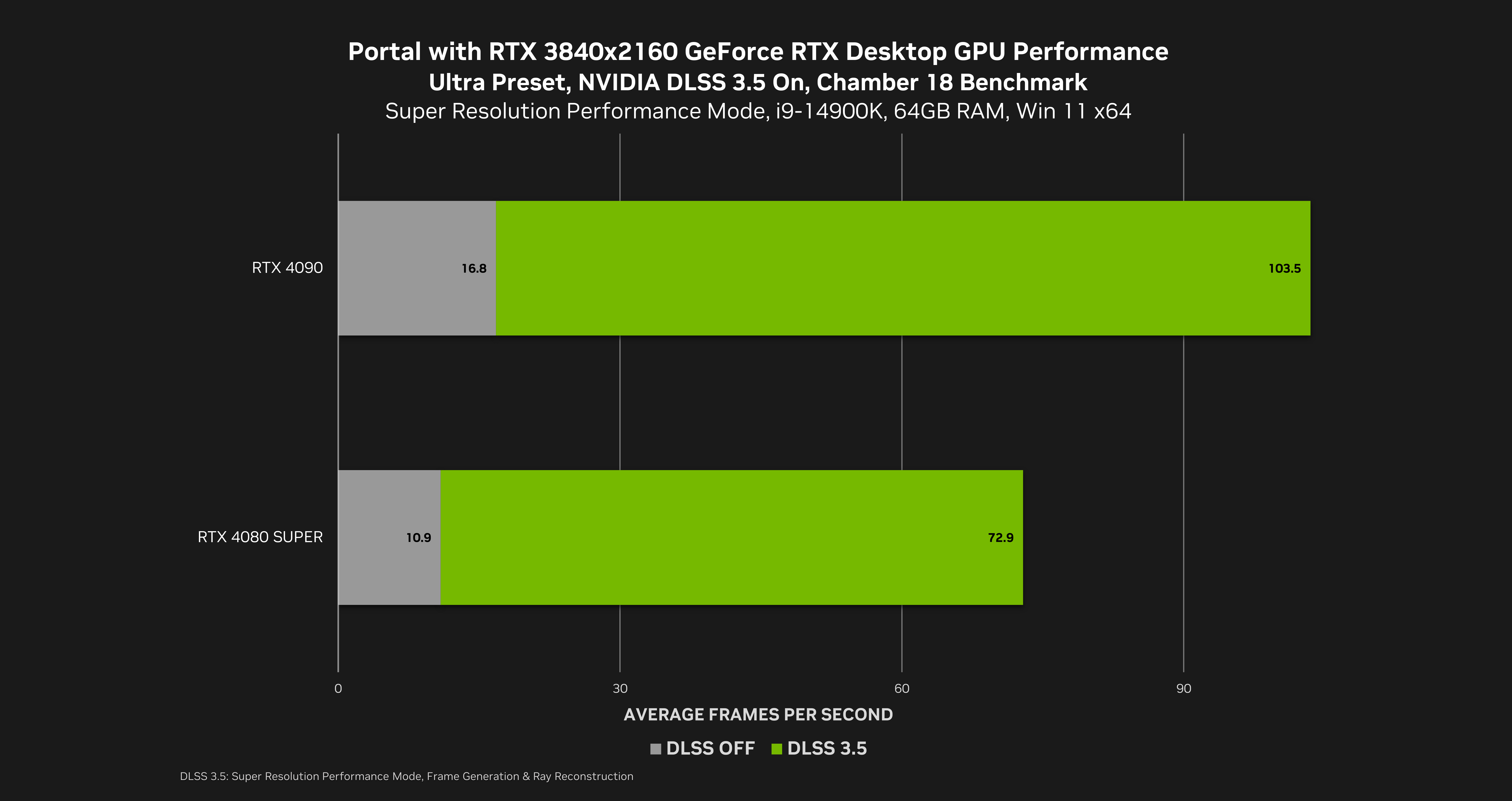
Enabling DLSS 3.5 with Ray Reconstruction multiples frame rates on the GeForce RTX 4090 by 6.2X, enabling max setting, fully ray-traced 4K gameplay at over 100 FPS; on the GeForce RTX 4080 SUPER, performance is multiplied by 6.7X to deliver a 70 FPS-plus experience.
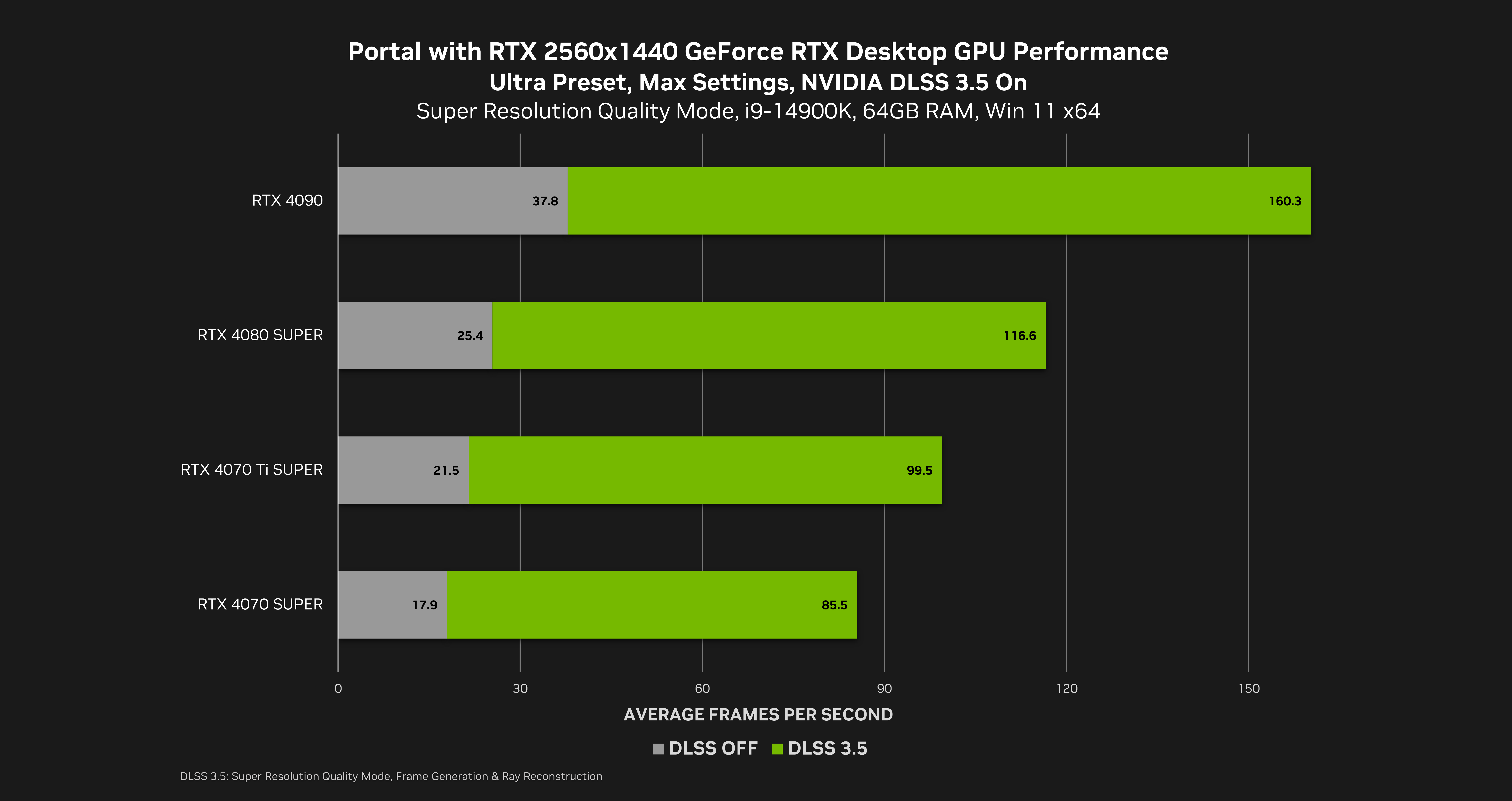
At 2560x1440, a 4.7X performance multiplier enables owners of the GeForce RTX 4070 SUPER, 4070 Ti SUPER, 4080, 4080 SUPER and 4090 to max everything out and play at over 80 FPS, and up to 160 FPS on the GeForce RTX 4090.
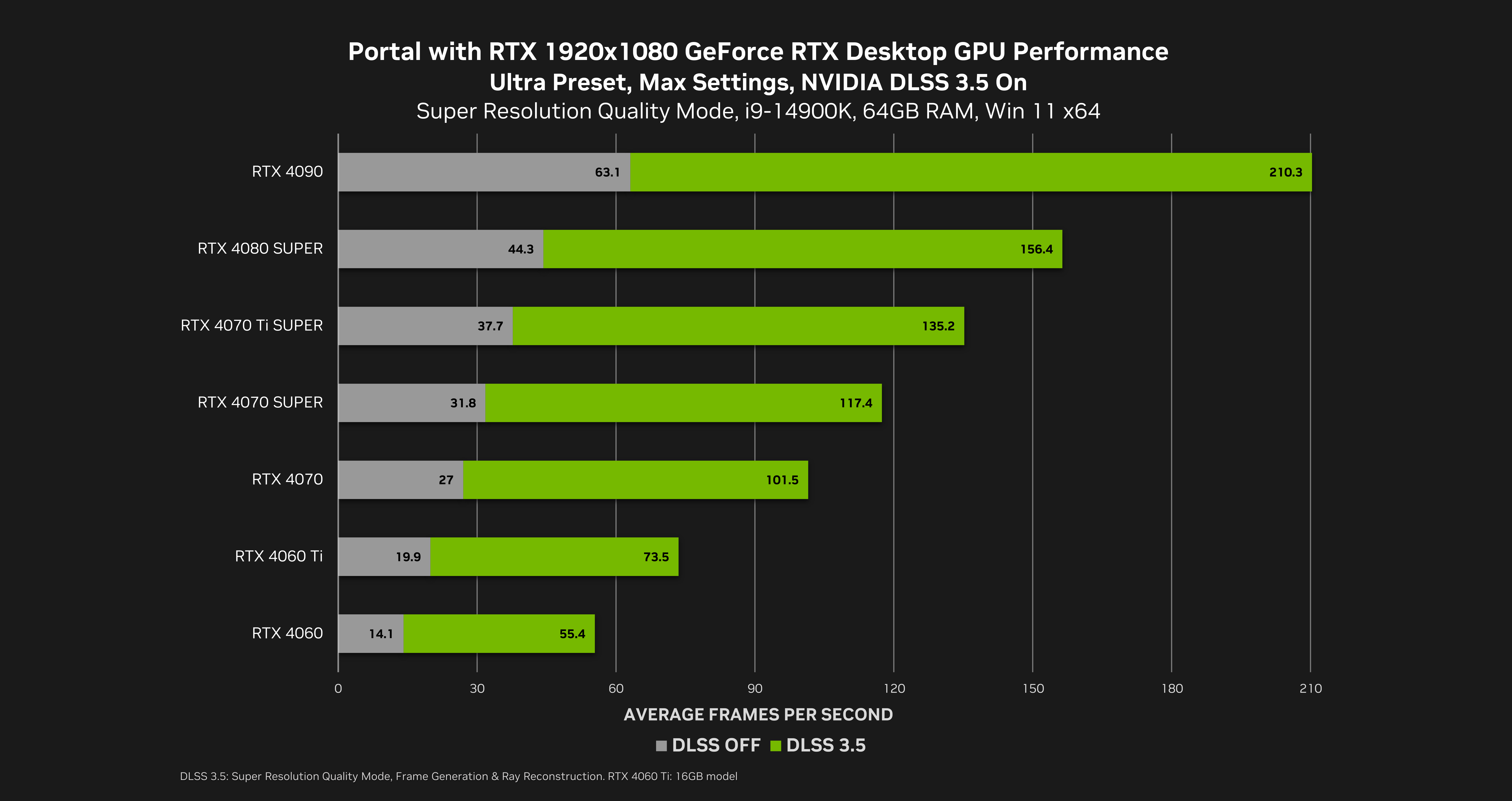
At 1920x1080, a 3.6X performance multiplier enables owners of virtually all GeForce RTX 40 Series graphics cards to play at over 70 FPS, with frame rates climbing rapidly as you move up the stack, all the way up to 210 FPS on the GeForce RTX 4090.
NVIDIA RTX IO Added To Portal with RTX

NVIDIA RTX IO enables fast GPU-based loading and game asset decompression, massively accelerating IO performance compared to hard drives and traditional storage APIs. NVIDIA RTX IO leverages GPU decompression for smaller data packages, enabling faster texture load times and lower CPU utilization, allowing developers to create a new generation of games with massive highly detailed worlds. NVIDIA RTX IO made its debut alongside the free Portal: Prelude RTX NVIDIA RTX Remix mod and in Ratchet & Clank: Rift Apart. Now it’s also available in Portal with RTX:
The cubes of Portal are one of the game’s most popular aspects, accompanying the player throughout their journey, and helping them overcome all manner of challenges. In Portal with RTX, Remix technology enables you to replace the cubes with alternative models, some of which cast light that realistically illuminates the test chambers and is reflected by shiny surfaces. Other cubes showcase Physically Based Materials, or have their own reflective properties to further highlight the fully ray traced technology at play.
The creation of bonus cubes for Portal with RTX allowed our talented artists to showcase their skills by crafting their own unique Storage and Companions to accompany players as they attempt to escape GLaDOS. Each individual artist received minimal direction in the form of a short concept prompt (such as space, clockwork, wood, magnify, arts & crafts, health, frozen, roll cage, power on, 4090), and were given free rein to design, model and texture their new friend in their own style.
Leveraging the power of our custom PBR shader and the ability to utilize emissive materials to dynamically affect the lighting in the game world, the results were breathtaking. These unique cubes enhance the player's experience, encouraging them to revisit their favorite chambers time and again.
In our new Portal with RTX update we’ve included 6 new cubes, featuring a variety of materials that interact realistically with the environment and lighting.
In Portal with RTX, press Alt+X, navigate to the “Developer Settings” menu, select the “About” tab, and scroll down to the “Secrets” section, where you’ll find a number of alternative Storage and Companion Cube models you can use. Pick a new cube, click “Save Settings” on the bottom left, and the cube models will be instantly updated on-screen.
DLSS 3.5 With Ray Reconstruction, Coming Soon To The NVIDIA RTX Remix Open Beta
DLSS 3.5 with Ray Reconstruction is coming soon to the NVIDIA RTX Remix Open Beta, enabling all modders to upgrade their work. Stay tuned to the RTX Remix changelog to learn when the tech is added, so you can upgrade your mods with game-enhancing Ray Reconstruction technology.
Portal with RTX NVIDIA DLSS 3.5 Update - Download Now
Portal with RTX and our new NVIDIA DLSS 3.5 and RTX IO update are available on Steam now, for free for all Portal owners. Download, install our latest Game Ready Driver, and get ready to enjoy the classic game in an entirely new light, now with even better image quality, even faster performance, and reduced texture load times.
For more announcements, and news about games leveraging our range of incredible RTX technologies, head over to GeForce.com.
If you don’t have a GeForce RTX PC or laptop, you can play Portal with RTX in the cloud using the same technologies as GeForce RTX 40 Series owners, including DLSS 3.5, and Full Ray Tracing, thanks to NVIDIA GeForce NOW Ultimate.
Portal remains a timeless classic; in December we released Portal with RTX, a fully ray-traced reimagining of Valve’s award winning game, which used the performance multiplication of NVIDIA DLSS 3 to power the most realistic path-traced lighting ever seen in a real-time game. Por
Portal remains a timeless classic; in December we released Portal with RTX, a fully ray-traced reimagining of Valve’s award winning game, which used the performance multiplication of NVIDIA DLSS 3 to power the most realistic path-traced lighting ever seen in a real-time game.
Portal with RTX was created using NVIDIA RTX Remix, a free, upcoming modding platform built on NVIDIA Omniverse, which enables modders to quickly create and share #RTXON mods for classic games, each with enhanced materials, full ray tracing, NVIDIA DLSS 3, NVIDIA RTX IO, and NVIDIA Reflex.
Now, RTX Remix has been used to remaster Portal: Prelude, the highest rated Portal mod, the 2008 Portal ModDB winner, and #3 overall Player’s Choice mod of 2008. Created by Nicolas “NykO18” Grevet and others, Portal: Prelude is an unofficial Portal prequel, set before the time of GLaDOS, featuring a new extremely challenging 8-10 hour campaign composed of 19 new test chambers, new advanced gameplay mechanics, a fully voiced story with NPCs, and a whole lot more.
Портал DSOGaming вслед за топом ПК-игр с худшей производительностью в 2022 году составил список лучшей графики в компьютерных проектах, вышедших за последние двенадцать месяцев.
We are rolling out a patch to address certain stability issues, bugs, and performance. We’ve introduced several new graphical settings, and optimized graphical presets based on user hardware. These changes should improve performance for the majority of RTX GPUs (RTX 20 series and
We are rolling out a patch to address certain stability issues, bugs, and performance. We’ve introduced several new graphical settings, and optimized graphical presets based on user hardware. These changes should improve performance for the majority of RTX GPUs (RTX 20 series and greater).
To align with these new settings, the default settings are set to “Ultra” for RTX 40 Series GPU, “High” for RTX 30 Series GPU, and “Low” for RTX 20 Series GPU. We advise users who would prefer to maintain their existing custom graphics settings to save them locally before updating Portal With RTX.
Users looking to further customize their experience can use the RTX Remix’s graphics menu, found by pressing Alt+X in-game–please note, we strongly recommend against altering any “video-advanced” settings within Portal’s original settings menu, as attempting to adjust these will not yield a better experience and will lead to instability.
To view our recommended graphics settings for specific RTX 20 and 30 Series GPUs for improved performance and quality, click here.
Updates:
Fixed some issues that could cause a crash on startup
Improved stability for lower resolutions
Changed “Fullscreen” mode to non-exclusive, which will improve stability; True fullscreen exclusive mode can still be enabled in the developer settings if desired (found in the Remix graphics menu via Alt-X)
Added Medium and Low graphical setting presets to improve performance on lower spec GPUs. Tuned up the High setting preset to include better volumetric lighting and particle lighting.
Presets now influence DLSS quality level when DLSS is set to “Auto”; custom DLSS quality levels can still be set, same as before
Known issues:
Possible crash during or after the final level
In the final cutscene, there are visual artifacts present when volumetrics are set to “off” (as is the case in the medium and low graphical presets)
Occasional stutter frames can be encountered when HUD is not visible (ex: during starting and ending cinematics)
Crashes on startup and when changing settings can still occur.
Portal with RTX offers a preview of gaming’s future, where every frame of gameplay is rendered with stunning full ray tracing - an advanced, GPU-intensive ( see recommended & minimum specs here ), version of ray tracing referred to as “path tracing” - which unifies all lighti
Portal with RTX offers a preview of gaming’s future, where every frame of gameplay is rendered with stunning full ray tracing - an advanced, GPU-intensive (see recommended & minimum specs here), version of ray tracing referred to as “path tracing” - which unifies all lighting effects such as shadows, reflections, global illumination, refractions and more into a single algorithm.
We have seen your feedback regarding performance on GPUs that are outside the minimum recommended specs (i.e. RTX 20 Series) and some that are in-between the minimum and recommended (i.e. some RTX 30 Series GPUs) and have put together some recommended settings for you to use to help improve performance.
The easiest path to better performance is to use GeForce Experience. Simply download the latest game ready driver (527.56), find Portal with RTX, and click Optimize to automatically configure the best combination of image quality and performance settings for your RTX 20 and 30 Series GPU.
Alternatively we have prepared a recommended graphic settings chart to help guide you to higher frames in your play experience.
To adjust your graphics settings in-game press Alt-X to open the Remix graphics window.
These settings target to improve framerates and your experience will vary depending on your system configuration. These settings may also reduce visual quality.
Please do not alter the Portal “video-advanced” settings, as attempting to adjust these settings may lead to instability; press Alt-X to use the Remix graphics settings window instead!
If you have already altered Portal advanced video settings we recommend you reset them to default and do not alter again.
Portal with RTX free DLC is now available, featuring full ray tracing, performance boosting NVIDIA DLSS 3 , and the low latency with NVIDIA Reflex. Portal with RTX is enhanced with full ray tracing, an advanced, GPU-intensive ( see recommended & minimum specs here ), version
Portal with RTX free DLC is now available, featuring full ray tracing, performance boosting NVIDIA DLSS 3 , and the low latency with NVIDIA Reflex.
Portal with RTX is enhanced with full ray tracing, an advanced, GPU-intensive (see recommended & minimum specs here), version of ray tracing referred to as “path tracing” which unifies all lighting effects such as shadows, reflections, global illumination, refractions and more into a single algorithm. Gamers will get to enjoy Portal’s famous test chambers with every photon of light fully ray traced in real time!
https://www.youtube.com/watch?v=ms1W3TD9de0
Experience realistic lights that bounce off of every surface, and cast reflections on every object, from the iconic portal gun to the warped glass that lines every chamber in the Aperture Science Enrichment Center. Light even shines through portals!
https://www.youtube.com/watch?v=DwFCSsc99Rk
And NVIDIA DLSS 3 delivers a 2.8x increase to frame rates, giving GeForce RTX 40 series gamers the performance to play Portal with RTX at 4K. Other GeForce RTX gamers will benefit from DLSS 2.
We also created some fun alternative cubes that can be unlocked by finding QR codes in the game. Scan them with your phone, press Alt + X in-game, click on Developer Settings, then go to About > Secrets, enter the code you see on your phone, check the box next to the new entry in the list, and all cubes will be switched to the custom cube you’ve unlocked.
With the DLC installed, you'll see it in your library as “Portal with RTX”, ready to be launched. Please ensure you have the latest GeForce Drivers installed and own the original Portal to play.
If you’re interested in finding out more about the technology behind Portal with RTX, you can check out the Portal with RTX announcement.
Full Release Notes:
Known Issues
Time demos recorded at low framerate may exhibit stutter when player is moving fast
Occasional crash before the Still Alive song
Possible crash when saving a GeForce Experience recorded video capture of Portal with RTX
Possible stutter when getting out of bed in Chamber 00, or during the end cinematic
Possible crash when Alt-Tabbing in Full-screen exclusive mode, or when changing display modes. If this happens, players can consider Borderless windowed mode as an alternative.
One of the catcher light beams in Chamber 15 is very faint
Other notes
Visual Settings menu now opens with Alt-X instead of Shift-Ins in order to support more keyboard layouts
XBox controller support added
Changed graphics preset names to disambiguate from DLSS settings