
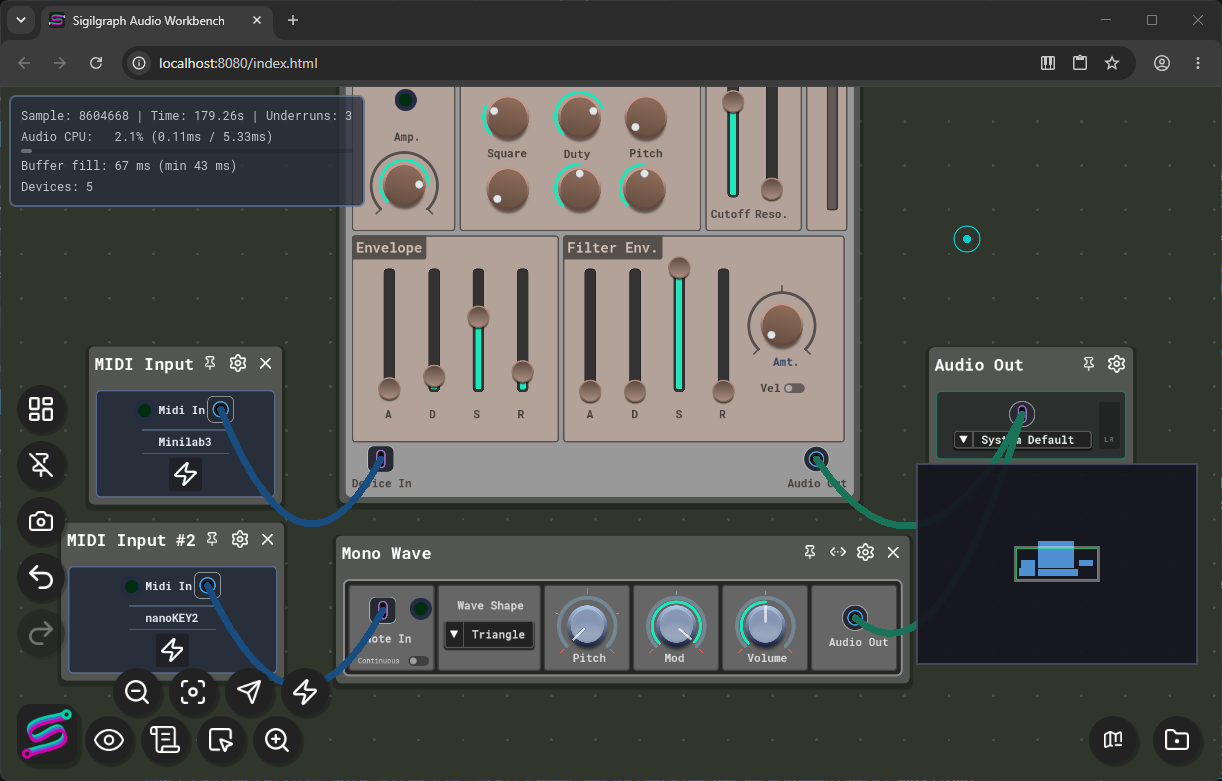
Here is the link for the web version. Sigilgraph Audio Workbench
This release adds a browser edition of Audio Workbench, touch input for the interface, and a level-of-detail system that keeps large workbenches responsive when zoomed out. It also adds multi-device MIDI input and corrects several devices and controls.
The browser edition is a separate build. It has fewer audio features and a lower performance ceiling than the desktop application. The desktop version remains the full application.
Browser Edition
The browser edition opens with the WebDemo project. It contains MiniDemo, BasicDrumKit, BasicDrumKitTest, and PachinkoSong. On first launch, the workbench loads MiniDemo.
Your active workbench is cached in browser storage and restored on return.
Use Download Workbench or the patch context menu to save a .workbench file to your device.
Projects can be exported as .sawp files by download, and patches can be imported from a file.
Leaving the page asks for confirmation. The power button is hidden in the browser edition.
Recording works in the browser edition.
Limitations of the browser edition:
Audio input is not available. Audio output uses the Basic Audio Server.
VST hosting and the Advanced Audio Server are not available.
Web MIDI input works in browsers that support the Web MIDI API.
Some processing runs at a lower evaluation rate, so the sound can differ from the desktop version.
Phones are not supported. A notice appears on phone-sized touch devices.
Large patches run more slowly than on desktop.
Touch Input
Hold a control still for one second to open its context menu. Moving the finger or touching with a second finger cancels the hold, so drags on knobs and sliders are not interrupted.
Pinch to zoom and drag to pan the canvas.
Touch screens have Context and Shift buttons. A tap can show the on-screen keyboard.
The start menu, project manager, asset manager, and settings are laid out for smaller screens.
Context menus reposition themselves to stay on screen.
Level of Detail
When zoomed out, the workbench simplifies device bodies, knobs, sliders, meters, and wires so that the interface stays responsive. Comment blocks are never simplified.
A new Level of Detail setting offers Off, Conservative, Balanced, Aggressive, and Auto. Auto uses Off on desktop and Aggressive in the browser edition.
At the farthest zoom level with level of detail enabled, knobs and sliders do not respond to input. Zoom in to adjust them.
Audio in the Browser Edition
The browser edition offers three latency profiles: Live (about 60 ms), Balanced (about 80 ms, the default), and Safe (about 150 ms).
If playback underruns repeatedly, the browser edition moves to the next higher profile, up to Safe.
Desktop audio settings are unchanged.
MIDI Input
Multiple MIDI Input nodes can listen to separate devices, or to all devices merged.
MIDI Input nodes can be created, copied, pasted, and restored together.
Each node keeps its device binding when devices share a name.
Desktop Changes
The default grid mode is now Dots. Existing settings keep the value already saved.
Level of detail is available on desktop, set to Off by default.
Fixes
Default values for the Compressor, Finish, Parametric EQ, Patina, and Spectral Polisher devices are applied again.
LFO, Note Modifier, and control device offset knobs are corrected.
The Mixer, Piano Roll, Joystick, and Recorder work correctly in the browser edition.
Waveform display and crop handles are corrected.
Wire colors and the wire context menu are corrected.
The asset manager refreshes when opened and after an import. Removing an item no longer raises a sort error.
Zoom and pan are corrected in the browser edition.
A browser crash on audio buffer change is addressed.