
Hello Cosmorists!
The long awaited 0.2 update is finally out!
Just like last month, this one is very tech-heavy, and especially save-heavy, but that tech-heavy focus is what becomes the foundation to player-facing features!
Save System
The rabbit holes
Just as I thought the save system was settled last month, there were even more rabbit holes, especially when it comes to player-facing features.
The .cossav extension
Instead of saves stored as .zip files, I instead saved them in .cossav files (Cosmorists save). A proprietary extension that'll be associated with Cosmorists saves.
Why .cossav files? Anything could go in a .zip file, which could lead to the game potentially failing to load the save if invalid data was inside and raise the odds of failure. With .cossav files, it's the same .zip structure, but the extension is renamed to .cossav so the game knows that this is a save file and not random .zip data.
.cossav files are really just .zip files wearing Cosmorists clothes. Anyone can rename them to .zip, and peek inside. The same six file structure from last month's LIC (Latest In Cosmorists) devlog is still there.
The migration to Documents/Cosmorists/Saves
After being .exe relative for the entire development period, all the saves have migrated to a new folder: Documents/Cosmorists/Saves.
Why migrate? The Documents folder is right there and visible in the file explorer. Anyone who isn't technical can peek into the folder and see the saves. If the saves stay .exe relative and isn't in the cloud? Once the player uninstalls the game, all the non-cloud saves will be gone.
That's the primary reason for migration. Persistence after being uninstalled. Even if the game is uninstalled, all the .cossav files in the new folder will persist, even if it isn't on the cloud.
.cossav registry keys
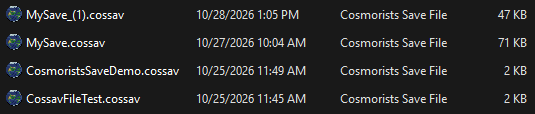
With the .cossav file foundations laid, I wondered, why not show the game's icon and show "Cosmorists Save File" as the file type in File Explorer? Lots of other applications, outside games, show custom icons with their logo on it, like how .docx files have a Microsoft Word logo associated with it. Why not do something similar for Cosmorists save files with the .cossav extension?
That's where registry keys come in. They're what gives certain file extensions an identity like it on Windows.
.cossav to in-game save
I went deeper. Those same registry keys can also launch the game. With the .docx analogy, double-clicking it also loads the document contents in Microsoft Word. Why not do the same for .cossav files, where double-clicking one loads the game, and loads the save's contents?
That is yet more registry keys. After a short refactor, the game launches and loads the save. Everything works on the registry side!
But also, when double-clicking a .cossav file, Steam shows the "Launch Game with custom arguments" with a path to the save.
Mutexes and pipes
Now that the game loads the save from double-clicking a .cossav file, there was a new problem. If a player double-clicks .cossav files more than once, multiple instances of Cosmorists will launch with their respective saves. Save switching in the existing instance was my goal.
I asked an AI model for guidance. The open-weight model GLM-5.3, mentioned Mutexes and Pipes, and walked through how to implement it in code. I didn't know what either of these were prior to this. That was a knowledge challenge. There were times where the game is launched, it works, but then, a sea of Cosmorists processes lie dormant in the Task Manager, wasting memory, preventing the game from launching at all due to a dormant process hogging the Mutex, and having to manually end them before the game could launch again.
When solving that problem, there would be a brief flash of a window that pops up for a fraction of a second before vanishing every time a .cossav file is double clicked. That was a timing problem. All the mutex and pipe code had to be moved to the very start of the game launch to prevent it from popping up.
The AppData/Roaming/Cosmorists folder and separation
This folder is the technical folder. Any file that could potentially lead to unexpected behavior when they're modified or deleted, and should persist if the game is uninstalled, is where this folder comes into play.
The .cossav files in the Documents folder is where all the player-facing files go. Files that non-technical players are free to copy and share.
Metadata caching
Since this game was developed over many years, I naturally accumulated lots of saves. I'm at over 100 of them, and loading the metadata of the save for the main menu to display them often takes around 1-3 seconds in the loading screen, which is about one third of the total load time. Although that's still fairly minor now, scale that up over more years, and that could add up.
The solution? A cache system for saves!
Instead of loading the metadata of all 100+ saves every time the game is launched, and reading potentially hundreds of files and scavenging old saves whose metadata is scattered about in different directories in different files depending on the version it was saved in, it'll all be stored in one cache file in the AppData/Roaming/Cosmorists folder. If that file isn't there, just load all the metadata the slow way and recreate the file. If it does exist? Just get all the file names in the Saves folder in Documents/Cosmorists for .cossav files (only get the file names, not the contents), read the cache file, and let the CPU do most of the work, checking for new saves in memory instead of in the disk, and adding and removing them accordingly! CPUs are fast, but disk reads are slow.
It now takes about a few hundred milliseconds at most to load all the metadata, even at 100+ saves!
This optimization is more for my own development convenience than a player-facing one. With 40 saves or less, which is the vast majority of players, the difference is barely noticeable, but it's a nice bonus if the save count is high!
The Steam dialog
If you double clicked a .cossav file, you likely encountered a Steam dialog along the lines of "Launch Game with custom arguments" with a [Continue] and [Cancel] option, while the game itself already launched.
It looks something like this:
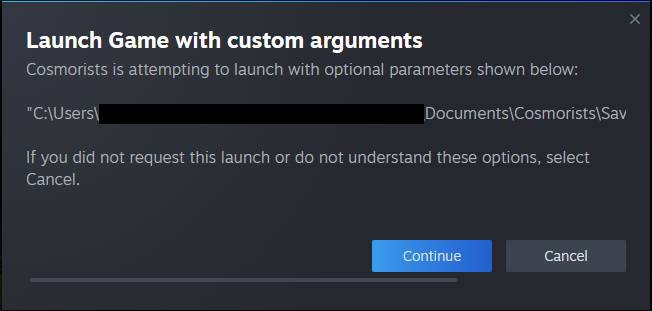
This is Steam's anti-malware security feature. Steam doesn't know that the player authorized the game to launch after double clicking a .cossav file. The same pattern of passing a file path through custom arguments is also used in malicious games, where said malware can abuse file associations and launch itself and do malicious things without player consent. That's Steam's way of saying "Did you intend to launch this game?"
Even with that one extra button, I'd preferably respect that dialog and leave it as-is and fix any bugs that launch the game from a save.
Removing the backup feature
That green icon before the update to the right of every save in the menu was the backup icon. All it really did was create a copy of the save that's still .exe relative. The feature felt redundant after the migration, most players aren't gonna understand what it does, so it's been removed.
The Discord channel
A day after releasing the 0.2 update, a new Discord channel was created, #saves.
It's dedicated to sharing .cossav files. I even uploaded a test file on there from the game's teaser trailer, the one containing the gray base. For now, it's the first easy-to-build sharing infrastructure for sharing saves.
Edge case testing
All the features are done! The save fail states themselves have become the new bottleneck.
Many edge cases were tested, hardening the .cossav to save feature against as many fail states as possible. Not in the right folder? Load the save, copy it to the right folder, and sync them. Corrupt data? Display a "Failed to load [save name]" with a likely reason for why it failed. Duplicate save? Don't copy it, and route to the existing save instead. Duplicate name but different contents? Resolve to the smallest unused integer and concatenate it with the save name. Drag-and-dropped a save into the game window or double-clicked a .cossav file? The game will save the current session first before loading it to prevent progress loss.
For the cache system? The cache file has two SHA256 hashes, one for metadata, and one for the .cossav save file, mostly for save integrity and safety. Tampered with the metadata? The metadata hash won't match, it'll re-read it from the .cossav files, and recompute the hash accordingly. Did a .cossav file get corrupted? The save hash will also not match, and it'll warn the player of possible corruption.
And last but not least, if a .cossav file outside the Documents folder is double-clicked, the game will add it as a file path in the AppData folder, and use that file path for saving and loading the file as a default override.
Even with all that, there's probably a fail state somewhere that hasn't been covered yet because there's an edge case not even I anticipated.
Why do this?
I did all that because for some reason, I found it fun!
That same drive that got me to develop the game in the first place in 2023-24, is still there, but it has largely migrated to being very tech and code heavy instead of flashy content like new biomes, new enemies, new weapons, new planets, new factories, and so on. This time, it's the .cossav file extension, learning how registry keys work, the .cossav-to-exe feature, the mutexes and pipes, the metadata caches, the hashes, and the edge cases, all coming together in a satisfying way!
This is what it looks like in the file explorer:
The infrastructure layer is the one part of the game that has largely been neglected for most of the game's development, which led to a lot of spaghetti code and weak foundations, which led to bugs and sometimes crashes, which can lead to broken saves in some cases. That same multi-week rabbit hole led to all these features because the foundation is centralized and reliable. It's not flashy like a new biome or planet is, but it's something the player feels!
Game design
Alright, that save system was very tech-heavy, now onto game design!
Automation
Now that I'm going in on densification over breadth, what happens to automation?
My original vision of making the first half of the game a survival-crafter, and the second half an automation game, will no longer be the vision.
Instead, bottlenecks will be what persists.
In the early-game, ores are often the bottleneck. You're scavenging for copper, tin, and eventually iron, for stronger tools and science.
In the mid-game, the spaceship is already repaired, and you likely have access to exploring different biomes, but now exploration has become the bottleneck because you need Aluminum to go to the space realm, and Aluminum requires exploring Deserts, Jungles, or Rocky Field biomes to obtain.
In the late-game, you now have access to the space realm for a renewable source of ores and several new ones, and automation to automate ores, but the late-game resources, like Magtise, Wilt-Steel, and Vampant bars, all have at least one resource that can't be automated.
Magtise is an end-game resource. Its crafting recipe is 1 Magtise Ore + 1 Carbon = 1/4 Magtise bar. Carbon can be automated. Magtise ore can't. The player still has to explore the lava caves for scarce nodes of Magtise.
Wilt-Steel is also an end-game resource. Its crafting recipe is 1/2 Gold Bar + 2 Pure Silicon + 1 Rotten Sludge = 1/2 Wilt-Steel bar. Pure silicon can easily be automated in the late-game, and so can gold bars. Rotten Sludge requires exploration of the Wilting caves, and requires either fighting powerful enemies or chopping down trees that take 4 real life hours to grow with low reproduction rates, and can only grow there, all for Rotten Sludge.
Vampant is the same story. It's 1/2 Plastic Bar, 30 Plant Matter, and 1 Vampiric Sample. None of these resources can be automated (yet), but Plant matter is abundant, and Plastic Bars come from crude oil, which also can't be automated yet, but can be reasonably common in certain biomes and depths. Vampiric samples are the bottleneck, because they require killing one specific enemy 500+ meters in the Verdant caves to obtain, and these can't be automated.
So even in late-game, when the player likely has a factory of sorts automating common resources, they can't automate rare resources that are a component of more powerful tools. To get them, it requires exploration.
This design will also go into the space realm. Any automation that gets added will only be for common resources.
Automation won't go away, but it'll be repurposed into a convenience layer for common resources in the late-game, and not an end-all state.
Space realm
Since Luna and Aquatica are now deprecated, the space realm is what will be the successor.
Zero-friction physics
The one thing that the space realm has that Luna and Aquatica don't, is zero-friction physics. Any movement in space stays moving until the entity accelerates against itself.
That creates a movement challenge that the player never had to deal with back on planets. Items that used to be drawn towards the player now "orbits" them in the space realm.
Asteroids
The equivalent of ores on Tierra, or formerly Luna and Aquatica, will be asteroids. Unlike on planets, they're constantly drifting, and requires navigating zero-friction physics to reach them.
They're also renewable. If you mined an ore on a planet, the tiles are gone and you need to explore a wider area to find more of it. If you mined an asteroid, another one can spawn elsewhere.
Impact damage
Since the player can easily go fast, why not add an element of environmental danger there aside from oxygen scarcity? Impact damage is where the core danger of the space realm is. Go too fast, hit a wall, and you've taken damage. It's the top-down equivalent of fall damage in side-scroller games.
The enemy can also take impact damage! If you and an enemy moved 40 tiles / second at a wall, both are going to take 60 damage regardless if the entity is a player or an enemy.
The shields will also have no protection against impact damage. They'll protect against melee, ranged, explosive, and hazard damage, anything relating to enemy attacks and hazard tiles the player steps on, but they can't protect against impact damage.
All this comes together to make the space realm need more skill than protection. A player with maxed out shield stats, but lacking skill in zero-friction physics navigation and moving too fast repeatedly, will be more likely to take significant hits than a player with moderate shield stats, but high skill in maneuvering.
Smaller area
The space realm is a smaller area, 1,024 x 1,024 tiles instead of Tierra's 40,000 x 20,000 x 1000+ cave layers. The spaceship lands directly at the center of it. It's more constrained and finite, but it also works neatly with renewable asteroids.
If it's too big, the player can get too easily lost from the spaceship, and run out of oxygen if they have no oxygenator with them.
Enemies
Since enemies also obey zero-friction physics, the core behavior that will be laid out, is that the enemy will zero out the relative velocity to match the player's velocity, then dive into the player, regardless if the player is nearly stationary, or moving at 35 tiles per second, before drifting out and repeating it again. The enemy will match-then-dive.
This behavior will be the foundation of what future space realm enemies will be like. Match the player's speed by zeroing out the relative velocity, then do something to attack the player!
Refactors
The UI refactor marches on
The tree-based UI code is already in the build, but it's messy. Even with all this testing, even I suspect that there may be bugs hidden in places that haven't been fully converted yet, where the spaghetti UI code meets the tree-based UI code.
The big challenge is migrating all that code. That's tens of thousands of lines of UI code accumulated over the course of 4 years, which are decentralized, uncoordinated, and mingle into every other system from saves, to player stats, to player inventory, to the tech tree, to the main menu, to the settings menu, and everything else in between. All that migration means breaking UI related things that work perfectly well, which means more visual bugs temporarily that'll look like the game is breaking. Subsequent updates will likely see a temporary increase of UI related bugs.
The parts that have already been migrated, are the loading screen that shows up when a player launches the game, and the player's health, hunger, oxygen, and energy bars and temperature / pressure data at the top-left thus far. It's already promising since the new tree-based structure allows me to add in a button or a text field or a progress bar, or whatever UI component there is, and that foundation is being expanded upon. Most of the month though, went into the save system rabbit hole while I tried to refactor more parts of it.
Save system
Even though I did all that refactoring and all the features that piled on, the save system still isn't 100% done yet. It's still relatively spaghetti, but more contained in one place instead of being all over the codebase. Even I don't feel certain that it's full-proof because of it, but now it's easier to trace potential bugs than it was before.
Contained spaghetti where one line of code only affects another part of the save code, is much easier to deal than one line of save code also affecting UI, enemy, player, and other parts of the game with tangled logic.
Even though v0.2 still deals with it heavily, my goal is to retire the .exe relative save folders altogether. The only remnants of it that will be kept are backwards compatibility and migration layers.
New features are later things
I could do it, but more save-related features are likely to be for later instead of something I'll add in a few weeks, and it'll be marginal improvements most players wouldn't feel. For now, the save system will mostly be in its bug fixing phase, primarily for saves that fail to load even if they worked in older versions, or saves that bugged out during the migration. It'll likely be added eventually, but it's already smooth enough as it is. The UI refactor is most of the radar.
Near future
I anticipate the rest of 2026 to be fairly slow in terms of gameplay features. All the infrastructure, and occasional infrastructure related rabbit holes that suck me in, are likely gonna get more attention than game design and content for now.
There might be some content added, but it'll be more "new enemy here, a new tile there, new tech in the tech tree", than "new biome, new space realm, overhaul there".
When that refactor is done, which might take months to fully achieve, I wouldn't fight the spaghetti code anymore for hours just to get a feature in. It'll allow me to slot in new features and new content just like that with ease!
In the meantime, after all that save shenanigans this month, most of the refactor will likely be UI-centric for a good while.