Greetings bored mortals. It's been a long while due to my first year at the JMIN master degree at the ENJMIN, after which I resumed working on Hand2Hand. While it doesn't give much content on the game, some systems gained some love while others have been inaugurated ; notably the launcher ! Well, more like a "launcher" but you get the concept.
Modding should be a bit smoother since all classes are now separated in their own folders. I will make sure to add more content next time, as the Angoulême Spawn! of October 2026 is approaching, and the Ruler class is not yet completed.
Other nasty crashes were also removed, but please checkout the known issues beforehand.
You will also notice the no-AI logo as well as the performance requirements in the store page. After some tests the CPU with too old technologies won't make the sound system work alas ; but it should run on most computers.
Launcher
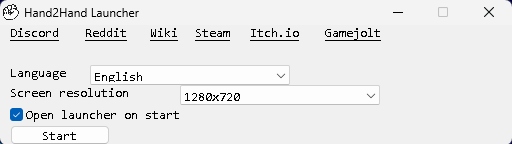
☼ Is now added
☼ Displayed when the game is executed by default
☼ Can be manually executed with the new launcher.exe file in the main Hand2Hand folder
☼ Has the following official Hand2Hand links :
► Discord
► Reddit
► Wiki
► Itch.io
► Gamejolt
☼ Language and resolution can be selected before launch
☼ Can untick the launch at start ; going back to the previous known behavior of launching the game directly
► This option can be removed by either
> Changing the openLauncherOnStart value in the settings.txt file
> Opening manually the launcher.exe and then ticking this settings again
> Add the -startlauncher option in the executable variables
☼ The content and the tooltip are also localized, dynamically updated when the language is changed in the launcher
☼ The width of elements are also dynamically updated depending on the string length ; this concerns checkboxes, text labels, hypertext links
The launcher will be expanded with new features along updates, such as (but not limited to)
☼ Saving settings sets for easy switching
☼ Selecting which screen is used
☼ Creating, editing and switching mod sets ; by specifying which mod uses what json files
☼ Detect controllers
☼ Accessibility tab
☼ Game control tab
☼ Load control file
☼ Adding localizations on local
☼ Links to new networks
☼ Most of the in game settings already there
Option menu
Show details
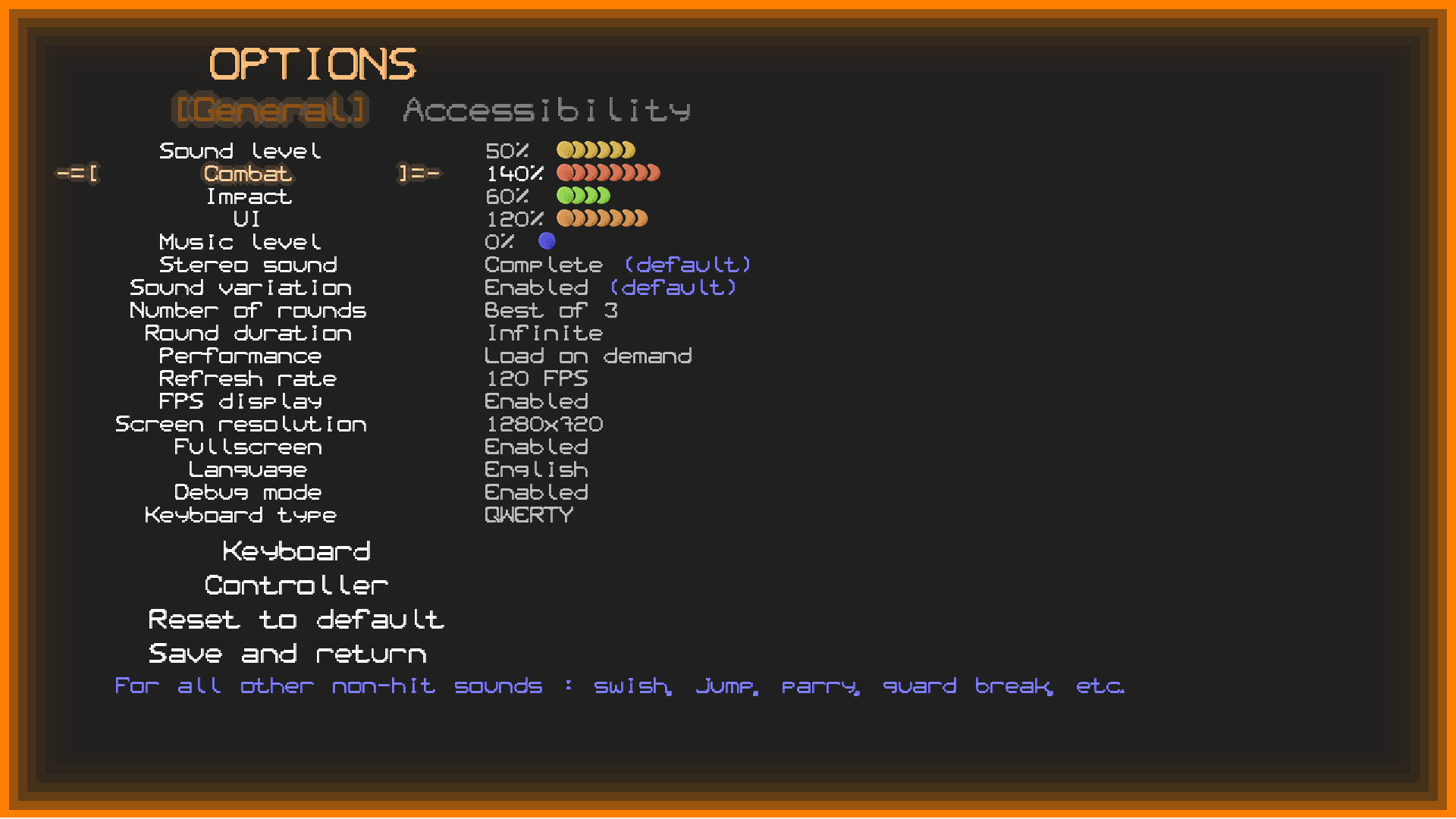
☼ Sound and music level now shows a % ☼ Sound and music level display is now aligned as intended ☼ Tab system added, able to be switched with left/right when on the index -1 in the settings list ☼ Two new tabs : General and Accessibilityµ ☼ The General tab is the default one you already know ► Combat sound volume added for all non-hit combat sounds : jumps, falls, swishes, etc ► Hit sound volume added ► UI sound volume added ► All of the above are then multiplied by the global sound level, but can go up to 200% level to amplify them if needed ; by default 100% ☼ Accessibility gains Player side, Player color, Combo display, Wind display, Particle display, Attack delay, screen shake ; all moved from the General tab ☼ Accessibility gains the following new settings
 ► Background brightness from 25% to 100% with 5% steps, changes both UI background and combat background brightness (example bellow with 25%)
► Game speed from 50% to 100% with 5% steps, only changes the combat speed outside of intro and outro. By default 100%. It does stack with slomo but doesn't change sound pitch by itself
► Background brightness from 25% to 100% with 5% steps, changes both UI background and combat background brightness (example bellow with 25%)
► Game speed from 50% to 100% with 5% steps, only changes the combat speed outside of intro and outro. By default 100%. It does stack with slomo but doesn't change sound pitch by itself
Class gallery & Selection
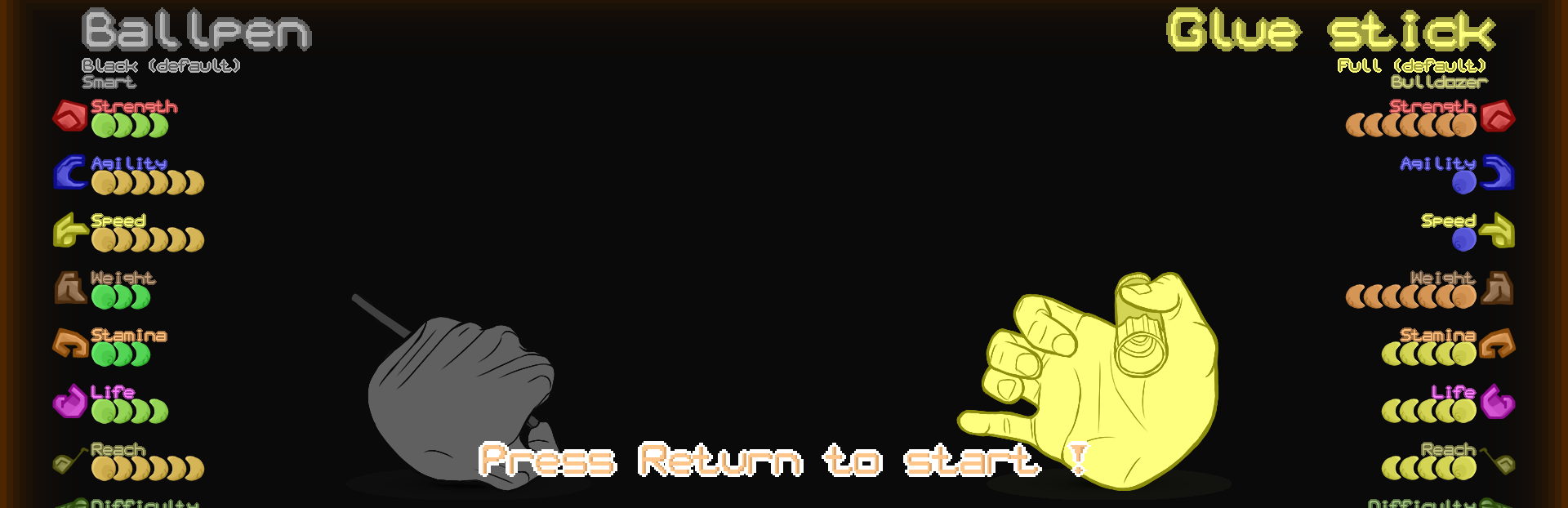
☼ Rearranged again the layers so the displayed class animation is always behind UI elements
☼ Badge list is displayed bellow the stance name.
Settings
☼ Default screen size set from 1024x768 to 1280x720 (screen type from 0 to 1)
Music
☼ Cleaned up the remnants of the older native Purebasic sound system when switching from combat to menu ; removing unwanted crashes cased by pausing no longer existent music IDs
☼ The intro music when starting a fight now overlaps with the music as intended, instead of abruptly cutting from the intro to the battle music
☼ The intro music is interrupted in pause, resumed when exiting pause, stopped when going back to menu ; as intended
Terrain
☼ Slightly optimized the parts display position computation especially if there's a lot (!) of sections (negligible but that's one less performance issue nonetheless)
☼ Their name can now be localized, with their respective entries TERRAIN_XXX_NAME
☼ Terrain name are now localized in french
Stance Badge
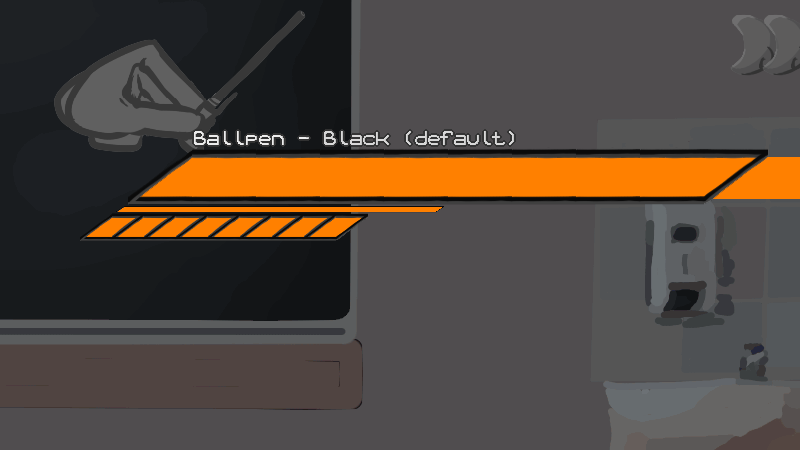
☼ Added
☼ Each stance now have one and only one badge
☼ Each badge applies effects on battle, intended to give either some advantages or good advantages with small drawbacks
☼ It is possible to mod the game with a class having none or more than 1 badge, but it's not yet possible to change each constant
☼ They are also explained in the now expanded tutorial menu
☼ List bellow
Show details
Smart
Sly, unpredictable, and dangerously intelligent, Smart stances have a much easier time controlling the battle and their enemy, pardoning mistakes ☼ Given to Ballpen Black, Hexkey Steel and Ruler plastic ☼ Parry damage soaking increased by 100% ☼ Damage received during dodge in/out reduced by 50% ☼ Increased base guard by an equivalent of 2 Weight ☼ 50% of damage inflicted also regenerates guardBulldozer
Through brute force they bulldoze their way into the enemy in an unstoppable fashion. They don't care about what's in front of them : hits are more guaranteed and less likely to be disrupted ☼ Given to Ballpen Red and Gluestick full ☼ Increased movement push and attack push by 25% ☼ Reduced received movement push and attack push by 25% ☼ Increased inflicted guard damage by 25% ☼ Increased inflicted stun duration by 25%Nervous
While the enemy barges in the arena, they barges in the enemy. Faster attacks but also faster precipitation... ☼ Given to Ballpen green, unarmed speed and hyperactive ☼ Animation speed 10% faster ☼ Increased dodge reload speed by 10% ☼ Dodge duration reduced by 10%Resilient
The resilient never backs down a fight and will continue to the end. They reward hitting the enemy with success to give more durability. ☼ Given to Chopstick plastic and Ballpen blue ☼ Increased stamina bar regain when finishing a combo successfully by 33% ☼ Stamina bar consumed 33% faster for HP and guard regenWall
When being smart is not for everyone, tanking everything naturally will give a much harder time for the enemy ; long enough to counter attack more ☼ Given to Unarmed Defense and Ruler Wood ☼ Decreased received damage by 10% ☼ Decreased received damage on HP and guard on the outer HP bar by 33% ☼ Decreased received guard damage by 25%Evader
Can't touch this, and even less the Evader. Being passive has entered Hand2Hand ! ☼ Given to Chopstick wood and Unarmed dexterity ☼ Increased dodge reload speed by 50% (= 33% less reload time) ☼ Increased dodge in/out speed by 100%Bruiser
Hitting hard is good, but bullying the enemy in a weak state is better. The Bruiser makes punishment harsher on an enemy doing too many mistakes. They also make sure to keep the target in place to continue the smashing. ☼ Given to Chopstick metal, Unarmed Power and Hexkey Aluminum ☼ Increased dealt damage against stunned and recovering targets by 25% ☼ Reduced attack push by 25%Balanced
Where balance shines, the combattant shines brighter. Good at everything, excells at nothing. ☼ Given to Unarmed Balanced and Ruler metal ☼ Damage dealt increased by 5% ☼ Damage received decreased by 5%Technician
The specialist enters the fray. More precision, better preparation. Maybe shooting the enemy from afar is funnier. ☼ Given to Gluestick empty ☼ Shot damage & guard damage increased by 10% (stacks) ☼ max ammo increased by 100% (unimplemented)Frame
☼ They can now have a specific hurtbox path value in case of multiple frames using the same hurtbox id
☼ This functionality was for a long time in the code, used in the dev version but was not continued nor used until now in the live version
☼ They are now correctly imported in game and configurable in their data file
Combo
☼ Reworked how they are stored and accessed for each player, more details for the nerds :
► Replaced the static arrays in the player struct by allocated memory
► Starts with 16 indexes, reallocated with a double size if a combo is longer, and so on
► Thus there's no longer a hard coded limit
☼ Max attacks in a combo increased from 16 to 0xFFFF (65535)
☼ If there's more than 5 combo icons displayed, the distance between each others is reduced proportionally
☼ Consequently there's on practice no combo length limit when modding the game, unless you really make a 65536 long combo
That's one less limit of the game removed, and thus one less potential crash for modders and future very long combos.
Dodge
☼ Animation is twice as fast when dodging-in (only cosmetic).
☼ Currently, dodging animation is artificial and displayed in priority while the player has its regular animation looping behind, which could make the display resuming a secondary idle animation midway from an odd position. Now when finishing a dodge the real animation is reset to idle animation. On practice it is only cosmetic and doesn't affect gameplay at all.
Parry
☼ Resets to Idle when exiting parry, like for the Dodge animation (only cosmetic).
Hit
☼ Resets to Idle when exiting hit, like for the Dodge animation (only cosmetic).
Endgame
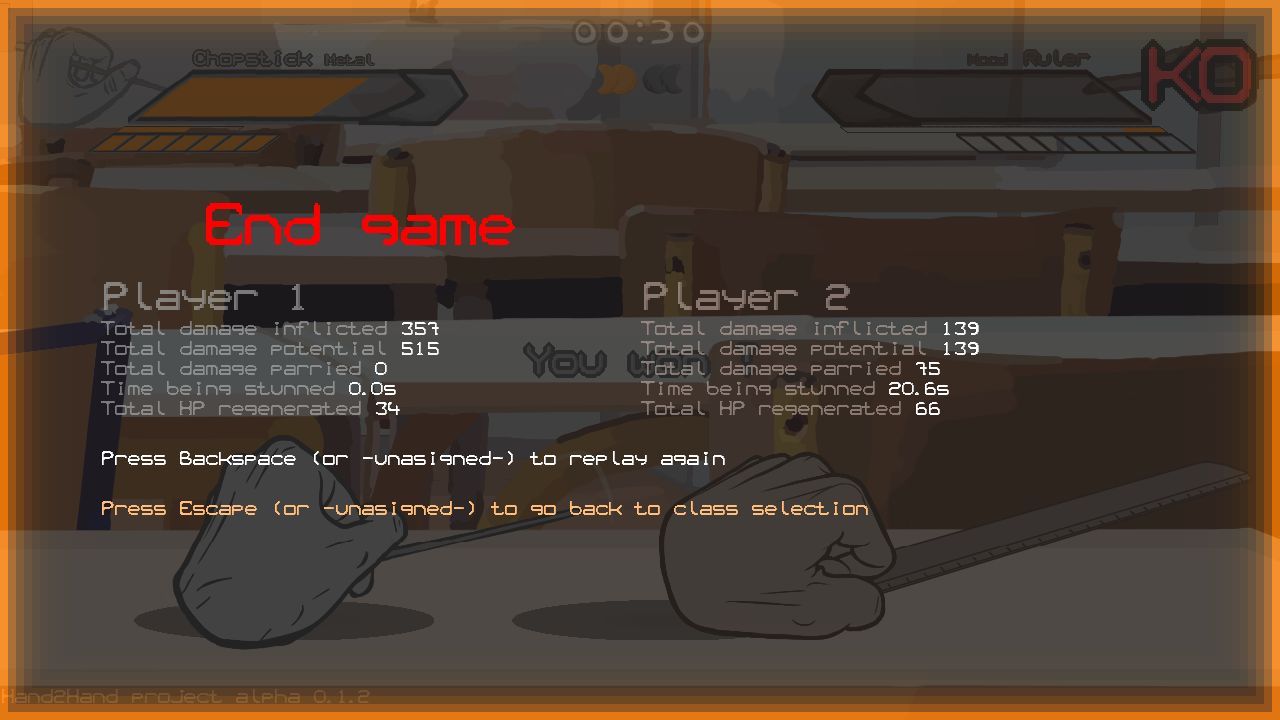
☼ Is now displayed after the last round
☼ Shows the following data
► Total damage inflicted
► Total damage potential (if not reduced by stamina, for example)
► Total damage parried
► Time being stunned
► Total HP regenerated
☼ Accept or the pause button restarts the whole match, from round 1
☼ Escape returns to the class selection menu like before
☼ The UI, statistics and layout are far from definitive
Ruler
Show details
Side [Neutral]
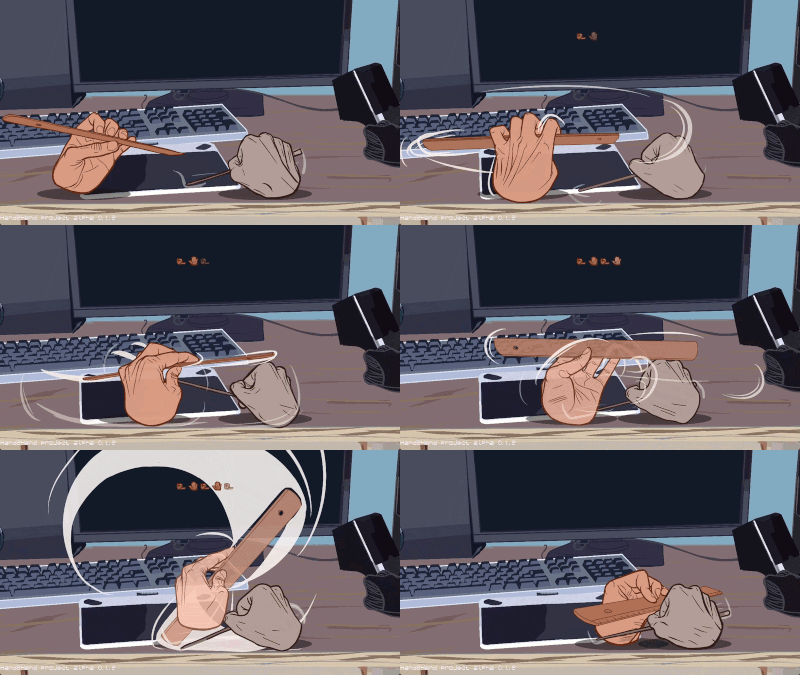 ☼ Added
☼ It rebranches to the Side [Side] combo. Thus this neutral is optional
☼ Added
☼ It rebranches to the Side [Side] combo. Thus this neutral is optional
Side Side [Neutral]
☼ Added ☼ It rebranches to the Side Side [Side] combo. Thus this neutral is optionalMiscellaneous
☼ When booting the game, the screen displays what it is currently loading, instead of an uninitialized blank screen
☼ If not found in the settings file, sound and music levels will be reset to default instead of being set to 0
☼ Final kill hit sound is no longer pitch varied even with the pitch variation enabled
Behind the scenes
Show details
☼ Default Purebasic keyboard and sound are no longer initialized as intended, which was a oversight since the reworked systems by Nemerod. This doesn't have any impact but would definitely remove future unknown side effects later in the development ☼ Fused color and color intensity into one single value, alpha being the color intensity ☼ Animation gadgets still have a color intensity value to dynamically change it without touching the base color value itself ☼ Class gallery default color changed from orange to vermilion to suit the player 1 color as intended ☼ Animation gadget can now have a time scale factor, by default 1. Not yet used but can have some use later in the development. ☼ Reorganized the code to put all (most) variables, constants and structures at start to make the dev a bit easier, instead of per data structure files ☼ Reworked how stance, class and player colors are retrieved to make it more consistent and easier to update through accessibility settingsBug Fixes
Show details
☼ [0.1.?]Known issues
Show details
☼ [0.1] Very long combo list in class gallery may step on the class desc or even outside the bottom screen border ☼ [0.1] Controllers are taken like PS3, other types might not have the same button layout ☼ [0.1.?] Attacking when landing doesn't flip the hand towards the opponent ☼ [0.1.0.?] AI tends to not follow combos when the player is in the air ☼ [0.1.0.?] Fullscreen is not a true fullscreen to avoid a bug on Windows 11 ☼ [0.1.0.?] Taking a screenshot with shift+f won't catch parts which are out of the screen ☼ [0.1.0.5] x86 version unavailable until further notice ☼ [0.1.0.7] When a lighter hand jumps between the space between the heavier player and a wall, the push physics is incorrect for a few moments ☼ [0.1.0.7] A combo with 5 or more attacks with big icons might be cut off for very small screens ☼ [0.1.0.7] Controller models may have different inputs and even affect both players at the same time ☼ [0.1.1] Cannot pause with controller or player specific menu keys in the fight intro ☼ [0.1.1.?] Values saved in floating point in the JSON aren't exact, but doesn't change much in practice the game rhythm ☼ [0.1.1.?] Changing sound output crashes the game ☼ [0.1.1.1] Lag or picking 50FPS or below makes physics a bit less precise ☼ [0.1.1.3] Some long text strings might break a bit of the interface, overlapping other texts or even getting out of the screen; especially on translations ☼ [0.1.1.3] If there’s one plugged controller connected to Player 1, it is not possible to change it for Player 1 using the controller (use the keyboard instead) ☼ [0.1.1.6} Unplugging a controller doesn't show any popup. If it is not plugged again for a while the game may quit without warning ☼ [0.1.1.6] If one is unplugged during runtime the controller no longer works until restarting the game (temporary fix made by Nemerod) ☼ [0.1.1.6] Refresh rate is a bit unprecise ☼ [0.1.1.6] Refresh rate settings is applied only on restart ☼ [0.1.1.6] Training terrain removed due to an unknown performance issueMod
Show details
☼ Real PLAYER_PARRY_DAMAGE_FACTOR added, by default 2 ; changes how much damage is converted into the parry inertia if the player blocks an attack. Higher this value, longer it takes to the player to exit guard ☼ Real PLAYER_DAMAGE_SHAKE added, by default 2 ; converts damage into screen shake. ☼ The following are changed from Integer to Real for more precision ; they were used as reals in the code but was imported/exported in integer involuntary ► PLAYER_PARRY_MARGIN_BASE ► PLAYER_PARRY_MARGIN_PER_AGILITY ► PLAYER_PARRY_MARGIN_PER_SPEED ► PLAYER_PARRY_DAMAGE_BASE ► PLAYER_PARRY_DAMAGE_MIN ► PLAYER_PARRY_COST_MIN ☼ Integer PLAYER_COLOR_MODE_BASIC_INTENSITY added, by default 128, clamped between 0 and 255 at game start. Sets the color intensity of the player in the basic color contrast mode (player 1 is orange, player 2 is blue) ☼ Integer PLAYER_COLOR_MODE_BASIC_BLACK added, by default 192, clamped between 0 and 255 at game start. Sets the color intensity of the player 1 (black) in the high contrast mode ☼ Integer PLAYER_COLOR_MODE_BASIC_WHITE added, by default 32, clamped between 0 and 255 at game start. Sets the color intensity of the player 2 (white) in the high contrast mode ☼ Completely reorganized the folder organization, making version exportation easier ☼ Each class has a separate folder named after it, containing its icon, a separate json file and all its sprites ; all of them are moved into a separate class folder ► You can use any folder path like before for custom classes, but now the difference is it's now on separate json files ► hand_classname_ is now completely removed from the sprites filename ► Sections of the sprite filename are shortened, for example neutral/side/up/back/down/heavy/windfront/windback are replaced by n/s/u/b/d/h/wf/wb (but you can use the naming you want in custom animations, like always) ► hit is not renamed this way ☼ VFX animations such as landing and hurt particles are moved in the sprite/vfx folder ☼ 2D UI elements are moved in the sprite/ui folder ☼ Fonts are moved in the sprite/font folder ☼ Their path entries in the data.json are updated as well, so you can still use them like you wantclass
--- Chopstick
------ chopstick.png
------ chopstick.json
------ [Chopstick sprites]
--- Ballpen
------ ballpen.png
------ ballpen.json
------ [Ballpen sprites]
--- [etc]
sprite
--- background
------ [Terrain sprites]
--- font
------ letter_white.png
------ letter_white_big.png
--- vfx
------ landing sprites
------ particle sprites
--- ui
------ atlas.png
------ [other ui elements]
sound (like before)
--- [All game sound]
music (like before)
--- [All game music]
data.json
language_XX.json (for each installed language)
class_string_XX.json (for each installed language)
settings.json