FEEBACK REQUEST We really appreciate all of your feedback; it is what help us identify areas to improve and work on. To provide feedback on the betas, contact us in Discord or fill this form: https://forms.gle/m2m7NNe7n7EREAsb6 Stay tuned! More exciting features coming! ːsteamthisː
1. Basic Information
This beta release focuses on improving battery lifetime through the following changes:
- New firmware - Fuel gauge: Better battery management and fuel gauge algorithms. Previously, errors in the fuel gauge estimations of the BQ27441 component caused the controller to turn off prematurely, even when there was much battery remaining. The new firmware implements a new algorithm to detect battery level and allow you to safely use all of etee's power.
- Note: The new average battery lifetime is 4.5-5h with haptics, up to 6h without haptics (navigate to the end of the page to learn how to deactivate haptics).
- More efficient haptics in SteamVR: Same user experience, less battery consumption for the etee haptics (aka. vibrations) in VR.
2. How to opt into the beta
To activate the beta release you will have:
- Activate the eteeConnect beta branch (see details below)
- Update your controller firmware version to 1.3.10.beta.0 (see details below)
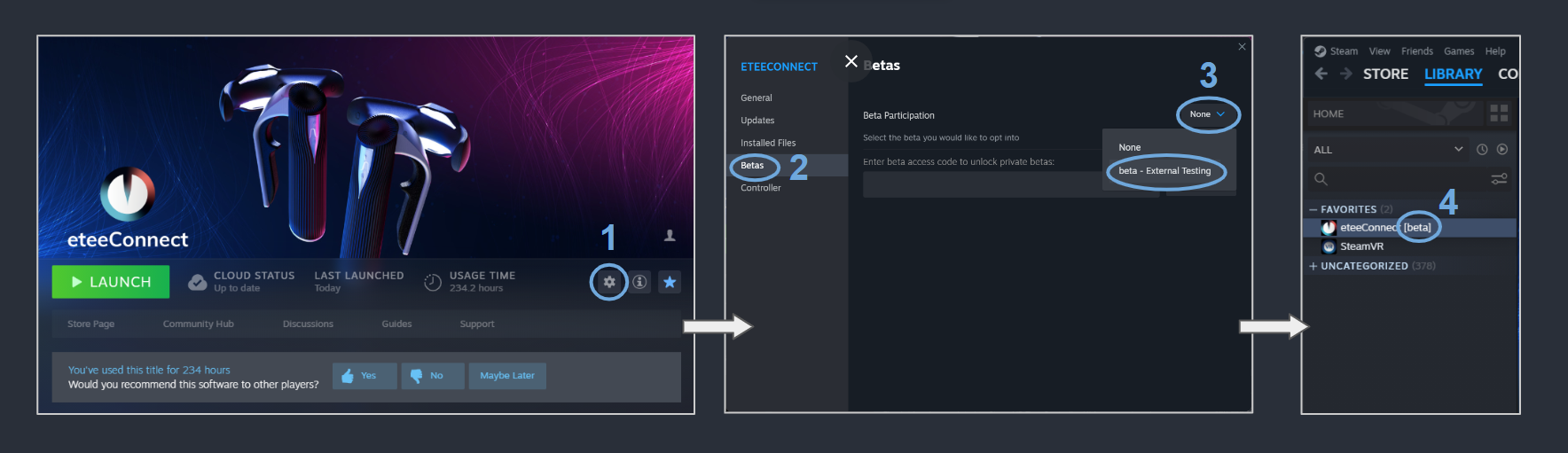
2.1. Activate the eteeConnect [beta]
- In Steam, navigate to: "Steam > eteeConnect > Settings".
- Enter the "Betas" section.
- Under "Beta Participation", click on the dropdown-menu and select: "beta - External Testing".
- If the beta was activated successfully, you will see a [beta] tag next to your eteeConnect app name.
2.2. Update your controller firmware version
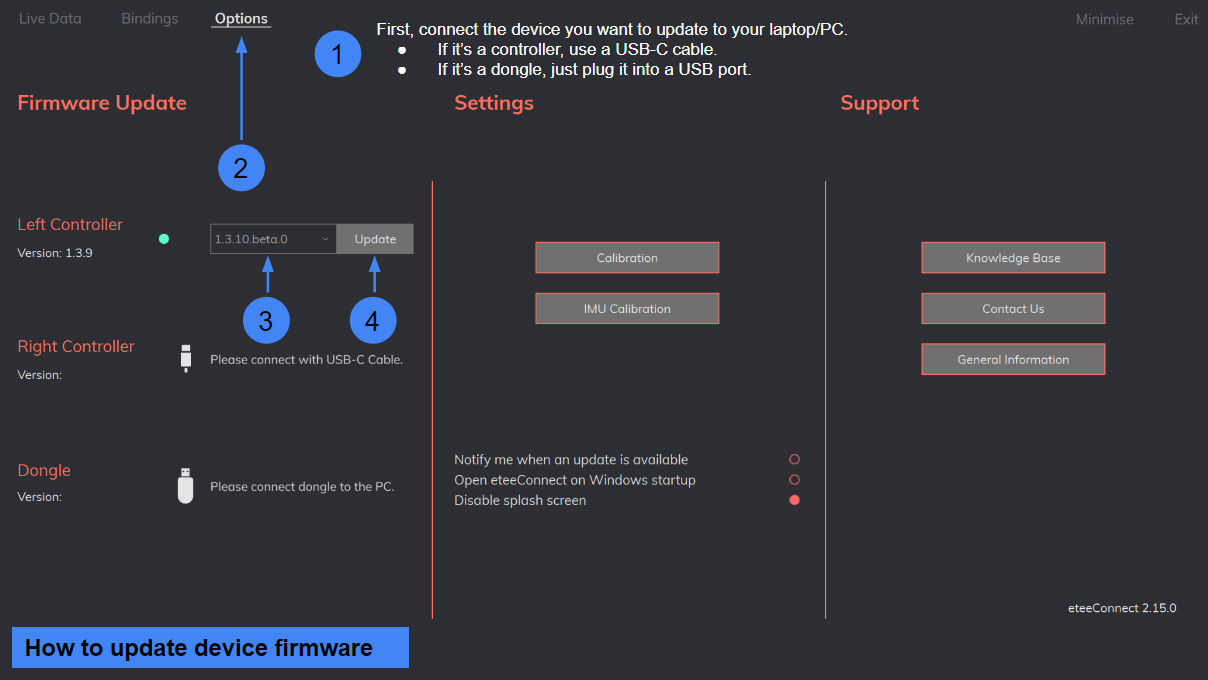
- Connect the controllers to your laptop or PC using a USB-C cable.
- Run the eteeConnect app, and navigate to: "eteeConnect > Options > Firmware Update". If the device you want to update is detected, you will see its version number. If you cannot see this, re-plug the USB-C cable connected to the device and wait.
- Next to the device, click on the drop-down menu and select version: 1.3.10.beta.0.
- Click "Update".
- To check if the firmware was updated successfully, check the firmware version number on the left, under the device name.
3. List of changes
3.1. eteeController firmware
New version available: 1.3.10.beta.0
Instructions: To update your controllers, please, use eteeConnect. Go to: Options > Update > Firmware, and follow on-screen instructions.
Changes to firmware:
- Better battery level management, using voltage levels for low and critical battery statuses in eteeControllers.
- Improved battery level estimation algorithms.
3.2. etee driver for SteamVR
New release version available: etee driver for SteamVR - v1.4.5.beta.3
- Implemented more efficient haptic patterns, while ensuring the same user experience.
- New bindings for Pistol Whip & Add Budget Cuts 1 added.
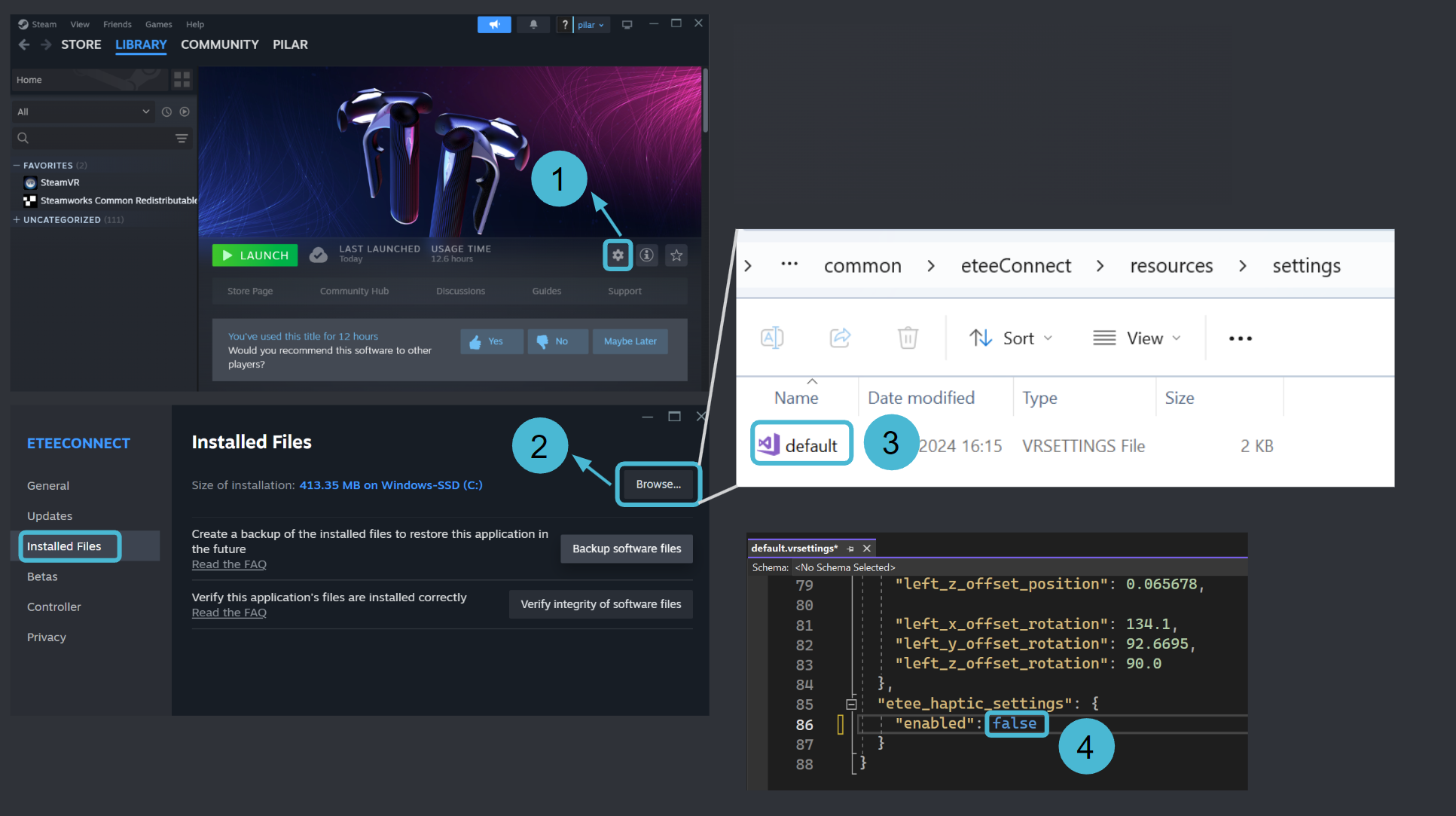
HOW TO DISABLE ETEE HAPTICS IN STEAMVR
- In Steam, navigate to: "Steam > eteeConnect > Settings".
- Enter the "Installed Files" section, and click the Browse button to open the folder where eteeConnect is located.
- Within the directory, navigate to the "eteeConnect > resources > settings" folder, and open the "default.vrsettings" file with your favourite editor. We recommend Notepad++ or VSCode, but you can even use text editor available in your OS.
- Navigate to the end of the document, and under "etee_haptic_settings" change enable to false to disable haptics. Make sure to not add any commas after this.
- Now you're ready to run SteamVR, and the changes should have been applied.