
Greetings! I bring news and cool videos from the Keysight 2 development mines, as well as a small patch for Keysight 1 tidying up a few things. But first:
An important announcement for all MacOS users of Keysight
It pains me to inform you that Apple is removing the Rosetta 2 translation layer required to run Keysight on Apple Silicon devices. Keysight cannot be updated to run as a native app on Apple Silicon.
When does this take effect?
On September 14th 2026, MacOS 27 was released. This operating system version does not include Rosetta 2 installed by default, but Rosetta can still be optionally installed to run x86 apps such as Keysight.
"Fall 2027" (or Autumn, to us civilised people) is the targeted release for MacOS 28, in which Rosetta 2 will be completely deprecated and no longer available.
So I just can't run Keysight beyond next year?
Well, yes and no. Strictly speaking you could simply opt to not update to MacOS 28, but I do not recommend this. I've also seen claimed that "Rosetta 2 will still exist for some older legacy games that are not supported any more", but I doubt this applies to Unreal Engine 4 and Keysight.
The good news is that emulation of the Windows version of Keysight on Apple Silicon does function flawlessly via translation layers other than Rosetta 2. The one that we tested was CrossOver, but the bad news is that it's a paid product (a one-time purchase, however).
Why can't Keysight be updated to run as a native app?
The short version is that it's simply built using old tools from before Apple Silicon really existed, as well as requiring a lot of hacks and janky third-party plugins to function at all.
Unreal Engine 4.27 claimed "preliminary support" for Apple Silicon and I tried porting the project to that engine version, but that turned out to be a dead end.
I've also tried porting all the way into Unreal Engine 5 where native app building is possible, but this breaks essentially every part of Keysight in both known and unknown ways. We're talking save/load, MIDI file loading, video rendering, preset exporting, particle systems, camera angles... all of it would need building from the ground up again.
I even considered just doing that, but even at a very optimistic estimate, it would take many months. At that point, I might as well keep my head down and simply work on Keysight 2 (which will absolutely be supported on MacOS and Apple Silicon).
1.6.3j changes
As of right now, this build is only available on Windows. As part of that whole "porting to 4.27" thing I broke the toolchain for getting MacOS builds, and I can't promise that will get fixed. The changes are super minor though:
More preset hotkeys.
Holding Ctrl / Shift / Alt now adds 10 / 20 / 40 to the preset slot index used when using a keyboard number key to change to that preset slot. So Shift + 4 will switch to preset slot 24, Ctrl + Alt 8 will switch to 58.
Fixed Keypress indicators
Sometimes these would turn black when randomising the preset, or any Basic menu mode material other than "glowing".
Fixed some instances of poor menu scaling on non-16:9 monitors
Yes I have an ultrawide, how could you tell?
New installations launch into Advanced mode by default
After years of answering questions and ending up having to explain how "Basic" menu mode is kind of useless and to switch to Advanced, I've opted to simply make it the default. It's not like "Basic" mode is a walk in the park on the UX front, if you're going to climb the horrible learning curve you might as well do it in a way that gives you access to all settings, right? I almost fully removed Basic mode, but it would be a pretty big change this late in development.
Keysight 2 news!
I wanted to end on some positive stuff, so permit me to ramble about how Keysight 2 is coming along:
It's getting there.
No, it doesn't make a single pretty light yet.
But it's getting there.
The development process is very open with lots of user discussion over in the Discord, but it's quite challenging to summarise what's been done and what still needs to get done. I'll start with the question on everyone's mind:
When will Keysight 2 be finished?
I don't know. When I started, I thought this would be a little one or two year project to get a minimum viable product together. I was very, very wrong. That makes me not want to provide any more estimates, but I promise I'm working very hard on it, and I'm proud of the progress!
It feels like wading through tar sometimes. Who'd have thought building something "properly" is a lot more work than throwing together a barely functional UX-nightmare? Still, I'll do my best to outline where we're at:
About 80% of the core foundation is laid
It's a little silly to try and put a number on this, since the remaining "20%" could turn out to be really difficult, but it definitely feels like systems are starting to lock together. What do I mean by "core foundation"? Well, this stuff is pretty much done:
The internal command line for handling menu actions
All actions flow through a centralised command line system, which opens up massive automation possibilities and streamlines subsequent development substantially. It took three attempts to build it cleanly, but we got there!
The UI building blocks
We're talking sliders, graphs, buttons, all that stuff. I had the ridiculous notion to make the UI of Keysight 2 "actually nice to use", and let me tell you: never build an animated UI. It's not worth it. But it works! It even has menu sounds (don't worry, they're optional)
The template system
A core concept for Keysight 2's user experience is that everything comes in templates (and each template can be exported to a .ks2 file). The editor to display template thumbnails / organise them into folders / allow drag-and-drop reordering is built and working, along with architecture to save and load them to the disk automatically.
The way values can be calculated
Values in Keysight 2 are... different. More on that later. But it's cool, I promise!
No actual visualisation is built yet though
This is less bad than you might think. Keysight 1's development was very naive and "linear" in a way. It was fast to set up, but any further features took an increasing amount of effort to implement based on all prior features, and nothing really fit together.
Every now and again, I'll need to add an actual button to the UI in Keysight 2 to control something. Every time, it shocks me just how clean and fast it is to leverage the foundations built to get things to happen.
Particles, lights, note objects... These are things I actually know how to build thanks to Keysight 1. I'm hoping that when the foundations are fully laid, I can very rapidly throw together beautiful stuff without getting bogged down in UI hell for every new feature.
Ok, so what will Keysight 2 do better than Keysight 1?
Everything!
I'll give an example deep-dive for the most critical aspect: user experience. Keysight 1 suffers from a problem of displaying far too much irrelevant information to the thing you want to do. Part of this is just bad UI design on my part, but a lot of it is due to wanting to support a lot of "niche" features to allow for flexibility and creativity. Let's take Note Objects for example:
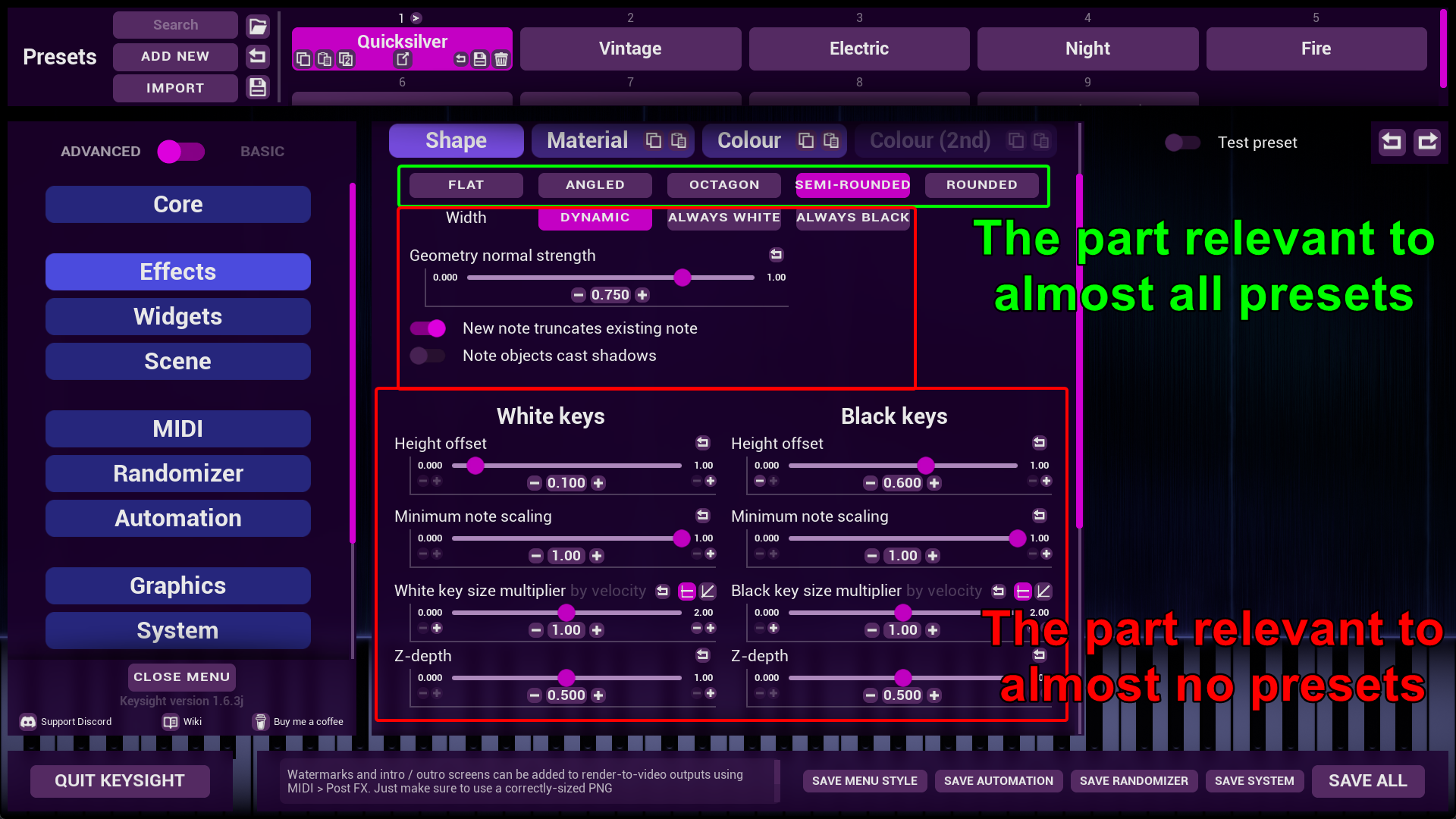
These sizing and positioning settings are not relevant to 98% of usecases, but every single user pays the cost of seeing those options regardless. My goal with Keysight 2 is to support more niche behaviour while displaying less. The first step with that:
Templates
These fill the same role as the "Basic / Advanced" menu switch in Keysight 1. Anyone who doesn't want to poke at settings can simply throw in a template that looks like what they want by browsing thumbnails. I've already got this working with menu theming:
Then if you want dig in, you can edit that template and play around. Templates can then be saved, exported and shared with others in the same way as the current .kspreset system, but more granular.
Better values
I told you we'd get to this, and I think this is the system I'm most proud of. Another core limitation of Keysight 1's user experience is that any variable like "Brightness" that might need to respond to "Lifetime" or "Velocity" needed a whole graph for each thing it could respond to. Heck, because "graphs" had only 5 points of data (start/stop + min/max + curve), you'd need two graphs just to have brightness go up and then down over time. Horrible!
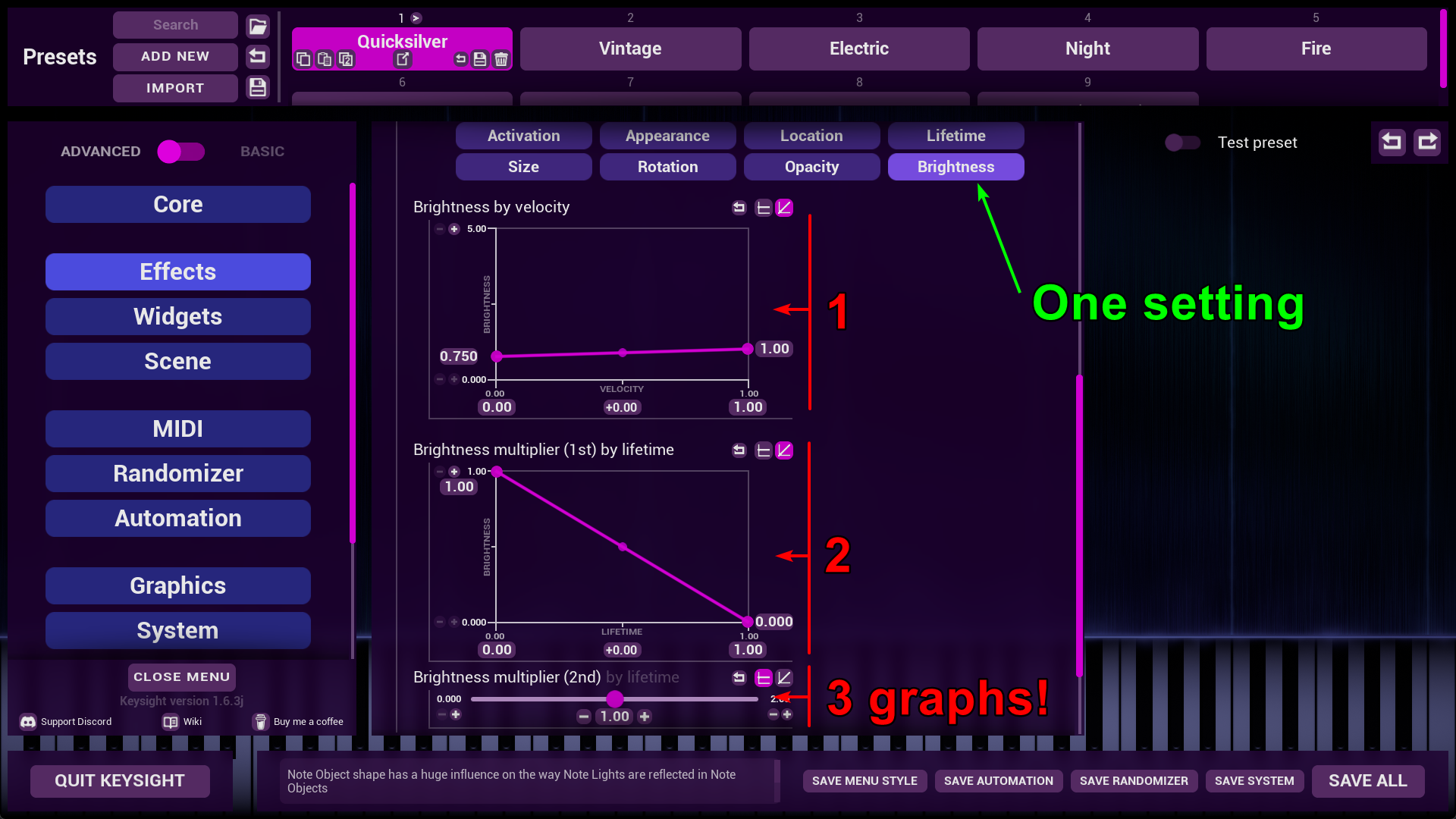
Now, behold the power of my fully armed and operational graph editor:
These allow for an arbitrary number of handles and interpolation modes. No more multiple graphs for the same variable!
I can't show this off yet, since it's the next foundational system I need to actually build, but: for a given variable like "Brightness" there won't be any graphs at all by default. All you get is a slider! If you want it to respond to something like "Velocity", you just add a graph and point it at that variable. Want it to respond to more variables, like "Lifetime"? Add more graphs!
I need to come up with a catchier name for this than "Value stacks". Even though they don't have a working UI yet, the internal systems are tested and working. Each graph in the stack can be placed in a folder, and each graph and folder have a mathematical operator to use against the graph / folder above them.
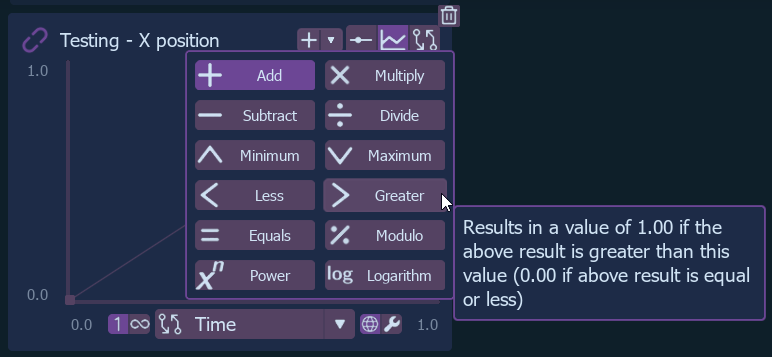
I'm genuinely giddy with excitement about this system working, because the user experience for someone who wants particles to be 10.0 brightness just has a single number that they set to 10.0. Anyone who wants particle brightness to be enormously complicated can make it exactly as complicated as they want. Both types of user only see UI elements relevant to what they're doing.
Rapid-fire teasers for other improvements
These are all things I have already looked into and/or planned. There's guaranteed to be lots of other improvements I'll only think about once I start building out more systems!
Preset organisation
Folders! And a vertical organisation rather than the horrible horizontal of current Keysight
Profile switching
Streaming and making videos on the side? Split your save data into single-purpose setups
Scene anchors
Move anything to anywhere! Why visualise a piano at all? With the hierarchical bounding box editor, you could build a guitar visualiser in Keysight 2!
Camera modes
"Orbit" versus "First-person" versus "Automatic". Orbit allows a more familiar 3D-software-style navigation that should make augmented-reality alignment much easier
Better materials
The new(ish) Substrate material model allows for all sorts of really cool surface effects
Raytracing (optional!)
UE5's Megalights seem purpose-built for Keysight's insane number of area lights and I would like to leverage it for beautiful soft shadows
Automation
Set up event or hotkey triggers for any menu action. Want a moving camera? Global brightness modifier? Chat-controlled anything? Automation is the answer
Robust, native video rendering
Unreal Engine 5's movie render pipeline should alleviate crashing and allow for rendering of UI elements like note counters into a video, and might even come with some speed benefits
Video playback
Want a video in the background of Keysight? Well, plenty do, and it looks like this will actually be viable to implement (nobody is more shocked than me)
Ambient particles
More particles = more better. Scene-level particle systems wouldn't require any input notes to trigger
Alternate particles
The single "master" particle system isn't going away, but for really niche particle paths, there will be a system to have "special" particle settings
Smooth note geometry editing
Adjust corner size, depth, and border width smoothly. No more "it's narrow, wide or nothing"
Better MIDI device support
Full track + channel support, multi-device support, in-depth rebinding...
Audio..?
Native piano sound. I have a VST engineer willing to work on this with me, and I'm somewhat confident we can do it and do it well. A lack of piano audio has always been the biggest complaint about Keysight 1, and I totally get it, and I want to fix it
Whew, ok, I think I'm done! Thank you for reading all the way down here, that was a hell of an announcement. If you wanna come chat about Keysight 2 stuff with me, please do! The Discord server is the best place to reach me.
Happy Keysighting <3
Now, back to work for me!