Fences 3.16 Released
Fences 3.16 Changelog Miscellaneous installer changes
Fences 3.16 Changelog
- Miscellaneous installer changes


Fences 3.16 Changelog Miscellaneous installer changes
Fences 3.16 Changelog

Fences helps you organize your PC by automatically placing your shortcuts and icons into resizable shaded areas on your desktop called fences. Its many customization features are what make Fences the world's most popular Windows desktop enhancement. Changelog for 3.13 (A culminat
Fences helps you organize your PC by automatically placing your shortcuts and icons into resizable shaded areas on your desktop called fences. Its many customization features are what make Fences the world's most popular Windows desktop enhancement.
https://store.steampowered.com/app/607380/Fences/
Stardock has released v3.13 for Fences with the latest fixes and improvements. Change Log New Feature: Target-based rules. Fixes for Wallpaper Engine compatibility Fixes Windows Explorer crashes from super long URL shortcut paths Fixes issues where Steam users could be prompted f
Stardock has released v3.13 for Fences with the latest fixes and improvements.
Fences 3.12 Opt-in Let’s try this again… As many of you are aware, Stardock released Fences 3.10 on Steam late last week (July 22nd), and as you may have noticed, it did not go well. Actually - to say it did not go well would be like retelling the Vesuvius eruption as just anothe
Fences 3.12 Opt-in
Let’s try this again…
As many of you are aware, Stardock released Fences 3.10 on Steam late last week (July 22nd), and as you may have noticed, it did not go well. Actually - to say it did not go well would be like retelling the Vesuvius eruption as just another cloudy day in Pompeii...
What happened
We had been working on Fences 3.10 for some time – it was up in beta for our Stardock.com customers for several months. It contained a bunch of stuff we were excited to release.
We’d gotten some reports of an issue with Wallpaper Engine and started to take a look, but from our knowledge, the overlap of users with Wallpaper Engine + Fences was quite low so we were OK moving forward with the update while we looked into it. With that, and since the beta on our website had gone well, we decided to go ahead and get the update out on Steam at the same time we released at Stardock without doing an opt-in beta on Steam first. This combination did not turn out well.
In retrospect, Steam would be exactly the place where there would be folks experiencing Wallpaper Engine / Fences overlap and we should have never released on Steam at all while we were still figuring out a solution.
We discovered that WPE issues had actually been introduced into the last version put onto Steam in 2020, but most people didn’t have this version. It was a small update, so we hadn’t pushed it out to existing users (anyone who installed 2017-mid2020). So we had spent our time looking at where in all the recent changes something might have gone wrong. Forum members quickly pointed out that 3.0.9.11 worked whereas 3.0.9.23 did not, which led us right to the answer.
More discussion can be found here: https://steamcommunity.com/app/607380/discussions/0/3055114073639412141/
Within a day, we decided to forgo scrambling to attempt a fix and yanked 3.10 – replacing it with 3.09.11.
What we’re doing
We must start with an apology. We are sorry that certain miscalculations and decisions caused frustration for our customers and support issues for the Wallpaper Engine team (thank you for your help, Tim from WPE). We're also very thankful for the help the Steam population provided – directly contributing to the eventual solution.
With that, Fences 3.12 is now available as a Steam opt-in; once we’re confident the issue is resolved, we’ll be releasing to all.
In the meantime, cheers, and enjoy your Fences + WPE combo!
- Stardock Software
Getting Fences 3.12 Op-in
Fences 3.12 Changelog
Fences 3.12 is a culmination of two revisions.
3.12
3.10 (taken down quickly for issues above)
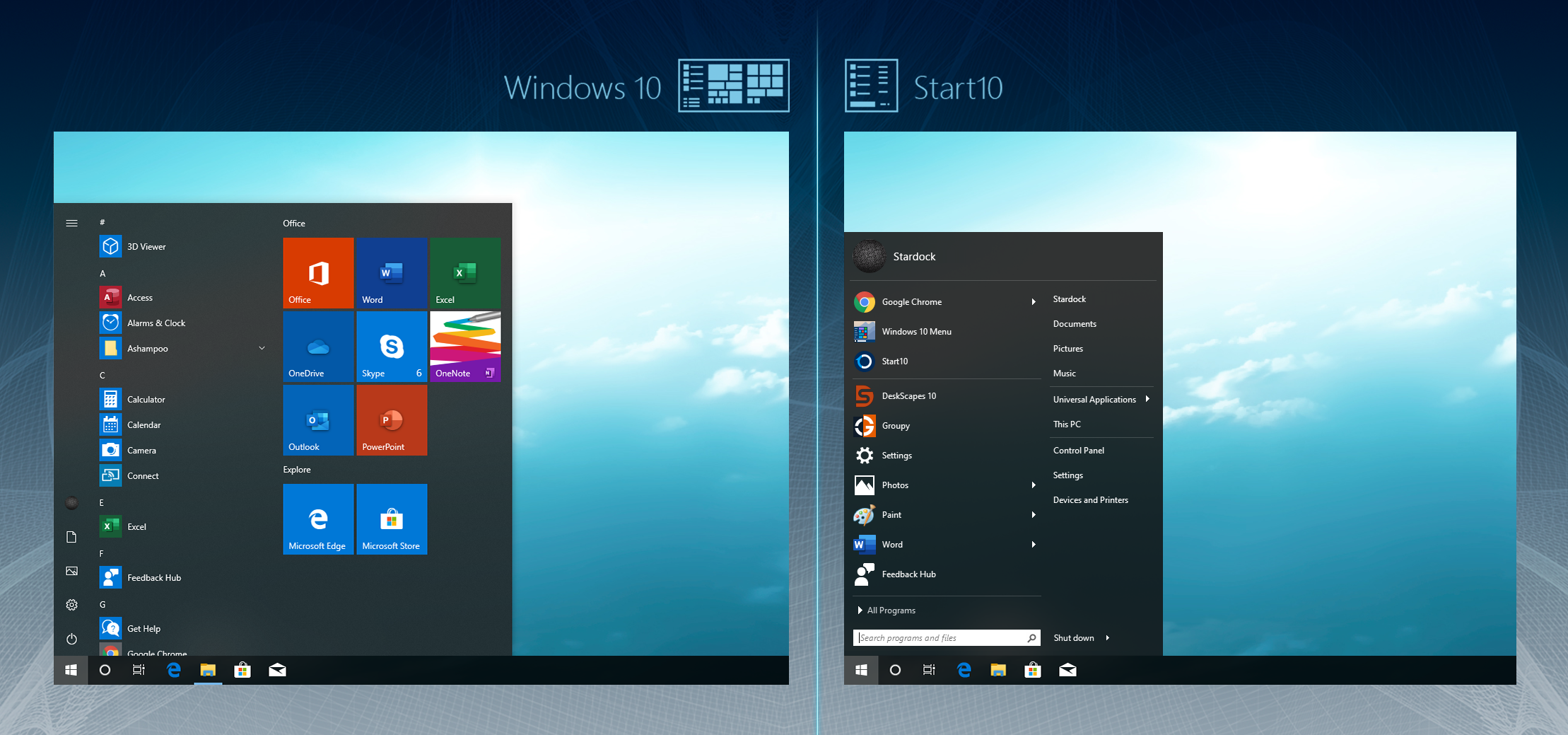
Bring back the full power of Windows Start Menu with Start10! Customize your Start menu, enjoy easy access to your search function, and replace the Start menu with a Windows 7-style look that will return you to the form and function you expect. Windows 10 vs. Start10 Start10 adds
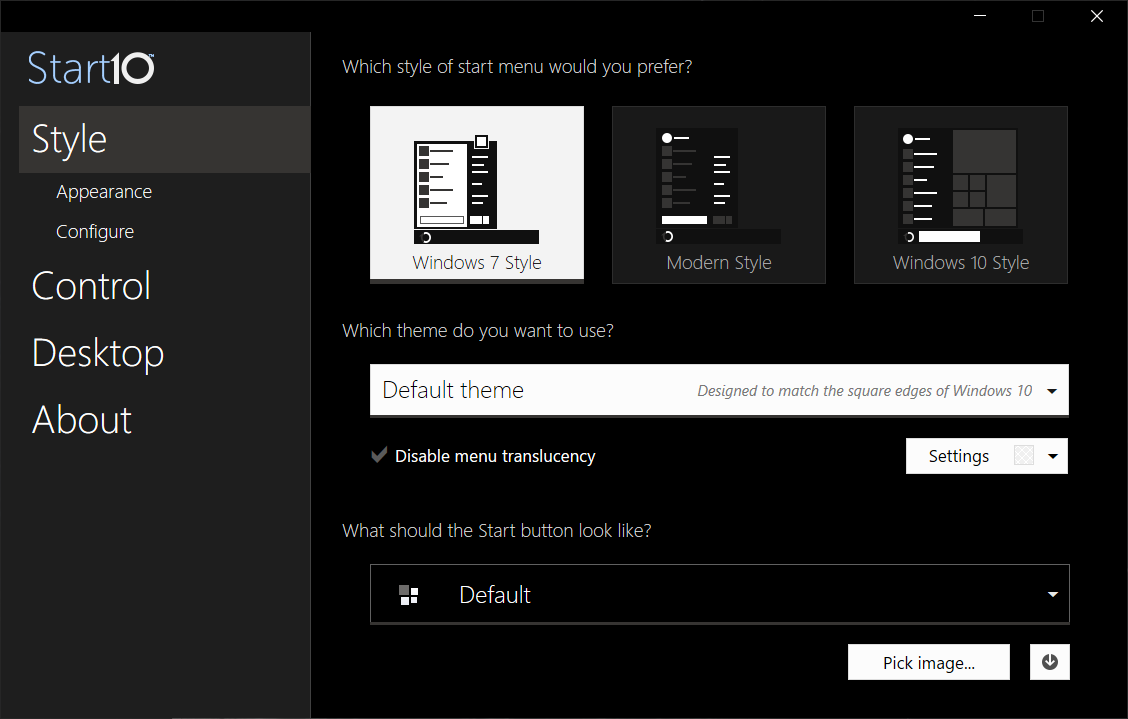
Bring back the full power of Windows Start Menu with Start10! Customize your Start menu, enjoy easy access to your search function, and replace the Start menu with a Windows 7-style look that will return you to the form and function you expect.
Start10 adds support for Windows 10's Dark Mode UI
Don't have Start10?
https://store.steampowered.com/app/620050/Start10/
More screenshots:




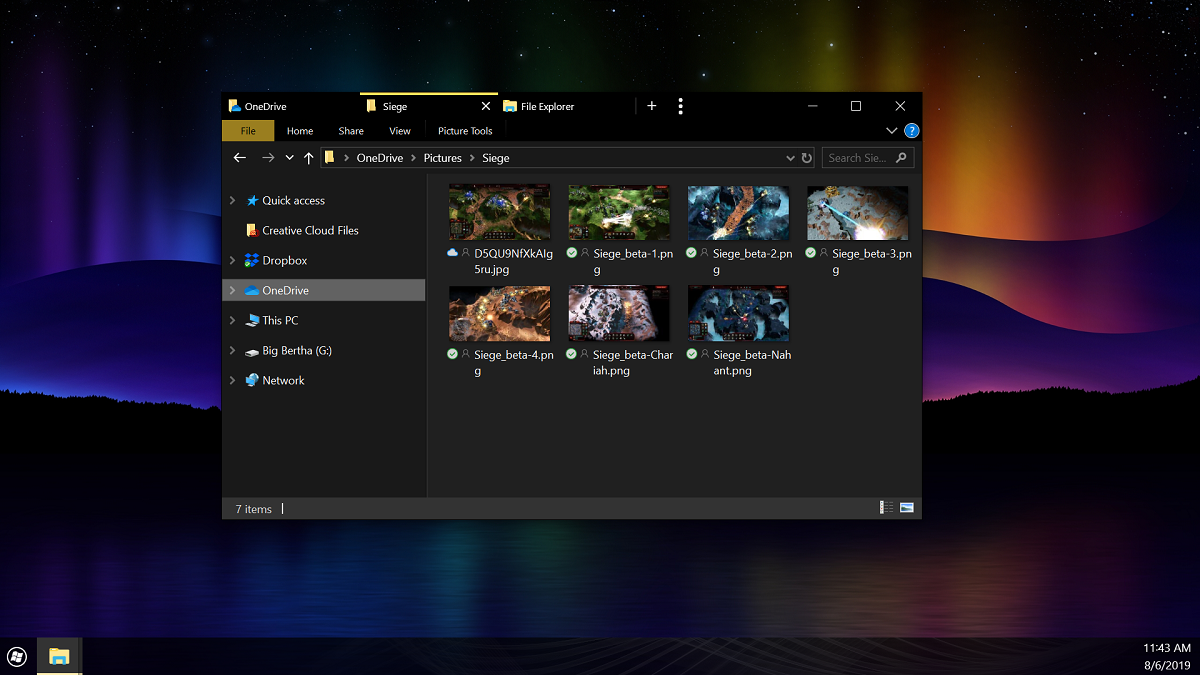
Stardock has released Groupy v1.25 with Dark Mode UI support. Groupy is a program that allows users to combine different programs together into a single window with tab navigation. For example, users can combine multiple Explorer windows together to get a tabbed interface or the
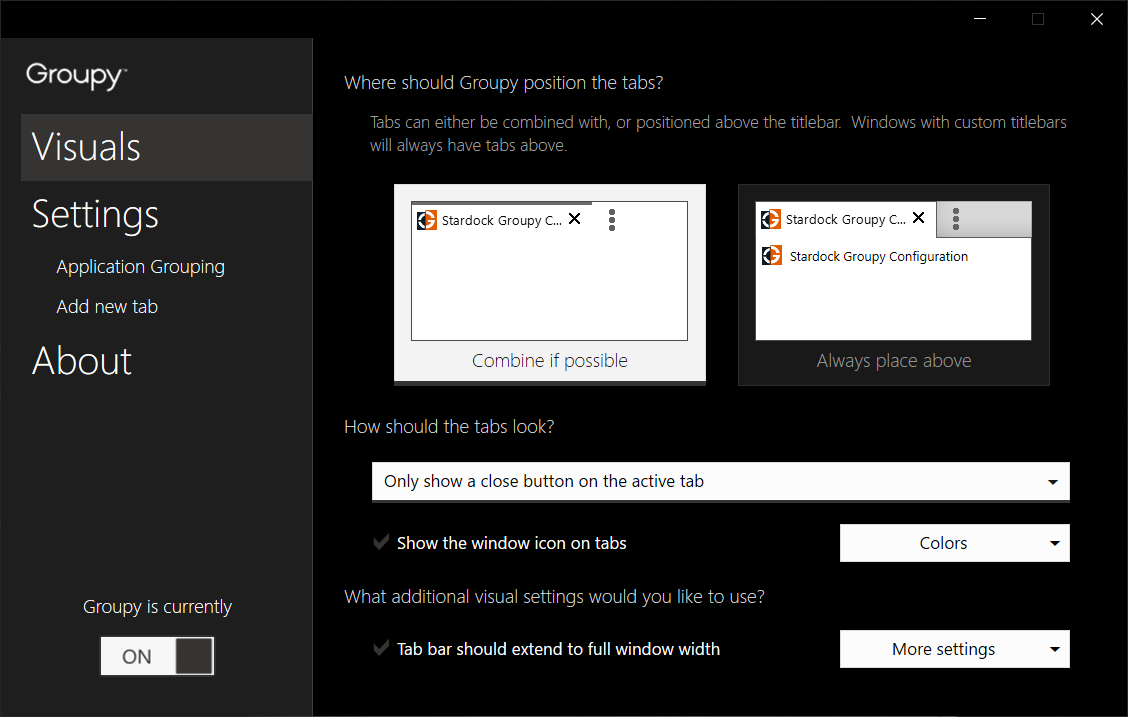
Stardock has released Groupy v1.25 with Dark Mode UI support. Groupy is a program that allows users to combine different programs together into a single window with tab navigation. For example, users can combine multiple Explorer windows together to get a tabbed interface or the same with the command prompt or even mix and match any set of windows.
Also resolved some tab color issues with the KB4505903 update for Windows 10 in dark mode.
Don't have Groupy?
Get it today and experience the power of tabs.
https://store.steampowered.com/app/912170

Get what you’ve always wanted from Windows: browser-like tabs for your apps! Keep all your apps together in browser-like tabs with Groupy! This app will transform the way you use your PC. A popular utility app from the makers of Fences and Multiplicity, Groupy lets Windows users
Get what you’ve always wanted from Windows: browser-like tabs for your apps!
Keep all your apps together in browser-like tabs with Groupy! This app will transform the way you use your PC. A popular utility app from the makers of Fences and Multiplicity, Groupy lets Windows users group desktop windows together as easily as browsers group websites together.
Groupy is a killer app that will let you take things like Microsoft Office programs, Adobe Creative Suite apps, File Explorer windows, and much more, and put them into tabbed groups. Just like modern web browsers group their websites together, you can now do that with all of the Windows apps on your desktop, making for a cleaner and more efficient experience.
Creating groups is simple: drag a window to another window and combine them into a single window, with tabs showing in the title bar. For example, open multiple web browsers, all in one set of tabs, or Office applications like Excel and Word, all in a single, easy-to-use window.
To ungroup, simply drag the tab off the group. Save existing groups and launch them at a later time, contained and ready to go.
Once a group is created, you can quickly switch between different windows with a simple hot-key or by clicking on the tab. Groupy can also automatically add launched programs into an existing tabbed group.
Groupy works on Windows 10, 8, and 7.
Features:
Today, Stardock released an update for Fences. Version 3.05 includes Simplified Chinese language support along with some adjustments to existing features. Fences allows a user to automatically organize their Windows desktop shortcuts and icons in shaded areas that can be hidden b
Today, Stardock released an update for Fences. Version 3.05 includes Simplified Chinese language support along with some adjustments to existing features. Fences allows a user to automatically organize their Windows desktop shortcuts and icons in shaded areas that can be hidden by double-clicking to reduce clutter.
A recent demand for Fences from the Asia / Pacific marketplace prompted the new Simplified Chinese language addition. Simplified Chinese language support brings the organization benefits and desktop control features of Fences to an audience of over 1.3 billion people more seamlessly than ever before.
In addition to Simplified Chinese language support, Fences 3.05 offers a number of updates and fixes, including better rule handling and adjustments for Microsoft’s Windows 10 Insider builds.
Fences is $9.99 and is available through Stardock and Steam. To see Fences in action, view the new Quick Tips video series on YouTube. For more information about Fences and Stardock’s suite of desktop customization and productivity applications, visit www.objectdesktop.com.
Full Change Log:
Today, Stardock released an update for Fences. Version 3.05 includes Simplified Chinese language support along with some adjustments to existing features. Fences allows a user to automatically organize their Windows desktop shortcuts and icons in shaded areas that can be hidden b
Today, Stardock released an update for Fences. Version 3.05 includes Simplified Chinese language support along with some adjustments to existing features. Fences allows a user to automatically organize their Windows desktop shortcuts and icons in shaded areas that can be hidden by double-clicking to reduce clutter.
A recent demand for Fences from the Asia / Pacific marketplace prompted the new Simplified Chinese language addition. Simplified Chinese language support brings the organization benefits and desktop control features of Fences to an audience of over 1.3 billion people more seamlessly than ever before.
In addition to Simplified Chinese language support, Fences 3.05 offers a number of updates and fixes, including better rule handling and adjustments for Microsoft’s Windows 10 Insider builds.
Fences is $9.99 and is available through Stardock and Steam. To see Fences in action, view the new Quick Tips video series on YouTube. For more information about Fences and Stardock’s suite of desktop customization and productivity applications, visit www.objectdesktop.com.
Full Change Log:
Fences Launches on Steam Popular Windows desktop organization software is now available on the ultimate entertainment platform Take control of your cluttered desktop and make way for a clean creative workspace with Fences, the perfect Windows organizational solution. Fences has a
Popular Windows desktop organization software is now available on the ultimate entertainment platform
Take control of your cluttered desktop and make way for a clean creative workspace with Fences, the perfect Windows organizational solution. Fences has a little something for everyone: it collects your icons, files, and folders in shaded areas that can be hidden with a simple double-click, and even creates desktop pages you can swipe through for easy sorting.
Creatives will appreciate the extra desktop space created by tucking files away in nearby Fences while they paint, design, edit and more. Project-based files and assets are where they need to be, one click away, exactly when you need them. Fences can also be dragged anywhere on the desktop, snapped to the sides, spread across multiple pages, or even rolled up with the click of a mouse.
If you stream or create video content, instantly make your desktop viewer friendly by activating Fences to eliminate all icons in an easy double-click. Ready to bring them back to the desktop? Double-click again to make all of your Fences reappear exactly where you left them.
Tired of searching through dozens of icons to find what you need or simply looking for a way to keep your favorite games in an easy-to-find section on your desktop? Then Fences is the tool for you.
Features:
Technical Features:
http://store.steampowered.com/app/607380
Fences Launches on Steam Popular Windows desktop organization software is now available on the ultimate entertainment platform Take control of your cluttered desktop and make way for a clean creative workspace with Fences, the perfect Windows organizational solution. Fences has a
Popular Windows desktop organization software is now available on the ultimate entertainment platform
Take control of your cluttered desktop and make way for a clean creative workspace with Fences, the perfect Windows organizational solution. Fences has a little something for everyone: it collects your icons, files, and folders in shaded areas that can be hidden with a simple double-click, and even creates desktop pages you can swipe through for easy sorting.
Creatives will appreciate the extra desktop space created by tucking files away in nearby Fences while they paint, design, edit and more. Project-based files and assets are where they need to be, one click away, exactly when you need them. Fences can also be dragged anywhere on the desktop, snapped to the sides, spread across multiple pages, or even rolled up with the click of a mouse.
If you stream or create video content, instantly make your desktop viewer friendly by activating Fences to eliminate all icons in an easy double-click. Ready to bring them back to the desktop? Double-click again to make all of your Fences reappear exactly where you left them.
Tired of searching through dozens of icons to find what you need or simply looking for a way to keep your favorite games in an easy-to-find section on your desktop? Then Fences is the tool for you.
Features:
Technical Features:
http://store.steampowered.com/app/607380