Fishing The Abyss

umaaaaaa studio

Released
Dec 16, 2024
Platforms
Last updated
Wishlist on SteamAdd it on the Steam store page. Opens in a new tab.

Updates & announcements

20 posts
  1. Developer post

    DLC AQUARIUM ver 1.0.5 Bug Fixes

    Fishing The Abyss AQUARIUM Update Notice We have updated from ver 1.0.4 to ver 1.0.5! The fixes are as follows: ・Fixed an issue where fish could be made smaller than the minimum size limit when given size-reducing food. ・Fixed errors in certain parts of the save data. Thank you f

  2. Developer post

    DLC AQUARIUM ver 1.0.4 Bug Fixes

    Fishing The Abyss AQUARIUM Update Notice We have updated from ver 1.0.3 to ver 1.0.4! The fixes are as follows: --------------------------------------------------------------- Fixed an issue where giving the "Size Down" bait could cause the game to crash -------------------------

  3. Developer post

    Fishing The Abyss AQUARIUM Update Announcement

    We have updated the version from 1.0.1 to 1.0.2. The following issue has been fixed: ---------------------------------------------------- Fixed an issue where, if a single creature met the conditions for both the smallest size crown and the largest size crown, only one crown woul

  4. Developer post

    DLC AQUARIUM ver 1.0.1 Bug Fixes

    Fishing The Abyss AQUARIUM Update Announcement We have updated the version from 1.0.0 to 1.0.1. The following issues have been fixed: ---------------------------------------------------------------- :Fixed a crash that occurred when feeding input (left or right click) was perform

  5. Developer post

    Free DLC "Fishing The Abyss AQUARIUM" is Now Available!

    Hello everyone, it's been a while. Thanks to your incredible support, Fishing The Abyss has been purchased and reviewed by many players. As my first release as a solo developer, this experience has been full of learning and growth for me. I truly appreciate all the feedback you'v

  6. Developer post

    10,000 Copies Sold!

    We are thrilled to announce that Fishing The Abyss has surpassed 10,000 sales! With so many interesting games out there, we truly appreciate you taking the time to play this little creation of ours—if it can even be called a "game"! Moving forward, we are releasing a demo version

  7. Developer post

    Updated from Version 1.4.0 BETA to Official Version 1.4.0

    ・Added an option to keep the window always on top. Note 1: Available only on Windows OS. Note 2: Cannot be used in borderless window mode; only available in windowed mode. The above update has been changed from the beta version to the official release version.

  8. Developer post

    Ver 1.4.0 Beta Update

    We have added new items to the system save data and implemented additional features utilizing Windows functionality. To distinguish this from an official version update, we have decided to release it as a Beta version. The previous Beta version had no reported issues and has been

  9. Developer post

    ver 1.3.0 Beta Update

    This update introduces a critical data protection system for save data, so we have decided to release it as a Beta version, separate from the official update . Update Details ・Implemented a system to detect data corruption caused by interruptions during save data writing and auto

  10. Developer post

    Ver 1.2.1 Bug Fixes

    !: Fixed an issue where points fluctuated during loading under certain progress conditions.

  11. Developer post

    Refund Request Guidance for Customers Affected by the ver 1.1.0 Point Accumulati

    Hello, this is umaaaaaa, the developer of Fishing The Abyss. First and foremost, I would like to sincerely apologize once again for the inconvenience caused by the issue in ver 1.1.0, where starting the game from either "New Game" or "Continue" resulted in beginning with an exces

  12. Developer post

    ver 1.2.0:UpDate

    Update Switch Functionality: Always Rain ←→ Auto (Default Behavior) This feature is available from the start of the game. To activate, left-click on a ground lamp during gameplay; a faint light will turn on. When the light is on, rain will continue to fall endlessly. Turning off

  13. Developer post

    ver 1.1.1 Fixed an Issue Where the Game Started with Abnormal Point Values

    ssue Identified in ver1.1.0! We have confirmed a critical issue in ver1.1.0 where the game starts with an abnormal point value. This is a serious problem that should never have occurred... We have now released ver1.1.1 to address this issue. However, I deeply apologize to the 74

  14. Developer post

    ver 1.1.0 Update: Adjustments to Basket Capacity Limit

    A critical issue was discovered in this update, resulting in a significant number of customers receiving a build that rendered the game unplayable. We deeply apologize for the inconvenience caused. The issue has been resolved in the current version, ver1.1.1. --------------------

  15. Developer post

    ver 1.0.5: Bug Fixes

    !: Fixed typos in some creature names. !: Fixed an issue where the encyclopedia scroll would stop working under certain conditions. !: Other minor bug fixes.

  16. Developer post

    ver 1.0.4: Minor Update

    !: Adjusted the game to launch in normal windowed mode instead of borderless window mode on the first startup. Note: This change does not affect users who have already launched the game. It is intended to make it easier for new users to move and adjust the initial window.

  17. Developer post

    Ver 1.0.3 : Bug Fixes

    ! : Fixed an issue where the game would crash due to an error when display environment information could not be retrieved. ! : Fixed an issue where the "Music and Fishing" archive achievement could not be unlocked for some reason. If the conditions are met, the achievement will n

  18. Developer post

    UpDate ver1.0.2

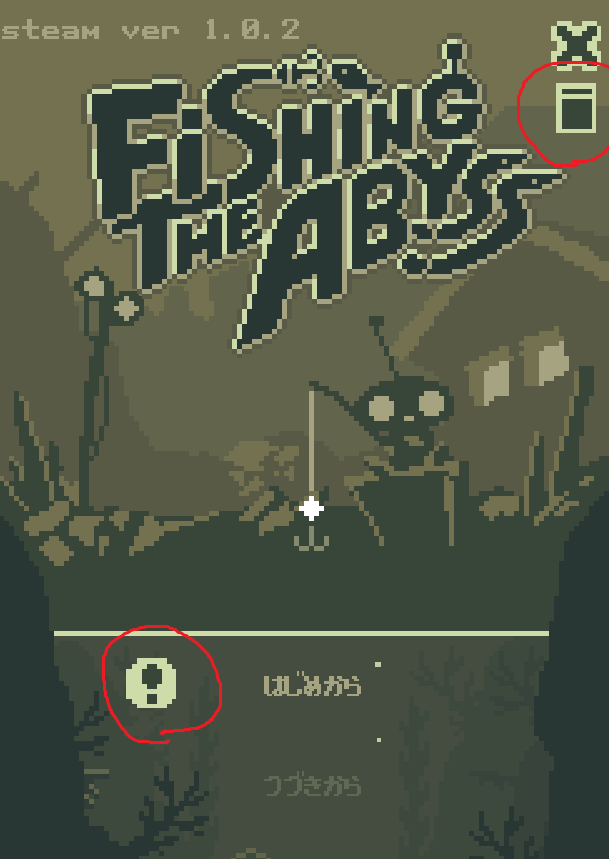
    ! : Added a toggle button on the title screen to switch between borderless window mode and standard window mode. → In standard window mode, a header is displayed at the top of the window, allowing basic functions such as minimizing and moving the window. Please use this mode if n

  19. Developer post

    How to Move the Window

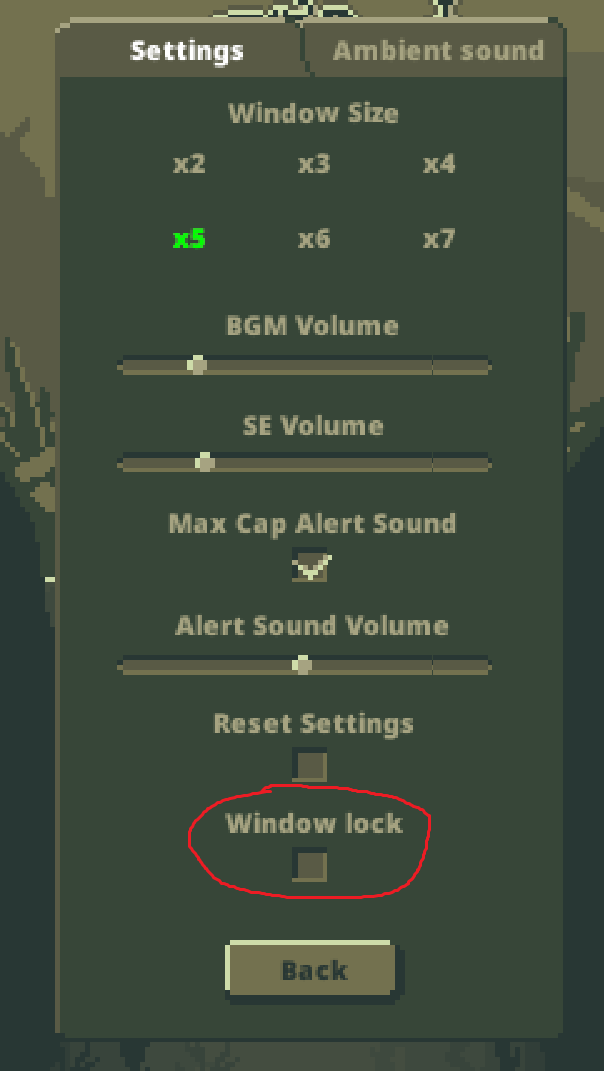
    How to Move the Window 1: Hover the mouse cursor over the window. 2: Left-click and hold. 3: The mouse cursor will change to a four-way arrow. 4: Drag to freely move the window. 5: Once you've positioned the window, you can prevent accidental moves by checking the "Lock Window" c

  20. Developer post

    v.1.0.1 - Bug Fixes

    ・Fixed an issue where pressing the Enter key while the window is active caused the application to crash.