PixageFX Studio

LizardWish

Released
Apr 5, 2021
Platforms
Last updated
Wishlist on SteamAdd it on the Steam store page. Opens in a new tab.

Updates & announcements

20 posts
  1. Developer post

    Exclusive PyxelAid Launch Discount for PixageFX Owners!

    Thank You, PixageFX Community! ❤️ Since the release of PixageFX, thousands of artists have used it to create amazing pixel art. Your support has made it possible for me to build something even bigger. I'm excited to announce that PyxelAid is coming soon! PyxelAid is a brand-new t

  2. Developer post

    Exclusive PyxelAid Launch Discount for PixageFX Owners

    Thank You, PixageFX Community! ❤️ Since the release of PixageFX, thousands of artists have used it to create amazing pixel art. Your support has made it possible for me to build something even bigger. I'm excited to announce that PyxelAid is coming soon! PyxelAid is a brand-new t

  3. Developer post

    1.1.3.1 is out! New Category, new modules, bug fixes

    Added : New Category : Pixel Art Helpers Added new module : Banding Reduction : Detects and reduces visible color banding caused by parallel pixel repetition. Preserves line continuity while softening unwanted stripe patterns. Added new module : Diagonal Smoothing : Fixes jagged

  4. Developer post

    1.1.3.0 is OUT!! New modules and bug fixes

    Added : Pixel Art Helper (Experimental )- Algorithms that help clean up pixel art. Currently in an experimental phase. Added : Pixel Art Cleaner soft & hard - AI based pixel art noise and hotpixel removal tool. Added : Channel Scaler - Scales RGB, hue, saturation, luminance,

  5. Developer post

    1.1.2.4 is OUT! AI based AA Remover, Enhanced LUT support, Tone Generator

    - Added new AI module : AI Remove AA AI-powered Antialias Removal Module - Enhanced module : Lookuptable (LUT) Enhanced LUT support, The Lookuptable module can now process cube LUT files of any size. - Added new palette module : Tone Generator Expands your palette by calculating

  6. Developer post
  7. Developer post

    1.1.2.2 is OUT! Bug fixes , new module, new preset!

    v1.2.1.4 - Added : 'Flowing Lines' module _ Fixed : When you canceled opening a file, the program would crash. _ Preset added : 'Scratchboard' (uses new 'Flowing Lines' module)

  8. Developer post

    Mini bug fix!

    Fixed : Fixed Size module (Crashes if you enter a value when realtime update is ON) Fixed : Add image (Crashes if you move module in list without a filename) Added : Alpha Outline (Added invert checkbox to draw alpha borders)

  9. Developer post

    Mini fix! Export all frames folder bug fixed.

    When the 'Keep source filename' option was selected in the 'export all frames' , it would export to the parent folder instead of the folder you selected. Fixed!

  10. Developer post

    1.1.2.0 is OUT!! Bug fixes and some changes

    Due to the time I've dedicated to developing the game MIDNIGHT FURY with the support of PixageFX and FBX2Spine, I haven't been able to release an update for a while. Here are the new features and changes in this update: Improved 'Select folder' window All templates have been revi

  11. Developer post

    1.1.1.0 is OUT! Brand new modules, Speed improvements and bug fixes

    WHAT'S NEW - Added : 'Scale' module (Newly added to replace old 'Scale' module) - Added : 'Deep Pixelize' module - Added : Deep Pixelization Template - Added : 'Fixed Size' module - Fixed : 'Dithering & Halftoning' ; crashes after enabling 'Auto palette generation' - Fixed :

  12. Developer post

    1.1.0.3 is OUT!! New modules , New features, New templates!

    Hi again! We've made improvements to palettes in this update. We have added new modules and new features to existing modules. The palette library from lospec.com is now embedded in PixageFX. Create your new palettes with 'Palette Generator' v1.1.0.3 - Added 'Palette generator' -

  13. Developer post

    1.1.0.2 is OUT!! New modules, new templates

    v1.1.0.2 - Added 'Histogram Matching' - Added 'Comic AI' - Added 'Portrait AI 2' - Fixed 'Lookup table' : If a 'LUT' file was not assigned in the 'Lookup Table' module, it would give an error when you added the next module. - Fixed 'Polygonize' : 'Load palette' & 'Save palett

  14. Developer post

    1.1.0.1 Mini Fix!

    - New module : COLOR TO ALPHA - Fixed : Mp4 Video was not exporting if there is no folder named 'Sequence' during export. - Fixed : Before Pixelate Basic and Pixelate Advanced modules, if there was a module that changed the image size (Scale, Image Resize etc.), the image would b

  15. Developer post

    1.1.0.0 is OUT! Cuda support, brand new modules and many bug fixes.

    Now some AI modules run faster with NVIDIA CUDA support*. (Select the CUDA supported graphics card you want to use from the 'Preferences' window.) * IMPORTANT! : All modules also work with AMD and INTEL graphics cards. Only some modules run faster on graphics cards with CUDA supp

  16. Developer post

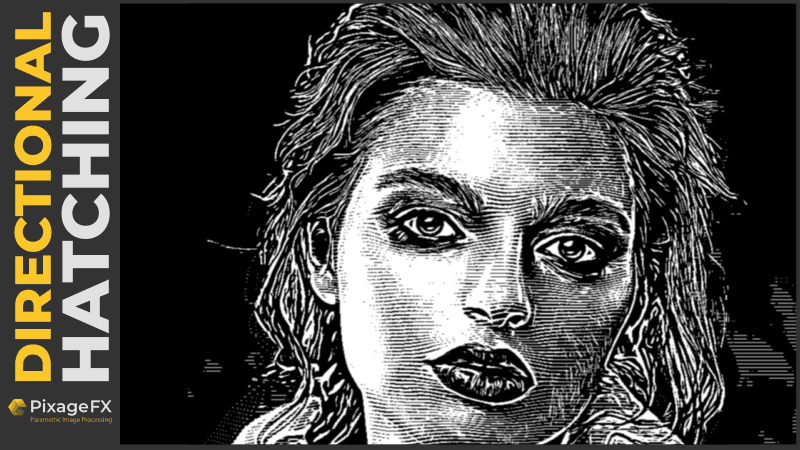
    1.0.5.950 is OUT!! New effects : MONEY & DIRECTIONAL HATCHING

    New stylization effect added : DIRECTIONAL HATCHING It creates an height map of the image and overlays a selected pattern by distorting it according to the height map. New stylization effect added : MONEY It creates engraved money effect. New templates added : Money, Directional

  17. Developer post

    1.0.5.940 is OUT! NEW TEMPLATES WINDOW!

    NEW FEATURE ADDED : TEMPLATES WINDOW You can apply one of the ready-made templates to your project when creating a new project or by clicking the 'Apply template' button in the Effects window. NEW WORKFLOW EFFECT ADDED : NOTEPAD A new widget you can use to take notes.

  18. Developer post

    1.0.5.930 is OUT!! New Feature : EFFECT GROUPING!

    With this version we've added new features to PixageFX that allow you to create even more complex effects. You can now change the INPUT image of any effect. The workflow, which previously worked only in a top-down order, now allows you to select a different INPUT Source at any st

  19. Developer post

    1.0.5.921 is OUT!! Better Depixelize and Leftclick+Space for panning

    New parameters added : DEPIXELIZE New features added : 'Left mouse button' + 'Space' for panning We also noticed that some of our users cannot reach us on social media. That's why we added the Social Media & Guides menu for better communication Please do not hesitate to conta

  20. Developer post

    1.0.5.92 is OUT!! Clipboard Import & Export

    New feature added : Import from Clipboard & Export to Clipboard Import from Clipboard : Imports picture you copied to the 'Windows clipboard' into PixageFX. Note : PixageFX copies the image in the Clipboard to the Clipboard folder under PixageFX Document folder (Default : C:\