Hello again! I am excited to finally release this Resource Rebalance patch that has been in the works for several weeks. It has a ton of stuff in it -an overhauled map generation algorithm, a resource affinity system, new buildings, exotic fruit crops, new data visualization tools, and a big pile of various improvements and bug fixes.
It's a major step towards the 1.0 release, and addresses some fundamental gameplay issues that I feel have been holding back the game since the beginning. So here's all the details!
Map Generation Improvements
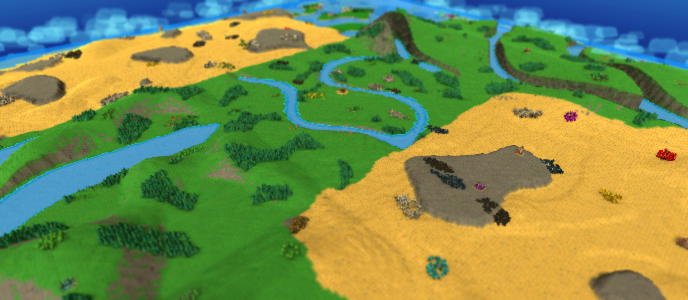
The previous logic for generating resources on a Custom map was pretty messy. In general the map was flooded with resources, because the old method didn't have a good way to keep patch size reasonable while still ensuring there was enough of that resource on the map. Or, you might get a bunch of tiny patches with just 1 or 2 items. There was no guarantee you'd have the right resources near your base, or that there would be enough on the map at all. And ultimately, it didn't even matter where resources spawned, because you could just arbitrarily create your own anywhere (see the next section for how that is addressed).
So I rewrote the resource generation algorithm from scratch!
BEFORE:
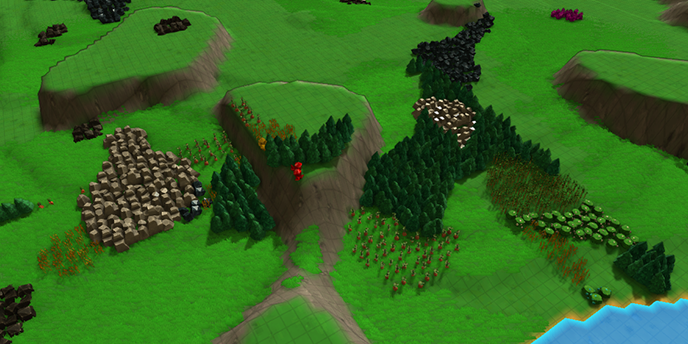
AFTER:
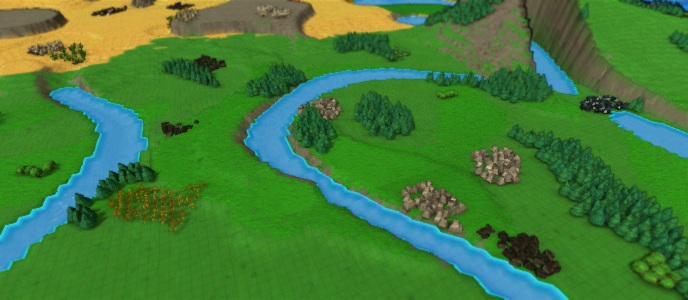
In the new algorithm, resources are generated in several separate steps. First, the map is divided into zones that are evenly spread out from each other (with zones being a bit closer together in the center of the map). Then, resource types are assigned to those zones - taking into account which resources are important to have close to the base, and how much of that resource has already been generated. Last, the patches are 'grown' outward to reach a target size based on resource type and distance from center.
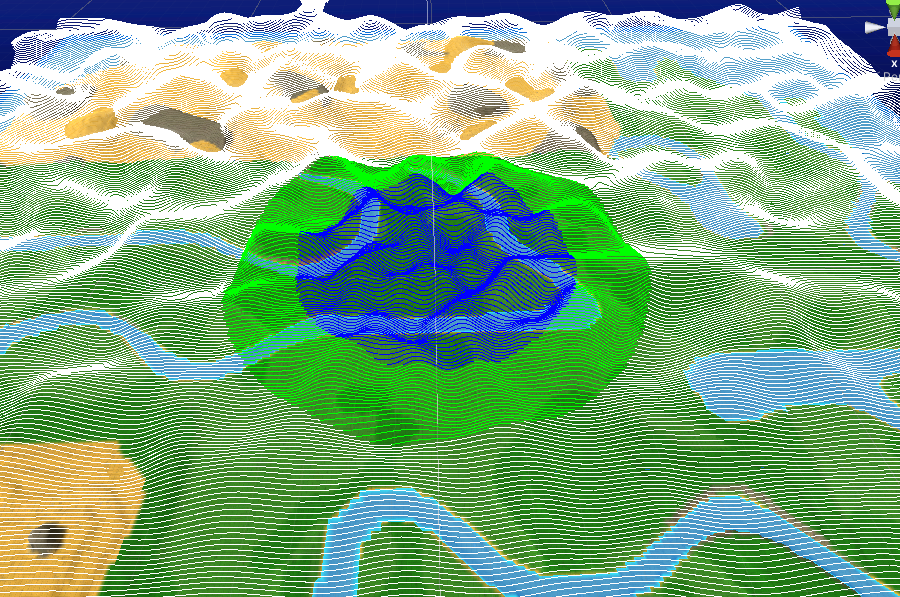
A debug view of the zone generation method - 'peaks' of this noise map are turned into resource zones. Note they are warped to be more frequent in the center
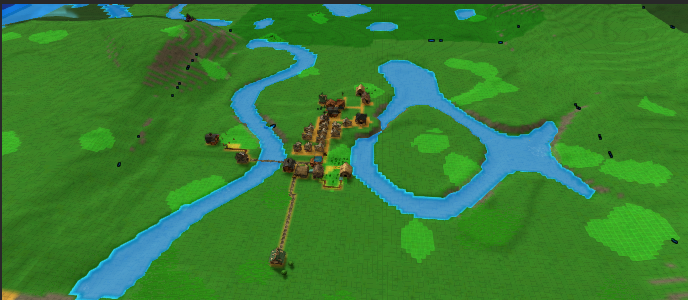
Resource zones after they are created
The result is a huge improvement in how maps play out. Resource patches are more consistently sized and have more space between them, resulting in more building area, less need to clear useless resources, and more meaningful mining & harvesting locations. Players will always have a good amount of certain critical resources near the base and reasonable amounts of all resource types elsewhere on the map. It also just looks better to not have huge fields of carrots, stone, and tomatoes smashed up against each other.
Resource Affinity & Yield
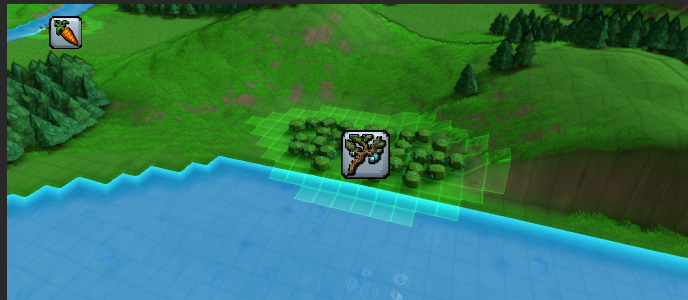
All the improvements to resource regeneration would be pretty useless on their own - as it was pretty simple to just place whatever crop you wanted anywhere on the map with no downside to consider. It made things a bit too easy - players had no incentive to take advantage of natural resource spawn locations, and missed out on having to solve interesting transportation challenges.
To fix this, the game now has the concept of Resource Affinity. Simply put, some things grow better in some parts of the map than in others. This means the efficiency of farms, foresters, and mines depend heavily on where you build them. And if that's the case, long-distance, high-throughput transportation options (like Trains) will become much more valuable. So it should make gameplay much more interesting in the long run.
Here's how it works in more detail. Each terrain tile can have affinity for a certain farm crop, tree type, or mineral. The affinity value can go from 0% to 100%. When a map is created, any naturally-occurring resource patches (plus a small area around it) is assigned 100% affinity for that resource type. When a resource is regrown on a tile the amount of items that can be harvested from it (i.e. its Yield) will be increased by 4x if it has the right affinity. On fast-producing farms, players will often be limited by how many crops are ready to be harvested, so a higher yield winds up producing a much higher amount of items over time.
There's a tooltip on each item source that lets you easily see all this data in one place:
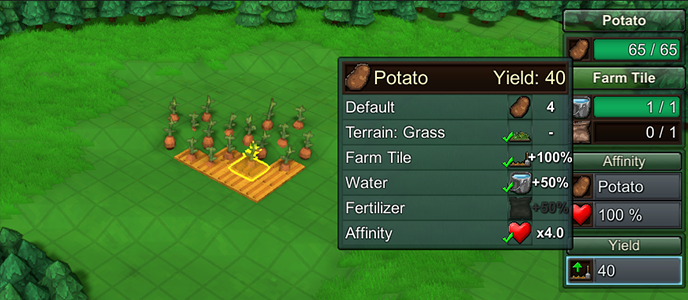
You can place resources without affinity, but the yield will be smaller. However, each time the crop/tree/ore finishes growing, the tile will gain a small amount of affinity. So over time, you can change affinity to match your desired farming area. However, this process takes some time, so it is much more effective to base your farms around natural affinity regions.
If a tile has Affinity for a different resource than what you planted, the affinity of the tile for the old item will decrease slightly each time growth completes. Once it reaches zero, that old affinity is lost and it begins adding affinity for the resource type being grown that tile.
Yield is also affected by Farm Tiles, Fertilizer, and Water. Previously, these would increase crop regrowth speed, but now they simply add more items to the resource once growth completes. (Earth Shrines still boost regrowth speed.)
Affinity & Yield details can be viewed in several ways: When placing a resource or a Farm Tile-type block, all tiles with relevant affinity are highlighted on the map. Hovering over terrain will display its affinity value. A selected resource displays current yield and affinity, and hovering the Yield element will give a detailed description of the boost factors that are or aren’t currently being applied. And the new World Data panel has options to display crop, tree, or ore affinity tiles.
Affinity only applies to above-ground resources - minerals that spawn underground aren't affected. However, their Yield is increased from previous version, and can be increased much further by supplying Pickaxes to the Mine Shafts (via connected Mines).
One big related change is that the old 'Ore Prospecting' feature has been disabled by default. Again, this made it too easy to create mines in arbitrary locations, and was always intended as a placeholder until these current resource improvements could be made. To balance this out, underground resources have a much higher yield now, so you won't need to create huge patches to get a useful mining setup. (For players that really liked the old style, you can re-enable this ability with global rule “Ore Prospecting”.)
World Data Panel
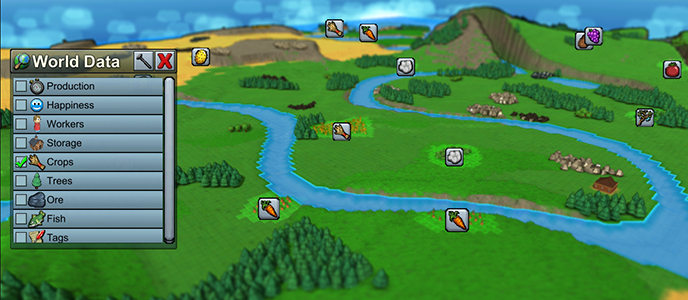
The hotkey for Data Overlay (default: F) used to just show all items stored or produced by all buildings. On big towns, the result was information overload and made it much less useful.
Now, there is a new panel you can toggle with the same hotkey which has multiple layers of data you can toggle on or off.
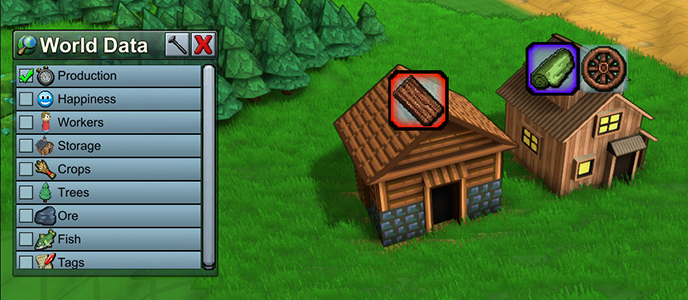
Resource groups like crops, trees, ore, and fish can be shown. This highlights all tiles with matching affinity, and shows an icon for that crop over each resource patch. (A ‘patch’ is calculated dynamically based on groups of nearby resources).
Data Overlay ‘Production’ tab shows icon highlight color when recipe is starved for input (red) or can’t produce because output is full (purple):
New Resources & Recipes
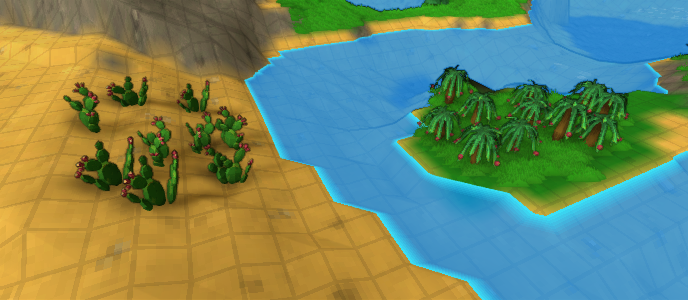
- Added new natural resource: Prickly Pear, which produces Cactus Fruit. Cactus Fruit can be harvested by Farms, but Prickly Pears can only be planted on Desert Sand tiles. They also only spawn naturally on Desert Sand terrain.
- Added new natural resource: Dragonfruit Tree, which produces Dragonfruit. Dragonfruit are harvested by Foresters and require Tree Planters.
Note: maps created before this update will use the old resource generation algorithm, and will not naturally spawn Dragonfruit Trees or Prickly Pears.
- Added new items and recipes: Cactus Jam and Dragon Punch
- ‘Fruit Juice’ and ‘Jam’ have been changed into fruit-specific items and recipes: Apple Juice, Pear Juice, Berry Juice, Apple Jam, Pear Jam, and Berry Jam. They are grouped into ‘Juice’ and ‘Jam’ satisfaction category for houses.
NOTE: For compatibility reasons, the old Fruit Juice recipe will be left intact on legacy maps. This recipe accepts any fruit, and instead of a generic 'Fruit Juice' item it will convert it to Apple Juice. Any existing ‘Fruit Juice’ items are treated as Apple Juice. Similarly, the old Jam recipe now produces Apple Jam and any existing ‘Jam’ items are treated as Apple Jam.
New Buildings
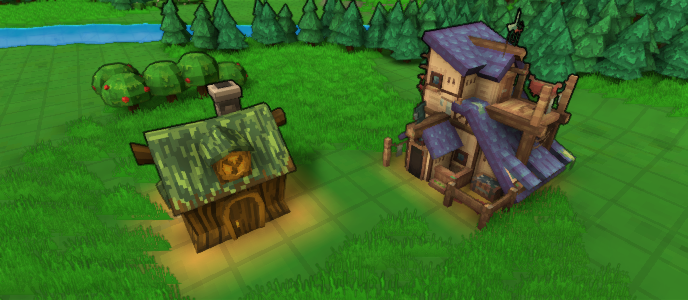
- Added new building: Tailor. This handles all clothing-related recipes (Shirt, Cloak, Warm Coat, Shoe) instead of the Workshop. Legacy maps will retain these recipes at the Workshop.
- Added new building: Medicine Hut. This handles medicinal recipes (Remedy, Fish Oil, Ointment, Antidote, Health Potion, Elixir) instead of the Enchanter and Kitchen.
NOTE: For compatibility reasons, maps created in prior versions will retain these recipes at the original buildings.
Balance Changes
- Removed default auto-replanting of all Farm crops, unless linked to a Farm or Farm Tile
- Can place a crop without a Farm Tile, as long as terrain is valid.
- Can no longer place Farm Tiles or Tree Planters on Sand or Rock terrain types
- Yield for underground resources has generally been rebalanced so that common resources like Stone and Iron Ore have a higher yield than rare resources like Gold or Mana Crystals. Previously this was the opposite.
- Mines will prefer to harvest above-ground resources before underground resources
- Made crop growth speeds more consistent (difference now is in the yield each item produces)
Miscellaneous Improvements
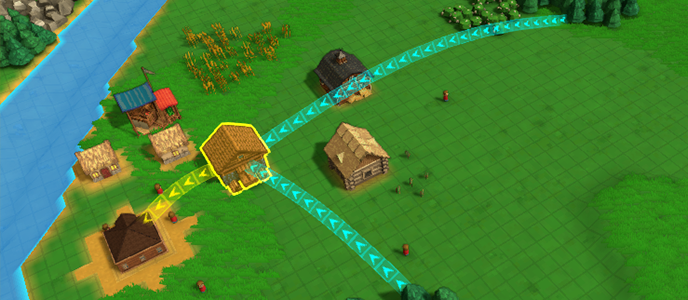
- Improved the visual lines that indicate worker targets & paths.
- When a building is selected, arrows indicate where workers are supplying input, and where they are delivering output. Assigned workers are highlighted as well.
- When a worker unit is highlighted, its pickup and dropoff locations are be highlighted.
- Farm Crops get automatically removed when placing or moving a building onto their location (unless they are compatible, like Farm Tiles)
- Can double-click on terrain to jump camera to that location
- Can now change textures on terrain that had a default texture assigned from its original biome (e.g. Deserts)
- Built-in Biomes now have a wider variety of textures
- Fixed bug: Mesa Valleys biome had resource distribution similar to Desert type
- Added Oasis biome
- Resource patches are no longer 100% solid masses, they have some natural spacing in between individual blocks
- Added ability to specify terrain type within each component of the terrain generator. The terrain used is based on the component with the highest height (unless a ‘Minimum’ height blend is specified, in which case the component with lower height gets terrain type precedence).
- When editing custom map generation, now can set resource ‘patch size’, which is a more useful value than ‘spread’.
- Mining ores spawn with higher resource counts as you get farther from center of map
- Tiles that are near water are highlighted when placing crops
- Water and Fertilizer state on Farm Tile is now simply On or Off. Instead of decaying slowly, water and fertilizer state will contribute to Crop Yield once growth completes, and each will deplete at that time (at which point it can be refilled by nearby water or Farm).
- Pickaxe state on underground resources are consumed one at a time when the ore node finishes regenerating, instead of slowly depleting.
- Added cursor highlight when navigating 2D views (underground mines, pipes, etc)
- Worker Overview panel now starts on left side of screen so it’s easier to see the workers you click on
- Camera can now be moved while dismissable modal menus are active (e.g. Worker overview, World Data panel)
- Fish particle effect changed - now shows as circular bubble rings. They can also be displayed as an Affinity Zone highlight. These zones are visible when interacting with Fisheries or Fishing Boats. Can also have these zone displays toggled on or off in the Global Data panel.
- Reorganized list of item icons that appear in Item Filters and Player Inventory
- ‘Remove Resource’ now has a dedicated control (default: Ctrl+X) which will toggle to and from the current build action without clearing it. It also has its own icon in the bottom-left Tools menu
- Improved performance of drawing glowing highlight tiles around the map
- Reduced glow when showing Market-connected paths
- Minor changes to campaign maps
- Riverbanks now default to a green grass texture, not sand
Bug Fixes
- Fixed bug: recipes would forfeit remainder of production time each time a recipe completed during a simulation tick, causing meaningful reduction in output on fast / highly boosted recipes, especially on lower framerates
- Fixed bug: Trains would remain at a stop loading a handful of items at a time, if new valid items constantly flowed into the building and the building contained other items that were not valid transfers to the train
- Fixed performance issue caused by frequently redrawing world highlights when certain buildings were selected
- Fixed some missing text characters in localized text, were appearing as boxes
- Fixed missing tooltip on natural resources & crops actively growing
- Fixed missing localization on 'InvalidTerrain'
- Fixed bug: unable to select an underground resource if it was on a Mine Shaft
- Fixed bug: hitting ESC while assigning a worker delivery would not immediately remove the dragged item’s icon from the cursor
- Fixed bug: worker preview paths were not always displaying
- Stopped building alerts from interfering with worker targeting actions
- Fixed bug: game loop would break when a worker assigned to harvest water from a river or lake
- Fixed out-of-date icons for potato & carrot plants
- Fixed bug: switching between maps might not update build button costs or locked state properly
- Fixed bug: empty inventory slots would sometimes appear as partially full
- Fixed bug: incorrect icon for Fabric filter category