
Hello players!
Thank you for participating in the 3rd beta.
Please read below the explanation on how to fix the game when errors are occurring.
🛑 Issue content
- 1. Stay blocked on the loading screen after starting the game.
2. After choosing quick match, the matching cannot proceed.
3. A pop-up appears “There is no matching server”
❓ Issue explanation
- The current system is set to prevent matching servers with a ping difference of more than 200. (Hereinafter Ping Filtering System).
The Ping Filtering System filters the servers with high ping for smooth gameplay.
The pop-up error “There is no matching server” may appear when the servers have a ping difference of 200 or more.
🛠️ How to mitigate ping filtering
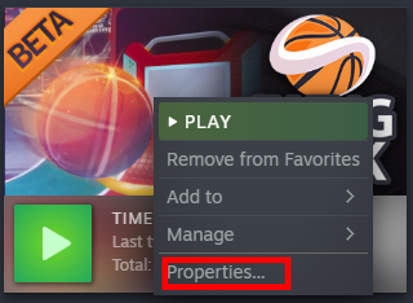
- 1. In the Steam Library, right-click Swing Dunk (Beta) and open Properties.
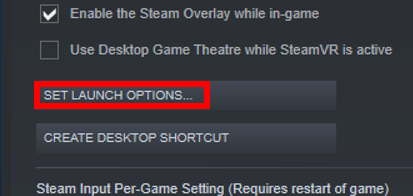
 2. Properties – GENERAL, click SET LAUNCH OPTIONS
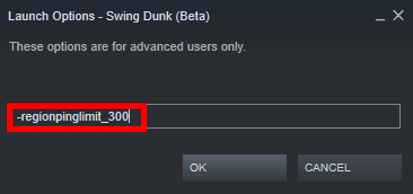
 3. Enter -regionpinglimit_300 and click OK
 4. Open Swing Dunk
※The ping numeric value mentioned above is a default filtering value set to 200 (Ping Filtering System)
※If there is no matching server with a filtering value of 300, the connection may be possible by increasing the filtering value.
※If the connection to the lobby is successful, the servers’ ping value can be seen in Create/Join a room (private match).
⚠️ Note
- As explained above in the part “Issue explanation”, players with a high ping filtering value may frequently experience lag while playing (delayed input, stuttering).
Therefore, we do not recommend matching by raising the filtering value too high.
We are currently reviewing this issue and we are considering ways to ease the ping filtering value.
Thank you
-Swing Dunk Team-