
Hello!
Here's what's new in Endless ATC version 4.6, released on August 11th 2021:
Features
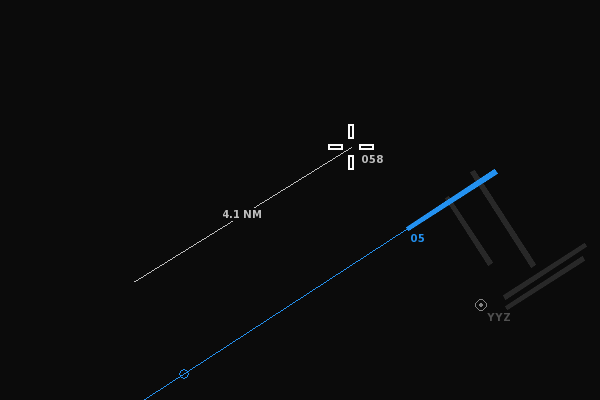
- Added a distance tool to easily measure the distance between any two points on the radar screen. Click and release the right mouse button to start drawing a line from that point. Move the cursor to see the distance&heading between the point and the cursor position. Clicking the right mouse a second time locks the measurement tool onto the two points. The two points can also be anchored to planes.
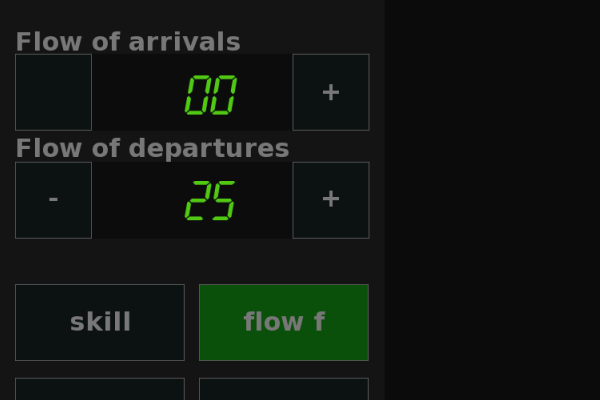
- New 'fixed flow' mode which lets you play with a fixed arrival and departure flow. The 'varying flow' mode is still available (for alternating traffic flow between min and max values) by toggling the flow button from fixed to variable. Note that the flow values apply to the main airport only.
- While in the weather menu, pressing the Ctrl key places clouds at the cursor position, as an alternative to random clouds when pressing the clouds button. Clouds can also be created by clicking and dragging from the clouds button onto the radar screen. Clouds cannot be placed near the boundary, because that could block arrivals entering the airspace.
- Added achievement for reaching a score of 10.0 or more at all of the 9 included airports.
- Keyboard players can pan the view using Shift + Arrow keys.
Adjustments
- Alt key doesn't unpause the game anymore, to allow for alt-tabbing from a paused game without unexpectedly unpausing.
- Pressing escape key while in full screen pauses the game instead of directly switching to windowed mode. Also, when switching from windowed to fullscreen, the game does not automatically unpause.
- Alt+F4 doesn't change the simulation speed anymore on before quiting.
- Added lowest overall airport score to the 'goals' screen.
- Minor performance improvements.
Changes and bug fixes regarding custom airports
- Approach routes that end in a holding at a defined beacon now switch to DCT mode on the last leg of the route, allowing you to enable the APP button again if there's a new route available from the beacon.
- Allow easier switching between approach routes if there are multiple routes defined for the APP beacon a plane is heading towards, by pressing the APP button multiple times.
- Allow defining a custom diversion altitude; the altitude at which departures trigger a diversion penalty. By default, the 'diversionaltitude' property is equal to the 'ceiling' altitude, requiring departures to climb in time before reaching the boundary. For smaller airspaces or when there are runways close to the boundary, a lower diversionaltitude may come in handy to avoid unwanted penalties.
- Allow for a higher rate of departures when departures routes are used at parallel runways, by having occasional simultaneous takeoffs taking place, in case the routes divert from each other shortly after takeoff.
- Longpressing the SID button for planes on a route will make planes readback the name of the last waypoint, if the location of the last waypoint matches a defined VOR or SID beacon location.
- Fix for custom planetypes unexpectedly overriding some default planetypes.
- Fix crash when defining custom planetypes without manufacturer property.
- Fix for departures being already in control by the user before takeoff in case the airport elevation is near the minimum airspace altitude.
- Allow for unique registration callsign pronunciation.
- Departure tag displays up to 7 characters of the SID name.
- Mouse selection distance doesn't depend on the separation value anymore.
- Fix crash when zooming out on a large map.
An easy way to add custom airports to the game is by downloading an airport txt file from this community maintained GitHub and copy the file to the /locations/ folder of the game.
If you use Discord you may also want to join the community server (also created and maintained by the community!), where lots of airports files are being created and shared. To create an airport from scratch, read further here.
Happy controlling!