
Changelog for version 4.2:
- Adjusted localizer status LOC, which will now only be active when the plane points towards the runway, not when overshooting the ILS. This avoids double penalties during overshoots at parallel runways.
- Improved help pages and hints for new players.
- Several minor corrections.
- Enabled custom airports.
- V4.2.3 Hotfix (6 July):
- Corrected label position properties.
- Corrected and expanded some explanations in the example file.
- Corrected transitions property, so it works for both ends of the runway. Note: transitions are optional navigation routes to the ILS (which are not available in the built-in airports, to keep the game easy to play, with the focus on vectors).
- V4.2.4 Hotfix (13 July):
- Added optional separation item to define the required distance between planes.
- Any undefined custom planetypes are now displayed in a message on screen when loading/resetting the airport.
- Improved explanations in example file.
- Increased the allowed range of several airspace values. Values given outside the range will be automatically capped to the maximum values. The limits are there because of game mechanics and playability. When designing an airport file you may need to make some simplifications to make things 'fit' in format of the game.
- V4.2.5 Hotfix (14 July): Fixed a crash that happened when using an incorrect custom runway configuration format. Ideally, any wrongly input properties (like typos, incorrrect arguments) should automatically fallback to a default value.
- V4.2.6 Hotfix (22 July): Bug fix for multiple transitions per runway, more departures from runways that intersect other runways, faster startup when using many custom files, wider range of allowed altitudes for various airspace properties.
- V4.2.7 (4 Aug): Further adjustments to allow more departures near intersecting runways, mainly for some runway configurations at EDDF and RJTT, fixed transition option for custom secondary airports, updated some SID points for EGLL.
- V4.2.8 Update (30 September 2020):
- Various small adjustments:
- Reduced the distance that triggers the warning message when a plane is near the airspace boundary.
- When dragging a heading from a plane that is flying a holding pattern, the plane will now leave the holding via the fix (unless the HOLD button is pressed first to deactivate hold mode immediately). This is somewhat similar to the already available 'after VOR fly heading' functionality of planes on a 'direct'.
- Various changes to the recently added custom airports feature, to make it a bit easier to create airspaces and to allow for adding more detail:
- In addition to the optional 'transition' routes to the ILS, 'departure' routes can now be added to each runway direction, to create more detailed SIDs. When there are SID routes defined for a runway, they override the default SID points for that runway, and planes will follow one of the routes instead. For clarity, 'transition' is now renamed to 'approach' (but old files will be compatible).
- All routes can be displayed on screen at once for easier editing or verification of created routes. This can be enabled by longpressing the custom airport button in the airport menu. Ctrl + click sets (temporary) visual markers on the screen that may be useful for positioning waypoints.
- The airspace boundary can now be defined as a polygon instead of a circle.
- Restricted areas will now work properly for concave polygons. Before, polygons had to be convex in order to function properly, requiring manually splitting of complex polygons into smaller ones. Now the game does this automatically.
- Improved pronunciation of long VOR names.
- Various small adjustments:
- V4.2.9 Update (22 October 2020) fixes some issues with some new features added in the previous update:
- Fixed bug that caused errors when adding multiple departure routes to a runway.
- Fixed bug that made airplanes leave and re-enter multiple times when flying near the boundary.
- Approach beacons are now highlighted for better visibility to the user.
- V4.2.10 Update (1 November 2020) has some more fixes and improvements for custom airports:
- Show available route(s) already if an APP beacon is selected.
- Fix for decimal values when specifying custom LOC or GS angles.
- Removed the limit for the number of approaches/departures/areas in a file.
- Optional specific inbound beacons for secondary airports (now similar to the main airport).
- Reduced the number of departures right at the start of a new game when many runways are in use.
- V4.2.11 Update (17 November 2020) has bug fixes for custom airports:
- Fix for unneeded go-arounds when two localizers are crossing each other close to the touchdown zone.
- When defining a very high airspace 'ceiling', then departures leaving the boundary below 15000 feet above ground level are not counted as 'diverted' anymore even if the ceiling is defined higher than that altitude.
- Fix for issue with case sensitivity when defining custom planetypes.
Custom airports is a new, experimental feature that allows you to add your own airports by editing text files! This (much requested) feature has been in development for quite some time, but as of now it includes all features as seen in the built-in airports, so it's time to make it public.
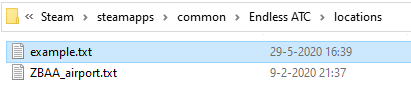
If you want to try it out (and don't mind editing a complicated configuration file), then browse to the local files of the game, where you'll find a locations folder: that's where you can put your custom airport file(s). In that folder is an example.txt file, which contains all the possible properties you can add to your airport file, with some explanation. Use this file as a guide to create your own airport. The file is pretty big, but most of the properties in it are only optional. In theory, just defining a runway and an airport code is enough to create a minimal, playable file. You can always add more detail later.
It may not be easy to look up all properties (runways, beacons, airlines, et cetera) to create an airspace in full detail, so to give you a head start I've created a collection of many (raw) airport files, automatically generated out of databases, containing runway data and coast lines. This can be found here.
Thanks for playing Endless ATC. Enjoy!