Starting with Steam Audio v.2.0-beta.17, Steam Audio supports dynamic geometry when modelling all sound propagation effects, including occlusion, transmission, source-dependent reflections, and listener-centric reverb. This functionality requires using the Embree ray tracer.
This functionality will be available in the Unreal Engine from version 4.25.
[video=autoplay preload loop poster=http://media.steampowered.com/apps/596420/announcements/dynamicgeometry/SteamAudio_Dynamic_425_v4.png]http://media.steampowered.com/apps/596420/announcements/dynamicgeometry/SteamAudio_Dynamic_425_v4.webm?v=1[/video]
(This video contains audio; you may have to unmute it to listen.)
In particular, Steam Audio handles rigid-body motion of objects, which means an actor with a Static Mesh component can move, rotate, or be scaled, and Steam Audio will update the acoustics appropriately. Deformable or breakable Static Meshes are not supported.
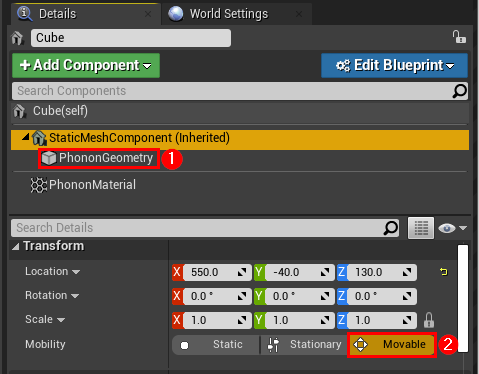
To use this functionality in Unreal, first enable Embree as described in the documentation. Next, attach a Phonon Geometry component to a Static Mesh Component of any Actor in your level that should be treated as dynamic geometry, such as a door. Configure the Phonon Material properties of the Actor as needed, then click Export to export the geometry data to a file. Now, at run-time, when the Actor moves (either through scripting, physics, or user interaction), Steam Audio will automatically update acoustics to match.