
Starting with Steam Audio v.2.0-beta.17, Steam Audio supports dynamic geometry when modeling all sound propagation effects, including occlusion, transmission, source-dependent reflections, and listener-centric reverb. At this time, this functionality requires the use of the Embree ray tracer, which is supported on Windows, Linux, and macOS. In addition to the C API, this functionality is available in the Unity plugin (as well as the FMOD Studio plugin, when used in conjunction with the Unity plugin).
[video=autoplay preload loop poster=http://media.steampowered.com/apps/596420/announcements/dynamicgeometry/steamaudio_2.0-beta.17_embreedynamicgeometry.png]http://media.steampowered.com/apps/596420/announcements/dynamicgeometry/steamaudio_2.0-beta.17_embreedynamicgeometry.webm?v=1[/video]
(This video contains audio; you may have to unmute it to listen.)
In particular, Steam Audio handles rigid-body motion of objects, which means an object can move, rotate, or be scaled, and Steam Audio will update the acoustics appropriately. Deformable or breakable objects are not supported.
To use this functionality in Unity, first enable Embree as described in the documentation. Next, attach a Steam Audio Dynamic Object component to any GameObject that should be treated as dynamic geometry, such as a door. Configure the material properties of the dynamic object as needed, then click Export to export the geometry data to a file. Now, at run-time, when the dynamic object moves (either through scripting, physics, or user interaction), Steam Audio will automatically update acoustics to match.
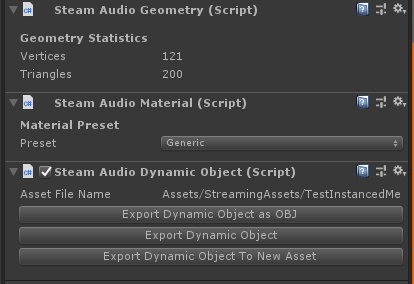
You can also attach Steam Audio Dynamic Object components to prefabs, and export their geometry data to a file. In this case, not only does Steam Audio handle the motion of prefab instances, it also updates the acoustics when prefabs are instantiated or destroyed. For example, as the above video shows, as soon as a wall object is added to the scene, we start hearing reflections from it. Once four walls and a roof are added, we automatically have reverb.
NOTE: Steam Audio v2.0-beta.16 introduced a more limited form of dynamic geometry support in the Unity plugin. This feature only modeled occlusion and transmission due to dynamic objects, and involved using Unity's built-in ray tracer. While this feature requires less work in terms of geometry tagging and scene setup, the new functionality introduced in v2.0-beta.17 supports dynamic geometry when modeling the full range of acoustic phenomena.