Update Ver0.9.4 Jun/07/2020
For me, Artstage has already all the necessary features for modeling, so I started modeling in earnest myself using Artstage.
I noticed it only after actually using it, but the stroke addition tool is more convenient than expected.
The shape of the stroke can be set in detail, and the width of the stroke can be changed by the depth of pulling the trigger.
The great thing is that you can edit the mesh of your strokes after you create them. You can adjust the shape of the entire stroke with proportional editing, or move individual vertices.
For example, you can easily and quickly create a character's hair with a triangular stroke.
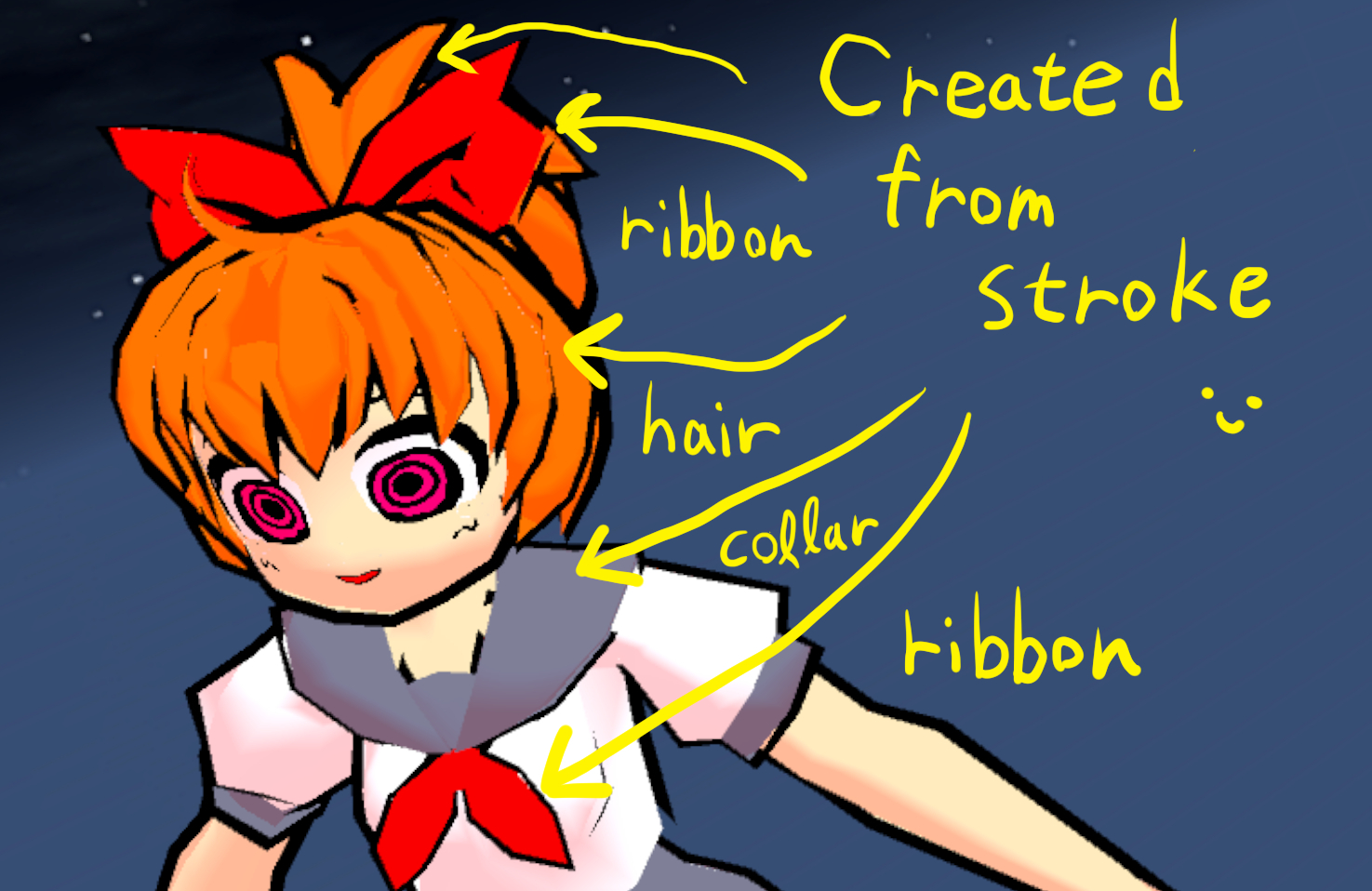
This is a video that actually creates hair using the stroke addition tool and adjusts the shape by proportional editing.
Watch video in this tweet!
https://twitter.com/_darger/status/1268171220156944384
Two options have been added to make Add stroke tool more convenient to use.
The first is the "Cross rotation" option. For example, when making hair, it is easier to work by rotating the cross section 180 degrees.
The second option is "Create stroke as new object". Up to now, objects were created for each stroke by default, but it will be inconvenient to work if there are too many objects. If this option is unchecked, strokes will be added to the current object. Again, you can easily select individual strokes using the linked mesh selection shortcut.
Also, the default quality UV unwrapping may previously generate overlapping UVs, but we have taken steps to fix this. By default quality, UV unwrapping of sufficiently high quality is now done.
What's more, sketch strokes are now displayed much cleaner.
Added "Size with pressure" option to Sketch Strokes tool. When the check is turned on, the stroke width can be changed depending on the depth of pulling the trigger.
Features
-A "Cross rotation" option has been added to the Add Stroke tool. For example, when making hair, it is easier to work by rotating the cross section 180 degrees.
-Added "Create stroke as new object" option to Add Stroke tool. Up to now, objects were created for each stroke by default, but it will be inconvenient to work if there are too many objects. If this option is unchecked, strokes will be added to the current object. Again, you can easily select individual strokes using the linked mesh selection shortcut.
-Added "Size with Pressure" option to Sketch Stroke Tool. When the check is turned on, the stroke width can be changed depending on the depth of pulling the trigger.
Improvement
-Sketch strokes are displayed cleaner than ever.
-Added UV overlap protection to default quality UV unwrap.
Fixes
-Sketch data is not saved when the model is saved with the sketch hidden.
-Problem with "Pin at X zero" option
-UV unwrapping fails after adding strokes with Add Stroke Tool.
-The uvScale value is not saved when the model is saved.
note: Features of early access are not stable. These may be changed or abolished.