
Update Ver0.7.2 Jan/25/2019
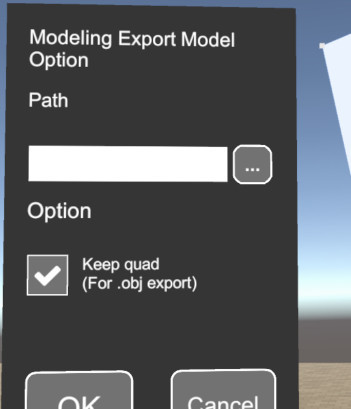
Added option to keep quad when obj file exported!
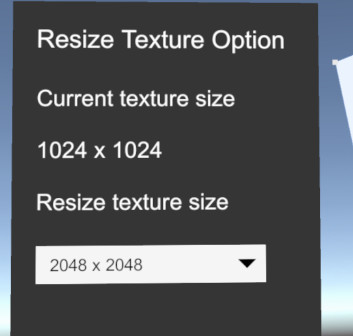
Resize texture function added!
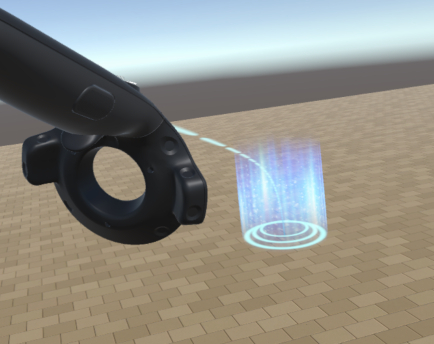
The teleport tool upgraded from pointer teleport to Bezier curve teleport!
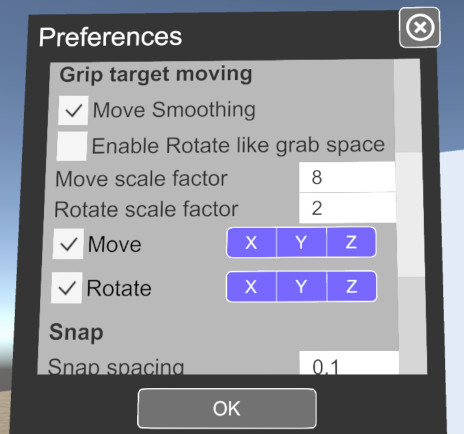
Also, a lot of setting items were added to preferences.
When moving the model by pressing the grip button, you can set the constrain for movement and rotation. In addition, it is now possible to change the option to rotate the model like grab space, change the scale factor of movement and rotation, and turn on / off smoothing movement.
It is now possible to change the snap spacing and to switch the showing floor on / off.
Features
-Added option to keep quad when exporting .obj file. (The n-gon of more than a pentagon is triangulated as before)
- Resize texture function added to texture menu
- Added preference grip control item constrain, smoothing movement on / off, option to rotate the model like grab space, setting scale factor of movement and rotation.
- Allowed to change snap spacing with preferences
- Allowed to change on / off show of floor with preference
- Added button to initialize all settings to preference (restart of application is necessary)
Improvements
- Change teleport tool from pointer teleport to Bézier teleport
- Refreshing "Processing" display window
- Changed sky box to that same as in-game when falling back to the SteamVR home screen
Fixes
- Wireframe display of mesh is displayed one frame delay
- If you start the application without turning on the power to the controller and exit as it is, it can not be terminated normally
- All constrains of the movement tool are turned on at the first start
Abolished
- Discontinue the gray Sky Box
note: Features of early access are not stable. These may be changed or abolished.