
The casualty board
Every so often a line turns up on the notices board that says DERELICT. Somewhere out there a hull is adrift with nobody running it, and from range you can tell its class and not much else. If one of your ships is close enough you can divert to it. Until this week that was about as far as it went; a derelict was a notice you could read and not do much with, and this week the page that lets you bring one home went in. They're rare: on paper about two a year for a fleet that's always flying, fewer if yours spends a lot of time in port.
Container salvage has been in for a while. A box drifts on a lane, you divert, you take it or leave it. A hull is a harder find to price, since the prize is a ship. Is it worth anything, what will the yard charge to make it fly, is there any fuel left aboard, and how do you get it to a port?
Salvage words
Last week I borrowed from the flight deck. This week the question I kept asking was what marine salvage software would call each thing on the page, and the answers ended up being most of the page.
A derelict is read on a casualty board. The top row is the derelict itself: the name it'll carry if it joins your fleet, how bad it is (wreck, repairable or sound), and a tape each for drive, thrusters and hull, drawn against the ceiling a repair could bring them back to. Beside that sit SALVED VALUE, what the yard would list a hull like this at; REPAIR EST, the yard's bill at the port it would be taken to; RUNNING, the cost per day; and FUEL ROB. ROB is "remaining on board", which is what a tanker's paperwork calls whatever is left in the tanks. The row underneath is ON SCENE: your ship (the tug now), how long the response leg took and its delta-v, and a clock running since you arrived.
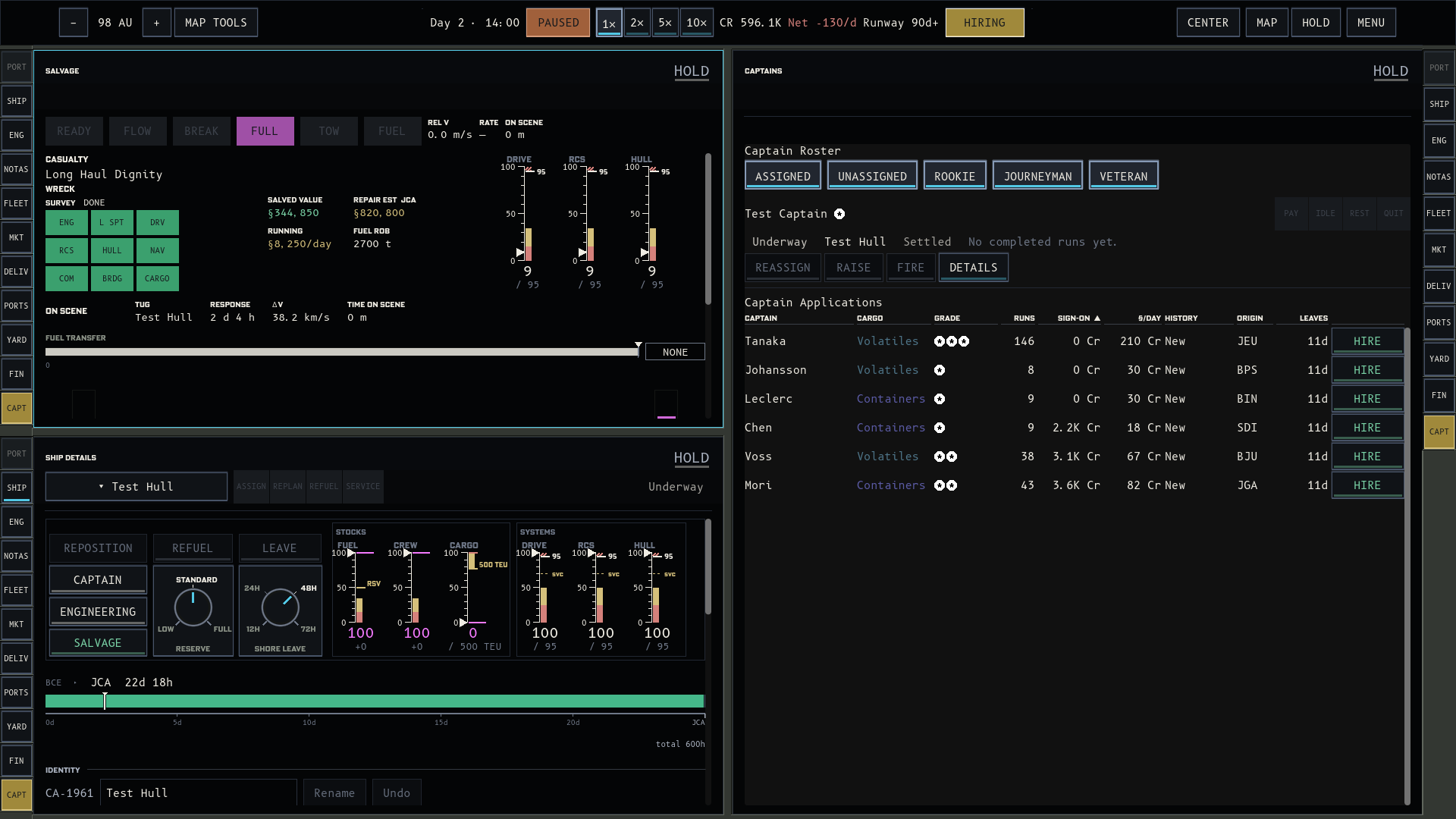
None of those figures says whether to take it, and I don't intend to add one that does. A wreck at a third of the price might be the better buy if the yard bill is small and there's fuel aboard. I'd expect players to disagree about that.
The survey
When the tug comes alongside, the page opens and the clock drops to 1×. The crew don't know what's aboard yet, so the first three hours are a survey. It's a grid of nine compartment lamps: engineering, life support, drive, thrusters, hull, navigation, comms, bridge and cargo. A lamp is dark until the crew reach that space, amber while they're in it and green once it's cleared, and every derelict is searched in a different order.
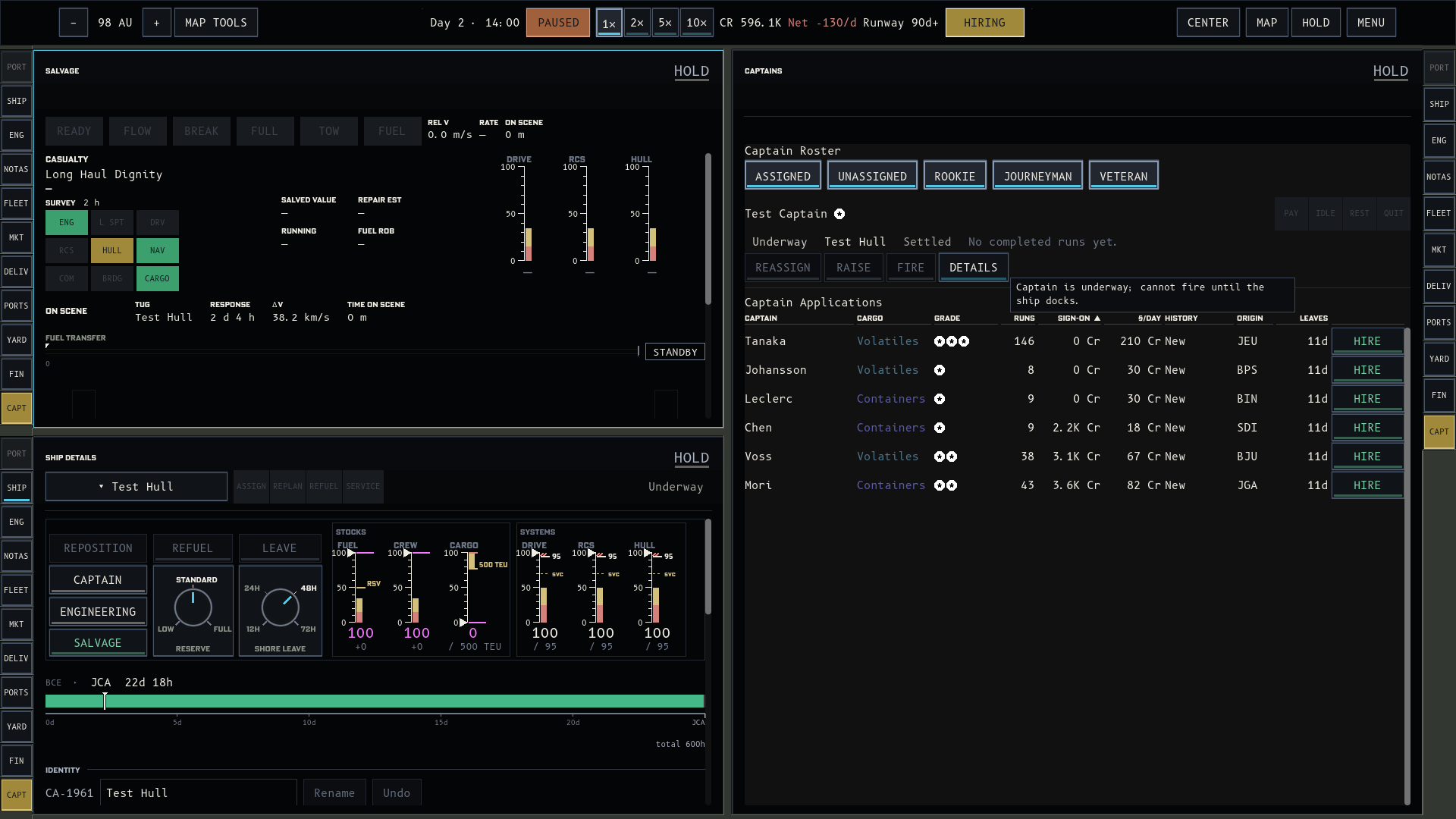
The tapes wait on the lamps. That went in today; until then the survey was a progress bar, which was accurate and very dull to sit through. Each tape now stands with its scale and bands drawn and no needle until the crew clear that compartment, and then the reading appears, so you can know the hull is finished an hour before you know whether the drive is any good.
Two ways home
Once the survey's done there are two ways to take it. TOW puts the derelict's mass on your ship's load line. The tug burns more fuel with it in tow and wears a little faster, then casts it off at the next port with a berth it fits, where it joins the fleet. Under the rig, the towage row shows the tow's tonnes against the tug's line, the port of refuge and the fuel the tow will cost, before you press anything.
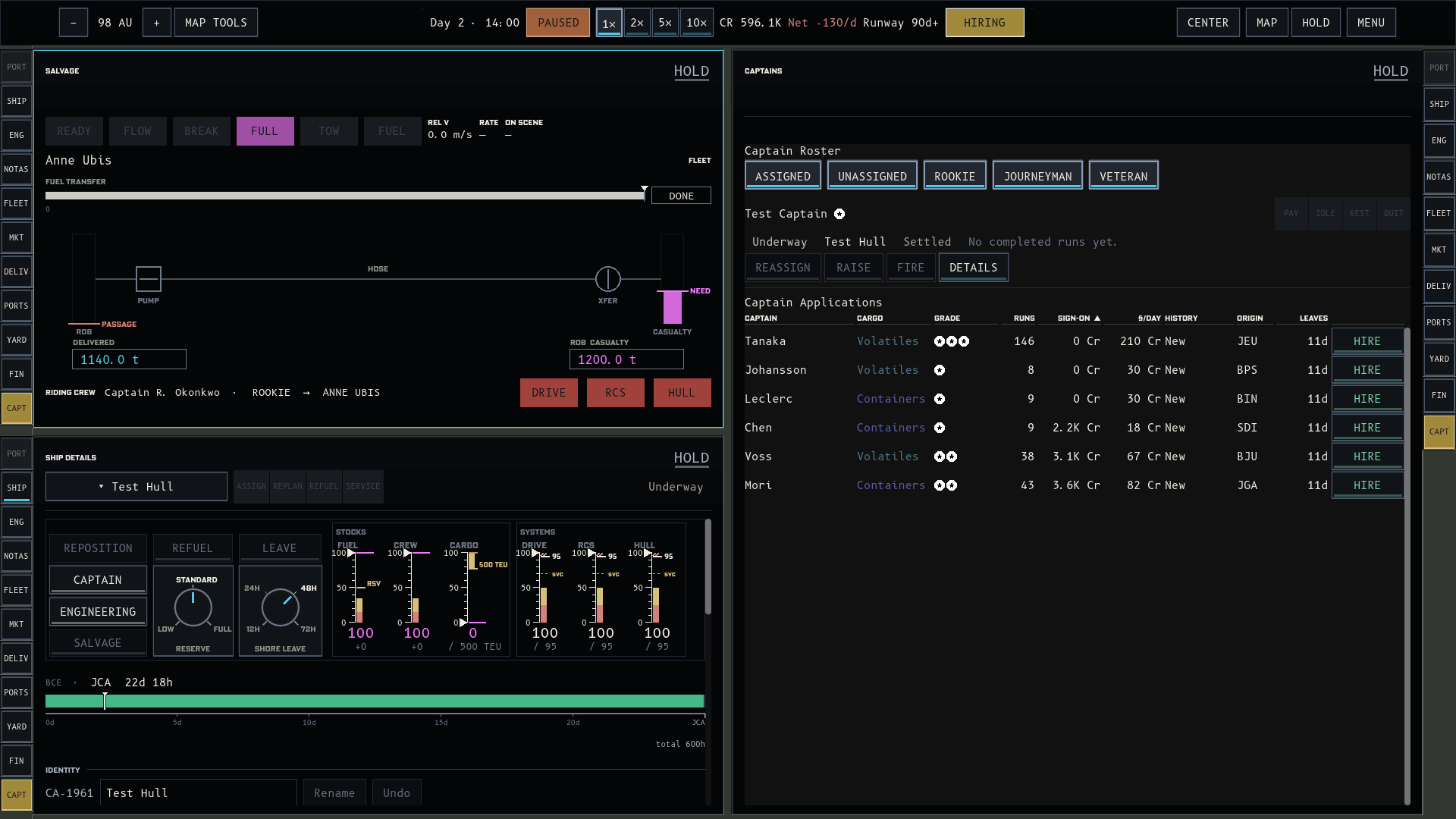
FUEL & CREW is the other way. The tug pumps fuel across at around 150 tonnes an hour, enough to reach the nearest port that can berth the derelict plus a reserve, and a rookie captain goes aboard. The rig is drawn after the fuel page on an Airbus: the tug's own tank against what the rest of its trip needs, the pump, the hose with the fuel moving along it, the valve, and the casualty's tank rising toward a NEED mark. When it fills, the new ship powers on. The page takes its name, puts the rookie aboard and runs the system lamps through a lamp test, and the top bar announces the ship joining the fleet. On a wreck the lamps settle red.
DEPART leaves the derelict where it is, with whatever the crew found out.
Holding alongside
In the first version the tug flew on when its booked stop ran out, finished or not. It holds alongside now until you take the derelict or press DEPART. The held hours are real hours and they cost what idle hours cost. Meanwhile the notice line reads HOLDING and lights the NOTAS key again, and Fleet shows the ship as Salvage · hold, so a tug you've forgotten about is hard to miss.
One from playtest: I couldn't tow a derelict into Pallas, because Pallas won't take dry bulk. The game was asking whether the port could work the derelict's cargo. There wasn't any, and a towed hull doesn't load or unload anything, so the port of refuge now only needs a berth it fits.
Finding a wreck
At that rarity a new player might not see a derelict for a long time. So the guided start puts one next to your ship after its first paid delivery, a small repairable hull that any berth will take, and the Guide lights the keys in order: DIVERT, CONFIRM, TOW. That only happens on the default start. If you reroll the system you meet them the normal way.
The numbers are all provisional, the survey length and the pump rate more than most. The refuelling pod's BREAK lamp never lights in this build; leaving closes the page in the same moment, so there's no frame to light it in.