
Taskbar Cats v0.4.90 is the biggest update since v0.4.2.2. The taskbar is still home base, but the cats have discovered that the rest of your desktop is much more interesting than we intended.
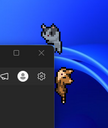
Windows are now real terrain. Cats can walk across them, jump between them, cling to their sides, climb up, and occasionally misjudge the whole operation in a very cat-like way.

Windows Are Now Part of the Playground
Ordinary app windows can become platforms, walls, ledges, and routes. Cats can walk between nearby surfaces, make short or high jumps, build momentum for running jumps, grab walls, catch ledges, pause while hanging on, climb up, struggle, or fall naturally when a route does not work out.
Adult cats at 2× and 3× can use the full parkour set. Baby cats at 1× keep a smaller and safer set of abilities while they grow.
The windows are not frozen scenery. Move, resize, minimize, maximize, restore, or close one and the cats react to the real geometry:
- A cat standing on a window travels with it while the support remains valid.
- If the platform disappears, the cat releases and falls instead of teleporting.
- A jump already in progress does not steer through the air to chase a moved target.
- A closed window does not magically reclaim its old cat when it returns.
- Failed jumps are allowed to fail. Not every leap becomes a suspiciously perfect landing.
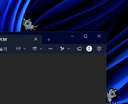
Cats Can Go Behind Your Windows Without Losing Themselves
When a foreground window passes in front of a cat, only the covered part of the cat is hidden. A head, feet, or half a body can disappear behind the window while the rest remains visible. The cat keeps its identity, support, position, and animation progress underneath, then continues naturally when revealed.
This is visual occlusion, not a reset button. A walking cat does not restart its walk, a sleeping cat does not wake up, and a hidden cat is not silently replaced with another one.
Every Cat Keeps Its Own Personality
Cats now receive a persistent individual identity and a personality shaped by several traits. Their preferences influence when they rest, run, jump, climb, explore windows, seek higher places, or return to a familiar taskbar or wide window.
These personalities are not rerolled whenever the desktop changes. The same cat keeps its identity and priorities across app restarts, window and monitor changes, display-mode changes, and growth from baby to adult. Physics and safety rules still win: personality chooses among possible actions, not impossible ones.
The result is less marching in lockstep and more small, recognizable routines. One cat may favor long taskbar runs, another may seek high places, and another may wander through a network of windows before deciding that this was all too much effort.
Baby Cats Grow Up
The 1× size is now the baby-cat stage. Babies walk, rest, sleep, and make short jumps, but they do not attempt adult wall climbs, high jumps, or long running leaps. When it is time to grow, they wait for a safe grounded moment and retain the same identity and personality as they become a 2× or 3× adult.
The old 4× size has been removed. The supported scale choices are now the baby 1× stage and adult 2×/3× stages, with movement and collision rules tuned for each size.
Better Across Monitors, Fullscreen Apps, and Busy Desktops
Multi-monitor movement now follows the real Windows monitor topology. Cats use actual connected edges and valid overlapping routes instead of pretending every screen touches every other screen. Different monitor positions, working areas, and display scales are handled while preserving the cat that was already there.
Fullscreen behavior is also more deliberate. Depending on your visibility setting, cats can remain visible using screen edges without treating the fullscreen app itself as a platform, or wait safely out of view until fullscreen ends. A fullscreen app on one monitor does not have to pause cats on another.
Taskbars and screen floors remain reliable supports even when foreground UI covers them. Start, search, notification, and other shell surfaces may visually cover a cat without deleting the floor beneath it.
Settings and Everyday Reliability
v0.4.90 also includes a large set of less dramatic but important improvements:
- An explicit option to start Taskbar Cats when you sign in to Windows, with a clear consent flow.
- Better settings, identity, and state continuity across restarts and display changes.
- Safer migration when switching between primary-monitor and all-monitor modes.
- Fixes for crashes triggered by display-setting changes.
- Better protection against duplicate launches, plus more reliable tray exit, clean shutdown, and recovery.
- Continued offline operation with no telemetry, account, cloud, or external network service required.
Why v0.4.90, Not v0.5.0?
This is a very large update, but it is not the final word on window parkour. More polish, behavior tuning, and compatibility work remain before the next major milestone. v0.4.90 focuses on shipping the real terrain system, persistent cats, growth, and the stability work needed to make them usable on everyday Windows desktops.
Thank you to everyone who tested strange monitor layouts, moving windows, disappearing supports, and cats with extremely questionable route planning.
Now your windows are their playground.