

■ New: search all your drawers
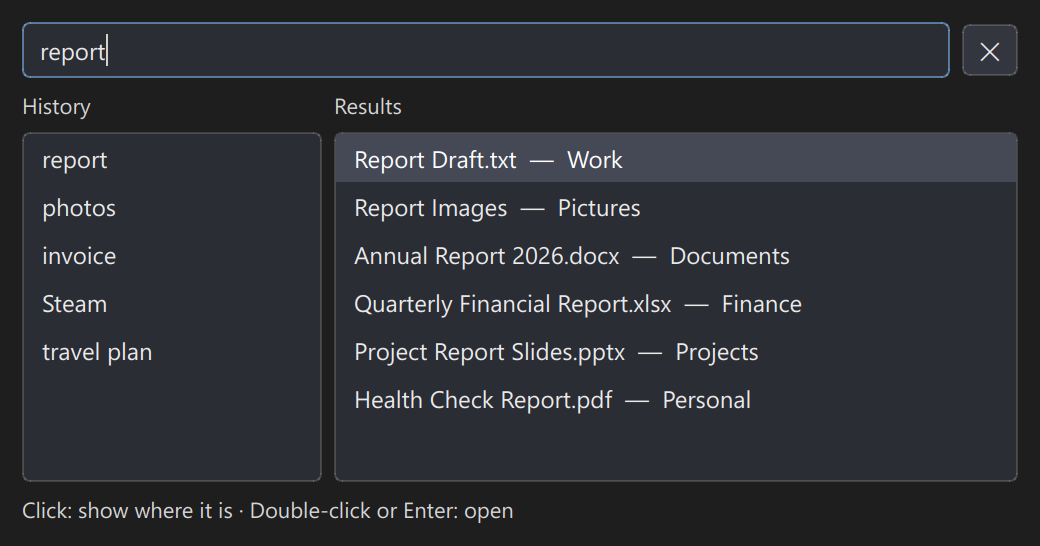
Once you have a lot of drawers, it's easy to forget where something went. Set a "Search drawers hotkey" under Settings → Basic, press it, and a search box pops up. Type a few letters and everything in every drawer with a matching name is listed.
Single-click a result and DeskForge opens that drawer and highlights the item, so you can see exactly where it lives; double-click or press Enter to open it. The left side of the search box remembers your last 10 searches — click one to run it again.
■ New: keyboard support in drawers
Click once inside a drawer and it works just like File Explorer: Ctrl+C to copy, Ctrl+X to cut, Ctrl+V to paste, F2 to rename and Delete to delete. It works in grid-layout drawers, honeycomb drawers and Explorer-mode drawers alike.
■ New features
- New "Search drawers hotkey" (Settings → Basic, not set by default): single-click a result to see where it is, double-click or press Enter to open it, and your last 10 searches are kept in History. Close it with the ✕ in the top-right corner or with Esc.
- Drawers now support the keyboard: copy, cut, paste (including files you copied or cut in File Explorer), F2 to rename and Delete to delete.
- New "Gently align drawers while dragging" (Settings → Advanced, off by default): while you drag, a drawer's edges or center snap lightly to nearby drawers — keep pushing and you can still drop it anywhere.
- The dark background behind "Minimised title bar" can now be sized freely: set its width and height in Drawer Appearance.
- New "Always use the system context menu when right-clicking icons in drawers" (Settings → Advanced, off by default): the drawer stays open until the menu and any window opened from it are closed, and "Rename" in that menu opens DeskForge's own rename box.
■ Display and performance
- At display scaling of 125% or higher, the Mechanical Dial and the Pomodoro Timer are now drawn at your screen's actual resolution.
- While a full-screen game or video is in front, drawers and widgets on the desktop pause redrawing to save resources, and catch up the moment you leave full screen; timers and reminders keep running. You can turn this off under Settings → Advanced.
■ Drawers
- Fixed right-click menus on drawers and their icons possibly vanishing right after appearing when another program grabbed focus (for example, the window Snipping Tool shows when a recording ends).
- Fixed a drawer on the right edge of the screen possibly not returning to where you placed it after being widened and pushed aside, once its contents shrank again.
- Fixed a full drawer sometimes not widening when items were added one at a time, leaving the extra items hidden.
- Fixed a drawer possibly shrinking abruptly while the mouse was still inside it — after deleting or cutting items, or when opening a subfolder with fewer items in Explorer mode. It now resizes only after the mouse leaves the drawer.
- Fixed DeskForge possibly closing or becoming unresponsive in the background, in very rare cases, after a grid-layout drawer was deleted.
■ Honeycomb drawers
- Fixed an edge case where, with some drawers collapsed and others set to Keep Expanded, clicking an item in a drawer could make a collapsed drawer quickly pop open and close again under specific conditions.
- Smoother anchor dragging in "Adjust boundary"; an anchor dragged as far as it can go now stops right at the limit.
- Fixed honeycomb drawers with the grid turned off possibly warning over and over that items would not fit when an anchor was dragged outward.
- Fixed the center icon possibly jolting when you stopped dragging an anchor in "Adjust boundary".
■ Widgets
- Fixed progress in Countdown, Timer, Stopwatch and the Pomodoro Timer possibly jumping back after DeskForge was reopened: a normal exit loses nothing, an unexpected shutdown loses at most 5 seconds, and the time DeskForge is closed is not counted.
- Menus on the Digital Clock, Clock Tools, Mechanical Dial, Pomodoro Timer and Notes now close when you click anywhere on the screen or press Esc.
■ Settings windows
- If the Settings window is hidden behind other windows, clicking "Settings" in the system tray again now opens a fresh one right on top; changes you had not confirmed with OK in the old window are not saved.
■ Finally
Thank you to everyone who reported an issue or sent us a suggestion — your feedback is where every update begins.
DeskForge is a one-time purchase, maintained for the long run: features you have already paid for will never be moved behind a subscription, and your desktop layout will never be moved to the cloud. We will keep fixing and adding, at no extra cost.
If you run into anything, use "Report a Problem" in the About window to tell us directly.
P.S. For the quickest update, we suggest quitting Steam completely and starting it again.