
New: Rename Clubs and Players
Rename clubs from the main menu
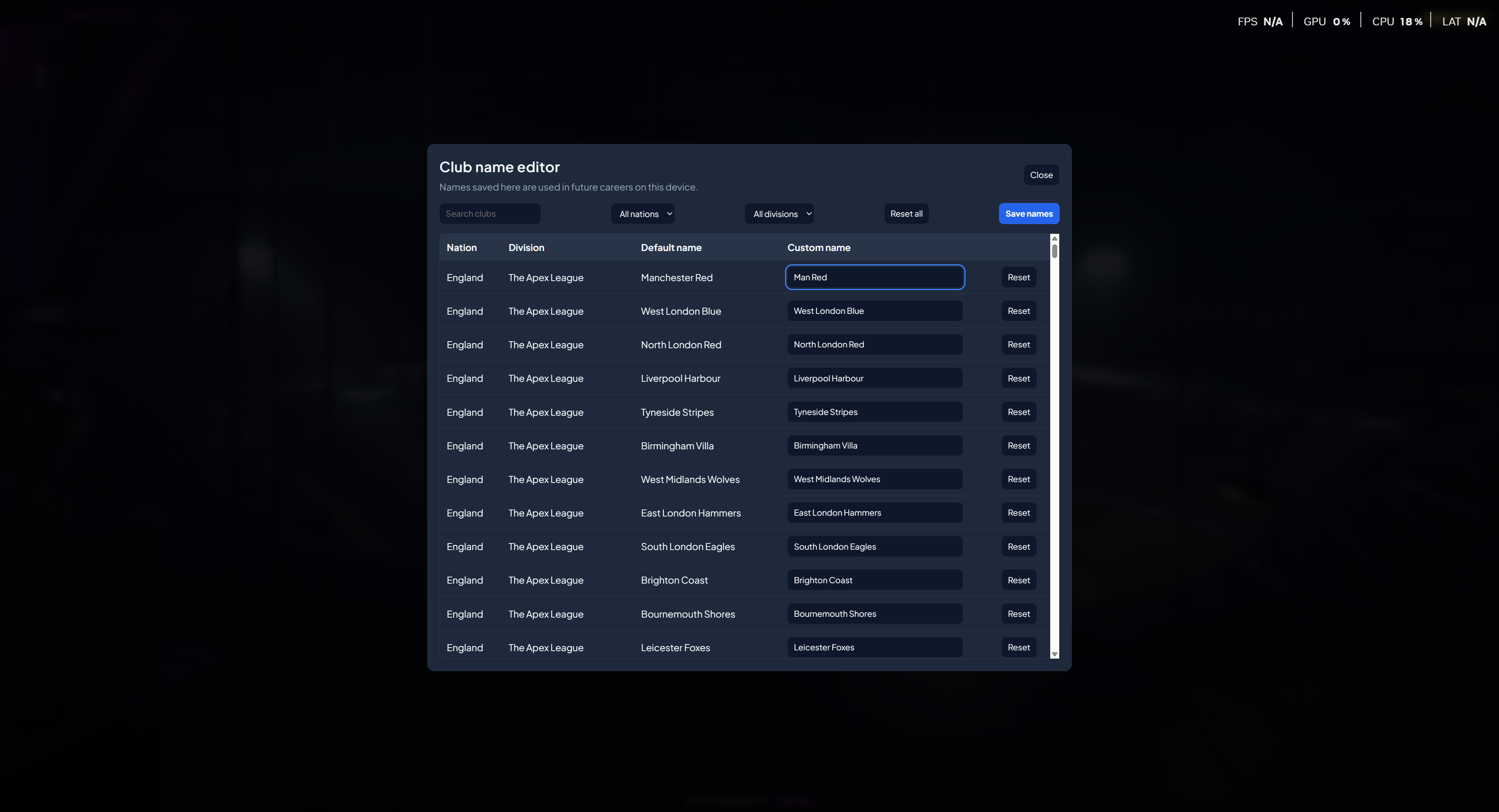
How to find it:
Main Menu → Rename Clubs
The new spreadsheet-style editor allows you to:
Rename multiple clubs at once.
Search for specific clubs.
Filter clubs by nation or division.
Reset individual names or restore every club to its default name.
Select Save Names to apply your changes.
Club renames are stored on your device and automatically used in future new careers.
Rename clubs during a career
How to find it:
Club → Names
This opens the same bulk-editing view using the clubs in your current football world. Changes are applied across fixtures, league tables, club profiles and relevant historical records.
Names edited here are also remembered for future playthroughs.
Rename players
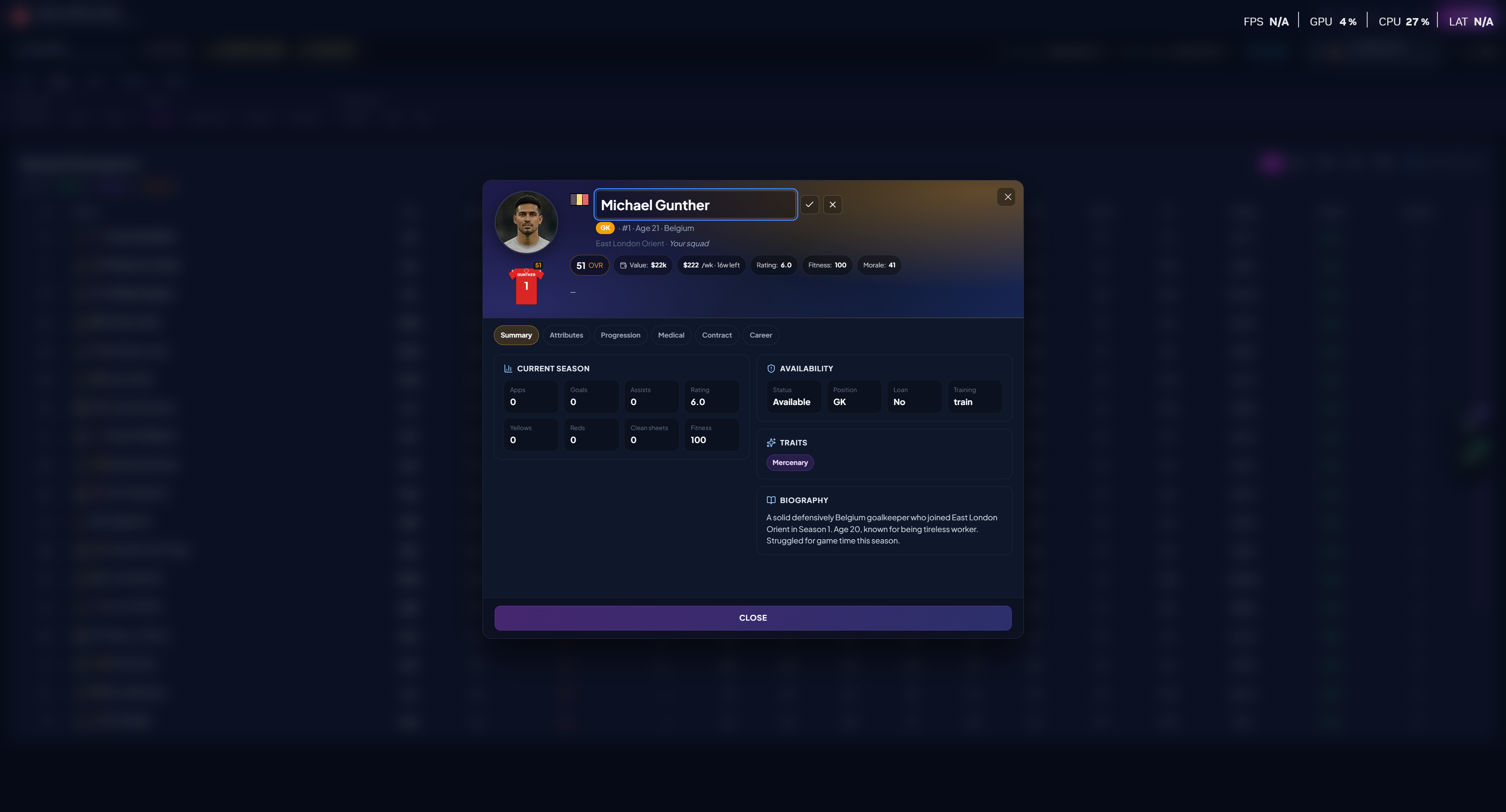
How to find it:
Open a player’s profile by clicking their name.
Select the pencil icon beside their name.
Enter the new name.
Select the tick icon or press Enter to save.
Player renames apply throughout the current career, including match events, transfers, scouting information and player displays.
Because players are newly generated for each career, player renames do not carry into future playthroughs.
Additional improvements
Club identities remain stable behind the scenes after renaming.
Empty club and player names are prevented.
Duplicate club names within the same nation are prevented.
Duplicate player names receive a numerical suffix automatically.
Kit and pitch labels automatically use a renamed player’s new surname.
New: Sell club & move on
You can now leave your current club mid-career and take over another club anywhere in your active football world.
How to start
Office → Profile → Sell club & move on
From season 2 pre-season, the Hub also shows a Ready for a new club? card with Explore a move
The flow
Review your sale — see estimated personal proceeds and what changes
Confirm the sale — proceeds go to your personal wallet, not the club treasury
Choose your next club — browse clubs across every nation in your world, filter by nation and tier, and see full takeover quotes before you commit
Complete the takeover — start fresh at your new club and continue your career
This is built for long chairman careers: build one club, cash out, and chase a new project in another league or country without starting a new save.
Your career follows you
When you sell and relocate, you keep progressing; the club you leave stays behind.
Stays with you
Director history and career chronicle
Personal cash and side Holdings
Your director profile and conduct record
Stays with the old club
Squad, staff, sponsors, facilities, and club relationships
The club returns to the league pyramid as an independent AI club
Fresh at your new club
New squad, manager, stadium, kits, and club identity
Clean transfer, scouting, and board narrative state
A new season chapter in your chosen nation and tier
Each successful move is logged in your director history — including sale proceeds and where you landed next.
Smarter week-to-week flow while between clubs
After you sell, you enter a between clubs period until you complete a takeover.
Continue becomes Choose next club and takes you to Office → Profile
You cannot advance the calendar until you’ve taken over a new club
If you save and reload while between clubs, the takeover wizard opens automatically so you can pick up where you left off
Takeover planning tools
The relocation wizard now gives you clear information before you commit:
Nation and tier filters to narrow the club list
Takeover cost and starting club treasury for every target
Affordability preview — personal cash after takeover and club treasury after takeover
Clear messaging when a club is out of reach, or when filters return no results
Two-step sale confirmation so accidental exits are harder
Fix: Top-tier takeover pricing
Fixed an issue where high-tier takeovers could be underpriced if you only met the personal cash minimum. Takeovers now correctly require enough total capital (personal cash plus starting club treasury) for the full takeover cost — especially for Tier 1 and Tier 2 clubs.
Fix: Cleaner club reset on foreign takeover
Taking over abroad now performs a full club reset so your new job feels like a genuine fresh start:
Transfers, scouting, and pending deals cleared
Board promises, media scandals, and club narrative threads reset
Commercial partnerships and sponsor state cleared
League power-broker and super-agent layers reseeded for the new club
Your director-level progress (history, holdings, personal wealth) is preserved separately and is not wiped by the club reset.
When you can’t sell yet
Selling is blocked until outstanding boardroom business is resolved, including:
An unresolved matchday or matchday briefing
End-of-season review still open
Chairman promises not yet set
An active sponsor scandal
No affordable takeover target in your football world (you need enough projected wealth after the sale to buy back in)
If sale is blocked, the wizard explains why and what to finish first.
Requirements
Your career must include multiple nations in the football world (set at director setup). Single-nation saves cannot relocate abroad within that world.
You need enough wealth after the sale to afford at least one takeover target — lower-tier clubs are the usual entry point after your first sale.
Tips for your first move
Start a career with at least two nations (e.g. England + Spain).
Play until you’re in a quiet week with no urgent inbox or matchday decisions.
Use Office → Profile to review sale proceeds before confirming.
Target a Tier 3 or Tier 4 club abroad for your first foreign takeover if funds are tight.
After takeover, check Hub, Team → League, and Continue to confirm everything is running normally.
Fixes:
Week advance is clearer and easier to resolve
We reworked how Continue works so you always know why the week won’t advance, and what to do next.
What’s new
Blocker banner — When something stops you from continuing, a clear message appears under the top bar explaining exactly what’s blocking you.
Smarter Continue button — The button label changes to match the situation, for example:
Go to Match day when a fixture needs your attention
Go to Treasury when you don’t have enough cash for the week
Set promises / Finish review / Resolve scandal when a decision or overlay must be completed first
One-click fixes — For issues that need a specific screen, the banner includes a direct action (e.g. Go to Match day, Review finances) so you’re not left guessing where to go.
Blockers we now surface clearly include:
Seasonal chairman promises
End-of-season review
Sponsor scandals
Unfinished matchdays and matchday briefings
Insufficient cash for weekly obligations (wages, facilities, loans, etc.)
Keyboard and mouse now behave the same
Space, Enter, and clicking Continue all follow the same rules in Football Boardroom.
If the week can advance → it advances.
If you need to go somewhere first (e.g. Match day or Treasury) → you’re taken there.
If a popup or decision must be resolved first → you get a clear message instead of nothing happening.
No more clicking Continue and wondering why the week didn’t move.
Help and shortcuts cleanup
Settings → Guide
Screen tips text now correctly refers to the Help button (circle icon) in the top bar, instead of suggesting you press ? for screen help.
Keyboard shortcuts (?)
Removed Toggle sidebar shortcuts from the Boardroom shortcuts list, since the Boardroom layout doesn’t use a sidebar. The list now only shows shortcuts that actually apply.
Quality-of-life summary
Before | After |
|---|---|
Some blockers only showed a brief toast after clicking Continue | Blockers are visible before you click, with a persistent banner |
Matchday was the only blocker clearly explained in the UI | All major week-advance gates are explained consistently |
Continue always said “Continue”, even when it couldn’t work | Button label reflects what you need to do next |
Keyboard and click could feel inconsistent | Space, Enter, and Continue all behave the same way |
What this doesn’t change
No changes to match simulation, economy balance, or save system
No new gameplay systems this update is focused on clarity and reducing friction in the core weekly loop