
hi Everyone, 3 relatively big updates in this weekend release, please check out the release notes below. If you have any feedback, as always, please put it in the Steam Discussions, we read all posts!
More Leagues v1. Release Notes
This part of the update adds more leagues to Football Boardroom. You can now start a save in England, Spain, Germany, France, or Greece, each with its own division names, cup competitions, and league branding.
Important context: this is the first iteration of the league additions. We plan to expand this over time and give each nation more of its own flavour. Examples on the roadmap include nation-specific sponsors (e.g. Spanish-style sponsors in a Spanish save, Spanish style chants, etc), atmosphere, and other local touches. For now, the focus is on getting the pyramid structure, UI, and economy working correctly across nations.
A note for German League saves: Football Boardroom currently uses the same director-led club structure across all nations. We know German football has its own distinctive ownership and governance traditions, including member control and the 50+1 model etc. We will explore how these can be better represented more authentically in a future update (and if you have any feedback, or input on it, let us know :) !)
A note on multiple leagues in one save: at the moment, you cannot consecutively play different leagues (e.g. you cant move between England to Spain and then to France on one save, but this is planned for later updates, where you could potentially own multiple clubs or sell clubs and move to other countries etc - we are still working out how this can best work in the game!)
Choose your nation and division
Click path: Main menu → New Game → Director wizard → Pyramid
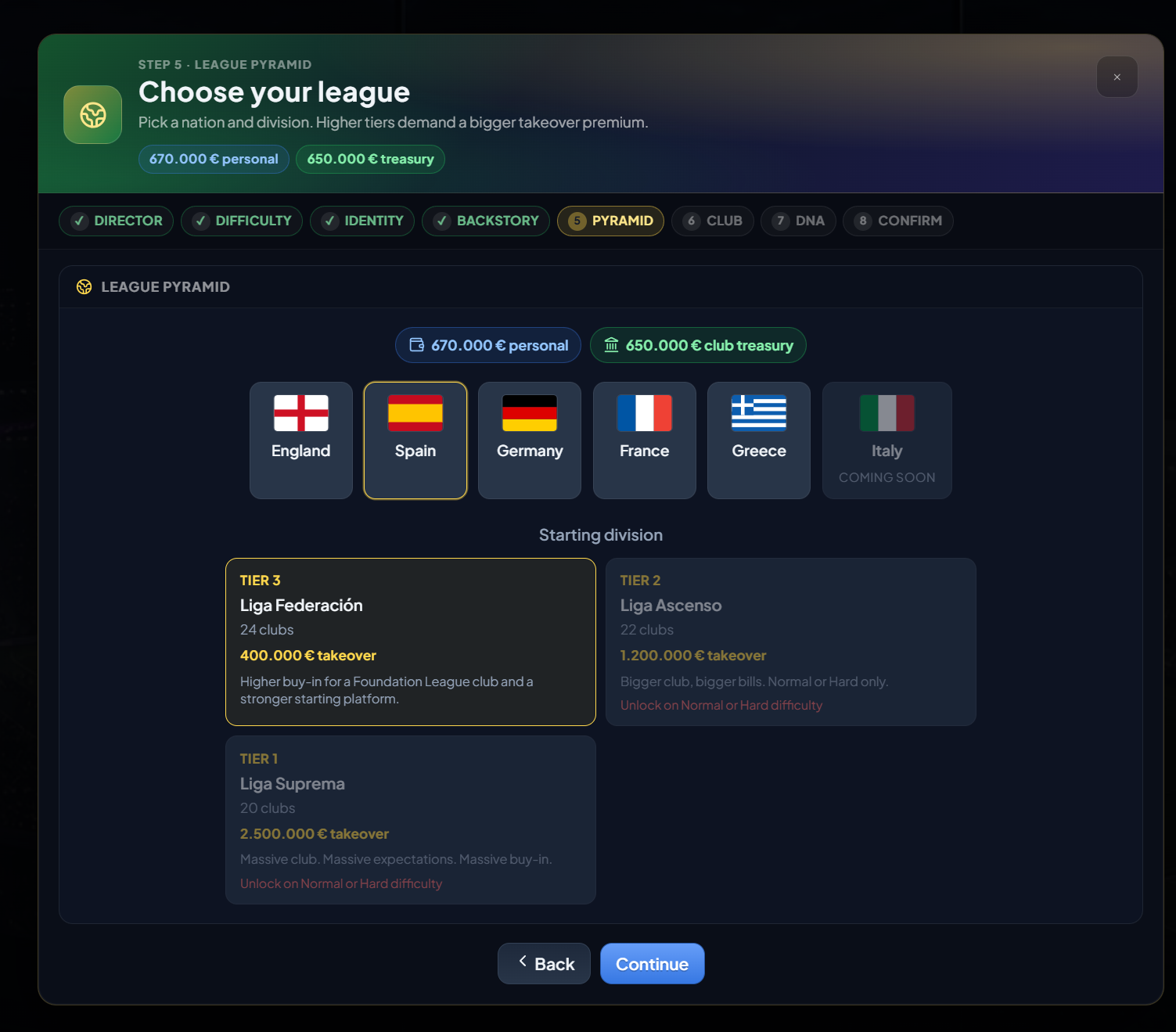
Pick England, Spain, Germany, France, or Greece
Italy shows Coming Soon and is not playable yet as we didnt get time to add the rules for Italy yet, but Italy will be the next league we add.
Each nation has the right number of tier tabs and takeover costs
Confirm screen shows the correct nation (e.g. "Spain — Liga Federación")
Display currency (USD, GBP, EUR)
NOte that we have added USD, GBP and EURO to the game, so you can see things in your relevant currency. We can add more currencies as we go!
Click path: New Game → Difficulty → Display currency
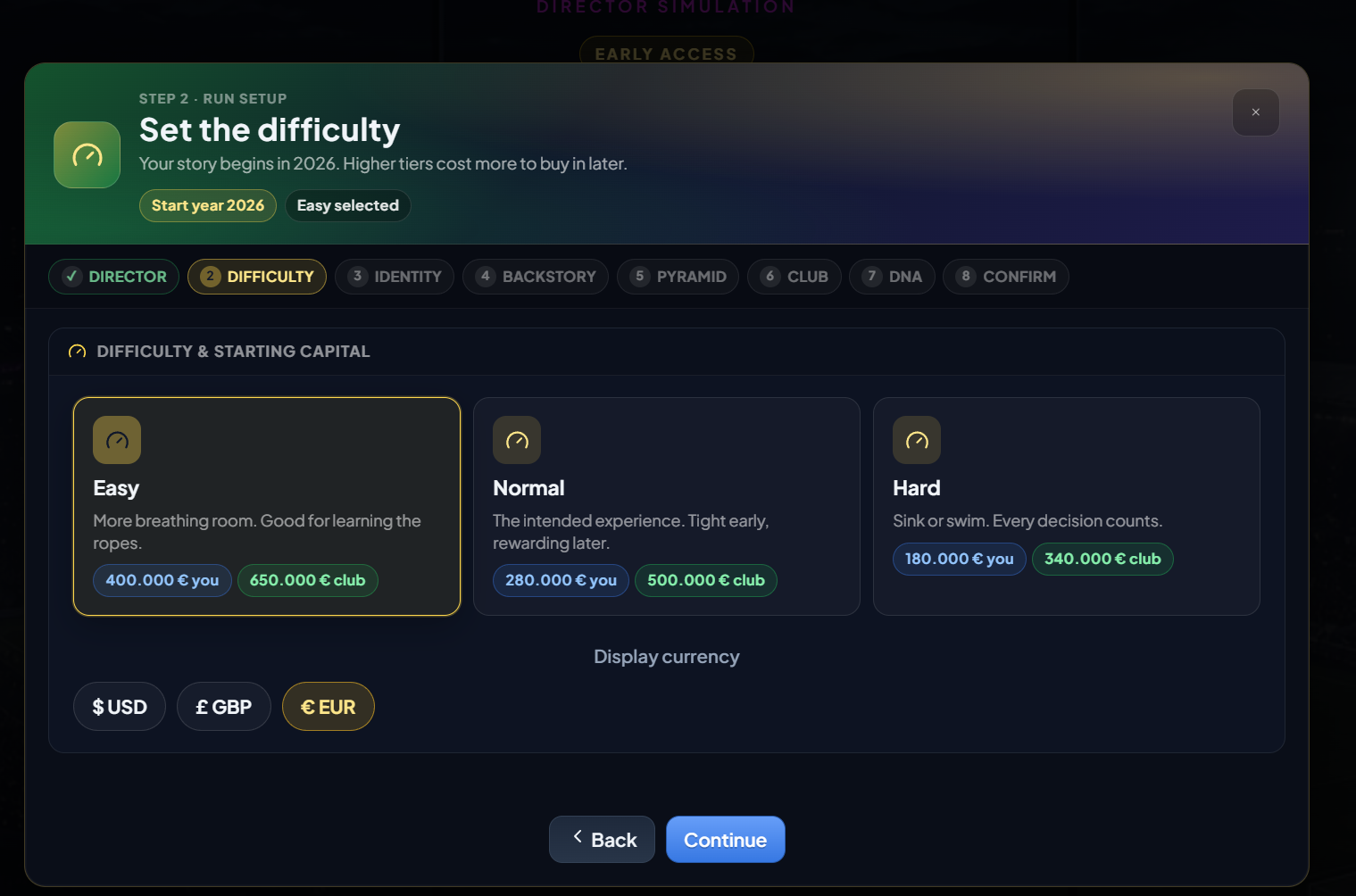
Toggle $ USD, £ GBP, or € EUR (1:1 display only, no exchange rates yet)
Applies in wizard previews, Hub, Director → Treasury, and Team → Manager → Contract
In-game nation branding
Team → League: correct division names and nation-specific league logos
Team → Cup: nation cup names (e.g. Trofeo del Sol / Trofeo Federación for Spain)
Club → Map: nation flag in the header
League Profile (new)
Click path: Team → League → Profile
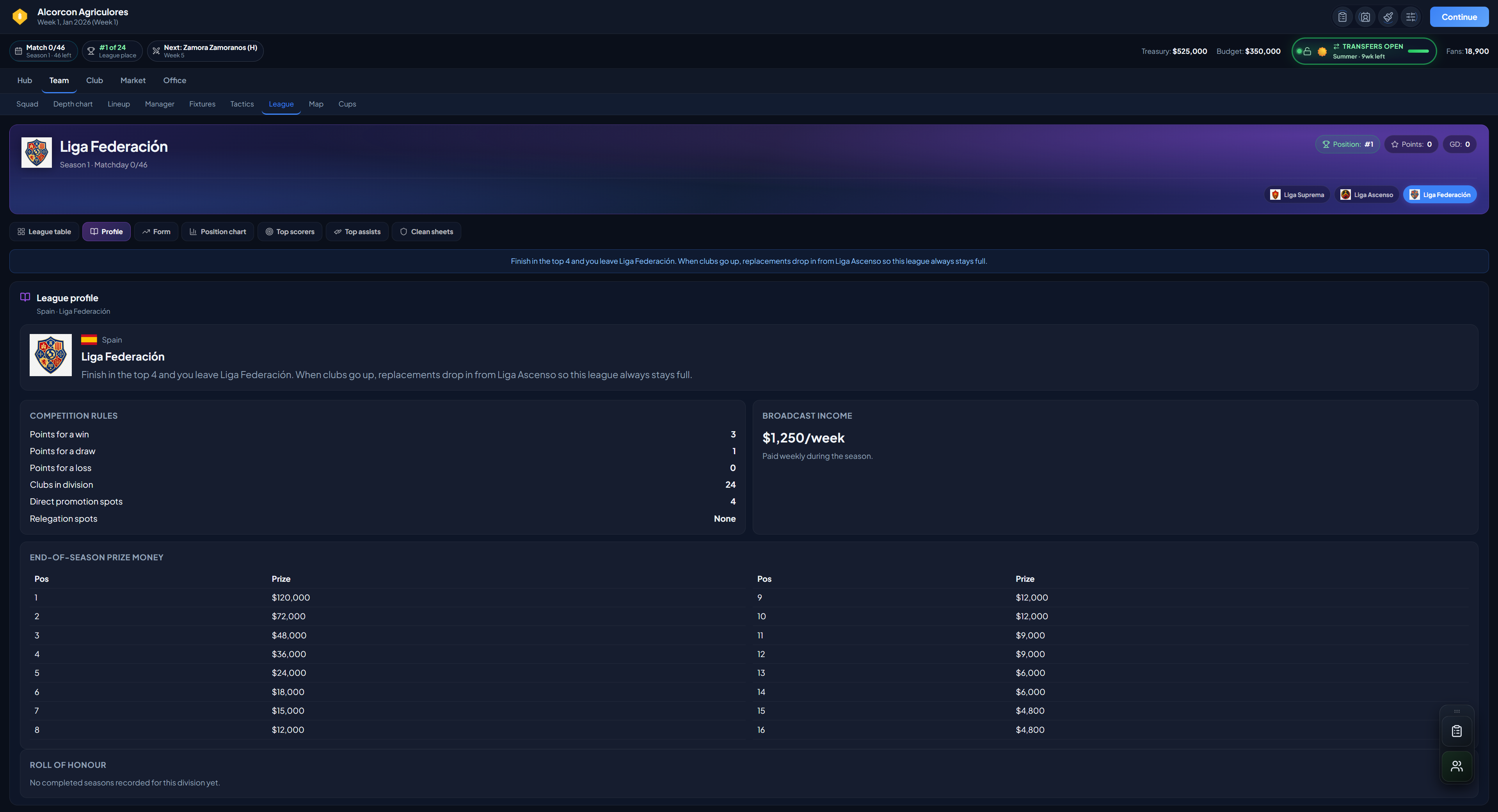
Rules, weekly broadcast pay, end-of-season prize table, and roll of honour for the tier you are viewing. Prizes and TV money respect your pyramid (bottom divisions do not pay like the top flight).
Caveats (this iteration)
Italy not playable
Currency is display-only and there is not yet the complexity of multi currency and conversion rates etc.
Deeper nation flavour (sponsors, atmosphere, etc.) planned for future updates
Some screens outside the main boardroom flow may still show $
Please keep the feedback coming in so i can make things more authentic
Nation Map Tab v1. Release Notes
Getting there
Open your club from the boardroom, then go to Team > Map.
This screen shows every club in your nation on an interactive map. You can browse rivals, scout other divisions, and open quick club previews without leaving the map.
Explore the nation map
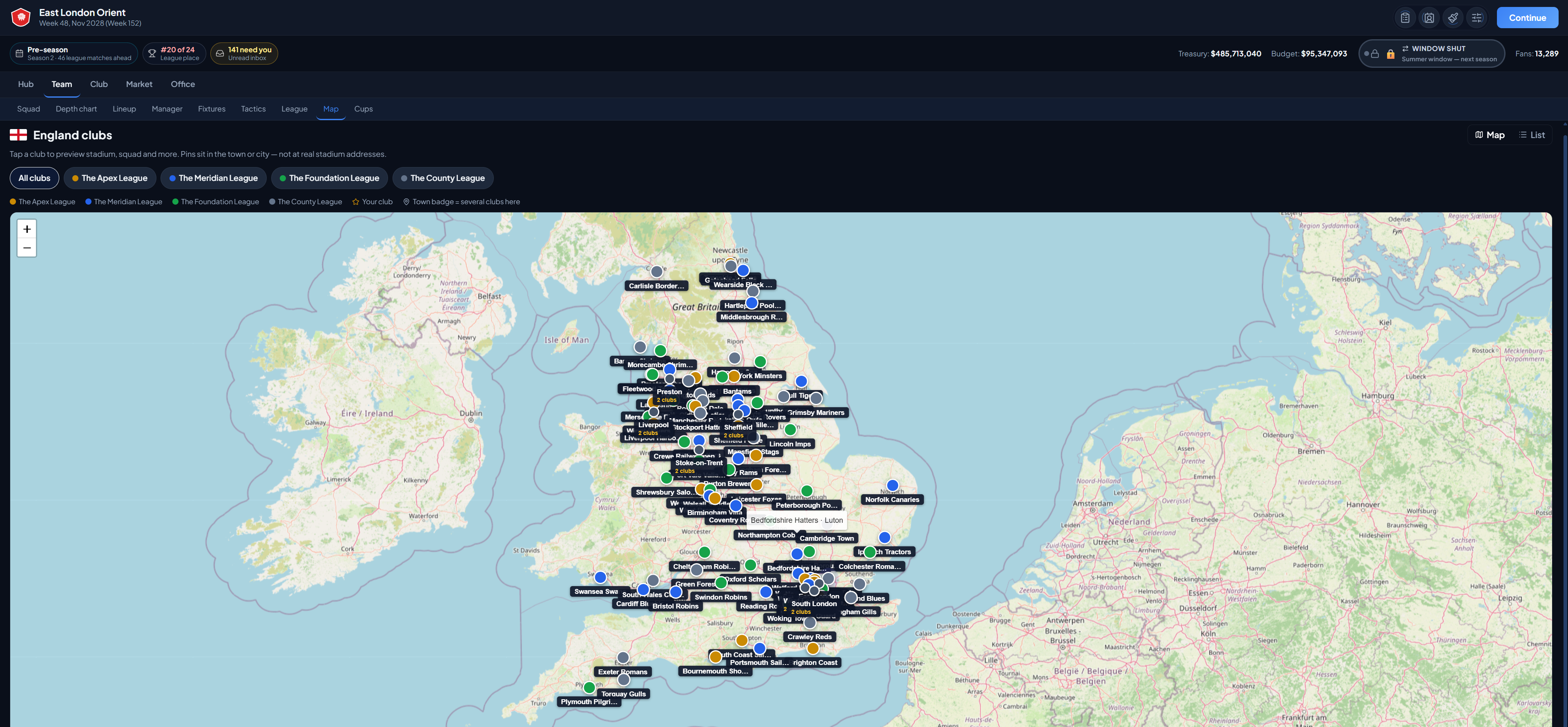
The map uses OpenStreetMap and plots clubs across your country. Each club appears as a coloured pin in its home town or city. Pins are placed at settlement level, not at real stadium addresses, so the view stays readable when many clubs share the same area.
Note: at the moment, the map layer is loaded via the internet (to keep file size down etc), so you will need an internet connection to view the map, however, if this is an issue for anyone, I can look to invest time in bringing the map and files locally into the game exe.
Colour coding by division
Each league tier has its own pin colour.
A legend above the map explains which colour matches which division.
Your club is marked with a star on the map and in the legend.
Filter by division
Use the filter pills at the top:
All clubs shows the full pyramid.
Individual division pills (for example Premier League, Championship) show only clubs from that tier.
If you filter to a division that does not include your club, a banner appears: Your club is hidden by this filter — show all clubs. Click it to reset the filter.
Towns with several clubs
Some settlements have more than one club. You will see a town badge pin (map pin icon) for those areas. Click it to open a popup listing every club in that town. Click a club name in the list to open its preview.
Switch between Map and List
Use the Map / List toggle in the header to change view:
Map view: pan and zoom the nation map; click a club pin to preview that club.
List view: scroll a searchable list of clubs; click a row to preview that club.
In List view, use the search box to find clubs by club name or town. Each row shows the club name, town, and a coloured tier marker. Your club is marked with a star.
Club preview panel
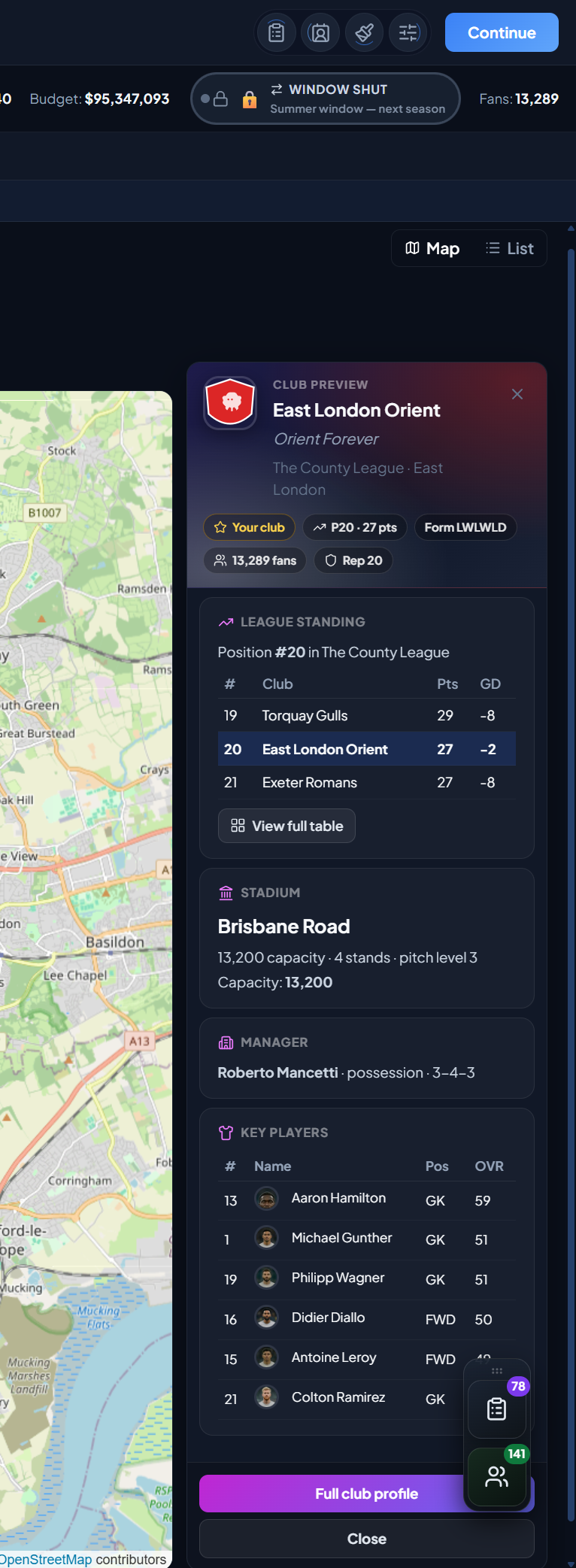
When you select a club (from a map pin, list row, or town popup), a preview panel opens on the side. This gives you a quick snapshot before opening the full profile.
Header
Club badge, name, motto
Division and home town
Quick chips for:
Your club (if it is yours)
League position and points (when available)
Recent form
Fan base
Reputation
League standing
For clubs in your division, you see:
Their current position in the table
A compact 3-row standings snippet: the club above, the selected club, and the club below
Columns: position, club name, points, and goal difference
The selected club row is highlighted
Your club gets a faint highlight if it appears in those three rows
Click View full table to open the complete league table in a modal.
For clubs in other divisions, live standings are not simulated. Instead you see a short note:
Live standings are only tracked for [your division]. This club is in [their division].
You can still click View your division table to open your own live table from the map.
Stadium
Stadium name, summary, and capacity
Manager
Name, style, and preferred formation
Key players
Top six players by overall rating, with shirt number, position, and portrait
Actions
Full club profile opens the full club sheet (same as clicking a club name elsewhere in the game)
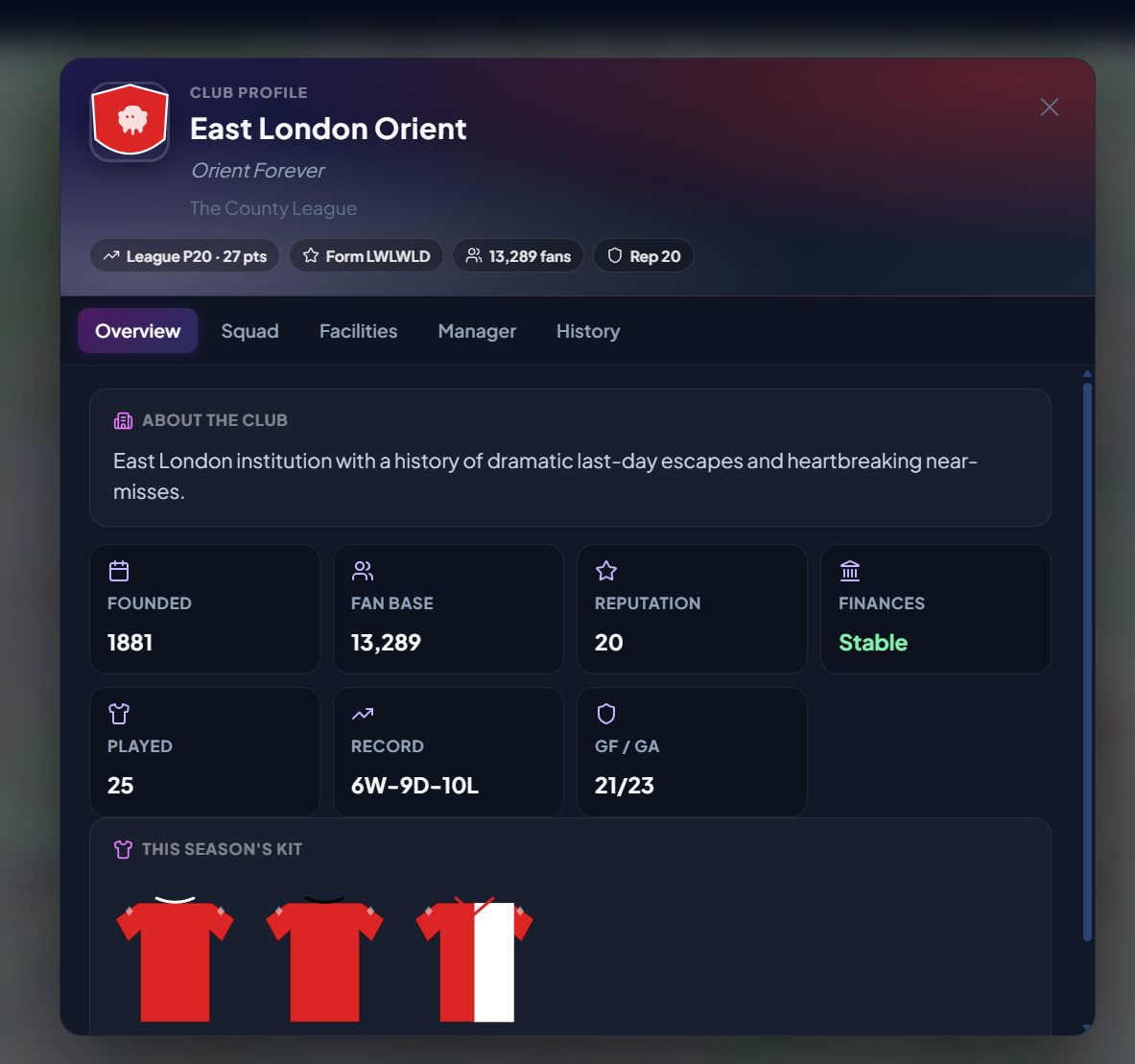
Close (or the X in the header) dismisses the preview and returns you to the map
Full league table modal
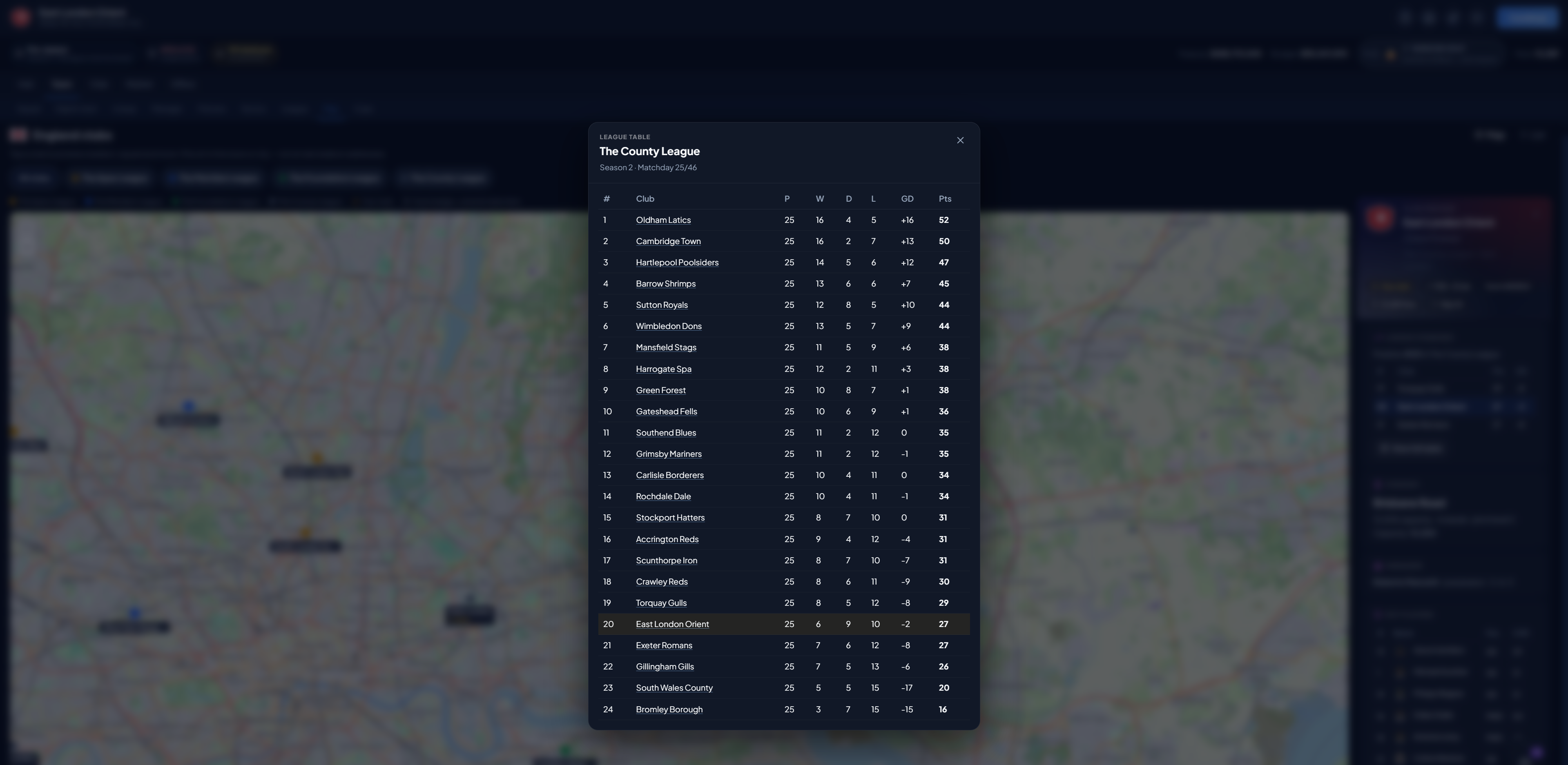
Open it from the preview panel via View full table or View your division table.
The modal shows:
Title: your division name (pyramid-aware, so it matches your nation’s league names)
Subtitle: season number and matchday progress (for example Season 2 · Matchday 14/38)
Full sorted table with columns: #, Club, P, W, D, L, GD, Pts
Highlights
The selected map club row is highlighted (when they are in your division)
Your club row is highlighted separately
Navigation
Click any club name in the table to open that club’s full profile. The modal closes automatically.
Click the X or click outside the modal to close it.
Good to know
Live tables apply to your division only. Lower or higher tiers do not have simulated weekly standings on the map yet.
Map availability depends on your nation. Playable nations show the full map; nations marked as coming soon show a placeholder instead.
Your position chip stays in the preview header for a quick glance, while the standings snippet adds context about who is above and below in the table.
Quick reference: common paths
What you want | How to get there |
|---|---|
Open the nation map | Team > Map |
Preview a club on the map | Team > Map → click a club pin |
Preview a club from a list | Team > Map → switch to List → click a row |
Preview a club in a busy town | Team > Map → click town badge pin → click club name |
See who is above/below in the table | Team > Map → select a club in your division → League standing section |
Open the full league table | Team > Map → select a club → View full table (or View your division table for other tiers) |
Open a club’s full profile from the map | Team > Map → select club → Full club profile |
Open a club from the league table modal | Team > Map → View full table → click club name |
Club Politics & Influence (v 0.1)
Football Boardroom is starting to lean into what we want it to be... less about picking formations, more about who you annoy when you make a call. The below are some updates related to this vision, and it is a first pass, not the finished version. Plenty more coming on board drama, agents, league power, and fan pressure.
The big idea
Every week you are balancing people, not just money. Decisions should please one group and wind up another. Reputation is split out so you can see who trusts you and who does not, instead of one vague “club rep” number.
What’s in this build
Who trusts you (Portal)
Five relationship tracks: Fans, Owners, Media, Agents, Manager. Shown as Happy / OK / Furious, not spreadsheets.
Where: Hub (Portal overview) → Who trusts you card
These feed into sponsors, spending headroom, transfer fees, and who picks up the phone when things go wrong.
Club board
Named directors with different agendas (investor, local owner, fan rep, sponsor rep, director of football). Big spends and crises can trigger board votes. You are not always blocked outright; you can approve, compromise, lobby, delay, or reject.
Where: Club → Board
Also: Hub → Messages (board category)
Manager requests
Your manager asks for things (signings, budget, academy minutes, staff). You respond with Approve, Delay, Reject, or Promise next window. Trust moves with how you handle them.
Where: Team → Manager → Overview → Manager requests
Also: Hub → Messages (manager category)
Fan factions
Supporters split into four groups: Ultras, Season ticket holders, Local community, Family supporters. They care about different things and react differently (ticket prices, youth sales, etc.).
Where: Club → Fans → Overview
Supporters’ forum
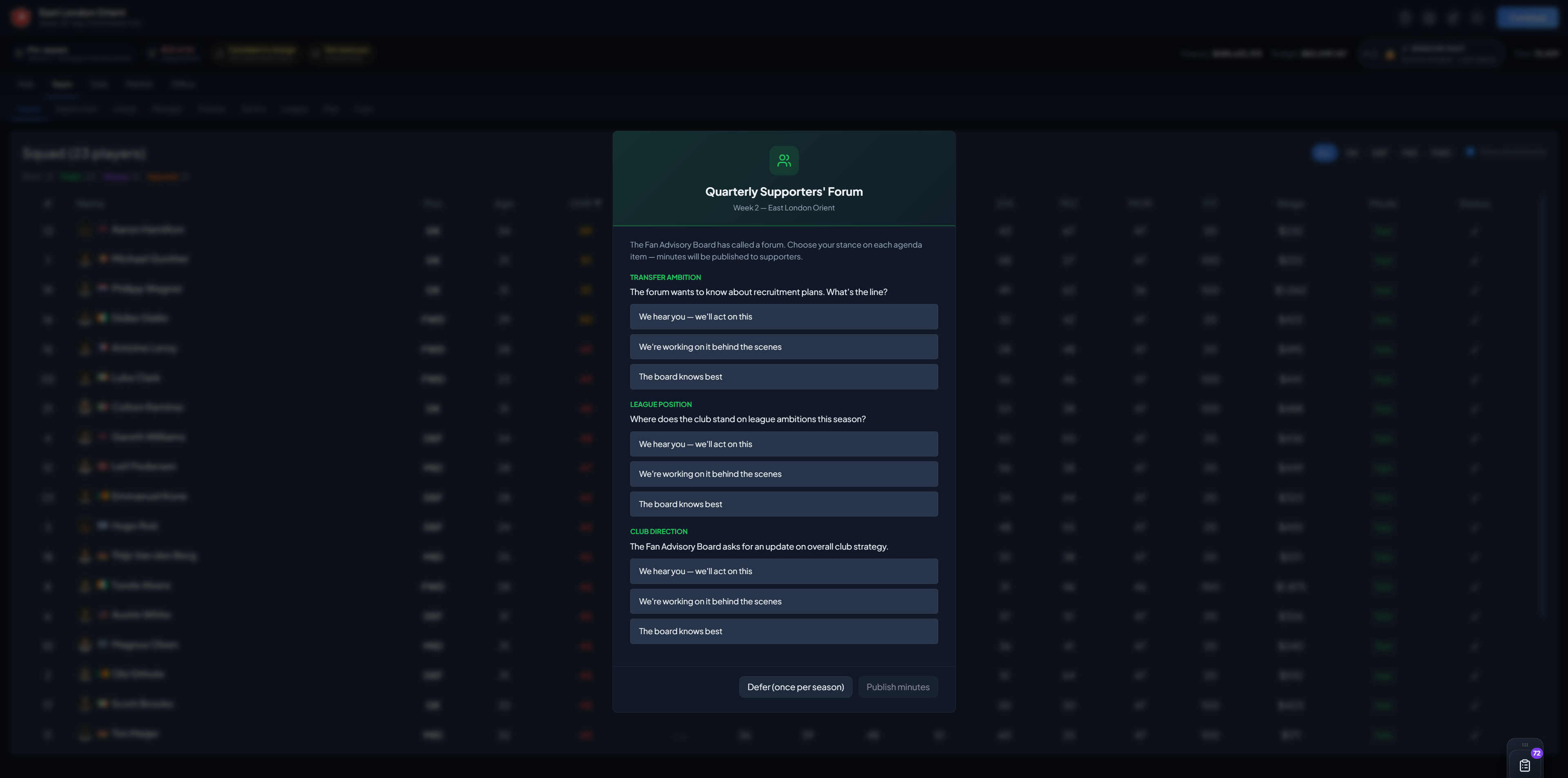
When fan unrest spikes, a supporters’ forum can be scheduled. The meeting screen now actually opens in Boardroom mode (it was getting stuck in the background before). Answer the agenda and publish minutes, or defer once per season if you have to.
Where: Full-screen overlay when a forum is waiting
Also: Club → Fans (green banner when one is pending)
Press with consequences
Press conferences can pull questions from what is going on (finances, manager sack, academy, board splits). Answers hit fan trust, sponsor confidence, journalist mood, and squad morale.
Where: Overlay when triggered, often from Hub → Messages (press)
League politics
Mid-season league votes (VAR, FFP, foreign limits, etc.), influence tier (Outsider / Insider / Power broker), TV deal choices, and owners’ dinner beats in the inbox. Separate from League Assembly, which still runs on the longer constitutional cycle.
Where: Club → League politics
Also: Hub → Messages (league category)
Super agents
Three named agents with different reach (local, national, global). Upset the wrong one and fees go up, listings dry up, or the market can freeze until you apologise, pay up, or wait it out.
Where: Hub → Messages (market freeze)
Also: Transfers (fee warnings when an agent is unhappy)
Inbox
Most of the above lands as Messages first: board votes, manager asks, league votes, agent freeze, owners’ dinner. Reply there, then check Portal or the relevant tab to see the fallout.
Where: Hub → Messages
What this is not (yet)
Not a full board simulation or FM-style politics layer yet, but this is the vision
Not every stakeholder has deep AI or long memory arcs yet
League politics is inbox-first, not a full owners’ league sim yet
Agent network is three agents, not a full market gatekeeper ecosystem yet
Fan factions react to events; they are not a full protest/riot sim yet
We will keep layering on compromise, favors, chronicle beats, and tighter hooks into transfers, sponsors, and the season arc.