
Thank you once again for your continued feedback and support.
This update focuses on usability, controller support, movement, map fixes, coin visibility, robot clarity, and performance improvements for laptops with both integrated and dedicated graphics.
Changes and improvements
Added an in-world HUD indicator showing the location of nearby coins.
Added a glow effect to coins, making them easier to see.
After opening and closing the pause menu, the player will now return to the same position where they paused. This is especially useful on the Expanded Map, where distances are much greater.
Improved player movement to make it feel smoother and less abrupt.
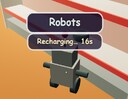
Added a visible status to helper robots showing whether they are currently resting or placing toys. Some players believed the robots were stuck when they were simply resting (30 sec cooldown).
Added input settings, as some controllers use different layouts and configurations.
Added support for using the B button to go back through the 3D book menus.
Fixed an issue where pressing B on some controllers could unexpectedly pause the game.
Fixed an issue where the baby could appear stuck when starting a new game with the baby enabled.
Fixed additional areas on the Expanded Map that could unexpectedly reset the player’s position.
Moved several tall plant dioramas that were positioned too close to shelves on the Expanded Map.
Removed a plant that was obstructing movement and corrected several other map inconsistencies.

GPU performance improvement
A high-performance GPU preference has been added to help laptops with integrated and dedicated graphics use the dedicated GPU more reliably.
On some laptops, Windows may launch Toy Keeper using the integrated graphics card instead of the dedicated one. This can cause significantly reduced performance, even on powerful systems.
A huge thank you to Llamawolfe for sharing their experience and helping us identify this issue. After manually assigning Toy Keeper to their dedicated GPU, their performance increased from approximately 25–30 FPS to 120 FPS.
Players who previously experienced very low performance are encouraged to try the new version and let us know in the comments whether performance has improved.
If the issue continues, you can manually assign the dedicated GPU in Windows:
Settings → System → Display → Graphics → Add Toy Keeper.exe → Options → High performance
Clarifications
Items placed inside boxes cannot currently be removed from them. However, you can hold the box and interact directly with the correct shelves to place the items inside.
Loose objects on the floor currently reset their positions whenever the player leaves and reloads the game.
We have seen that some players enjoy organizing toys directly on the floor, so a future update will save the position of each toy between sessions.
Thank you again for your patience, reports, suggestions, and continued support.