
Version 2.00 is out. The headline feature is the new 3D match screen. Watch your players pitch, hit and run on the field from 9 camera views, from behind the backstop to the batter's own eyes. Managing works as before, and pitch-by-pitch commands and pitch calling are available on this screen too. We also added editors for the uniforms your 3D players wear and for the look of the ballpark they play in. 3D mode is available in both the full game and the demo.
3D matches
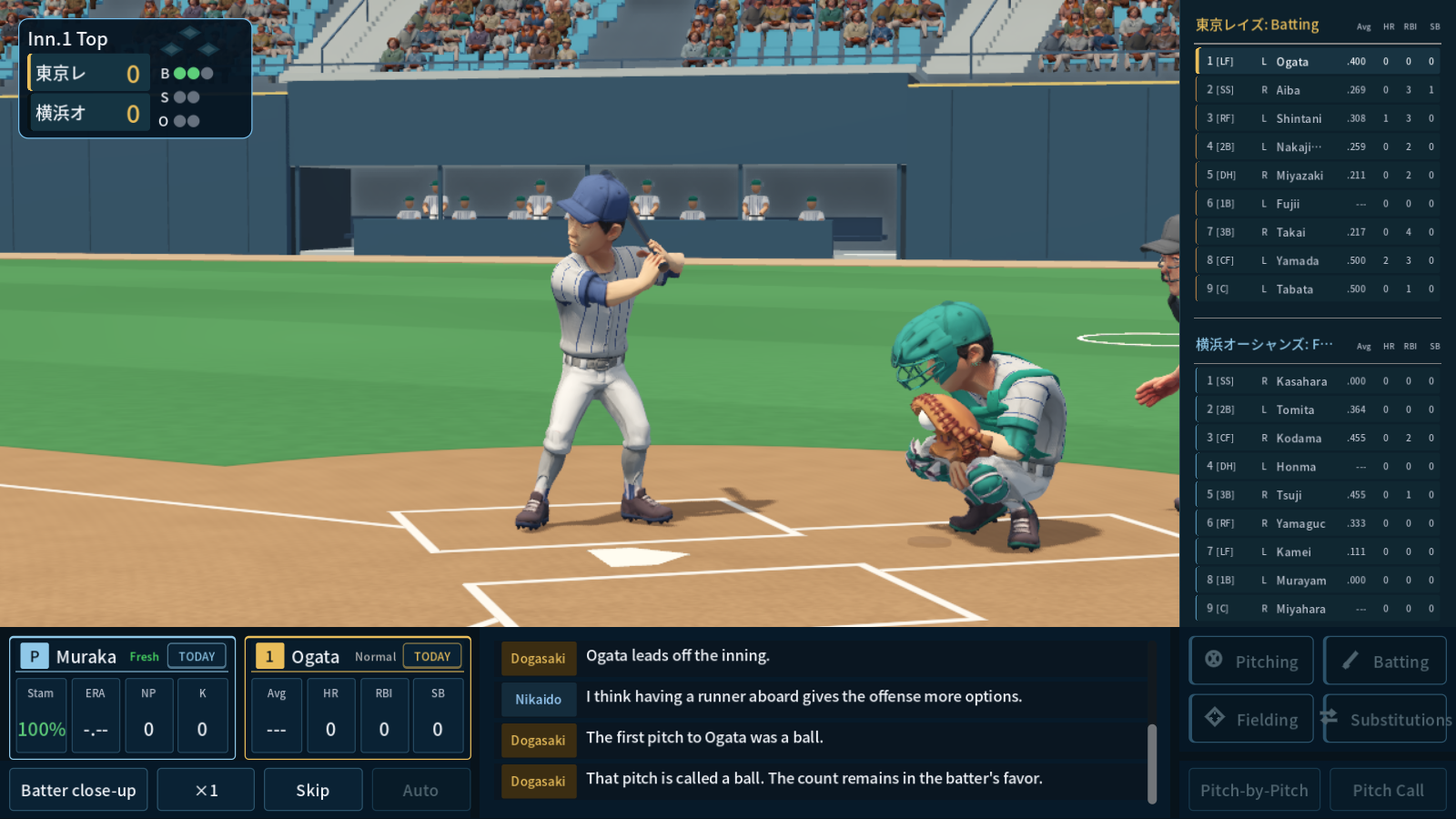
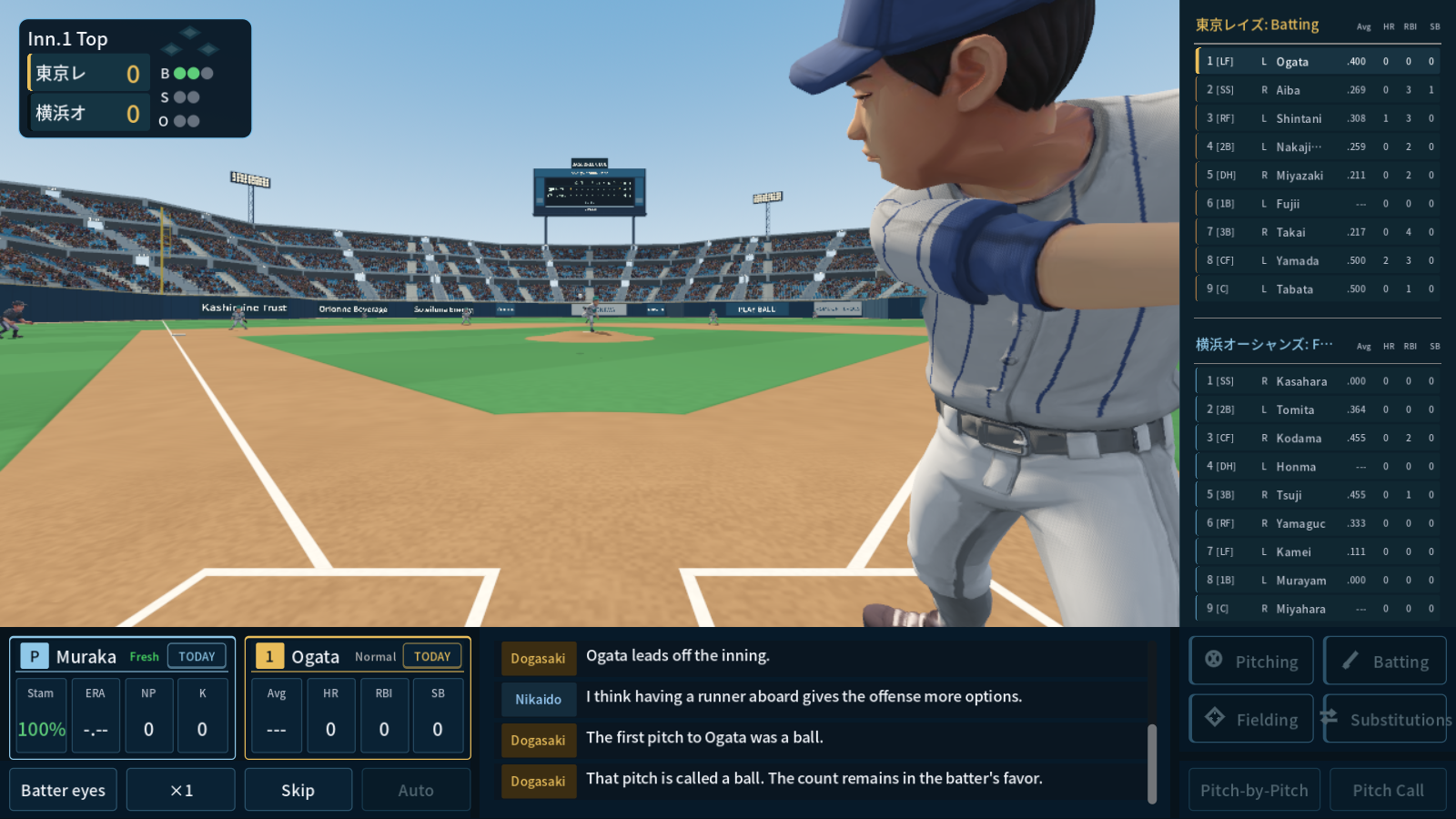
- Choose 3D under "Match screen style" in Settings and your next game opens in 3D. The previous screen remains as Classic, and you can switch back at any time. Games play out the same way and produce the same results on either screen
- Nine views: Backstop, Broadcast, Catcher, First-base stands, Third-base stands, Outfield stands, Batter close-up, Batter's eyes and Ball's eyes. Ball's eyes flies along with every pitch and batted ball
- You can manage from this screen too: offensive and defensive commands, substitutions and defensive alignment, plus pitch-by-pitch commands and pitch calling from the catcher's view. Speed changes and skipping work as before
- Players carry over their generated hairstyles, beards, builds and handedness, and hold bats and gloves. Catchers wear their gear, umpires and base coaches stand on the field, substitutes sit in the dugouts and spectators fill the stands
- As a batter walks to the plate, an introduction strip with their portrait and stats appears. Pitchers are introduced the first time they appear in a game
- Some features are not yet implemented in 3D mode. We will add them in future updates
- * Each pitch is simulated first and then shown on the 3D screen. To keep the animation consistent with the result, in scenes such as a throw arriving too late for an out, players may move in slow motion or the throw may be abandoned. This is being adjusted.
Game info without leaving the screen

- The board at the lower left always shows cards for the current pitcher and batter. Click a card to cycle through career stats, today's stats, head-to-head stats and abilities, so you can decide on a pinch hitter or a relief pitcher on the spot
- Click the ballpark scoreboard to enlarge it and check the inning-by-inning scoring at a larger size
- Clicking the pitcher's or batter's name, or a name in either lineup, opens the player detail screen as before
- Both scorebooks sit on the right, and the play-by-play announcer and color commentator carry the game along at the bottom
Replays and presentation
- Home runs, double plays, great defensive plays, close plays and more are replayed from a different angle after the play. Stolen bases and pickoffs are shown from a camera near the base
- Players react to the situation: runs, home runs, strikeouts, errors, the closer's entrance, walk-offs and more. Reactions grow bigger in close games late
- In the game that clinches the league title or the postseason championship, the players gather on the mound, and the traditional tossing of the hero is followed by a trophy ceremony and a team photo
Uniform Editor

- Open the Uniform Editor from the Management tab or from the team form in the CSV Editor. Pick the cap, jersey, trim, pants and belt colors from a 30-color palette and combine them with four designs: plain, pinstripes, single trim and double trim
- Edit while checking the 3D body from the front and back, with the existing 2D portrait shown on the same screen
- Export your setup as a share code. Anyone can paste the code to get the same uniform
Ballpark Editor
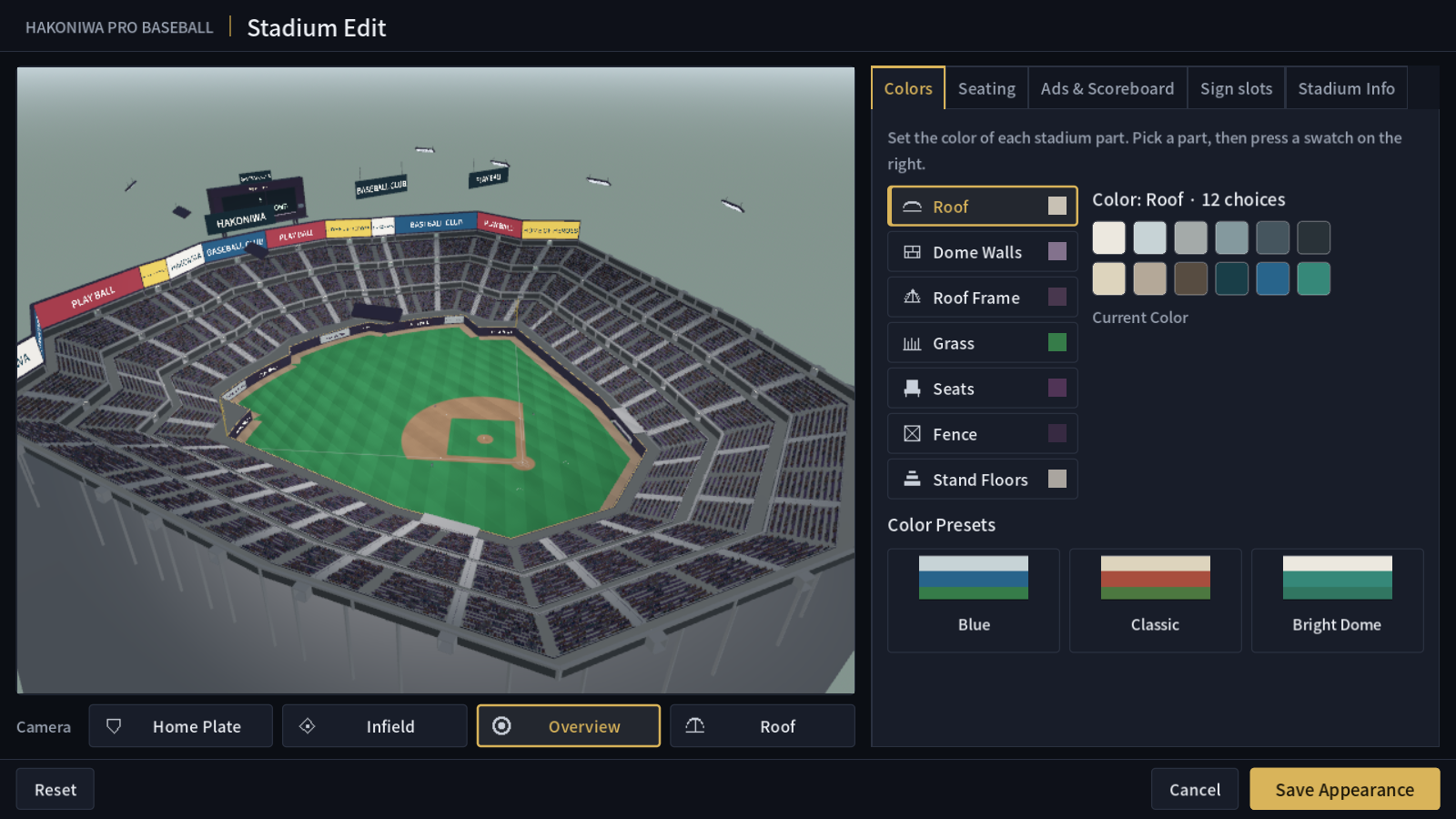
- Open the Ballpark Editor from Data Edit → Stadiums. Choose colors part by part for the roof, walls, roof frame, grass, seats, fence and stand floors, or apply one of three color presets to change everything at once
- Set the number of tiers and rows of seating. Place signboards with your own text and colors on the outfield fence, the upper stands, around the scoreboard, the dome ceiling and the advertising strip above the seats. The scoreboard can show the live score or free text
- Dome or open air, fence height and the distance in each direction can be edited on the same screen. Preview from the home plate, infield, panoramic and roof views while you work
- Sponsors under contract in Management appear as advertisements on the outfield fence of your home ballpark
Bug fixes
- Fixed an issue where games could fail to start when playing with a custom team added in the CSV Editor. A team can no longer be saved without a stadium, and the stadium is checked before starting
- Fixed an issue where quitting in the middle of an international tournament could leave your team unrecognized on resume. Affected save data is also repaired on load
- Fixed an issue where you could not proceed when there were not enough national team candidates. The reason is now shown, and the tournament can be cancelled
3D mode is heavier to render than the previous screen. On systems where it runs slowly, switch back to Classic in Settings.
Thank you as always for your reports and requests.