
Hey survivors!
If you participated in the previous Not Quite Dead Playtest, or if you are currently experiencing a black screen when launching or loading the game, your old local save files may no longer be compatible with the current version.
Please delete the old NotQuiteDead local save folder before launching the game again.
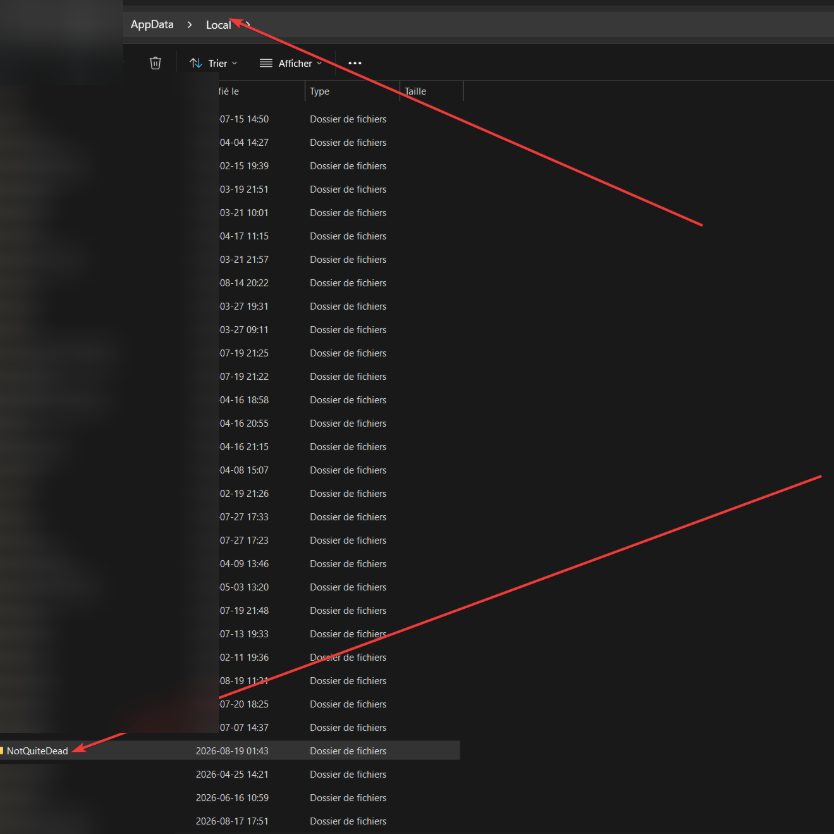
How to remove the old save
Press Windows + R
Type:
%LOCALAPPDATA%
Press Enter
Find the folder:
NotQuiteDead
Delete the NotQuiteDead folder.
Launch the game again.
The full location normally looks like:
C:\\Users\\YOUR_USERNAME\\AppData\\Local\\NotQuiteDead
⚠️ Important
Deleting this folder will reset your local save data/progress, so only do this if:
You played an older Playtest version of the game.
You are getting a black screen.
Your game refuses to load correctly after updating.
Old Playtest save files may contain data from systems that have changed significantly during development.
If you're starting fresh with the current version, you should then be good to go.
Thanks for helping test Not Quite Dead and for your patience while I continue polishing the game! ❤️