
You can now review your saved words on your phone. We also regrouped Settings, based on your feedback.
Review on your phone
Open Integration → "Review on your phone", press Start and scan the QR code with your phone. Reviews run in the phone's browser; there is no app to install.
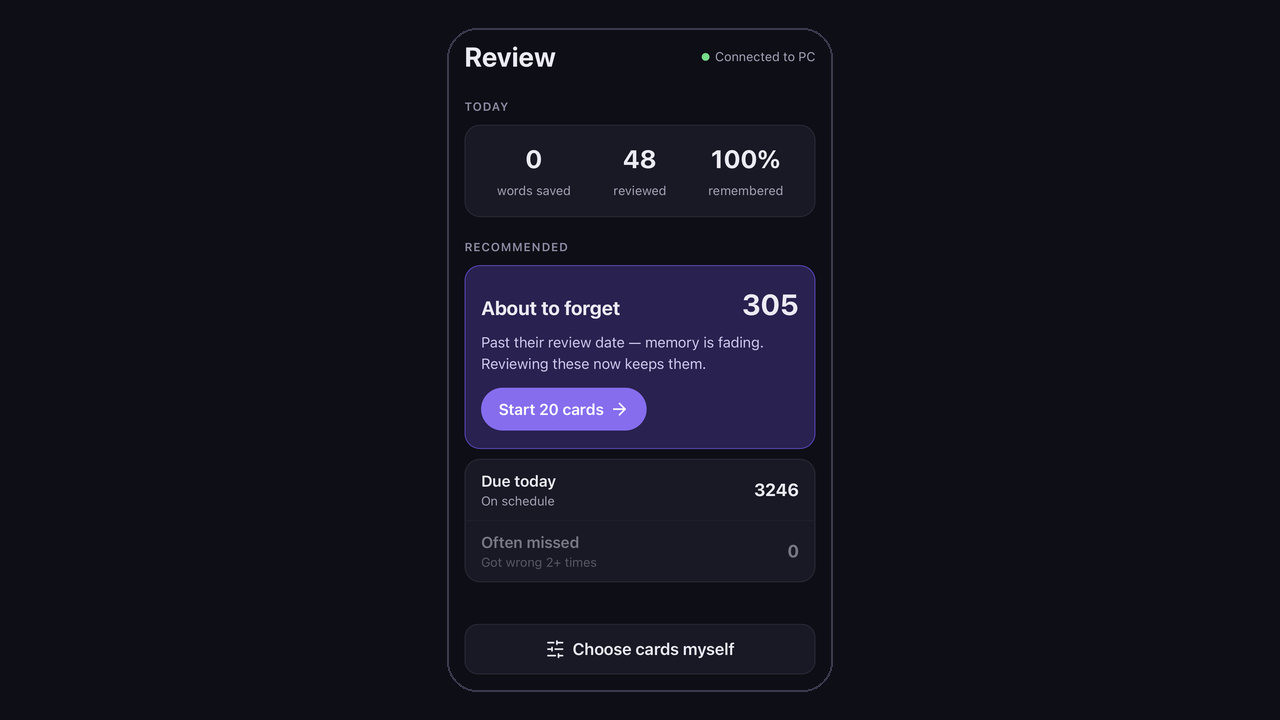
The home screen shows today's numbers and recommends the words you are about to forget.
"Choose cards" lets you pick the game, tag, language and number of cards.
The back of each card shows the part of speech, meanings, the line from your game and examples, each on its own.
The phone can read the word and examples aloud, and plays a short sound on Got it and Again.
Reviews on the phone count toward your reviews on the PC.
Use it on a phone connected to the same Wi-Fi as your PC, at home or another network you trust.
The free version reviews up to 10 cards per session.
Settings are regrouped
Thank you to everyone who told us they could not find a setting. We split the pages by what they are for: Settings holds what you need to play and learn, and App settings holds Playto itself.
"Region" (Current profile): how the game you have selected is read, and where its translation appears.
"Capture" (Shared): automatic capture, responsiveness, the Start Capture screen and speech recognition.
"Display" (Shared): the overlay's background and font size.
"Learning" (Shared): saving words, reviews and reading aloud.
"Method" (Shared): the translation method and the model.
Advanced is now "App settings", grouped into Appearance, Startup, Data and Support. UI language is under Appearance.
Each setting has a ? next to it that explains what it does.
Other improvements
The badges, detail panel and re-translate menu in the Log now explain themselves.
Starting without a game selected brings Playto to the front and opens the Start Capture screen, where you can pick one.
Starting while the model is still downloading shows the progress and starts on its own when it finishes.
Fixes
Fixed: one line in a column of text could appear much smaller than the lines around it.
Fixed: raising Overlay Font did not enlarge every line in a column.
Fixed: a short translation could break in the middle of a word.
Fixed: a two-line heading could be centered in a box wider than its text.
Fixed: PCs whose CPU lacks AVX were told the translation engine could not run on them.
If something still feels off, tell us through Contact us in the app, Discord, or this Steam thread.
If Playto is part of your gaming, a short review helps other language learners find it — and we read every one.