
Spot Translate
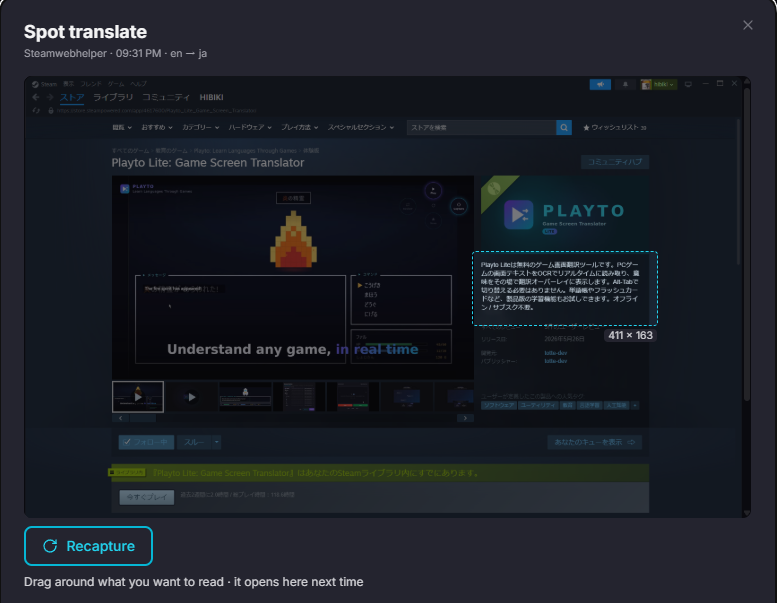
One key grabs a single frame of your game and opens it inside Playto's own window. The game keeps running. Nothing is drawn over it, and your mouse stays yours.
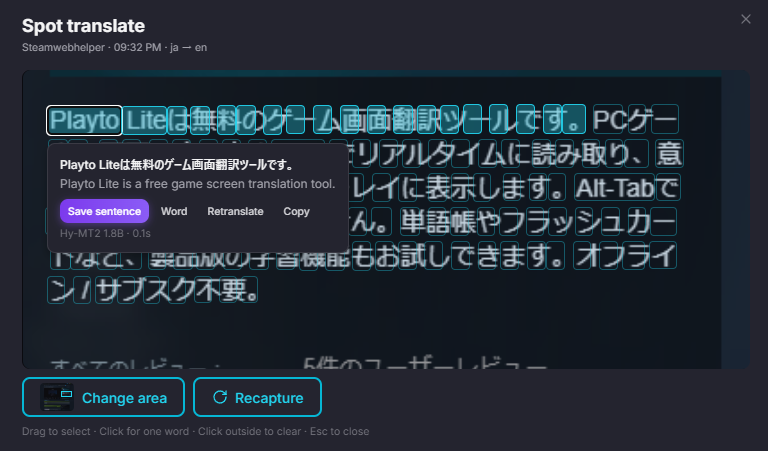
On that still frame, drag around the part you want to read. Playto enlarges just that area, and from there you click a word, or drag across several. Only what you picked goes to translation, and the result saves where your other lines do.
Playto remembers the area per game, so the second time the key takes you straight to it.
Where it earns its place
Fast-moving scenes — the frame is frozen, so you read at your pace instead of the game's.
In-game chat that keeps scrolling — grab it before it goes, then pick through it afterwards.
Long descriptions and item effects — take only the lines you need.
A reworked layout
Navigation is down to three places: Home, Log and Learn.
Home now leads with the session, so what you can do in the game you are playing sits in one card. Review and resident mode sit below it, quieter. The in-app guides are split into tabs, so the section you want is easier to reach.
For first-time players
The tutorial now runs inside Playto's own window as a guided tour. A practice game opens next to it, and each step lights up the one control to press: start a session, drag the reading area, watch the translation land, stop. Only the highlighted spot is live, and Skip or Esc leaves at any time.
Stopping opens the session review, and the tour stays with you through it: the words it read, the scene album, a quick round of cards, and the session's score. After that, a short tour of Home points out the four places you will use most — the session, Spot Translate, resident mode and First steps — and then you are on your own.
The first screen after setup is down to two choices: start the tutorial, or skip to Home. Skipping still gets you the Home tour.
After you stop
The end-of-session screen is now simply your score for that session: the card, your running total, Done. The sharing buttons are gone. The card is still kept, and you can open it again from History.
Smaller changes
Spot Translate no longer discards every line when you point it at a language other than the session's.
Model downloads try the mirrors in a better order, which shortens the wait in regions where the main source is slow.
The floating Quests, First steps and Guide buttons no longer follow you to Log and Learn. Quests now live at the top of Practice; First steps and Guide stay on Home.
Everything above, including the tutorial and the tours, is in all 23 interface languages.
Known issue
A line that the reader splits into two pieces can appear as two blocks instead of one. That is the trade for no longer merging unrelated labels into a single unreadable block, and we are working on telling the two cases apart.
If something still feels off, tell us through Contact us in the app, Discord, or this Steam thread.
If Playto is part of your gaming, a short review helps other language learners find it — and we read every one.