
Main New Features and Improvements
Added Korean Language Support
Korean is now available as a display language in Edge3.
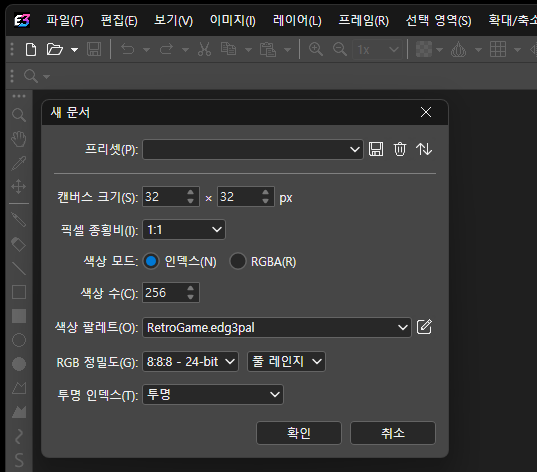
You can change the language from Edge3's settings in the Steam client.
Please let us know if you notice any awkward translations.
Added Sprite Sheet Import
You can now split a sprite sheet with evenly spaced frames into individual frames and import it as a frame animation.
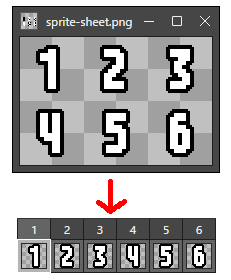
Use “File > Import > Import Sprite Sheet”.
Added Image Sequence Import
You can now import sequentially numbered PNG or BMP files as a frame animation.
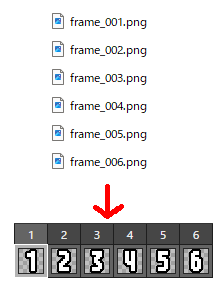
Use “File > Import > Import Image Sequence”.
Added Canvas Rotation
You can now rotate the canvas in 90-degree increments.
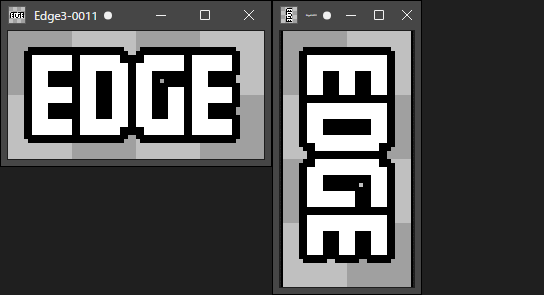
All cels in the image asset are rotated. Use “Image > Rotate Canvas”.
Added RGB Precision Conversion Method Selection
You can now choose between “Full Range” and “Shift” when converting colors to a lower RGB precision.
“Full Range” maps the full range of values representable at each bit depth to the 0–255 range.
“Shift” converts values to 8-bit by shifting bits. For example, converting from 5-bit to 8-bit shifts each value left by 3 bits, producing evenly spaced values such as 0, 8, 16, …, 248.
With this method, the maximum value does not reach 255; for 5-bit precision, it is 248.
You can set this in the “New” dialog, or from “Image > Color Mode > RGB Precision > Conversion Method”.
Added Hexadecimal RGBA Values to the Color Palette
When using the RGB color space, RGBA values can now be displayed in hexadecimal.
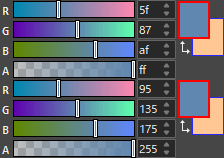
Change this from “Color Palette Panel Menu > View > RGB Color Display Format > Hexadecimal”.
Some RGBA values outside the Color Palette panel, such as those in the Color Picker, are also displayed in hexadecimal.
Improved the Canvas Size Dialog
A preview has been added to the canvas size dialog. You can also drag the handles on the preview to directly adjust how much the canvas is expanded or reduced in each direction.
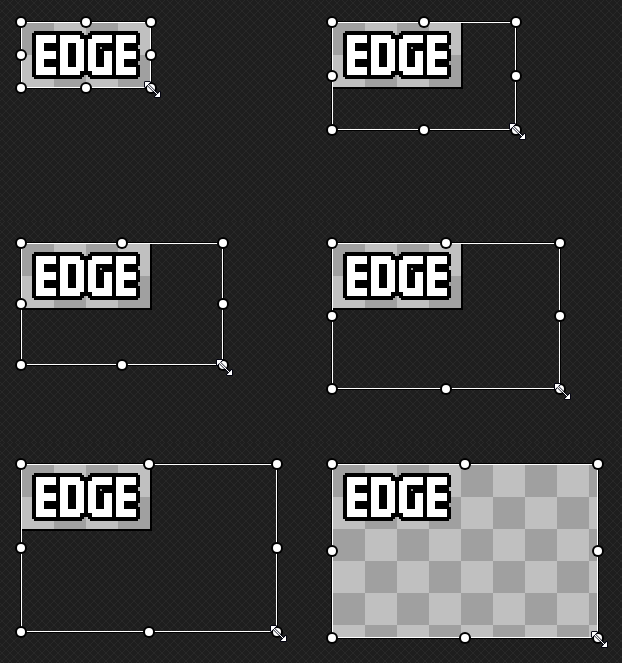
You can still enter values manually as before.
Improved Cropping During Selection Transform
When you use “Crop” while a selection is being transformed or rotated, pixels extending beyond the canvas are now preserved.
For example, you can paste an image larger than the canvas and then expand the canvas using “Crop”.
Other Improvements
Renamed some control points previously labeled “Anchor” to “Handle” in selection transforms and similar operations.
Added an icon for deleting layers. It is not included in the default toolbar, so add it through toolbar customization if you want to use it.
Bug Fixes
Fixed an issue where the “Tool Interruption: Scroll” setting was not applied in some screens.
Fixed an issue where the right side of text could be clipped when a space was entered at the end.