
Patch Notes — v0.3.1
v0.3.1 — Command Experience Overhaul and Performance Optimization
NEW MISSIONS — 14 new incidents
Wildfires and major risks: wildfire smoke on the motorway, a large agricultural fire threatening barns, a camping fire during peak season, a wildfire with trapped hikers, and a scrubland fire near an industrial site.
Rescue and special interventions: severe allergic reaction after an insect sting, a tree fallen onto an occupied car, a hornet nest at a school, animal rescue from a roof or well, and a mass food poisoning incident.
Road traffic accidents: tractor accident, electric bicycle collision with a car, accident involving an electric vehicle, and a roundabout accident with a fuel leak.
Every new mission includes its own emergency call, qualification questions, and contextual answers.
These missions are fully available in French, English, German, and Spanish.
NEW — End-of-Shift Report and Finance Ledger
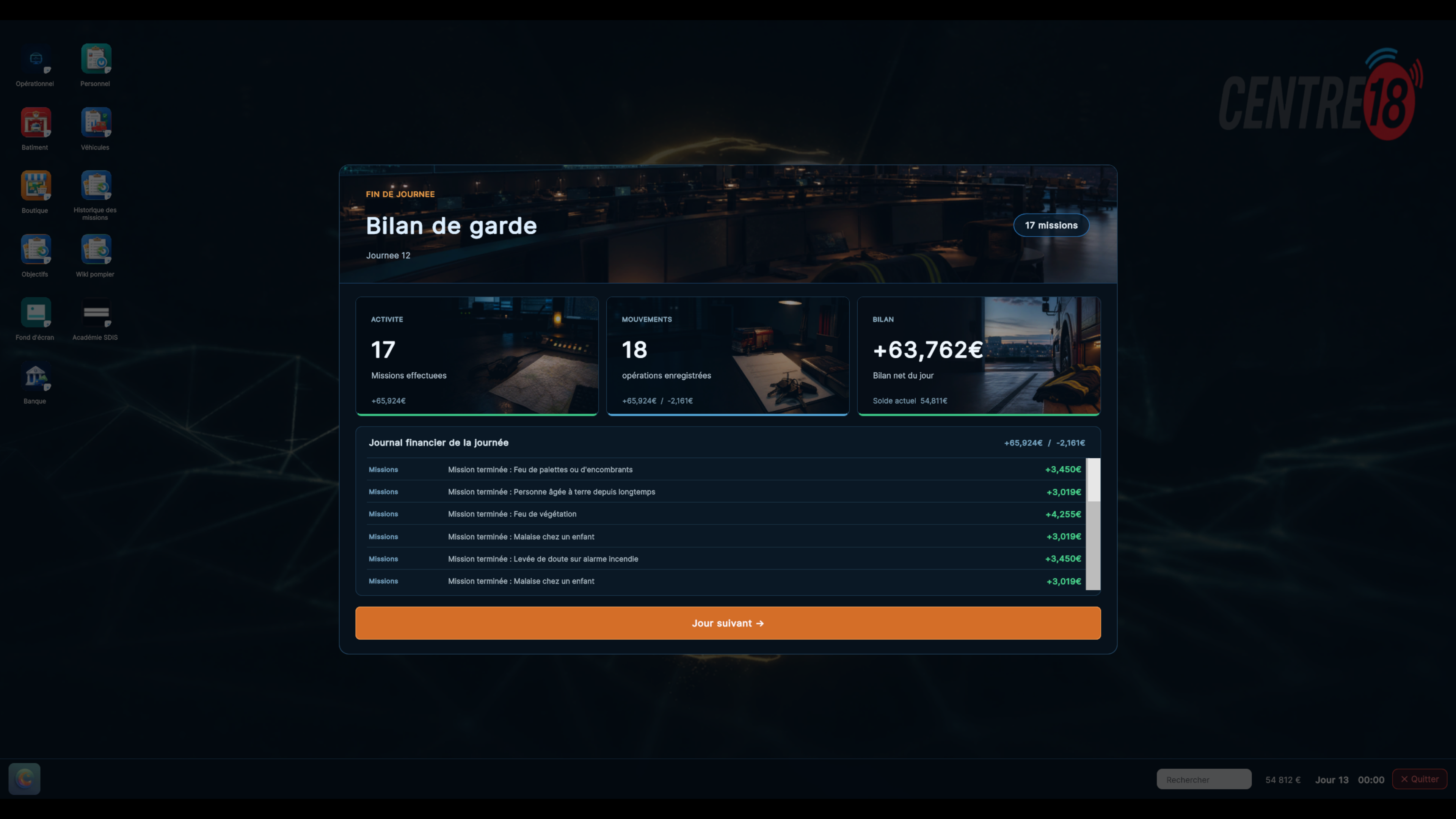
The end-of-day recap has been completely rebuilt as a proper operational handover dashboard.
Three dedicated visual cards now present operational activity, cash movements, and the shift balance.
Added a scrollable finance ledger detailing every incoming and outgoing transaction of the day: missions, objectives, salaries, loans, fuel, maintenance, buildings, and investments.
Vehicle purchases and sales are now recorded in finance history and displayed in the end-of-shift report.
The daily net balance now includes every player transaction, rather than only mission income and fixed charges.
New dedicated artwork has been created for the Activity, Fleet, and Handover cards, following a realistic French emergency-services art direction.
BALANCING — Fire Mission Rewards and Frequency
Increased rewards for fire missions, especially smaller fire incidents.
Reward multipliers now cover the actual identifiers used by fire-mission templates.
Reduced the overall frequency of fire missions to better reflect the real diversity of firefighter operations.
Medical emergencies, road accidents, and miscellaneous interventions now appear much more often; major and critical fires remain available without dominating the call flow.
Reduced the cost of a full vehicle overhaul: maintenance now costs 12% instead of 25% of a vehicle's value, making expensive appliances more sustainable to operate.
IMPROVEMENTS — Personnel and Crews
Added an “Available” filter in Personnel to show only agents who are not assigned to any vehicle.
The vehicle crew-composition page has been compacted so crew slots, profiles, and actions remain visible without unnecessary scrolling.
Improved readability for the selected crew slot and role requirements.
Added a “Train” action directly on every available agent from a vehicle's crew-selection screen.
Training selection now opens in a compact panel matching the Personnel app.
Fixed remaining white backgrounds in training-addition and related list interfaces.
Corrected CCF crew requirements: it now has 4 firefighters, including a crew commander, an HGV driver, a team leader, and a firefighter.
MAJOR REWORK — New Main Menu
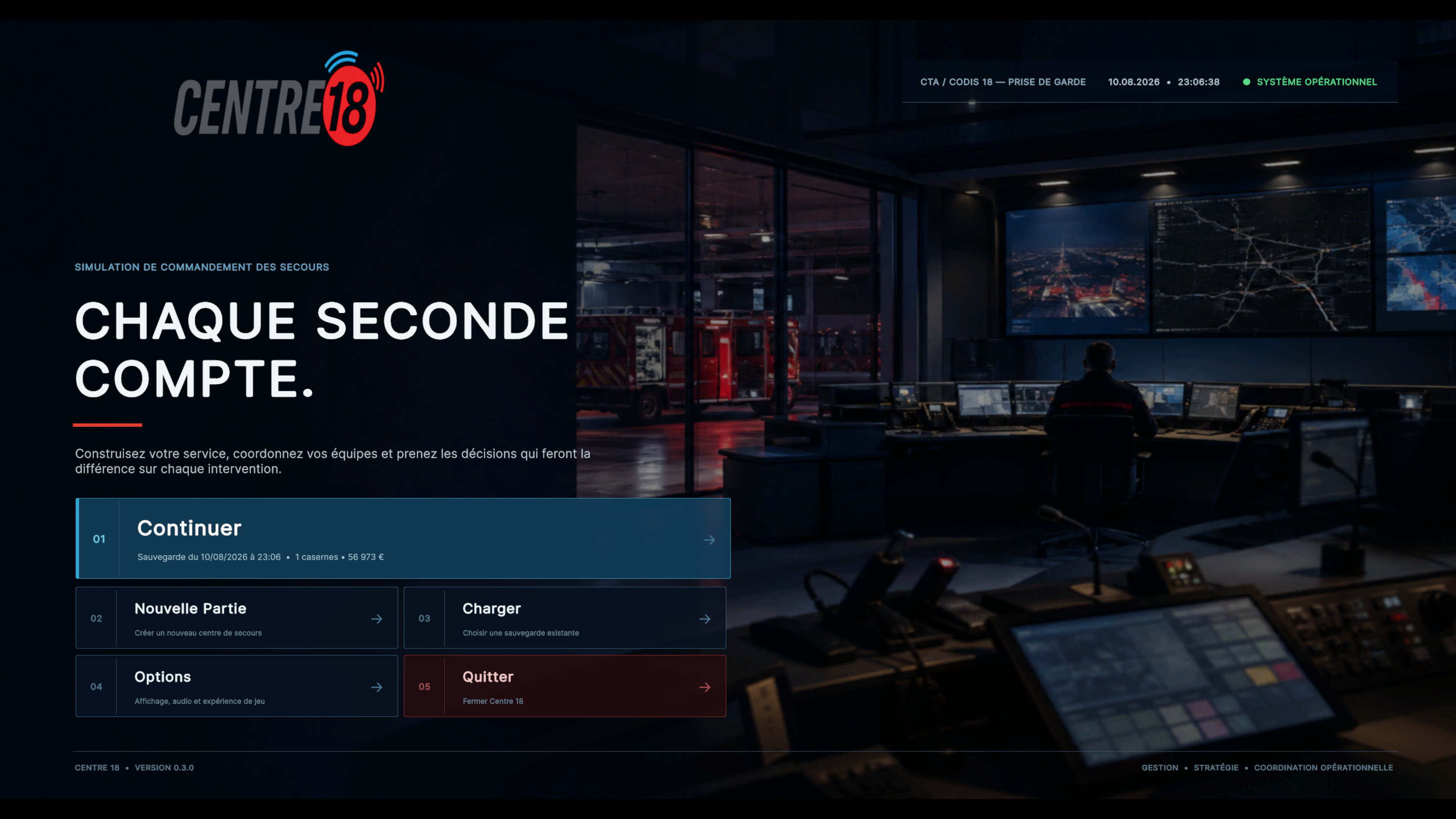
The main menu has been completely rebuilt with a new art direction inspired by a real emergency operations center.
New cinematic composition, new background artwork, stronger Centre 18 identity, and a clearer visual hierarchy.
Buttons, save information, and selection states have been fully redesigned.
The latest available session is now presented more clearly before resuming the game.
Animations, contrast, spacing, and readability have been improved for high-resolution displays.
REWORK — New Game
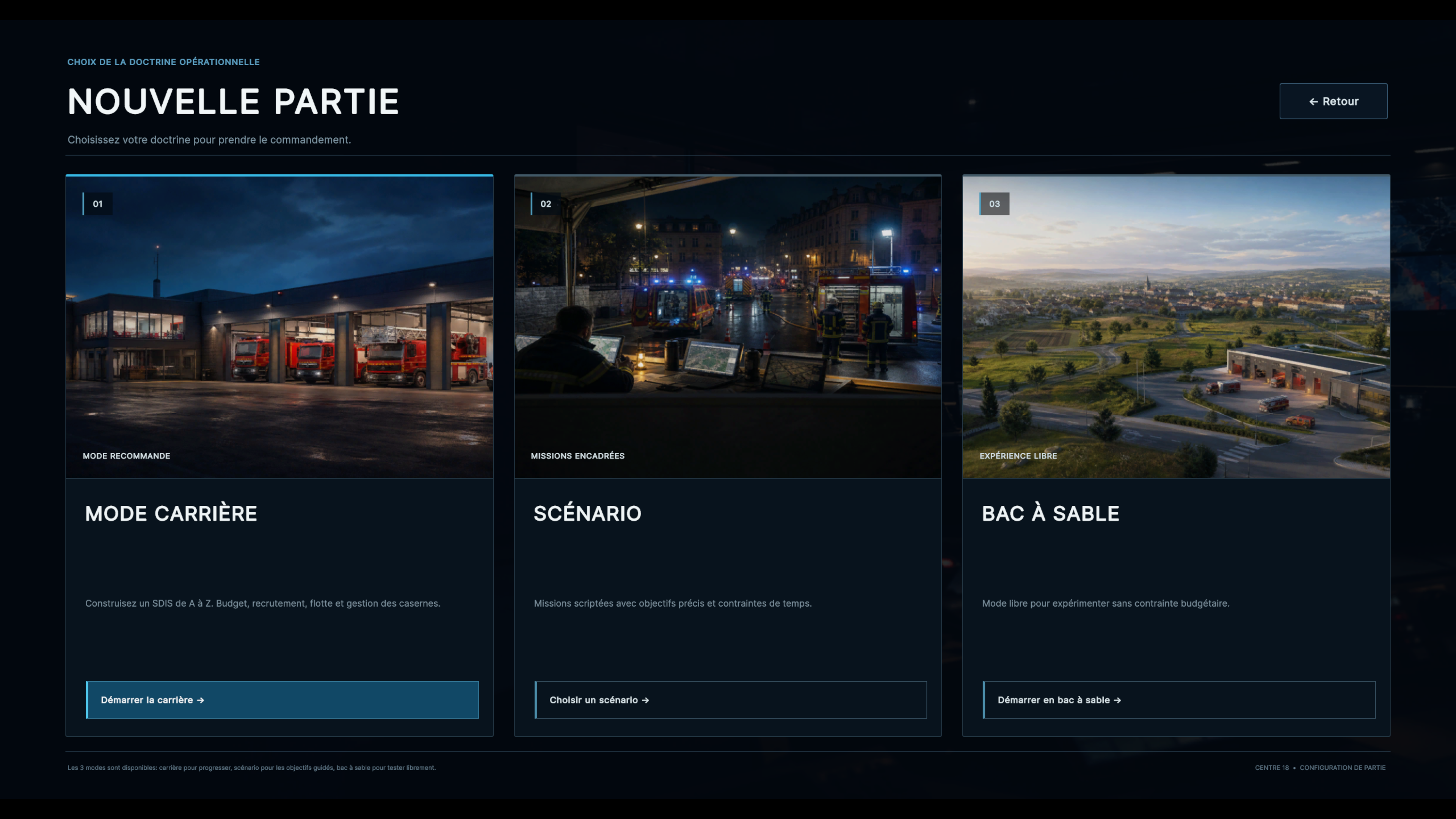
The New Game screen has been completely redesigned.
New dedicated artwork for Career, Scenario, and Sandbox modes.
Each mode now has a clearer presentation with its own identity, description, and primary action.
New save-slot selection page with a cleaner layout designed as a proper game interface.
Occupied and available slots can now be identified immediately.
Improved confirmation before replacing an existing save.
NEW — Sandbox Session Configuration
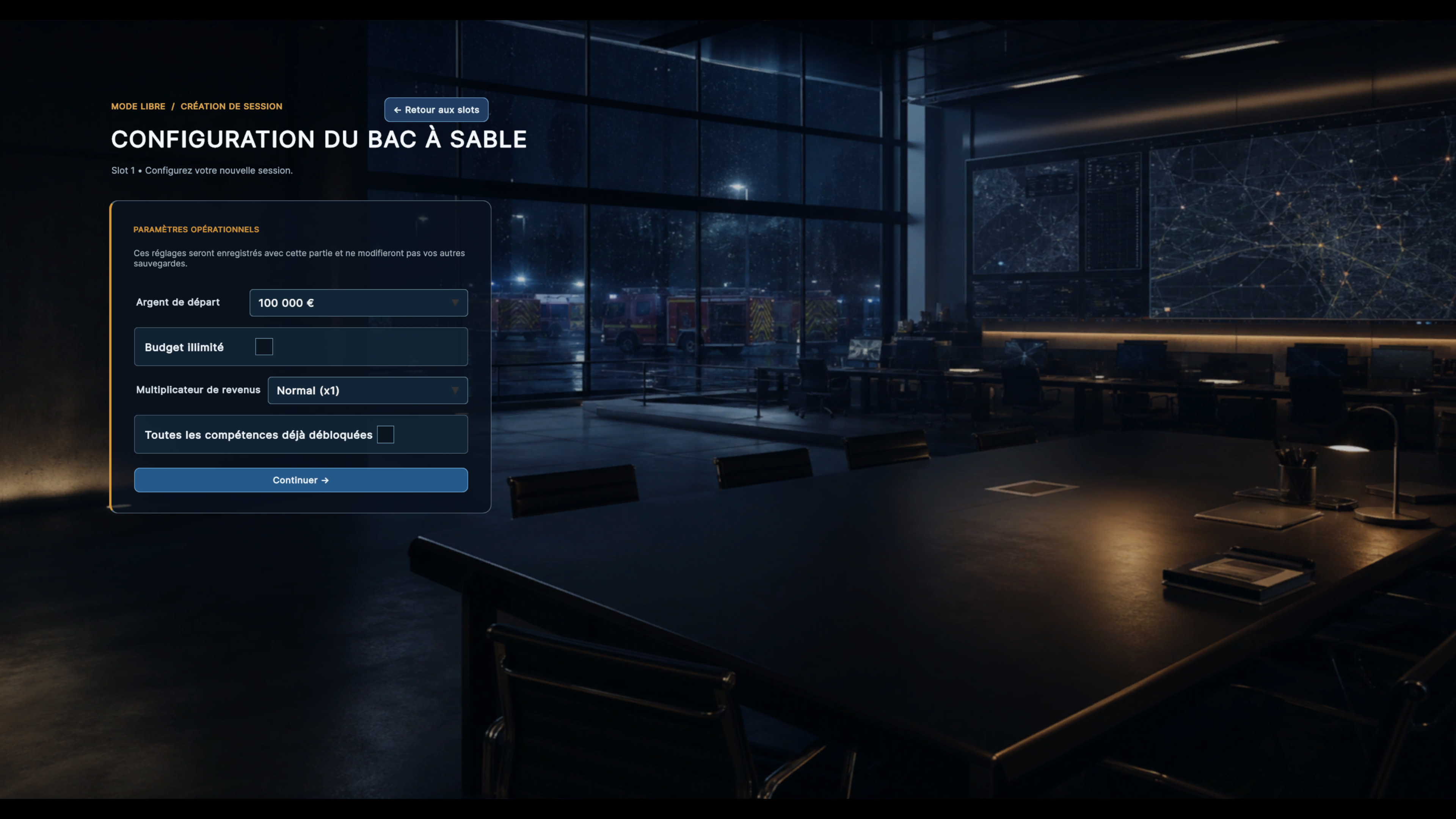
Sandbox games now include a dedicated configuration screen after selecting a save slot.
Choose a starting budget of €100,000, €200,000, €300,000, €500,000, or €1,000,000, with an optional unlimited-budget setting.
Set a mission-income multiplier from Normal (x1) up to x5.
Optionally begin with every SDIS Academy skill already unlocked.
Each sandbox save keeps its own selected settings, including budget and income multiplier.
The setup screen now uses dedicated command-center artwork and a redesigned operational interface.
REWORK — Load Game
The Load page has been fully rebuilt to present saved games more effectively.
New organization by game mode and redesigned session slots.
Key information is now visible at a glance: day, stations, vehicles, personnel, and save date.
The old heavily boxed cards have been replaced with a cleaner and more natural presentation.
Improved empty states, unavailable actions, and navigation back to the main menu.
REWORK — New Options Menu
The Options menu now uses a completely redesigned full-screen layout.
New numbered side navigation for Display, Audio, Gameplay, Shortcuts, and Summary.
All settings are now aligned and organized like a proper configuration panel.
New fixed action bar keeps Cancel and Apply available at all times.
Improved dropdowns, sliders, hover states, and keyboard selection states.
All existing settings remain fully supported: resolution, display mode, VSync, frame-rate limit, quality, volumes, language, autosave, and shortcuts.
MAJOR REWORK — New Pause Menu
The Escape menu has been completely rebuilt as a suspended command interface displayed over the 3D scene.
The game scene remains visible in the background to preserve immersion in the operations center.
New numbered navigation with a description for every action.
Resume is now clearly presented as the primary action.
Added a live session summary showing game mode, duty day, active missions, stations, vehicles, staff, and available budget.
Load and Options pages opened from pause now follow the same professional visual direction.
New in-game presentation for load slots.
The new Pause menu is localized in French, English, German, and Spanish.
MAJOR REWORK — Vehicle Shop
The Shop has been completely redesigned as a proper acquisition center for operational vehicles and equipment.
New dark technical visual identity that remains consistent with the Centre 18 universe while clearly separating purchasing from management pages.
Available budget, vehicle count, delivery site, and site capacity now remain visible at all times.
The catalog has been reorganized into clearer families and filters for fire, rescue, and light vehicles.
Cards use the actual vehicle artwork and more clearly present each vehicle's role, crew, equipment, speed, and price.
Added a dedicated selection panel combining artwork, acronym, specifications, delivery site, total cost, and ordering action.
Ready, Insufficient Budget, and Insufficient Capacity states are now immediately identifiable.
Fixed long acronym display so it remains visible even when the vehicle name spans multiple lines.
Improved catalog spacing, selection, hover states, and readability on high-resolution displays.

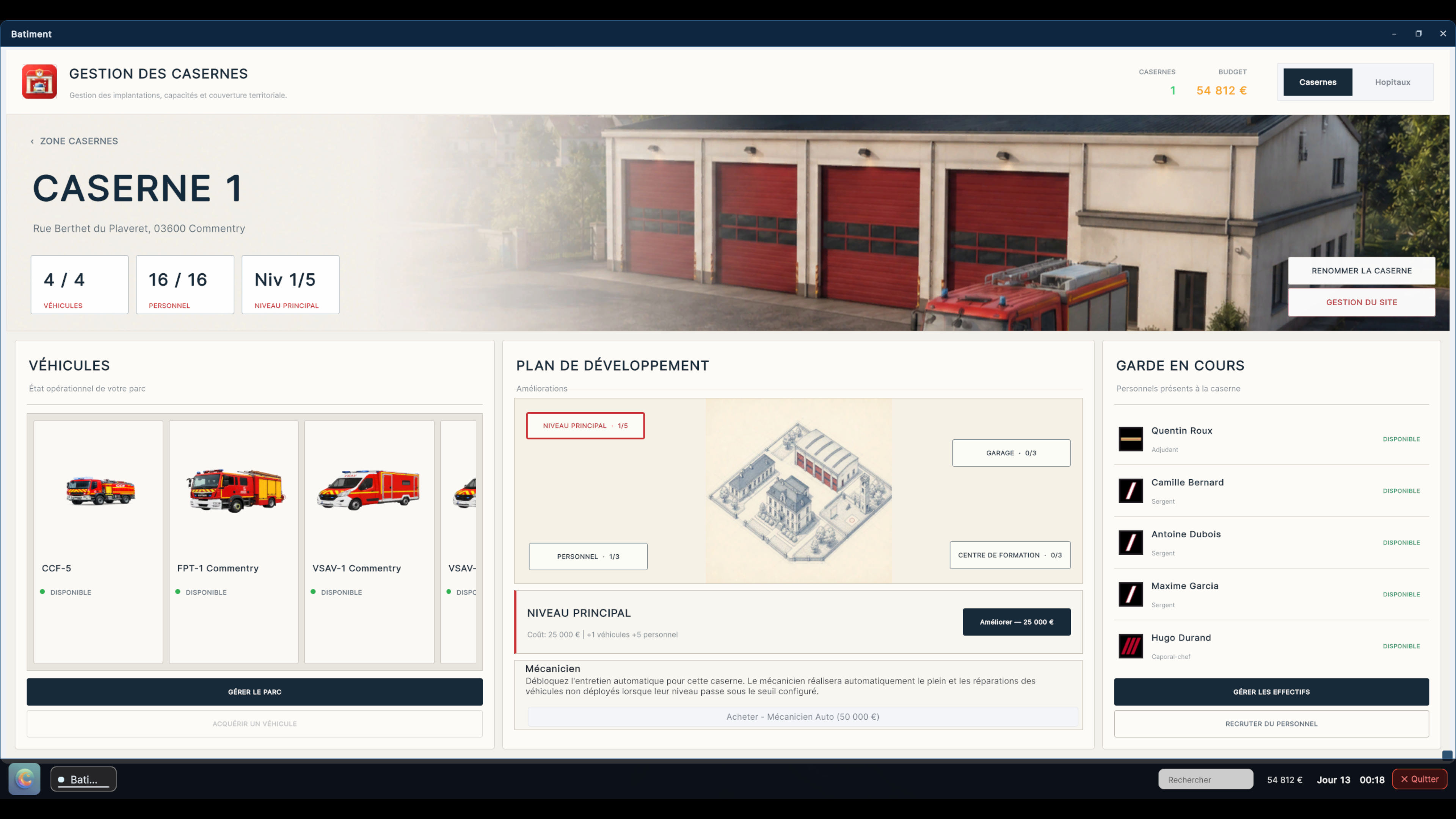
MAJOR REWORK — Building Management
The Building app has been completely rebuilt with a new light, professional interface designed as a proper operations management tool.
Fire stations and hospitals now have their own visual identity, with new dedicated artwork blended naturally into each page.
New illustrated development plans have been added for both fire stations and hospitals.
The main page now keeps all essential information visible without global scrolling: capacity, site fleet, development plan, upgrades, and on-duty personnel.
Only the Vehicles and On-Duty lists can scroll, keeping the overall building overview visible at all times.
Displayed fleets are now strictly filtered: each fire station or hospital only shows vehicles actually assigned to that site.
The on-duty roster is likewise limited to personnel assigned to the selected building.
Vehicles now use their actual artwork and personnel use rank insignia instead of generic pictograms.
Rename and Site Management now open in compact floating panels that can be closed with the cross, Cancel button, or by clicking outside.
Sell, Liquidate, and Delete actions have been grouped into a dedicated management menu to keep the main page uncluttered.
Fixed an issue that could duplicate management actions after repeated clicks.
MAJOR REWORK — New Call Sheet
The call sheet opened from an Operational call has been completely rebuilt as a new light interface inspired by real emergency call-processing software.
Added a complete Centre 18 header using the game's authentic logo and new vector pictograms designed for high-resolution displays.
Call reference, incident type, severity, category, duration, and address are now grouped into an immediately readable header.
Added a four-step visual workflow: Identity, Situation, Qualification, and Deployment.
Caller conversation, completed questions, qualification, location, victim identity, and operator notes have been reorganized to reduce unnecessary framing and improve readability.
The operational summary clearly displays recommended resources and the incident's qualification readiness.
Vehicle selection and deployment have been completely removed from the call sheet to prevent duplication and keep the page focused.
A single clearly identified action now opens the Dispatch Center, which remains the only screen used to select and deploy resources.

MAJOR REWORK — New Dispatch Center
The Dispatch Center has received a complete visual overhaul consistent with Centre 18's new light art direction.
New operational header with Centre 18 identity, call reference, incident type, priority, and a real-time clock.
Operational requirements and their current coverage remain visible throughout vehicle selection.
Search, vehicle-type filtering, eligible-only display, and automatic deployment suggestions are now grouped into a clearer toolbar.
Vehicles now display their actual artwork, call sign, fire station or hospital, crew, distance, estimated arrival time, and availability.
The active selection is easier to identify, while detailed crew information remains accessible without leaving the page.
Added a fixed deployment bar showing the number of selected vehicles and any validation issues.
Existing resource compatibility, distance, valid-crew, and deployment-validation logic remains fully preserved.
MAJOR REWORK — New Mission Detail
The active-mission tracking sheet has been completely redesigned to match the visual identity of calls and dispatch.
The new header displays mission reference, address, status, severity, elapsed time, and estimated income.
Progress is now emphasized with separate tracking for every deployed vehicle and each stage of its route.
Reinforcement requests and hospital selections are presented as clearly identifiable priority actions.
Deployed resources use the actual vehicle artwork and display their live operational status.
Deployed personnel retain their actual rank insignia and their vehicle and site assignment.
The radio log now has a dedicated column, clearer chronology, and independent scrolling.
Status changes, arrivals, transports, returns, reinforcements, and radio messages continue to update automatically.
Legacy emoji elements on this sheet have been replaced with a more professional visual and typographic presentation.
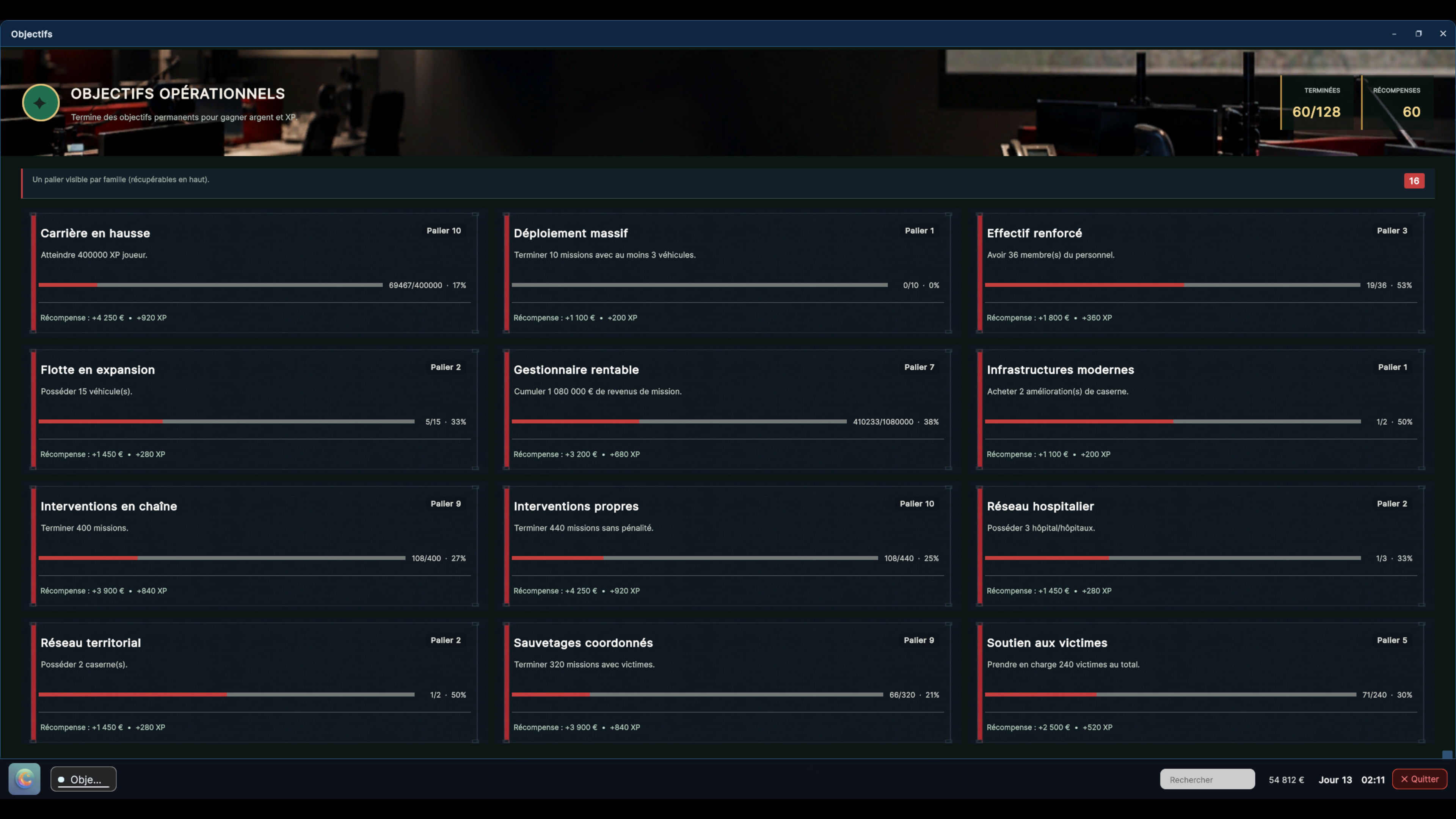
MAJOR REWORK — Operational Objectives
The Objectives app has been completely rebuilt with a new dark operational identity consistent with the game universe.
Generic white panels have been replaced with proper progression cards designed like operational case files.
New card backgrounds and dedicated frames add depth and a distinct identity to every objective.
Progress, tier, status, financial reward, and experience are now organized with a much clearer hierarchy.
Text sizing and positioning have been reworked to remain readable inside every card, including objectives with longer titles.
The main background, top banner, counters, and progression colors now follow a single coherent art direction.
The grid displays more objectives at once while maintaining consistent spacing and immediate readability.
MAJOR REWORK — Centre 18 Wiki
The Wiki has been fully redesigned, from its home page through every category, page, and subpage.
New art direction inspired by a modern operational documentation workstation for a realistic French emergency call center.
New photographic and thematic backgrounds have been created for the different categories instead of reusing one generic image throughout the app.
Home-page cards now provide stronger contrast between artwork, titles, and descriptions.
Article pages have been fully restructured with side navigation, breadcrumbs, headings, operational advice, and clearer content hierarchy.
Navigation between categories now uses a compact, straight-edged presentation instead of the previous cluttered rounded buttons.
Overall text sizing, contrast, margins, and readability over dark imagery have been improved.
Decorative elements that felt artificial or inconsistent with the French emergency-services setting have been removed.
MAJOR REWORK — SDIS Academy
The SDIS Academy has been completely rebuilt across both the Progression and Skills tabs.
New realistic photographic header and visual identity inspired by French firefighter training and command.
The temporary header monogram has been replaced with a proper Academy presentation.
Current rank, level, total experience, and progress toward the next rank are now grouped into a clearer career dashboard.
The rank table has been reorganized to better distinguish completed ranks, the current rank, and upcoming progression milestones.
The skill tree has been fully redesigned around six families: Experience, Income, Recruitment, Vehicle Maintenance, Fuel, and Vehicle Purchasing.
Created 24 new skill illustrations, with separate 5%, 10%, 15%, and 20% tiers for every family.
Requirement, Available, Unlocked, and Skill Point Cost states now use consistent colors, frames, and contrast.
Large white panels have been removed, while card positioning, columns, and progression information have been improved.

MAJOR REWORK — Mission History
The History app has been completely redesigned as a proper archive of past emergency incidents.
A new header, new backgrounds, and new cards have been created for operations-center mission tracking.
Essential information has a clearer hierarchy: date, reference, incident type, status, deployed resources, duration, and financial result.
Filters, counters, empty states, and selections now match the other management applications.
The dark palette, status accents, and typography improve list readability and remove the generic white-table appearance.
Mission cards make better use of the available space and remain readable when displaying dense information.

MAJOR REWORK — Vehicles App
The Vehicles app has been fully rebuilt for managing fire stations, hospitals, and their fleets.
New panoramic header, navigation, and indicators for total fleet size, available vehicles, deployed resources, and budget.
Fire station and hospital cards once again use their complete original photographs in a compact, better-balanced format.
Site-card information areas have been redesigned to remove the previous artificial-looking text block and better integrate capacity and availability.
Existing authentic vehicle artwork has been preserved and placed over newly created garage backgrounds.
Vehicle framing has been corrected so every unit remains fully visible and properly contained within its card.
The detailed vehicle view now presents call sign, type, fuel, maintenance, crew, and management actions more clearly.
Hospital selection and medical-transport resources have been reorganized into a more compact and readable presentation.
Card and List views, site capacity, availability states, and navigation between a site and its operational fleet have all been improved.

MAJOR REWORK — Personnel App
The Personnel app has been fully redesigned with a dark interface consistent with the Vehicles and Building applications.
A new summary header displays total staff, deployed personnel, and daily payroll.
Personnel distribution across fire stations and hospitals now uses clearer cards with the sites' authentic artwork.
Personnel and Recruitment views have been redesigned to distinguish available staff, assignments, positions, and candidates more clearly.
The assignment screen now presents the selected vehicle, crew requirements, assigned personnel, and ranks more effectively.
Remaining white backgrounds and buttons have been removed or replaced with consistent dark states, including empty lists and unavailable actions.
Agent cards, selections, summary panels, and assignment or removal actions have all been improved.
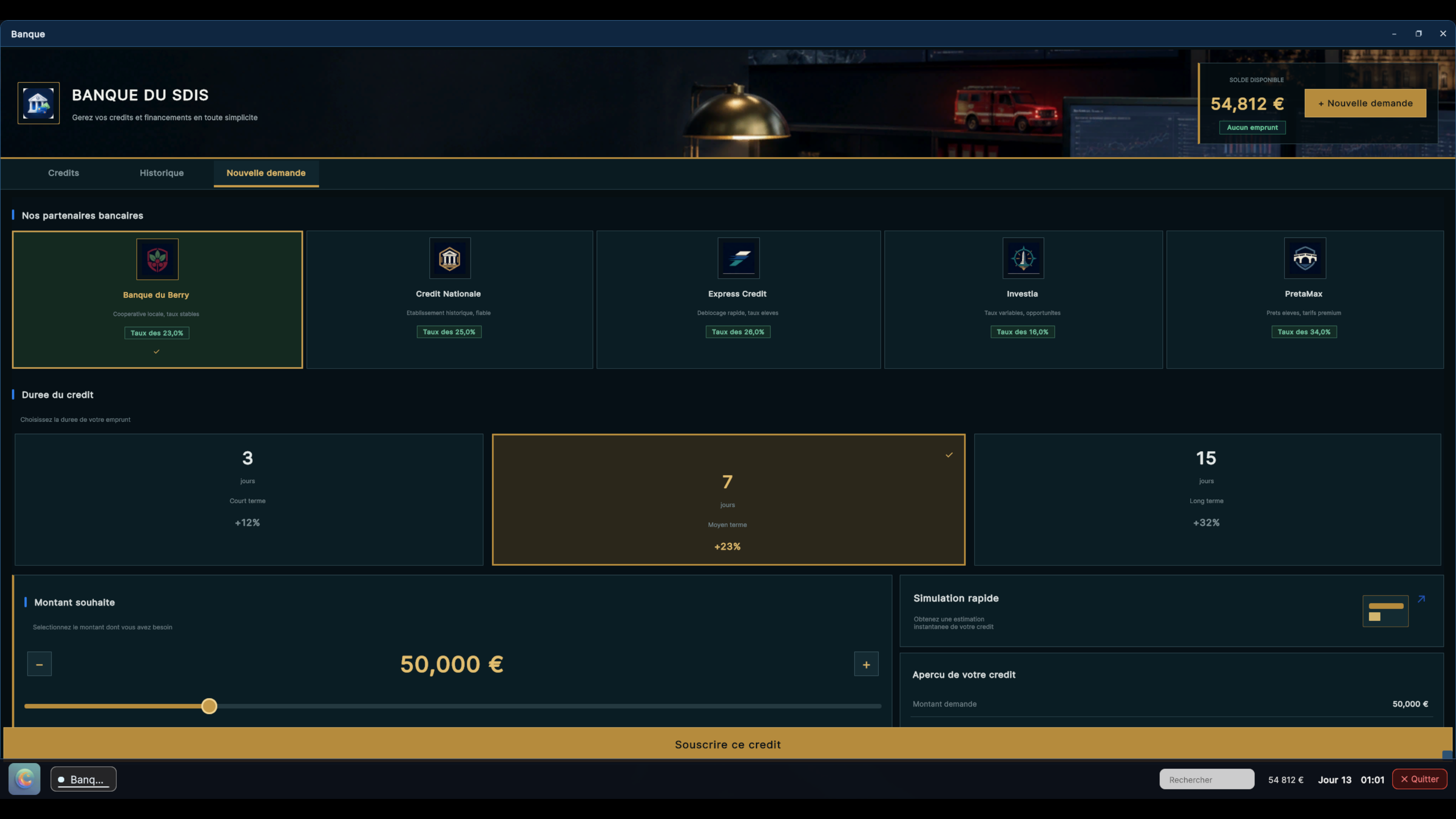
MAJOR REWORK — Banking App
The Banking app has been completely rebuilt as a proper operational treasury tool.
A new panoramic header depicts a modern institutional financial environment adapted to emergency-services management.
Five original emblems have been created for the Berry, Nationale, Express, Investia, and Prêtamax partner organizations.
Navigation now groups Active Loans, History, and New Application into three consistent tabs.
Added a financial dashboard displaying current exposure, daily repayment load, remaining borrowing capacity, and active cases.
Active loans now use new schedule cards with progress, remaining principal, daily repayment, and partial or early repayment actions.
History is now presented as a true operations ledger with incoming and outgoing cash-flow summaries.
New loan creation has been fully reorganized: partner, duration, amount, simulation, fees, total cost, and limits are visible in a single application file.
Large white panels have been replaced with a midnight navy, slate, brass, and institutional green palette.
Selection, hover, validation, debt, and disabled-action states have been completely harmonized.
PERFORMANCE — Main Menu
The main menu now uses significantly fewer resources while it remains open.
Navigation between Home, New Game, Load, and Options is smoother.
The player's selected frame-rate setting is correctly restored when entering the game.
Large illustrations are only loaded while they are displayed, reducing slowdowns and memory usage.
Menu music and game sounds are now loaded only when they are actually needed.
PERFORMANCE — Operations Center Wall Displays
The four operations-center wall displays have been heavily optimized.
They now use fewer computer resources when no new information needs to be shown.
Distant or hidden displays update less often, improving performance inside the operations center.
The wall map remains sharp and readable while using fewer resources.
Calls, missions, statistics, and map information continue to update normally.
FIXES AND POLISH
Fixed vehicle, fire-station, and hospital names on the map: tooltips now remain contained within their card.
Fixed several issues that could prevent some of the redesigned pages from displaying correctly.
Fixed several backgrounds, buttons, and fields that remained white in the Academy, Vehicles, and Personnel applications.
Fixed image framing across Objectives, Wiki, Buildings, Hospitals, and Vehicles cards.
Fixed text that was too small, misaligned, or overflowing from some cards.
Fixed several visual inconsistencies between the main menu and in-game menus.
Fixed a duplicated arrow on some Back buttons.
Removed old decorative elements that made interfaces feel generic or overly busy.
Selections, hover states, and unavailable actions are now easier to identify.
Switching between main-menu pages is now smoother and more stable.
Version 0.3.0 save files remain compatible with this update.
Closing Note
Version 0.3.1 is a major usability and polish update for Centre 18. It delivers a clearer, more consistent, and smoother experience from the main menu through the complete handling of an emergency incident.
We will continue improving the game based on your feedback. Thank you for your support, and have a good shift!
DISCORD