
🛋️ COUCH CO-OP UPDATE: RIKOGOL v1.6.0 IS OUT NOW
Grab a friend: two players can now play Versus Bots on one PC, and you can play the whole game on a controller, from the main menu to the final whistle.
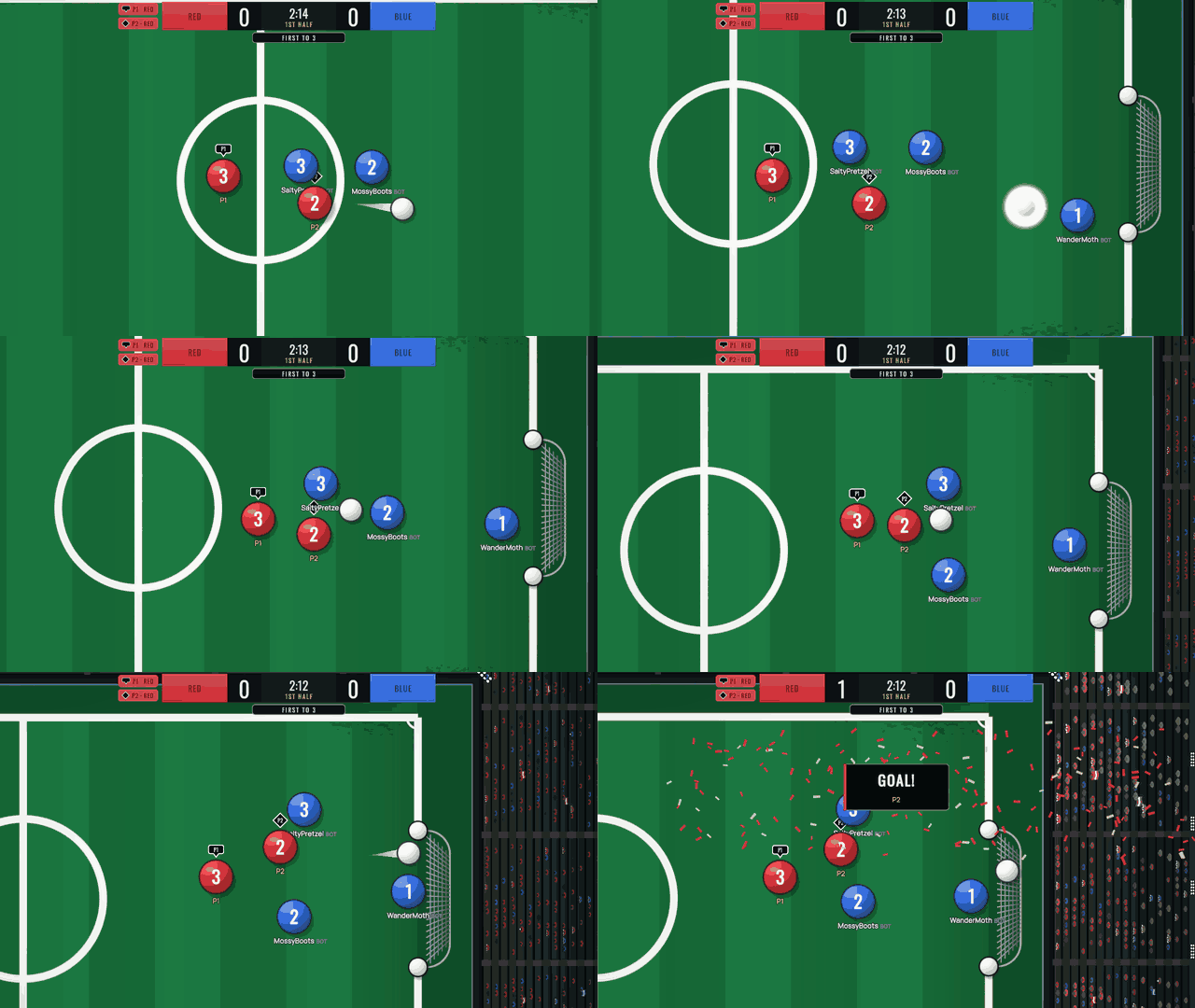
P1 on the keyboard and P2 on a controller attack together in a Versus Bots match, and P2 finishes the move.
👥 TWO PLAYERS, ONE PC

In Training › Versus Bots, select Players to open the Local Players card. The second player joins by pressing their own kick button: the South button (the bottom face button: A on Xbox, ✕ on PlayStation) on any controller, or the / key on the keyboard (the key to the left of the right Shift). Press it again to leave. Team up against the bots or play against each other: each player picks their own team with left and right on the card, and bots fill every other spot.
- Same keyboard: P1 moves with W A S D, kicks with X and opens the menu with Esc; P2 moves with the arrow keys, kicks with / and opens the menu with Backspace. Keys work by their position on a US keyboard, and the join card shows each one as it is labeled on your own layout (on French AZERTY, for example, W A S D appears as Z Q S D). When you play alone, your usual keys stay the same.
- Mix and match: P1 on the keyboard and P2 on a controller, the other way around, or two controllers.
- One shared screen, no split screen: the camera frames the ball and both players. On the largest pitch, if both can't fit at a readable size, it keeps the ball and the player closer to it in view, and an arrow at the edge of the screen points to the other player.
- Each player's disc carries a badge (▼ P1 or ◆ P2), and chips next to the score bar (such as P1 · Red) show who is on which team.
- Either player can open the menu; while it's open, neither disc responds to the controls, and the match keeps running.
- Steam Remote Play Together: a friend can join from their own PC and play as P2.
🎮 FULL CONTROLLER SUPPORT
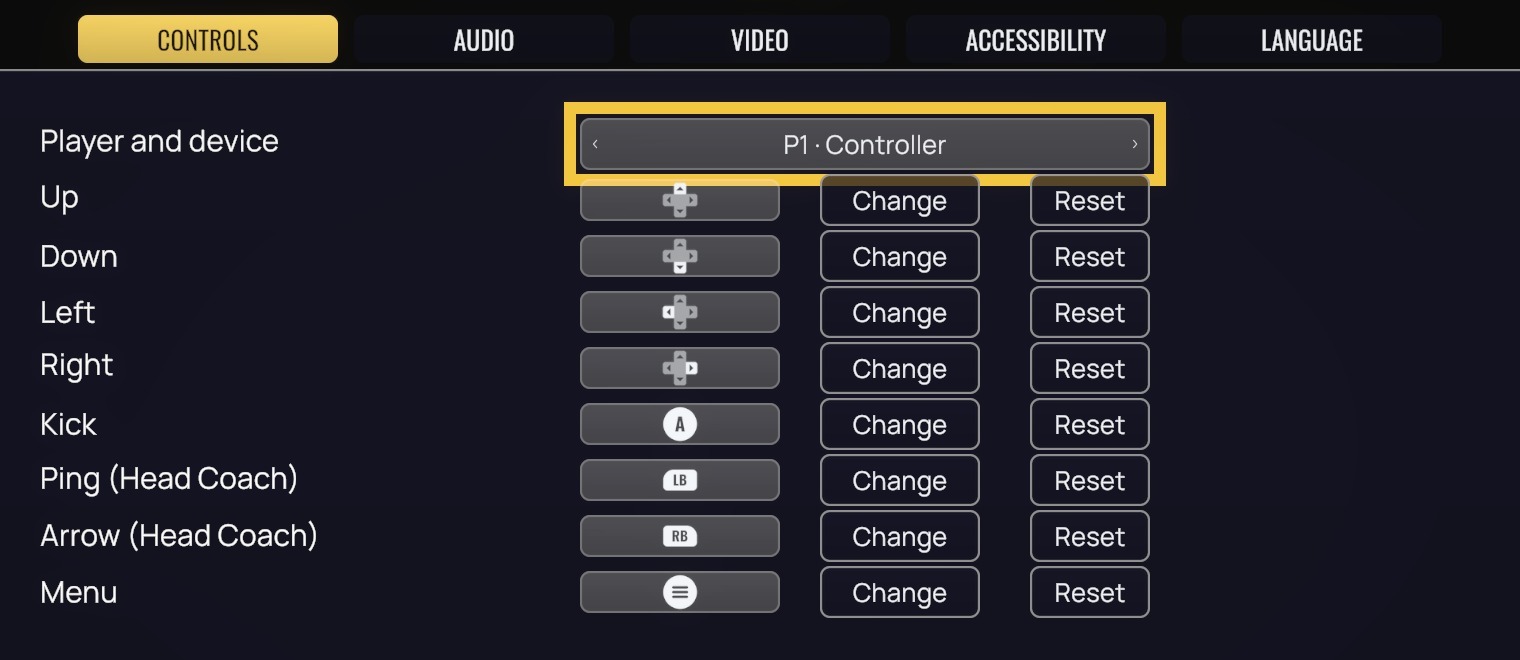
Every menu and every match now works on a controller: Xbox, PlayStation (DualShock 4 and DualSense) and Switch Pro controllers (the Switch Pro shows Xbox button prompts). On-screen button prompts follow whatever you used last: keyboard keys, Xbox buttons or PlayStation buttons. When you play alone, the keyboard and any controller both control your player, with no join step.
- In a match: move with the left stick or the D-pad (the stick reads 8 directions, just like the keys), kick with South, and open the menu with Start (Options on PlayStation).
- In menus: the D-pad or the left stick moves, South confirms and East (B / ○) goes back.
- As Head Coach (the online role on the touchline who sends pings and draws arrows for the team): the right stick moves your aiming reticle; hold LB (L1) to open the ping wheel, pick a slice with the right stick and press South to send it; to draw an arrow, hold RB (R1), then hold South and move the reticle. Release South to finish the arrow, or release RB first to cancel it.
- The View button (Share / Create on PlayStation) moves your focus to the panels on the match screen: formation, kick votes, removing the Head Coach and chat. Press East or View to return. While you're in the panels, your disc doesn't respond to your controls, and the match keeps running.
- When you're using a controller, text fields open Steam's on-screen keyboard in Big Picture mode and on Steam Deck.
- In Settings › Controls, the Player and device selector switches between four sets you can rebind and reset: P1 · Keyboard, P1 · Controller, P2 · Keyboard and P2 · Controller.
✨ ALSO IN THIS UPDATE
- Playing Versus Bots alone on Hard now counts toward achievements and stats. On Easy or Medium it still doesn't, and online achievements (such as your first online match or hosting a room) still need an online match.
- Your disc no longer slips under the score bar when you play along the top wall.
- Korean Steam names and room names now display correctly instead of showing up as empty boxes.
- In online matches, players who join someone else's room now hear each of the ball's bounces off the walls and nets once, exactly when they see it on screen. Before, these sounds played early, and some never played at all.
- The version tag in the main menu now reads “v1.6.0 — Couch Co-op Update”.
💬 WHAT CURATORS SAY
“Pure skill, no rules! Two buttons, real physics, 11v11 with friends via Steam. One minute and you are on the pitch!” — OFEN™
“Rikogol is a superb arcade football game with fair physics. No fouls, no offsides, just pure skill. A cool feature is the coach role on the touchline. (translated from Russian)” — SOKOL- RUS
“A pretty enjoyable football game with simple controls but a fun physics system. It's nice to play with bots or with friends. (translated from Turkish)” — Türk Cemiyeti
📣 GOOD TO KNOW
Two players on one PC is an offline mode, available only in Versus Bots: online matches stay one player per PC. Achievements and stats don't count in a two-player match, on any difficulty, and there is no Head Coach in local matches. Steam normally updates the game automatically.
See you on the pitch! 🔥