
Hello everyone, and a huge welcome to the incredible number of you who joined in the last week! It’s been very overwhelming to have so many playtesters! Overwhelming in the sense that I’m astounded and excited by how many of you want to try out my silly little solo developer flight sim game, but also overwhelming in that I was immediately unable to keep up with all your amazing feedback. If I didn’t respond to your feedback or bug reports personally, please know that I’ve read all of them, and I sincerely appreciate the time you’ve taken to try the game and submit your feedback and bug reports. They have already helped me make the game better.
I’m sorry to anyone experiencing major graphics issues or crashes. Some of these are fixed, but a lot are not. Many graphics issues are being caused by issues correlated to running the game systems below the listed minimum system requirements. I want Lakehopper to work on as many machines as possible, and I’m definitely going to do my best to chase down the cause of these errors and see what I can do to fix them, but I can’t promise any timeline for fixes.
I’ve added some major improvements to the control rebind system, with more on the way. Read below for details. Many of you are encountering issues because Unity’s InputSystem doesn’t have as much native support for many flight sim peripherals as I had hoped. I’m investigating what the best fix here is, and I’ll keep you posted on any further improvements.
I’ve got a new update for you and it’s a hefty one! Here’s the big items, and the full changelog is below.
Plane Power Puzzles
It quickly became clear that I hadn’t done enough to communicate how my near-future electric powertrain was meant to work, and many players were rightfully confused when the batteries on the plane drained so fast! I’ve made some changes to make it far clearer that running the hydrogen fuel cell power plant is required for flying. Hydrogen is 100x more energy dense by weight than even the most efficient batteries. The hydrogen fuel cells serve as the primary source of engine power in flight. The batteries can serve as a emergency power source, or supplemental power. Eventually, they’ll be required for avionics and system startup, through right now, they don’t function that way. I didn’t make this all clear enough and a lot of players were getting stuck. That’s on me!
I’ve made the following changes to make it clear to new players how important the power plant is, and how to get it set up.
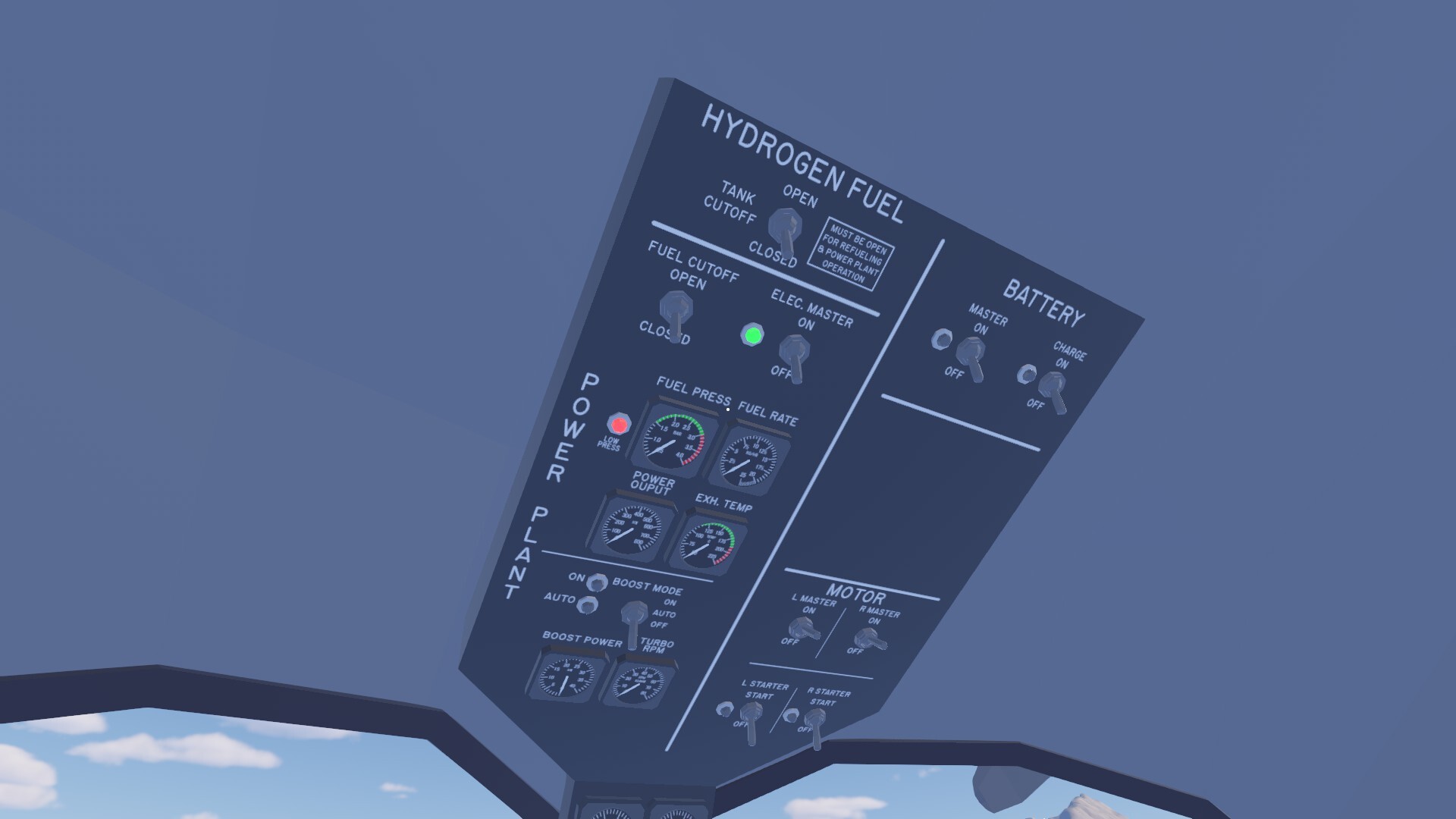 New low fuel pressure and electric master disengaged alerts.
Power Plant Interlock: The motors will no longer start unless minimum fuel pressure has been reached and the Electrical Master is on. An alert buzzer and blinking panel lights have been added to indicate this fault. The engines will not shut down if fuel pressure drops, and this interlock this only prevents startup from 0 RPM. Battery power is not required for startup. This behavior will likely change in the future, but this was the easiest short term solution to guide players to a successful flight. (The fuel pressure alarm will go off if the engines are running, to alert the pilot of a low fuel pressure state, but the engines won’t shut down unless they truly run out of power.)
Environmental Clues: I added scenery at Test Island, as well as some other labels to cue players to fill the plane with hydrogen fuel.
Instrument Panel Changes: The fuel gauges have been moved to the port/left side of the instrument panel, making them much more visible. They’ve also been labeled.
Fueling Port Relocation: The fueling port was out of sight for those who didn’t know it existed, and hard to find even for those who were looking for it! The fueling port has been relocated to just behind the rear door, and labeled. I’ve added some extra text to indicate that the Tank Cutoff switch needs to be open for refueling. I also adjusted the panel label to make it clearer that it must also be open for fuel flow into the power plant.
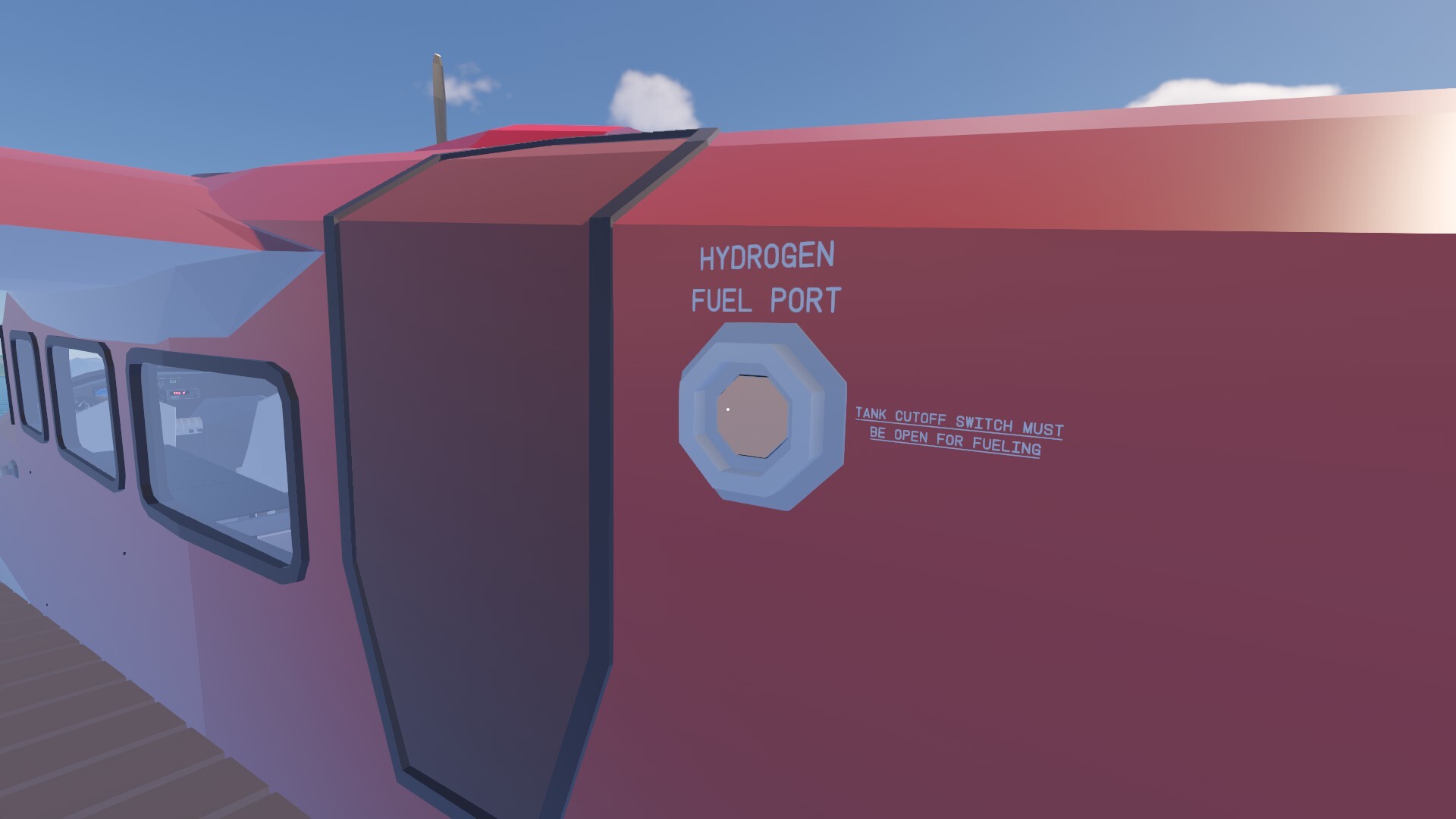 The fueling port's new location, out in plain sight.
Power Plant Checklist: The power plant startup procedure has been added as its own individual checklist in the binder. I’ve also gone through the checklists and reduced the emphasis on the batteries and their charge state.
Confounding Controls
As mentioned above, I saw a lot of feedback that there are a multitude of issues with rebinding controls. I don’t think these changes will fix all of them, especially with more complex flight sim hardware, but this should make the whole experience a lot less unpredictable.
I’ve added a new rebind window that pops up when you click the relevant button, instead of immediately starting to listen for input. The window adds a bunch of requested functionality that will make rebinding a way smoother process, and also help me debug issues with certain peripherals.
 A shiny new rebind window!
More detailed binding information: The rebind window will show the name of the button/axis and the device picked up by the rebind. This should help make sure you’re binding the right input, and help me debug issues with flight sim peripherals. There’s more work to do to better support a wider range of input devices, but this makes everything going on a lot clearer.
Listen for Binding button: The rebind process doesn’t start listening for input until you’re really ready. This reduces the chance of accidental rebinds.
Cancel/Confirm Rebind buttons: The control won’t actually be rebound until you click confirm, and any changes (including clearing or resetting to default) can be discarded by clicking cancel. This will help reduce accidental rebinds.
Individual Reset Default button: This will reset the default binding for that specific setting, not the whole list!
Clear Binding button: This allows the player to completely remove a binding to prevent conflicts, undo mistaken bindings, etc. A highly requested and important feature!
Navigation Know-how
 Brief beginner's guide to VOR navigation.
Lakehopper is meant to challenge players, and that includes a focus on radio navigation. However, I definitely threw everyone into the deep end without any tutorials, which will be added in the future. The VOR is a rather counterintuitive navigational instrument. In the pilot’s binder (B key by default) I’ve added a brief step by step for the very basic operation of a VOR gauge, which should help players at least be able to get from A to B.
Porpoise Pandemonium
 The complex physics forces acting on the plane's hull at speed.
Water physics are complicated. A lot of players are struggling with the plane’s difficult takeoff, and that’s OK! It’s difficult on purpose, because it’s difficult in real life. The presence of porpoising is not a bug. Different planes behave differently, and I need to fine tune exactly how much it happens, when it happens, etc. I’ll continue to listen to your feedback for that, but it’s a real effect that real life seaplane pilots have to deal with. These sort of challenges are exactly what drew me to making a game that focuses on seaplanes!
(For those wondering, the plane leans to the left on takeoff because of the torque from the propellers pushing through the air and the angular acceleration of the rotor. They spin one way, which causes a force in the opposite direction. The default aileron trim is set for the plane at normal cruise, but that doesn’t do any good when you’re barely moving! Physics is fun!)
I’ve made some tweaks to the settings for the water physics that should make the porpoising/oscillations/bouncing more manageable. Please let me know how the changes feel and if they made things a bit more manageable for you. This sort of thing is really hard for me to evaluate on my own, and it’s not an exact science.
Taking off with the keyboard is very possible, but there’s a trick to it, and it takes practice. You’ve gotta be on the rudder, ailerons, and elevator all at the same time. It's especially important to pull up the right amount at the right time to cancel out the oscillations. I performed 40-50 successful keyboard takeoffs with various trims and flap settings just to test these new physics settings to make sure it's possible. I’ll be adding more settings soon to allow you to fine tune how the keyboard yoke works for you.
Full Changelog
Thank you again for taking the time to try out Lakehopper! I know there are parts of the game that need a lot more work, but things are already improving by leaps and bounds!
Here’s the full changelog!
Major Changes
Multiple changes to make power system operation clearer and intuitive.
Added control rebind window with more functionality including clearing bindings, resetting defaults, and canceling changes.
Basic VOR Info added to the binder. On the nav page is a bare bones description of the very basic function of the VOR instrument. It should be enough to let pilots who have never seen one before get from place to place.
Water physics tuning. Adjusted the 3d geometry used to calculate the plane’s water interaction physics. Adjusted some of the forces on the plane to reduce porpoising and make it a little easier to manage.
Improvements
Made trim gauges larger and improved their readability. Added labels. This is not their final design and they’ll continue to be improved, but they should be slightly more useful now.
Various additional small binder tweaks. Fixed some spelling, matched checklist names to panel names.
Increased the intensity of the water ripples. Should help judge landings and takeoffs better, especially on the Low graphics setting. This is a visual only change that doesn’t effect physics interactions.
Adjusted panel labeling for the Tank Cutoff switch. It wasn’t clear that this controlled both refueling and normal hydrogen fuel flow into the power plant.
General checklist improvements, including matching checklist text to panel labels.
Bugfixes
Fixed an issue where VSync was not enabled by default, and checkbox in settings would show checked even if VSync was not enabled. (This was one of the causes of high CPU/GPU usage, even on the main menu, though not the only reason.)
Fixed an issue where the engines could be removed from the plane mid-flight and the plane would then have infinite thrust forever.
Extended the dock colliders to the sea floor to prevent swimming under the docks when the player instead wants to climb back on the dock.
Fixed an issue where setting an axis deadzone to 100% would cause the game to crash. Capped deadzone at 99%. This may fix some input device related crashes.
Fixed an issue where the X/A button on a gamepad would re-open the pause menu if a controller was used to resume the game from being paused.
Fixed an issue where bulletin boards were not adding new jobs, and shortened the time it will take to do so. There should now always be new jobs to do each time you leave and return to a bulletin board.
Edit: This fix won't work on existing saves. I'll follow up with a proper bugfix soon. Also, currently the mechanic is that jobs only refresh when you fly away and return. I may change this as well.
Known Issues (that I’m working on, or have as a high priority to fix)
Graphics turning black on certain graphics cards or integrated graphics. I’m working on hunting this one down, but I don’t know if it’s an easy fix or not.
The game needs to display controls prompts for tools and the binder, and other critical game mechanics that aren’t obvious to players. This is a high priority for me.
Issues supporting flight sim peripherals. Limitations of the Unity InputSystem. I’ll either need to dive in and write something custom, or look for another solution.
Some peripherals are causing crashes, freezes, or just simply not working.
Need a reset button for when the fuel nozzle gets dropped in the ocean. No littering allowed.
For some players, locations like Nest Lake or Manypeaks are failing to load until the game is saved and reloaded.
Definitely hunting this down. If this has happened to you, please let me know!
Need to be able to hold to adjust trim faster.
Need some tutorials and more player guidance.
Many more…