
Hi everyone, this week we focused on player-facing fixes and clarity from your forum and Steam feedback: less guessing where to click, clearer reads on regulatory heat and racing/engine screens, and a few parity updates (golf decor, offices, sequels, cover art on desktop, culture/comp knobs).
Below is the release notes for the fixes / tweaks, mostly legibility and systems, with clicks paths so you can jump straight in. Thanks for the reports everyone they shaped this patch.
Legibility and quick UX
Golf — find the full loop faster
Go to: Empire → Golf Club.
Then: Open Course (the course / hex builder tab on that screen).
What you should see: Short, step-oriented guidance from land → draw/save the hex sketch → opening → operational, and clearer pointers to membership and hiring a GM once the club is operational (those controls live on the Course side of the flow, not buried on a one-off screen).
Optional: Empire → Command Centre and the Player Guide may point you back here when golf needs attention.
Released titles — genre and design tags in one place

Go to: Games → My Games (Reports), then open a released game into its Game Record.
What to look for: A Genre / sub-genre readout and a creative sliders summary (and related planning fields) so you can plan sequels without guessing what you shipped.
Racing — season wins update during the year
Go to: Empire → Racing Team.
What to look for: A Season wins stat on the overview (alongside career-style totals) so wins tick up after race weeks, not only at season end.
Engine Lab — clearer copy and a fair “flagship” rule
Go to: Games → Engine Lab (once unlocked).
What to look for: Copy that matches how major programs actually work (e.g. after you Start, partner attention behaves as one big program at a time), clearer baseline vs total framing, and a deterministic flagship tie-break (latest qualifying release on that engine, then review score, then a stable tie-break).
Regulatory heat — why the meter is moving

Go to (pick one):
Home → Dashboard — find the Regulatory heat strip when heat matters; use Driver estimate to expand a read-only breakdown of what is likely pushing heat (policies, monetisation, crunch, lobbying, etc.).
Studio → Company — open the Ethics & Compliance card; the same driver estimate panel appears there for a slower read.
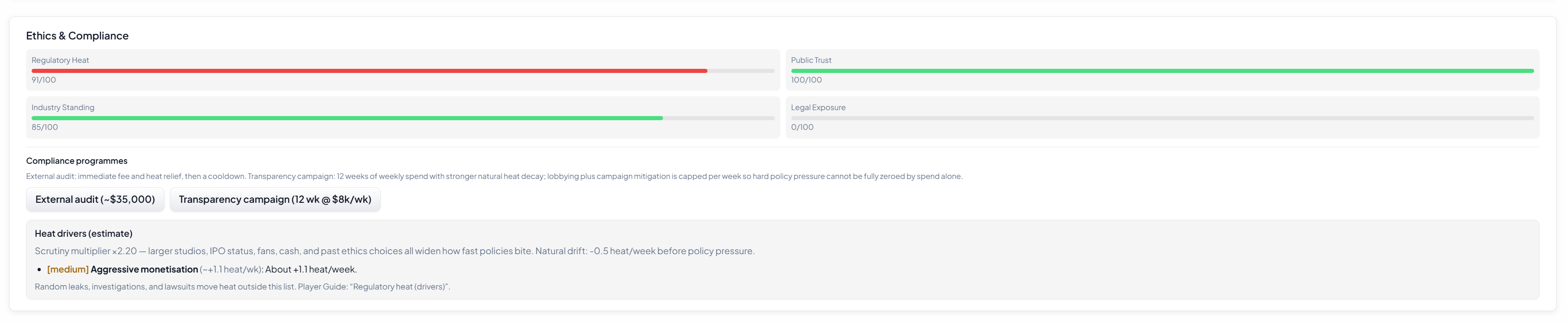
Player Guide — article “Regulatory heat (drivers)” for the same concepts in prose.
What to look for: Named drivers with rough weights so heat feels less like a black box.
Systems and parity
Golf — placeable decor / feature tiles
Go to: Empire → Golf Club → Course (hex builder).
What to look for: Decor / feature tiles are placeable (with a visible budget), while routing still follows the base hex layout. Save/load keeps the extra layer.
Sequels — copy the parent game’s design in one pass
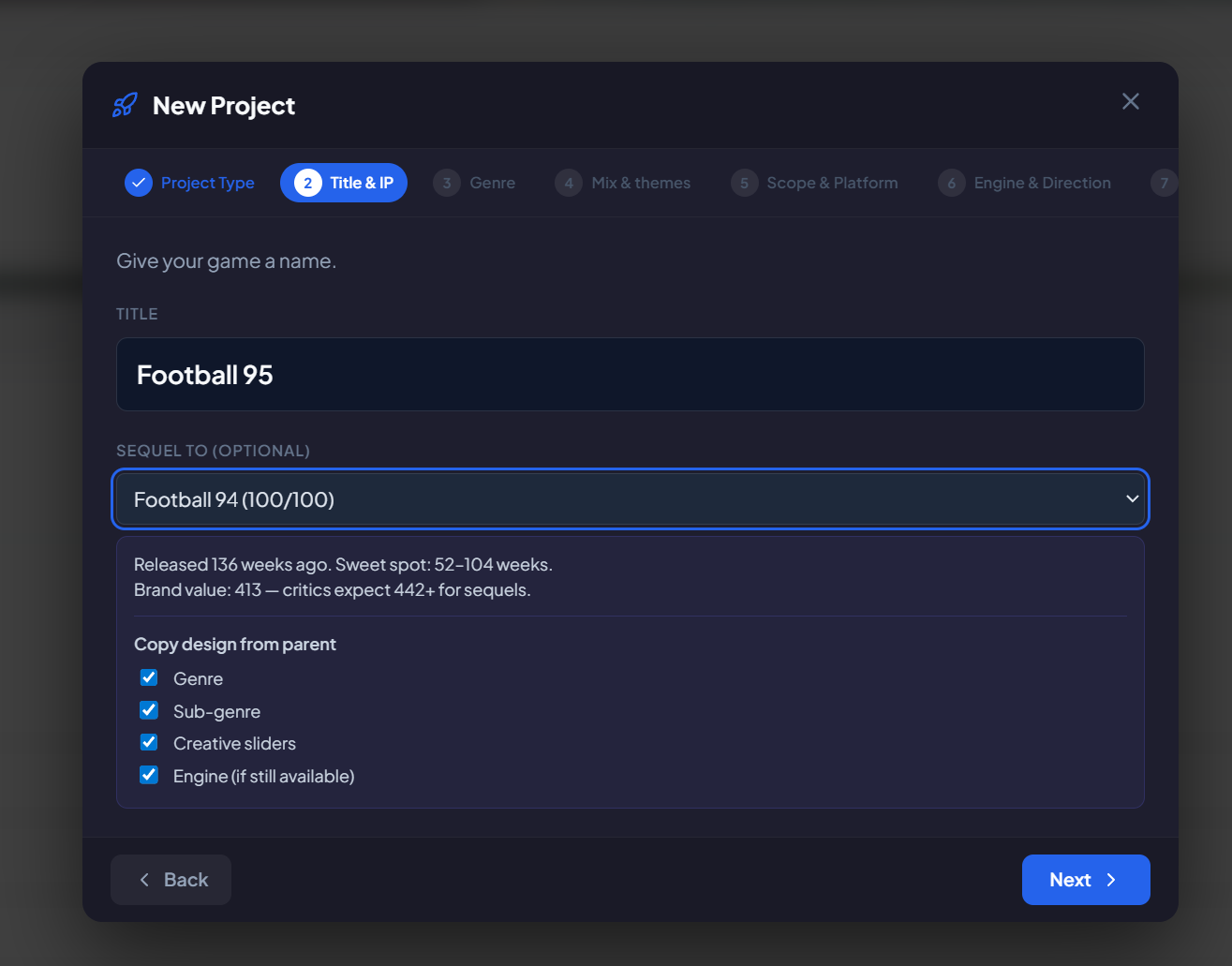
Go to: Projects (from the left rail under Projects).
When: Starting or editing a sequel tied to a parent title.
What to look for: Copy design from parent with checkboxes for genre, sub-genre, creative sliders, and engine (when still available).
Offices — upgrade every site; more than one office per country
Go to: Studio → Company → scroll to Offices.
What to look for: Upgrade this office on each listed office (not HQ-only). Open office can add another site in a country you already use, with costs and hire routing updated accordingly.
Cover art — your own PNGs on desktop + easier layout

Go to: Studio → Trophy Room or Projects → open a project and launch the cover art builder (where you edit layers / ART).
In the builder, My PNGs (desktop) — path is under app data in a cover-user-assets folder; use Open folder, drop .png** files, then Refresh list.
Builder UX: Select an image or shape layer and use the white corner handle to drag-resize on the canvas; fine X/Y remains in the properties strip below.
Culture — ongoing profit-sharing
Go to: Studio → Culture → Cultural direction.
What to look for: Ongoing profit-sharing — a persistent intensity slider with weekly payroll cost and a small morale upside (and spend reflected on culture-related financial lines).
Regulatory heat — things you can do, not only wait
Go to: Studio → Company → Ethics & Compliance → Compliance programmes.
What to look for: External audit (up-front cost, heat relief, then a cooldown) and Transparency campaign (multi-week weekly cost with stronger natural decay). Help copy notes that lobbying + campaign mitigation is capped so extreme policy pressure cannot be spent away entirely.
HR depth — design for later
Note for players: There is no new HR incident sim in this bundle; groundwork is documented for future improvements though.
Community — smarter “sequel demand” events (J1)
Go to: Games → Community (over the campaign).
What to look for: Sequel demand-style events should not nag for a sequel that is already released or already in development.
Quick navigation cheat sheet
If you care about… | Start here |
|---|---|
Heat breakdown | Home → Dashboard (expand Driver estimate) or Studio → Company → Ethics & Compliance |
Spend on compliance | Studio → Company → Ethics & Compliance → Compliance programmes |
Golf loop / hex decor | Empire → Golf Club → Course |
Mid-season racing stats | Empire → Racing Team |
Engine programs / flagship | Games → Engine Lab |
Shipped game tags | Games → My Games → Game Record |
Sequel inheritance | Projects (sequel flow) |
Offices | Studio → Company → Offices |
Cover PNGs + resizing | Studio → Trophy Room or Projects → cover builder; desktop folder cover-user-assets |
Profit-sharing knob | Studio → Culture → Cultural direction |