
This update is about deeper game projects, new genre options, proper software product, and, a built-in Home OS layout designer so you can shape how your console’s dashboard feels once the online service is live.
Update to Game builder — Mix & themes
Clearer wizard copy: genre vs theme vs optional setting / mechanics / flavour, plus a “game so far” summary on the Mix step.
Help & Player Guide distinguish Recipe lab (Projects) from Mix lab (Progression) so you know where to experiment vs unlock.
Six new mix tags (Arcade Pulse, Dungeon Crawl, Highway Run, Platform Hop, Score Chase, Snap Session) with icons, tooltips, era bias, and pair bonuses.
More to come in future updates.
Update - New genres
Racing, Fighting, and Adventure are fully hooked into demand, regions, covers, reviews, wizard flows, and competitors.
Genres without bespoke milestone tables still get safe action-style milestones so nothing gets stuck.
Update - Software products (non-game apps)
Software sits alongside games with expanded categories and monetisation, wizard + quick-create parity, sim handling for demand/milestones, dedicated milestones, and clearer Game Record copy.
More to come on this in future updates.
Console Home OS layout (online era)
Once your console is in the online-service era, you can open a Home OS, layout strategy tool from hardware: pick blocks, stack and reorder them, choose an OS philosophy, tune cosmetic colours, and see live preview with position weights (what matters most at the top of the stack).
What you get in first iteration:
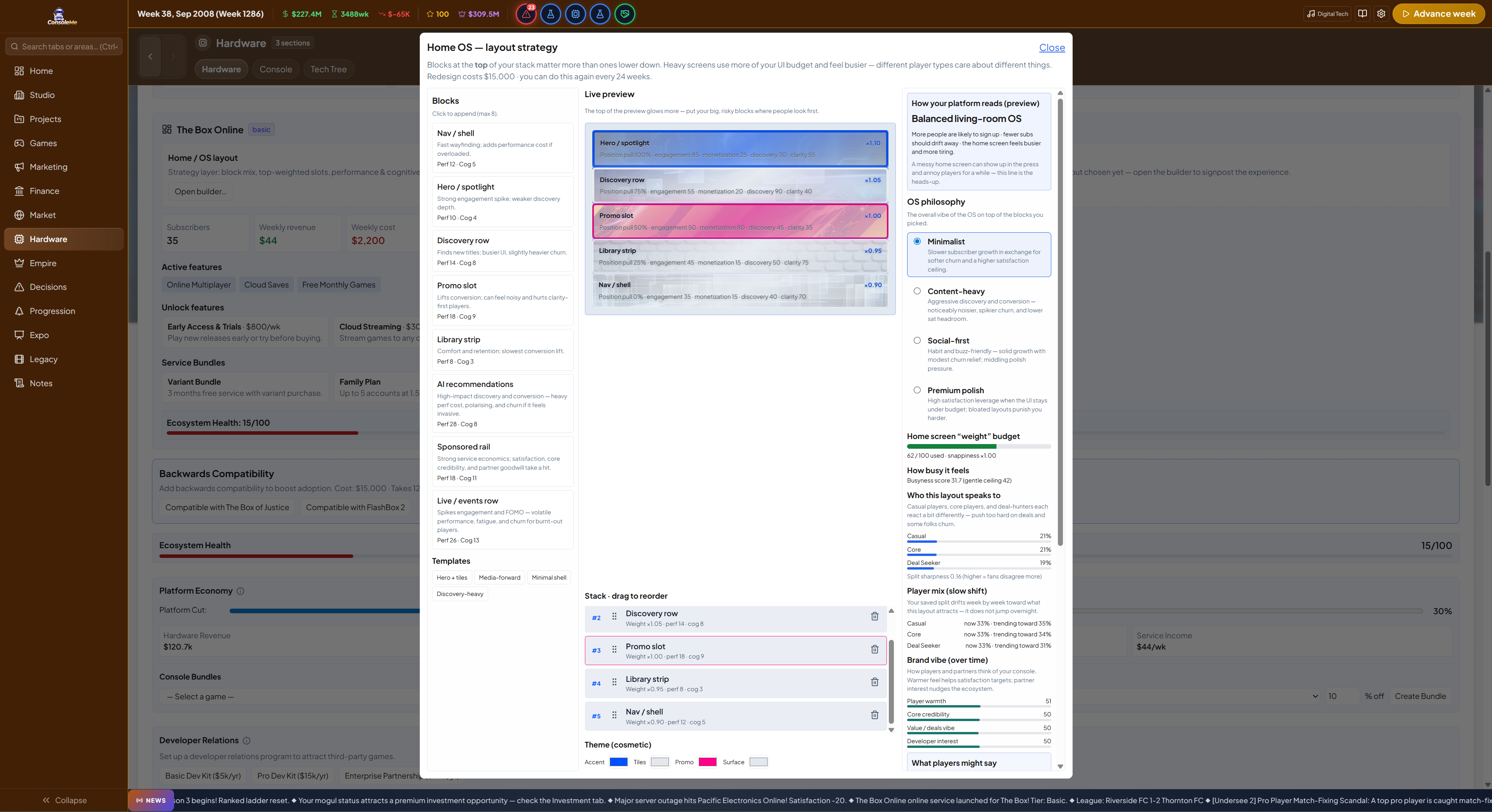
Live wireframe preview with block art, attention-style emphasis (stronger glow / brightness toward the top of the stack), and philosophy-specific visual tone on the preview (minimalist / content-heavy / social-first / premium)—same blocks, different feel.
Readable UI — copy is written for players (happiness bar, cancellations, player mix, plain summaries), not internal jargon; layout summary shows tags (philosophy + block names), not raw codes.
Theme-safe text — cosmetic background colours won’t strand you with unreadable text.
Motion — smooth reorder/add/remove; Apply plays a short full-preview refresh before the modal closes so the change lands with impact.
Cost & cooldown on redesign; small capped effects on subscribers and satisfaction in weekly online-service processing (the sim rules stay bounded—this is the new surface to express your platform’s vibe).
Access via your console detail page (Hardware -> Hardware -> Click on your console -> Look for online services section (ensure you have online service) and then press ''Open Builder"
Thanks for Playing!
ConsoleMe Team