
Directors,
Update 1.1.2 is now live for both Realindustry and the demo.
This is the update I promised a little while ago: a rebuilt Automation Board, smoother scheme editing, building favorites, building and recipe hiding, achievement fixes, new mining recipes, and improvements to the things you interact with every day.
Your feedback since launch has shaped almost every part of it. From fewer unnecessary clicks to clearer production chains and serious automation and save fixes, this is a substantial update. I hope it brings Realindustry much closer to the game you want it to be.

Automation Board 2.0: understand what your industry is actually doing
Building cards now show inputs, outputs, electricity use, and scheme status together: working, short of resources or power, waiting for synchronization, or resting. Partially blocked schemes can show both their working and waiting branches.
Use Needs attention to find shortages and errors, or Hide stopped schemes to focus the overview. The opening button and compact strip also flag problems in enabled schemes.
You can now compare what a scheme could produce with what it has actually produced. Nominal rates estimate capacity; measured rates use completed automation operations over the last 1, 5, 15, or 30 minutes. See whether production is keeping up with its plan.
Select a resource to open Resource connections: a movable, resizable window with producers, consumers, recipes, rates, shared stock, and balance. It can estimate stock-depletion time when measured automated flow is negative. Open a related scheme or jump straight to a production block from there.
Resource graphs show measured production, consumption, and inventory over time. Alphabetical flow sorting keeps lists stable as rates change, resource columns scroll independently, and summary indicators can be hidden.
Existing saves begin collecting new measurement history during play after updating. Conditional schemes still have estimated nominal rates; resource connections describe shared inventory rather than direct building-to-building transfers.
Automation editors wherever you need them
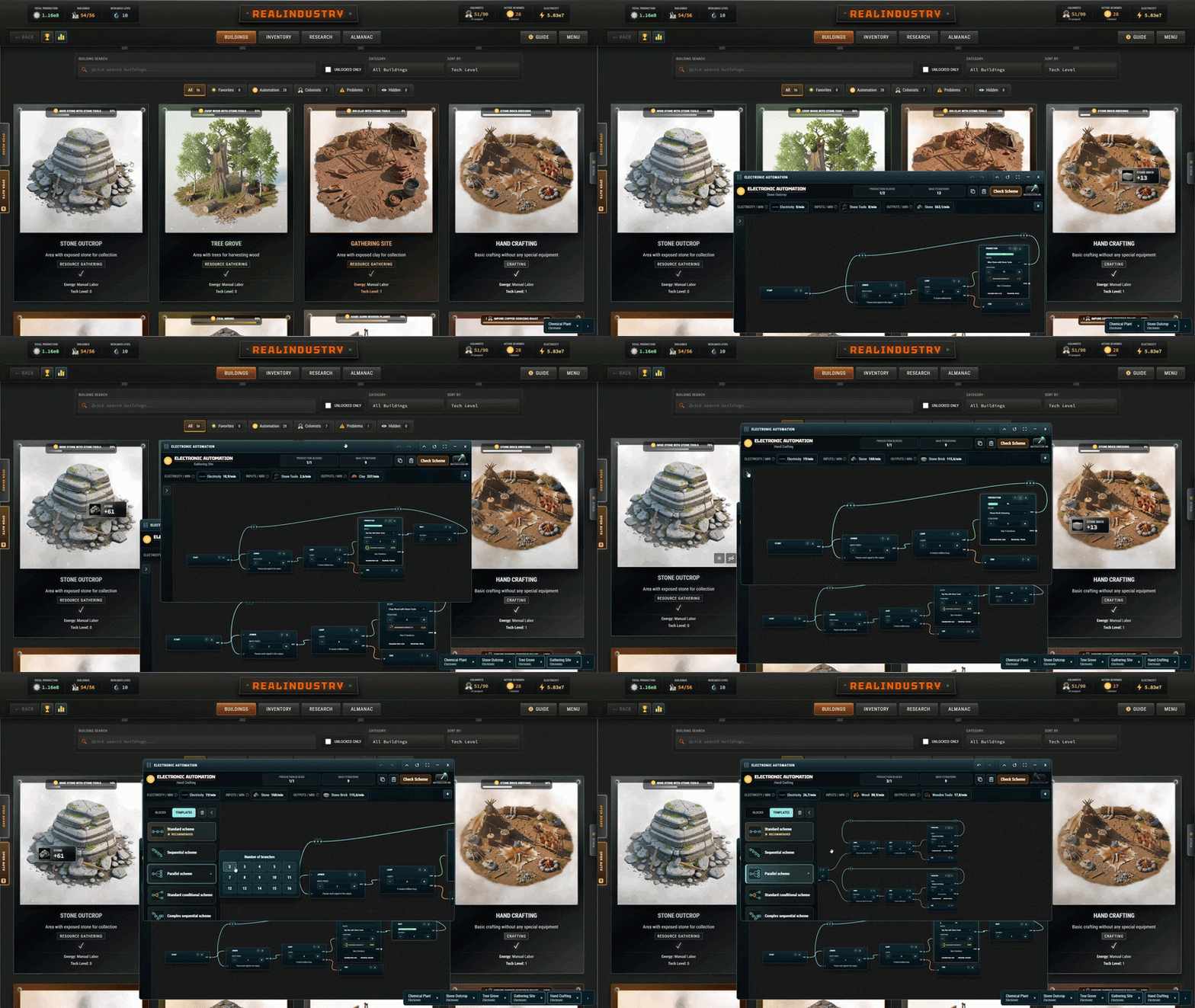
The new automation editor window manager lets you open schemes from the Automation Board, resource connections, production interfaces, and the automation progress indicators in the Buildings list. Managed scheme tabs remain available as you move between game screens.
Keep two editors visible at once. Opening a third minimizes the oldest into its tab, preserving its draft, undo history, graph view, selected blocks, and layout. Restore it to continue where you left off. Reopening an existing scheme brings its editor forward.
Compact layouts and collapsible controls give the scheme more room. The dock can shrink to a counter, and keyboard actions go to the foreground editor.
Editors opened from a building's production screen save and close when you leave that building. Minimize one first if you want to keep it in the manager and return to it from another screen.
Recipe and resource dropdowns now have search, occupied ports are clearer, finite loops show their progress, and clearing or replacing a populated scheme asks for confirmation. Parallel templates also let you choose 2–16 branches, with the normal staffing, slot, and power requirements still applying.

Achievement fixes: Minimalist and Achievement Hunter
Minimalist now asks you to complete a Tier 5 research while holding no more than 80 different resource types with positive stock, checked after paying the research cost. A large stack of one material counts as one type, and exactly 80 types qualifies.
Already unlocked achievements stay unlocked. Older saves recorded total item quantities rather than resource-type counts, so they cannot retroactively prove the new condition. If Minimalist is still locked, complete an eligible Tier 5 research after this update, in a new playthrough if you have already completed them all.
Achievement Hunter now combines achievement history across all playthroughs, including confirmed Steam achievements and ending achievements. You no longer need mutually separate playthrough results to exist in a single save. That history is kept separately from individual saves and can accumulate locally while Steam is unavailable, then synchronize when it returns.
Keep your building and recipe lists useful
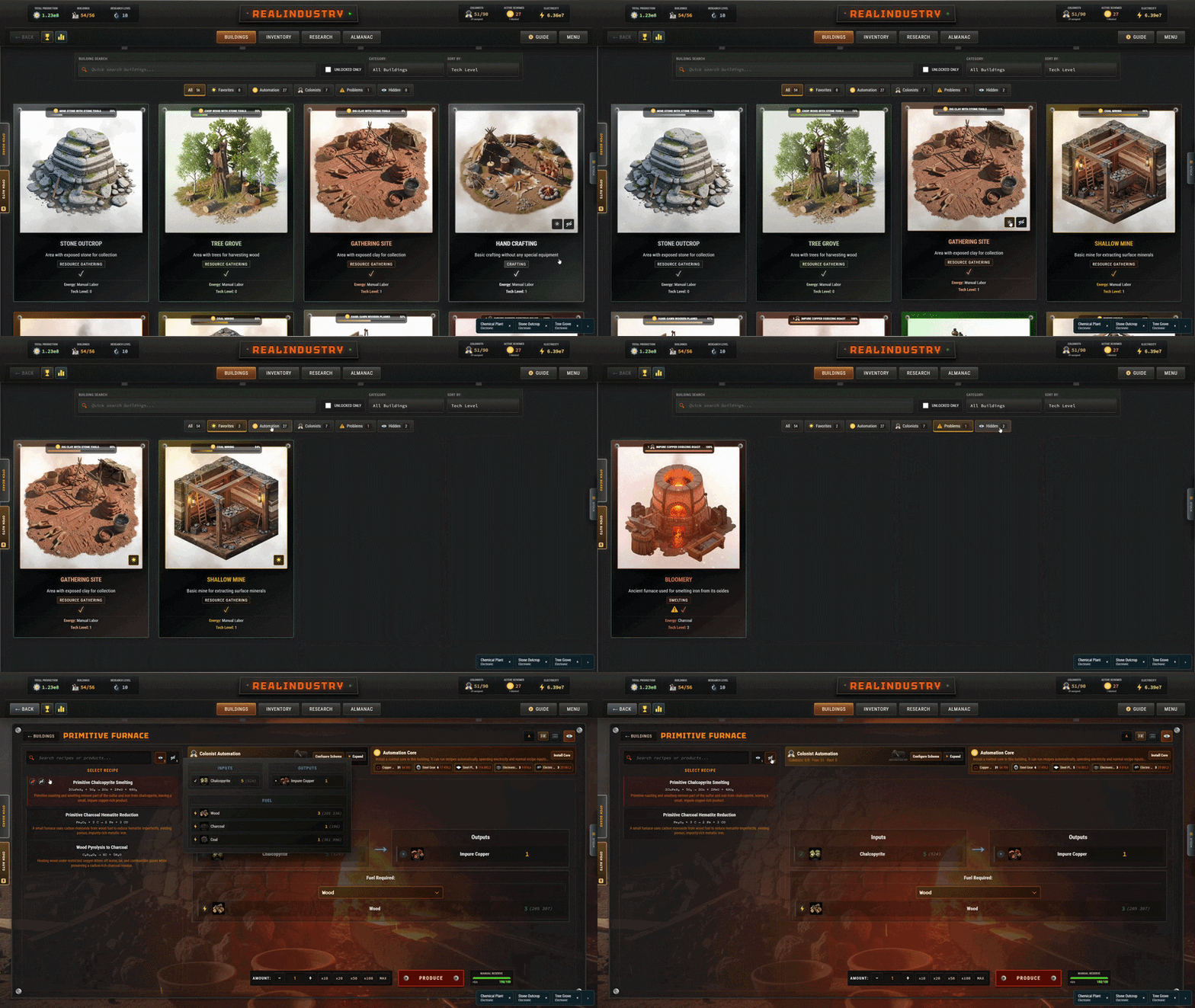
You can now mark constructed buildings as Favorites and reach them through a dedicated view. You can also hide buildings you no longer need in your everyday list and restore them from Hidden. Hiding a building leaves its production running.
New Automation, Colonists, and Problems views help you find active work and shortages. Colony progression sorts by construction and unlock order; favorites lead the technology and alphabetical sorts. Your filters are remembered.
Recipes have their own Visible and Hidden views. Hide an obsolete recipe to remove it from routine navigation and recipe suggestions, then restore it whenever you need it. Existing automation keeps its assigned recipes. Each view remembers its own selection, and hiding every recipe still leaves a clear route to restore them.
Resource lookups now show fuel uses, recipe tiers, and automated recipes, with tier-sorted results. Recipe search finally stays in place when you select a result.
New ways to supply coal and limestone
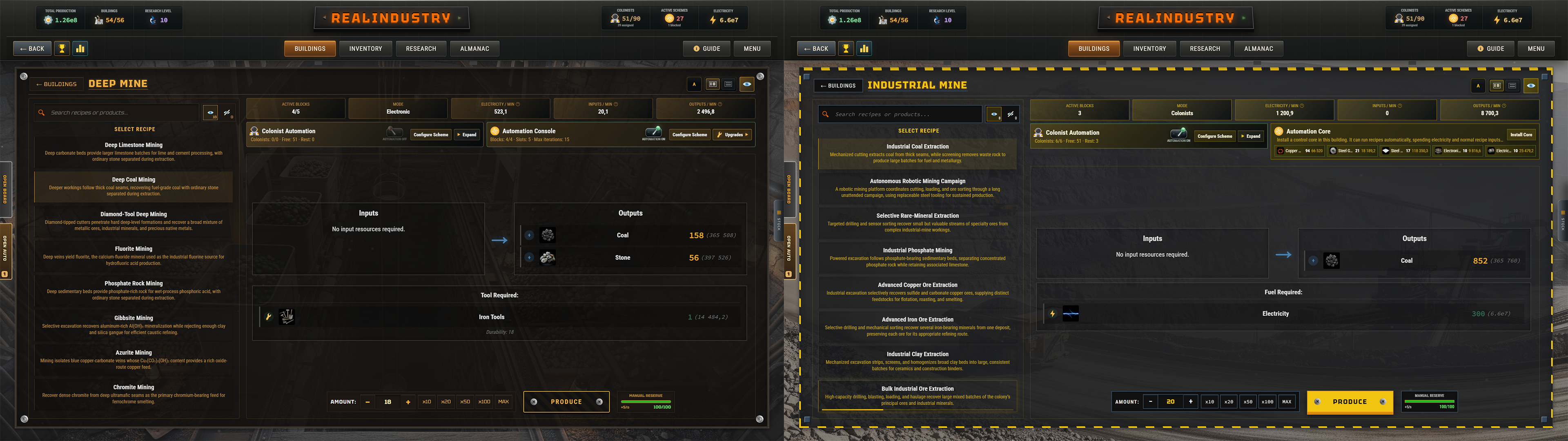
Three new recipes fill gaps in mining progression, and all three are available in both builds:
Deep Coal Mining: 6 Coal and 2 Stone per iteration in the Deep Mine, using Iron Tools.
Deep Limestone Mining: 6 Limestone and 2 Stone per iteration in the Deep Mine, using Iron Tools.
Industrial Coal Extraction: 30 Coal per iteration in the Industrial Mine, using 15 Electricity.
They unlock through the corresponding existing mining research. The full game now has 357 recipes, and the demo has 152.
Serious fixes and the small details that matter
This update fixes a serious automation bug that could multiply signals indefinitely in certain branching schemes. Shared timed blocks and simultaneous arrivals now behave consistently, duplicate tasks already present in saved schemes are consolidated, and runaway execution has stronger safeguards.
Save storage now cleans redundant copies, exports compact archives by default, and shows estimated usage with tools to clean old backups after exporting. Current saves and unique valid recovery copies are preserved. Errors distinguish local-storage limits from a full disk, and large healthy saves no longer trigger misleading warnings.
Disabled Produce buttons explain what is missing, efficiency suggestions respect batch limits, hotkeys stop interrupting typing, idle warnings have their own setting, Almanac scrollbars work properly, and tooltips stay stable during colony updates.
The demo also has a visible completion objective and Registry progress, updated links to the released full game, and restored Project Planner tutorial voice lines.
The complete list is below.
Full changelog
Automation Board and production analytics
Rebuilt the Automation Board overview around building cards that show production, consumption, electricity use, and scheme status together.
Configured schemes remain visible when stopped, waiting, resting, or blocked, making it easier to inspect the whole automation setup.
Added clearer status descriptions for working schemes, resource and electricity shortages, colonist rest, synchronization waits, missing Start blocks, unavailable recipes, and instant-loop errors.
Added a partial-operation status for schemes with some branches working while others are waiting.
Added a Needs attention filter for resource shortages and scheme errors. Intentional waits and colonist rest are treated separately.
Added Hide stopped schemes. This saved display preference keeps enabled schemes visible while they wait, rest, or encounter problems, and does not change flow totals or resource connections.
Improved the board's opening control with a gentle pulse and an amber warning with a problem count when enabled schemes need attention. The compact strip also shows these problems.
Added measured production and consumption rates based on completed automation operations, alongside nominal scheme estimates.
Added measurement periods of 1, 5, 15, and 30 minutes, available on the board and in compact-strip settings.
Shared the selected measurement period with building production counters, resource connections, resource balances, depletion estimates, and measured resource graphs.
Measurements use the save's play clock, so pauses and reloads do not add unrelated real-world time to production-rate calculations. While a measurement period fills, rates use the shorter interval collected so far.
Added a movable, resizable Resource connections window showing automated producers, consumers, relevant recipes, shared inventory, estimated scheme balance, and measured balance.
Resource connections show each consumer's share of estimated demand and an approximate stock-depletion time when the measured automated balance is negative.
Selecting a resource highlights related building cards. Building and recipe buttons in the connections window open their corresponding automation editors; shortage links can focus the relevant block.
Producers and consumers scroll independently in the connections window, which sits outside the board's scrolling list. Closing or minimizing the board closes the connections window.
Standardized building-card sizes. Production and consumption columns show three resource rows at once and scroll independently to expose additional resources.
Kept the total-flow panel above the scrolling building list and expanded it by default.
Added saved sorting by throughput or alphabetical order, shared between the board and compact strip. Alphabetical order remains stable as rates change.
Added an option to hide or show the board's summary indicators.
Added resource-history graphs with measured production and consumption on one axis and total inventory on the other. Inventory includes manual production and other resource sources and uses.
Added a searchable resource picker with hover tooltips for resource-history graphs.
Saved measured history for each measurement period and compacted older samples to keep history storage bounded. Existing saves begin collecting the new measurements after updating; existing one-minute resource history remains usable where present.
Retained aggregate estimated scheme-flow history alongside the new resource graphs, with the existing 10-minute, 1-hour, 10-hour, 100-hour, and 1,000-hour viewing ranges.
Added explanations distinguishing nominal estimates, current calculated flow, and measured flow. The editor shows potential scheme flow, the Inventory shows flow calculated from current conditions, and building production consoles show measured rates.
Building resource lists now describe the current scheme instead of retaining unrelated resource types from earlier recipes in cumulative statistics.
Automation editor windows and workflow
Added a shared automation editor window manager, with an Open schemes dock that remains available across game screens.
Open schemes directly from the Automation Board, resource connections, a building's production interface, or its automation progress indicator in the Buildings list.
Keep two editor windows visible at once. Opening or restoring a third automatically minimizes the oldest visible editor to its tab.
Minimized editors preserve their draft, undo history, graph view, selected blocks, window position and size, window mode, grid snapping, and expanded or collapsed panels during the session.
Reopening the same building and automation mode brings its existing editor forward instead of creating a duplicate.
Added direct navigation to a specific block from resource-connection recipes and scheme problems.
Added a collapsible editor dock that can shrink to an icon and an open-scheme counter; its collapsed preference is remembered.
Added compact editor layouts for quick access, with expandable flow summaries, block palettes, and bottom controls. Editors opened from production start with the fuller layout.
Refined floating editor sizing and diagonal placement of additional windows. Corrected the desktop application's minimum editor width so header controls fit properly.
Pending edits are saved when an editor closes or is automatically minimized, including changes made before the normal autosave delay completes.
Editors opened from a production screen save and close when leaving that building unless first minimized into the manager. Minimized editors remain available after changing screens.
Keyboard actions, including selection, deletion, and Escape, now affect the foreground editor. Clicking or restoring another editor changes which window receives these actions.
Added confirmation before clearing a populated scheme, replacing it with a template, or pasting another complete scheme over it.
Added search to recipe and resource dropdowns in the editor. Recipe search also matches associated inputs, outputs, fuels, and tools; resource search includes names, descriptions, categories, and chemical formulas.
Search ignores letter case and accents, focuses the search field when the picker opens, and supports Escape to dismiss it.
Occupied input, output, and reroute ports now show their occupied state and prevent an additional connection from being attached to the same port.
Finite Loop blocks now display current pass counts and progress, including active and blocked states. Finite loops remain visible at zero progress before execution reaches them.
Added an explanation when a colonist Production block exceeds 10 iterations: larger closed-cycle batches can require more colonists and rest, while independent parallel cycles are often more efficient. Electronic automation does not have this rest penalty.
Fixed recipe and resource hover tooltips disappearing during frequent automation updates, both in managed windows and directly opened editors.
Improved copy, paste, and clear controls and retained their labels and keyboard accessibility in compact layouts.
Automation synchronization, templates, and reliability
Fixed a serious bug that could cause signals to multiply indefinitely in schemes with shared timed blocks and branching retry paths.
Production, Wait, and Rest blocks now allow only one active execution per block. Additional arrivals while the block is busy no longer create duplicate timed work.
Coalesced equivalent simultaneous signals at instant blocks while preserving distinct Barrier inputs, reroute directions, and finite-loop contexts.
Processed automation events in simulation-time order, including completion and subsequent reactivation of a timer within the same update.
Added recovery for duplicate timed tasks already present in saved schemes, preserving the task with the most advanced progress.
Improved instant-loop detection across splitter branches and added bounded work and queue safeguards against runaway execution. A scheme blocked by the loop guard stays blocked on later updates until its execution is reset.
Updated nominal-rate estimation to use the same shared-timer and signal-coalescing rules as runtime execution.
Added Latched mode to Barrier blocks: each connected input stores at most one signal, repeated arrivals at that input are ignored, and all stored inputs reset after the Barrier fires.
Kept Buffered mode for synchronization that should queue extra arrivals for later sets.
Newly placed Barriers and Barriers in newly applied built-in templates default to Latched mode. Existing or pasted legacy Barriers without a mode retain Buffered behavior.
Added live Barrier input indicators showing whether a signal is stored. Hovering or focusing an input explains the source block, source output, stored count, and synchronization behavior.
Clarified that disconnected Barrier inputs are not required for synchronization.
Updated Barrier guidance to explain that a latched input remembers an earlier condition result. Schemes requiring all conditions to be true at the moment of production should recheck them immediately before production.
Added a 2–16 branch selector for parallel colonist, parallel electronic, and parallel conditional templates, replacing the fixed four-branch setup. Normal staffing, production-slot, and power requirements still apply.
Templates with more than eight branches automatically use cascaded Splitters, preserving the existing eight-port limit per Splitter.
Added an anchored branch-count picker that stays within the screen and follows palette scrolling.
Improved block descriptions, especially the distinction between a Splitter copying a signal, a Joiner passing each arrival onward, and a Barrier synchronizing inputs.
Achievements
Fixed and reworked Minimalist: complete a Tier 5 research with no more than 80 resource types that have a positive inventory amount.
Minimalist counts different resource types, rather than adding up all units. Exactly 80 types qualifies, positive fractional amounts count, and zero-quantity inventory entries do not.
The Minimalist snapshot is recorded when research completes, after its cost has been paid. Reducing inventory later does not retroactively qualify an earlier research completion.
Previously unlocked Minimalist achievements remain unlocked. Old completion records that only stored total units cannot establish the new type count; an eligible Tier 5 research must be completed after the update, in a new playthrough if necessary.
Fixed Achievement Hunter to use cumulative achievement history across all playthroughs and confirmed Steam achievements.
Achievement Hunter requires every other achievement, including ending achievements, and excludes itself from its own requirements.
Added achievement history stored separately from individual saves. Starting a new game or deleting one save slot does not reset that history.
Merged achievements from loaded older saves, locally recorded ending progress, the desktop file mirror, and confirmed Steam history instead of overwriting one history with another.
Added checks at startup, save synchronization, Steam-stat updates, and new achievement unlocks, allowing any final required achievement to complete Achievement Hunter.
Local progress can accumulate while Steam is unavailable and synchronize when Steam returns. Old progress absent from saves, local history, and Steam cannot be reconstructed automatically.
Achievement Hunter is now an account-wide completion achievement, excluded from the current playthrough's achievement list, counters, and production bonuses. Its former run-specific +100% output bonus was removed.
The demo does not award Achievement Hunter. Updated descriptions avoid revealing story details.
Building favorites, visibility, and navigation
Added a star action to mark constructed buildings as Favorites, with a dedicated Favorites view. Favorites sort first in Tech Level and Alphabetical modes.
Added a hide action for constructed buildings and a dedicated Hidden view for restoring them. Hiding a building keeps its production and automation running.
Added All, Favorites, Automation, Colonists, Problems, and Hidden views, each with a building count and an explanatory tooltip.
The Colonists view identifies buildings with colonists assigned to a running program; the Problems view identifies active programs blocked by shortages, power, or execution problems.
Added a Colony progression sort: built buildings in construction order, followed by buildable buildings in unlock order, followed by locked buildings by technology level.
Improved category filters and retained saved category, view, sort, and unlocked-only preferences when loading or returning to the Buildings list.
Building search can find hidden buildings for recovery. Hidden buildings are excluded from quick-open suggestions and Enter-based quick opening.
Explicit navigation can temporarily reveal a filtered or hidden building without replacing saved list preferences.
Added clearer empty states and a button to reset restrictive filters.
Building automation progress now shows a percentage, recipe information, an editor action, and the total assigned colonist count where applicable.
Favorite and visibility controls operate without entering the building. Hiding removes its favorite flag; favoriting a hidden building restores it.
Fixed navigation controls consuming Enter or Space as global building-grid shortcuts, improved card visuals after construction, and removed the building-image hover zoom.
Recipe visibility, production, and resource lookup
Added recipe hiding and restoration, with separate Visible and Hidden views and recipe counts in the production interface.
Each visibility view remembers its own selected recipe. Hiding the selected recipe chooses a visible fallback, and an all-hidden list explains how to restore recipes.
Normal production navigation skips a remembered hidden recipe. Explicit navigation from an existing task can still reveal that hidden recipe for inspection.
Recipe visibility is respected by editor recipe choices, new-block defaults, quick templates, Almanac recipe lookups, quick resource navigation, and Research Tree suggestions. Recipes belonging to hidden buildings are also removed from those suggestions and lookups.
Visibility settings filter navigation while preserving existing automation schemes and their assigned recipes.
Fixed recipe search being cleared when selecting another recipe. Search now resets when changing buildings; keyboard recipe navigation follows the current search and visibility view.
Added live automation progress bars to recipe cards, including resource and electricity waiting states.
Added a tooltip explaining why Produce is unavailable: missing recipe or fuel selection, invalid amount, cooldown, batch limits, manual-reserve limits, and insufficient resources, fuel, or tools.
Shortage explanations show required, available, and missing quantities. If one resource is used in several roles, the tooltip explains the combined cost.
Unified production availability checks and actual spending so a resource used as both an input and fuel or tool is charged correctly. Resource availability is rechecked immediately before production.
Blocked-production information and button availability update as inventory, cooldowns, and the manual reserve recover.
Improved tool-efficiency suggestions to respect both batch limits and the available manual reserve. A smaller efficient batch is suggested when appropriate; when no fully efficient batch fits, the warning explains why and hides the correction action.
Corrected the amount-increase control and held-button behavior so they stop at the current production limit.
Added a hint explaining how to view a building's background: hide the interface, then keep the mouse still without clicking for 2.5 seconds to hide the remaining interface controls; move it to bring them back.
Resource recipe lookup now includes fuel uses, marks them As fuel, and combines ingredient and fuel amounts when the same resource serves both roles.
Added Tier and Automated labels to recipe rows in quick resource lookup.
Sorted producing and consuming recipes by unlock tier in the Almanac and quick resource navigation, retaining source order for equal tiers.
Fixed quick resource navigation being replaced or closed by unrelated hover tooltips when moving the cursor outside its window and across other interactive elements.
Added live inventory amounts and resource value to Almanac lookup hover tooltips.
Preserved production resource hover targets while inventory and navigation callbacks update, keeping their tooltips stable during background production.
New mining recipes
Added Deep Coal Mining in the Deep Mine: produces 6 Coal + 2 Stone per iteration, uses Iron Tools with 18 iterations of durability, and requires no fuel.
Added Deep Limestone Mining in the Deep Mine: produces 6 Limestone + 2 Stone per iteration, uses Iron Tools with 18 iterations of durability, and requires no fuel.
Added Industrial Coal Extraction in the Industrial Mine: produces 30 Coal per iteration using 15 Electricity, with no tool requirement.
Added all three recipes to the appropriate existing mining research unlocks in the full game and demo.
Updated recipe totals to 357 in the full game and 152 in the demo.
Save storage, backups, and recovery
Reduced redundant save-storage usage by removing duplicate shadow copies and obsolete backup generations during startup and save writes.
New writes no longer create an identical shadow for each protected record. Previous-version backups are bounded so redundant copies do not consume most of the space available for current saves.
Automatic cleanup preserves primary saves and preferences, plus the best valid recovery copy of a missing or corrupt save, including recovery-only data that exceeds the normal backup budget.
Added more aggressive cleanup under storage pressure and one retry after a local-storage quota failure.
Separated local backup writes from the desktop file mirror so a failed backup write does not prevent the mirror from being updated.
Removed duplicate save-processing work that copied and parsed large records multiple times during a write.
Cleaned obsolete desktop file replicas on startup and through manual cleanup, preserving recoverable files if promoting them to a valid primary fails.
Deleting a save slot now also removes its backups, shadow copies, desktop replicas, legacy alias, and manifest entry, preventing recovery from reviving the deleted slot.
Export saves now creates a compact archive of current or recoverable records and settings by default.
Added Include old recovery copies in export for players who want all retained local backup generations in their archive. Exporting does not alter stored saves.
Both old full archives and new compact archives import without recreating redundant backup copies.
Added estimated storage sizes for manual saves, autosave, backups, shadow copies, and total storage.
Added Clean old backups, enabled after initiating an external save export. It preserves current saves and unique valid recovery copies.
Collapsed save-storage tools into a summary row by default, with expandable actions and size information.
Added distinct error messages for unavailable local storage, an exhausted local-storage quota, and a full storage disk. The local-storage quota is separate from free disk space.
Fixed a healthy large save collection incorrectly showing a storage warning simply because it exceeded the cleanup threshold. Health warnings now reflect a failed storage probe.
Updated the current manual-save slot only after its save record has been written successfully.
Improved Save and Load panel layout on small screens so storage tools and the scrollable save-slot list fit correctly.
General interface, demo, and documentation
Fixed global hotkeys taking priority over text fields, search boxes, editable content, selection fields, and hotkey-binding capture. Board hotkeys no longer bypass typing protection.
Added an independent Show idle warnings setting, separate from ordinary event and achievement notifications.
Suspended idle warnings while the game is paused by the menu or blocked by modal screens, tutorials, the intro, save loading, or difficulty migration, and reset the inactivity timer during suspension.
Fixed Almanac scrollbar visibility inside the page-flip layout, added an appropriate resource-list scroll area, and refreshed scrollbar geometry after layout changes.
Added a persistent Demo goal control with Registry progress, completion steps, and a completed state. Unlocking the demo's three Registry entries completes the objective; players can continue playing afterward.
Updated demo navigation and notices to direct players to the already-released full game instead of presenting it only as a wishlist destination.
Improved narrow-screen navigation wrapping to accommodate the demo objective and other header controls.
Restored the demo tutorial voice lines for opening and closing the Project Planner.
Updated guide text covering production flow, automation analytics, Barrier behavior, and save-storage tools.
Refreshed guide screenshots for the production interface, inventory, automation editor, and Automation Board.
Updated affected interface and game-data translations across English, Russian, Ukrainian, German, French, Spanish, Italian, Japanese, and Simplified Chinese.
What comes next
The next update will probably address the remaining reported problems, along with any new ones that turn up after 1.1.2. Its main focus, though, is planned to be new content.
Based on your feedback, I want to add several new power plants for fuels that currently lack power-generation options, particularly oil-based fuels and gas. That should give these parts of the production chain more purpose and give you more choices when supplying the colony with electricity.
I will share more when the update takes shape.
Thank you for making this update possible
Realindustry only launched on September 22, and it has already sold more than 2,500 copies, even after accounting for refunds.
For my first solo game, especially one as unusual as Realindustry, that is an enormous milestone. Thank you for giving it a chance, supporting its development, and giving me so much motivation to keep going.
I also want to thank everyone who has tested the game carefully, described problems in detail, shared saves and examples, and explained which parts of the interface made your work harder. Without that level of testing and feedback, I would probably never have found many of the problems fixed here on my own.
This update exists because you took the time to help. Please keep sharing what works, what still gets in the way, and anything unexpected you find in 1.1.2.
Thank you, Directors. I hope your next session feels smoother from the first click.
— AssemblyPrime