
Hello! 👋 Welcome to the first post on the DRAIN Devlog (development blog) from the PENKINTON team.
First, we'd like to introduce ourselves. We are Esaú and Vidal, founders of PENKINTON and creators of DRAIN. You could say we're both directors, but we're divided into so many roles that it's difficult to define just one. In terms of workload, Esaú handles the art, and Vidal handles the programming.
With that in mind, let's describe the Devlog a bit more.
As the name suggests, the Devlog will cover development. In this case, the development of DRAIN.
Here, we'll cover the game's progress since the last post, from a technical perspective, with the aim of being transparent with the community about our progress and to share knowledge and listen to suggestions for improving quality. It will also serve as a way for us to vent.
To be completely honest, we can't promise a posting schedule for this blog. With the demo release date just around the corner (April-May), our priority is finishing it. Even so, we'll do our best to publish at least one post a month.
Since this is the first post, we'll give a summary of what we've accomplished so far, followed by our plans.
Each section will be written by the person in charge of that section.
Art [Esaú]
Map reworks
(I hated the particle effects)
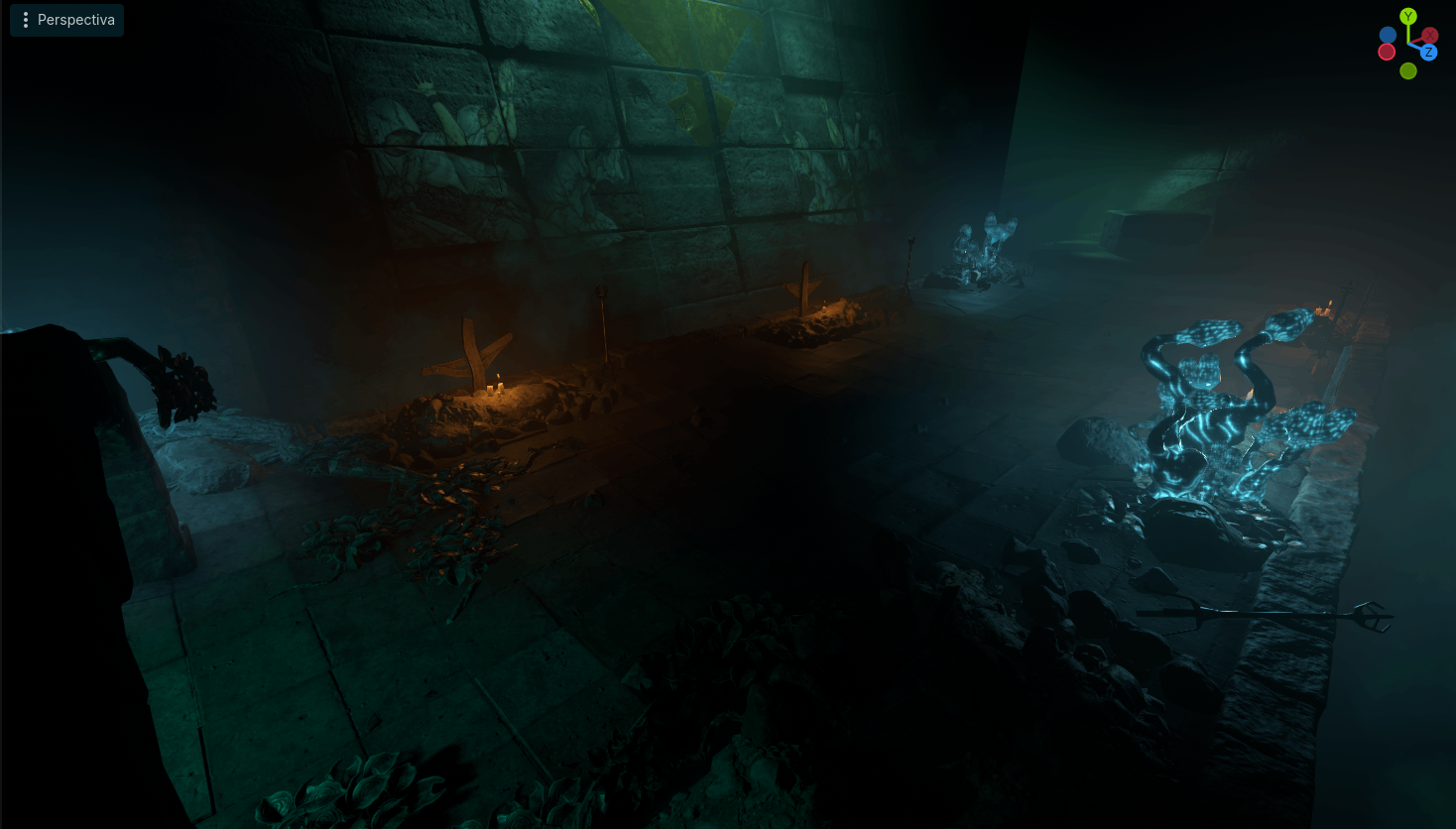
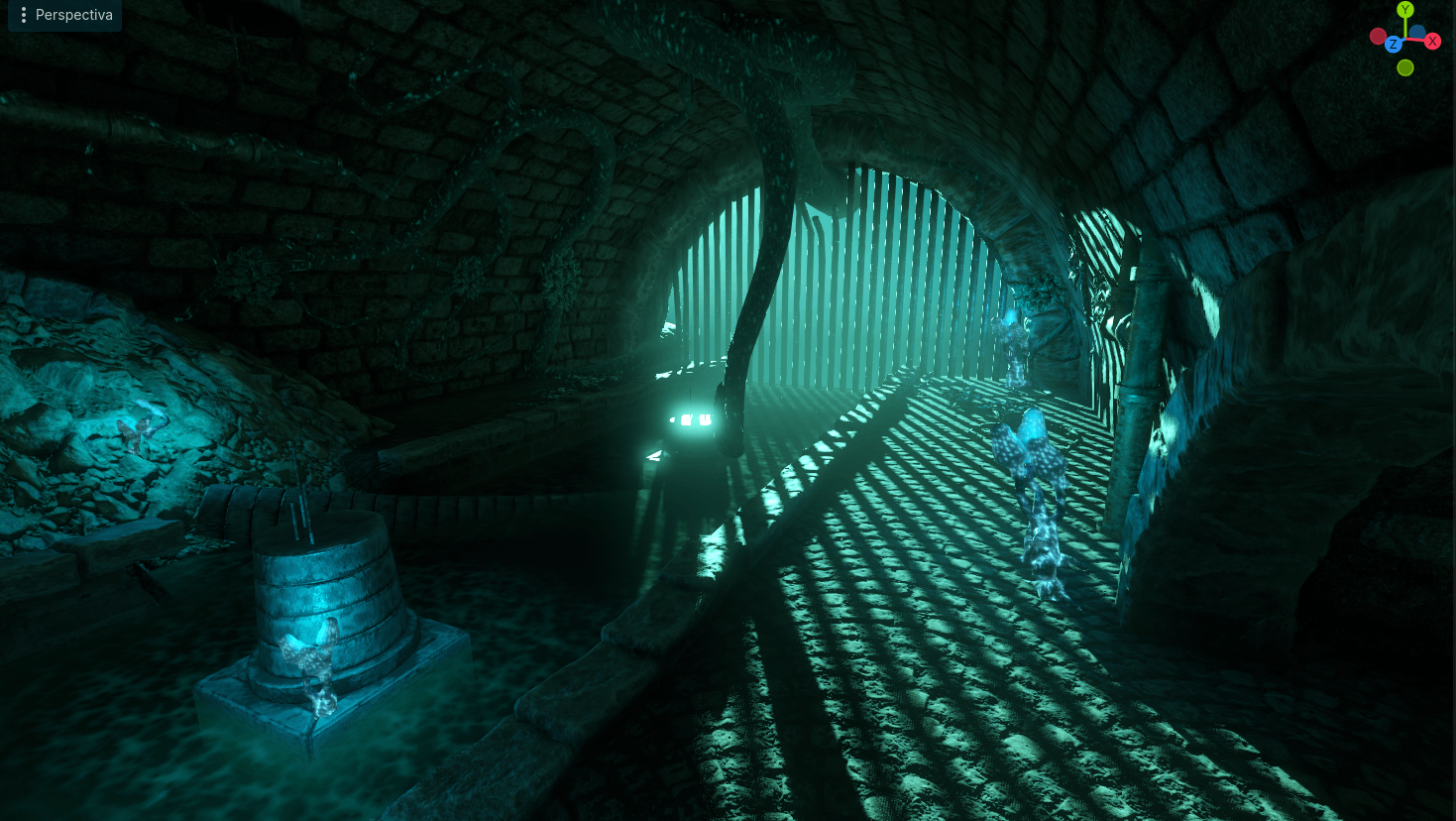
These changes I made during the rework of these maps include:
Texture changes
Model changes
Global illumination changes
Creation of new particle effects
Creation of new fire effects with Six Point Light shaders
General optimizations (although this area can still be improved a bit more)
Why did I decide to make these changes to maps that were already finished?
Well, simply because it didn't quite meet my own quality standards, I felt the textures and geometry weren't convincing with the art style I wanted for the game. I thought that to make the game look amazing, we needed to slap geometry everywhere, but I learned that good texturing is far more valuable than just slapping geometry on haphazardly (not to mention more optimized). In the most demanding scene, without using any upscaling, we're getting at least 150 fps on an RX 6600 at Ultra settings in 1080p. I learned to use software from Janga FX's Elemental Suite to create new fire shaders and improve the game's overall visual quality. This will undoubtedly improve not only the fire effects but also countless other volumetric effects in the future.
Why did I hate particle effects?
They sacrifice performance xD I had to experiment for a very long time to achieve a visual balance between decent and good performance.
What's next?
Well, basically, I'll finish the rest of the mapping for the demo in April, taking advantage of the new knowledge I've acquired.
Programming [Vidal]
There are many things I'd like to talk about from a programming perspective, but since this post is to give an update on the current state of the game, I'm going to focus on the most recent developments.
Combat
The concepts for the combat gameplay have been around for a year, but for one reason or another, they hadn't progressed beyond prototypes to something truly satisfying. While there's still a lot of polishing to do, what we've achieved in these last few weeks is a very solid foundation.
Actually, I started reprogramming this latest iteration about two months ago. The code from the previous version was decent. It was designed to be completely isolated from other systems, with the flexibility to change practically everything through parameters. For that reason, and because we hadn't yet finalized the details, the code ended up getting a bit too convoluted. At the same time, the gameplay still wasn't quite right, so it was a good time to redo it.
I started by modifying the existing code, but with a clearer vision, I quickly decided to reorganize everything. The variables and functions were moved to more logical places, allowing for some flexibility, but also establishing constraints. It might sound negative, but I actually envisioned these constraints as a way to keep the combat gameplay on the same path.
As I mentioned, the previous code was completely isolated from other systems. Now, characters store their combat information in their variables. The combat system simply takes those variables and uses them as needed, depending on each encounter. It might sound strange compared to other games, but it makes sense if you understand that exploration mode is completely different from combat mode.
Another interesting thing I'd like to talk about is context-sensitive time slowdown, such as during impacts. Although Godot has a variable for this (Engine.time_scale), it required some planning in both code and nodes. Some things needed to slow down but weren't, like fire effects, for which it was necessary to replace the TIME variable in their shader with a global variable manually updated based on "world" time, not engine time. Another issue was some timers, which were a bit tricky to detect, since the slowdowns are very brief and only some timers needed to be affected, not all of them. We might find more details like these, but it works well for now.
Animations
I'm referring to how to implement them, not how to create them. This is what took me the longest to figure out the best way to do it.
I'm talking about the AnimationTree. It's a robust system, but that very fact raised more questions for me. How should I implement different layers of independent animation within the same model? At the same time, some of them need to be blended. For example, the protagonist closes her hands to hold her daggers, but she also walks or fights; it's important to keep in mind that these can be different styles.
In short, they are sets of animations with layers upon layers. What I ended up doing is something like this:
The root where the different body parts merge (BlendTree)
The layer where states are exchanged between exploration mode and combat mode (StateMachine)
The exploration mode layer (StateMachine)
The layer where combat styles are exchanged (StateMachine)
One layer for each combat style (StateMachines)
Not to mention the code needed to access all these layers depending on the context. But this post is getting too long, and I'd like to vent about something else related to animations.
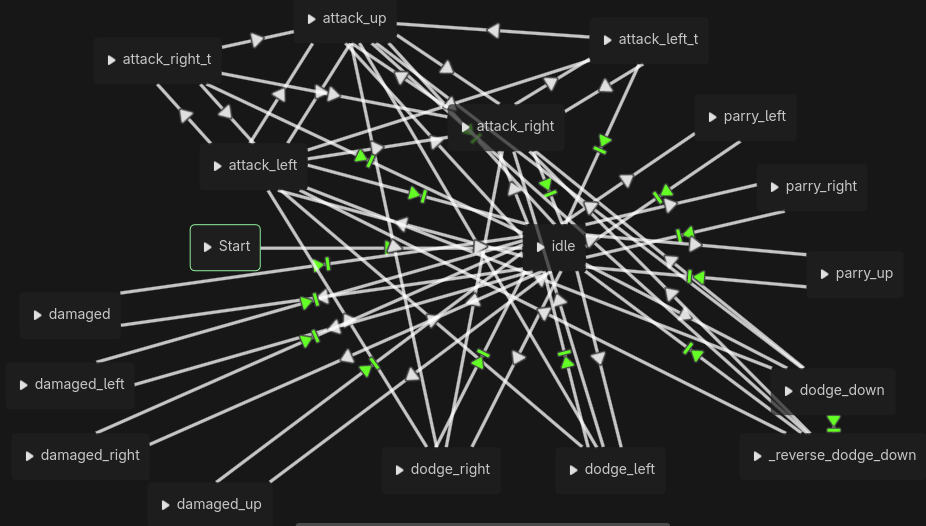
I've seen worse, and it should be possible to clean it up a bit, but many of these connections are used to achieve smooth yet reactive transitions. Animations are still missing, by the way.
People with good eye will have noticed that most connections aren't automatic. Initially, I tried to use the StateMachine's conditional and expression system as much as possible, but I realized it was forcing me to think more than necessary. It was more direct and simpler for me to handle this from the code, though perhaps not for others.
This leads to another topic I'd like to discuss, but again, this post is getting too long, so I'll leave it for future posts.
Tutorial
To wrap up with the last thing I'm working on, which is somewhat related to the issue of slowdowns, I had to implement a pausing system, but without pausing the entire interface.
Those with some experience in Godot will have already considered the node property for choosing the behavior when pausing the node tree. For the most part, achieving these pauses was a matter of planning which nodes should be paused, which shouldn't, and which should inherit this behavior. It wasn't as straightforward as it might seem, given the many global systems and resource load, but it wasn't difficult either.
The trickiest part is that during these pauses, instructions are displayed that react to the player's actions. This means that other systems, like the input manager for detecting button presses, must continue functioning fully, while others, like the combat system, must continue partially. This is because most timers, functions, and variables need to be paused, while the code that reacts to the player's actions must continue processing and detecting whether the action was successful. There was no magic bullet or anything like that. I had to organize the code so that it would continue to function independently of the tutorial, but still allow the tutorial to take over somewhat.
Once that was sorted, it was just a matter of programming each step of the tutorial. It wasn't fun, and I broke the combat in ways I didn't understand, but it works now.
What's next?
There are still some combat features to be programmed, and we're currently discussing the interface. My focus is on figuring out how to implement it. After that, I'll program the final part of the game's opening sequence.
Thank you so much for reading this far, and apologies for the long post. We're passionate about game development and wanted to share it with you, so please feel free to leave your questions, suggestions, and comments.