
It finally got done! An Item selector is here.
This has been such a highly requested feature, and I'm so excited to find out if it scratches that itch that I made a trailer for this update. Also because there is so much more, things like the wake of the ship now making waves, just has to be seen .. So here's a little trailer..
Item Library mode
Its a solid question, why did Shipshaper not ship with this core feature, a simple list to select items from. Well the answer is a long story, but the short of it. To do that, every item type needed its own placement mechanism. You dont want to drag a mast and then see all the rail loops or places where windows go.. You just want to drag it where masts go. The same for guns , you just wanna drag or place them where guns go, not where masts go. So its a circus of different modes.. Once you remove the organic freeform logic, you gotta replace it with something. And only after all your feedback and seeing how you use the game did the solutions present itself.
Also NO, THE OLD MODE STILL EXISTS... they can work side by side.;) 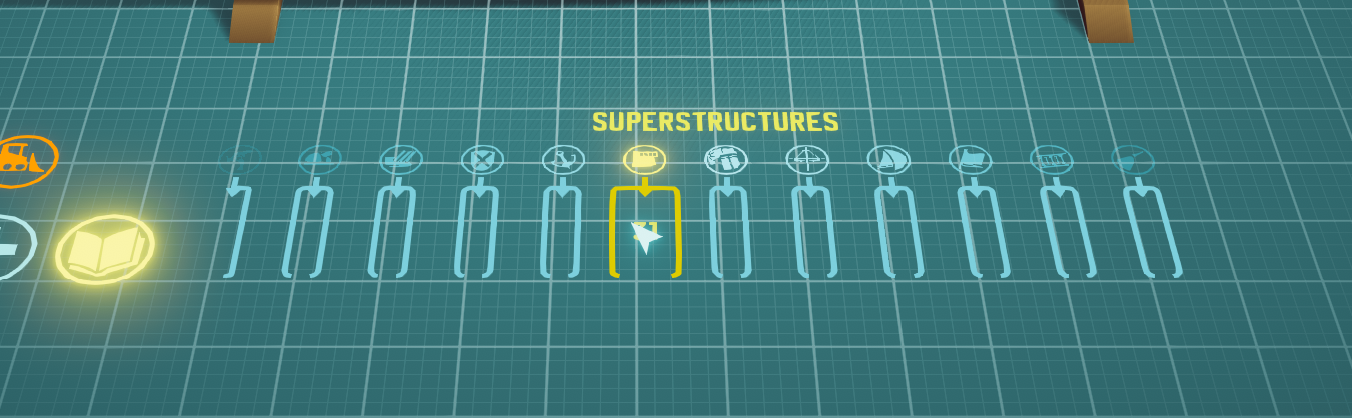 featured above the library itself. Every item in the game categorized.

Open up a category and scroll through every item , including a full color preview in the colortheme you are using. Some items have a little flavour text or explanation. Like how funnels boost your ship's speed.
A few notes:
1. Localisation, the naval terms cannot be quickly translated, they require the humans translators to work on them, and the speed I am releasing features cannot be matched by them.. So please have patience, I upload the new translations the moment I get them. I expect them later this week.
2. Early Access: Bugs may occur, please report them, if I am not sleeping , generally I respond and often fix in a few hours.. So post anything you spot , or would like to have..
3. The best way to get More out of Ship shaper is to leave a review and positively influence the algorithm, more is better. The better the game does, the longer I can keep working on it and the better it gets
The changes in full:
New Item Library:
very part on one scrolling belt, sorted into folding categories. Hover a folded category to see its name and item count.
New categories: Gun Emplacements, Small, Medium and Large Guns, Flags and Pennants, Shields and Signs.
Every variant (flags, shields, patterns) has its own cell. Previews show guns with barrels, propellers, paddle wheels, rudders and rails.
Pick an item and place it as often as you like. Right click or click the floor to put it down.
Looser placement than classic creation: no bow, stern or superstructure limits.
Rails light up every rim they fit and snap to the nearest one.
Masts and dorsal props snap to the centreline, also on superstructures.
Sails and flags: aim at a highlighted mast or rope and place them anywhere free on it. Studding sails go along the square sail's range.
Hovering a gun lights up every emplacement that fits it. Gun categories only list guns your emplacements that are free on the ship.
Invalid spots show a red cursor and red part name.
New parts
Barge bow.
Raised Platform superstructure.
Tirpitz style funnel. (supports rails and side items)
Large smokestack. (supports rails and side items)
Side exhaust vent. (kaga style)
Ansaldo quad gun turret. Fits medium emplacements.
Medium pedestal crane. Fits medium emplacements.
Catapult Plane emplacement. The carrier plane can use it.
Striped top jib and torn top jib.
Lettering: numbers 0 to 9 and 15 naval symbols (anchor, arrow, chevron, roundel, colon, cross, dash, diamond, draft mark, load line, period, plus, slash, star, triangle). Letters are raised with separately coloured sides. Pick the character with the stretch handle or the detail arrows. Under Shields and Signs.
Multiple rudders, stretch out a rudder along the width and more may spawn
New Features
Ship stats under the ship name: weight, engine power, sail area, size, guns and gun tonnage, plus 1 to 5 ratings for stability, load and handling. Poor ratings glow.
Stability rating counts load, list, trim, deck clearance in turns, and keels and fins.
Stats button next to the ship name.
Stern stretch: drag the stern handle aft to lengthen the hull from the back.
Item detail belt: select a part to swap between all its variants. The one on your ship shows in full colour.
Selecting the bow, middle or stern handle opens its detail belt.
Watch video on YouTube (opens in a new tab)
Water
Wakes: ships leave wakes that ripple out, bounce off rocks and coastlines, and rock other ships. Your ship does not ride its own wake.
Wake size follows speed. Stopped ships leave calm water.
Coastal surf: waves build up along shores, with splashes along the actual coastline.
Sinking and diving ships spray accordingly
Smoother ocean reflections.
Distant water uses less detail for better performance.
World mode
Collision sounds based on hull material (wood, metal or mixed), hit angle and speed. Hulls creak when pressed against rocks or ships. Splashes and groans when sinking, capsizing or hanging from the crane.
Rowing: oar ships have their own rowing sound and no engine sound. Oars stay in time with it and follow the telegraph: slower at quarter and half, backwards astern, raised at stop.
Ships lean less in turns, most of all low, wide ships and sailing ships.
Wind heel is less as sails are furled or reefed.
Deck flooding uses the highest deck point, so raised decks protect and low insets no longer flood early.
Sail power and the sail gauge use the real sail area.
Top speeds may shift slightly as torque has been increased but speed lowered.
Only the two biggest funnels smoke.
Esc returns to the editor from world mode.
Space hides all UI, clicks still sail the ship.
Editor
Painting the hull switches to hull mode, painting anything else switches to item mode.
Right click in hull mode, the colour picker or delete mode opens the creation menu.
Clicking empty floor steps back one level. A second click shows ship stats.
Idle guns stop turning and oars lift while the cursor is over the ship.
Rising mast-to-mast ropes take multiple jibs
New emplacements no longer copy the last rotation you used.
Cloning guns gives the right mirror yaw
Screenshots no longer show the Item Library and Stats buttons.
Fixes
Autosave could overwrite your ship while on social screens or viewing an unchanged downloaded ship.
Right clicking out of a social screen did not fully return to your own ship.
Parts on the hull side sank into the deck sometimes
Deck props on the centreline were misaligned.
Windows on older saves shifted or tilted on load, superstructure windows landed flat on the roof, and hull windows snapped to plank edges.
Overhanging emplacements lost their supports on raised bows, and small riggers got none.
Stretching one emplacement could also stretch another.
Turrets could not be dragged right after launch.
A gun could vanish from its emplacement when generating a colour theme.
The first emplacement placed after launch could face 90 degrees off.
Deleting masts left a stray rope behind.
Dorsal profile did not update after a stretch.
Superstructure mode dropped out when orbiting the camera.
Camera orbit could stop working after switching back to the game window. Cheerio, Tomas