
Steam Next Fest starts today! 🎉
Vibralizer is participating Feb 23 – Mar 2, and we just shipped a new demo update to kick things off.
If you tried the demo earlier, this update is absolutely worth a fresh look — it includes three big additions:
NEW: Now Playing + Playback Controls
Vibralizer can now display what’s playing once your music starts (Spotify, Youtube in Chrome, etc.), including track, artist, album art, and song timeline — and, for many platforms, you can control playback directly inside Vibralizer:
⏯️ Pause / Play
⏮️ Previous
⏭️ Next
No more switching back and forth between apps while you’re vibing!
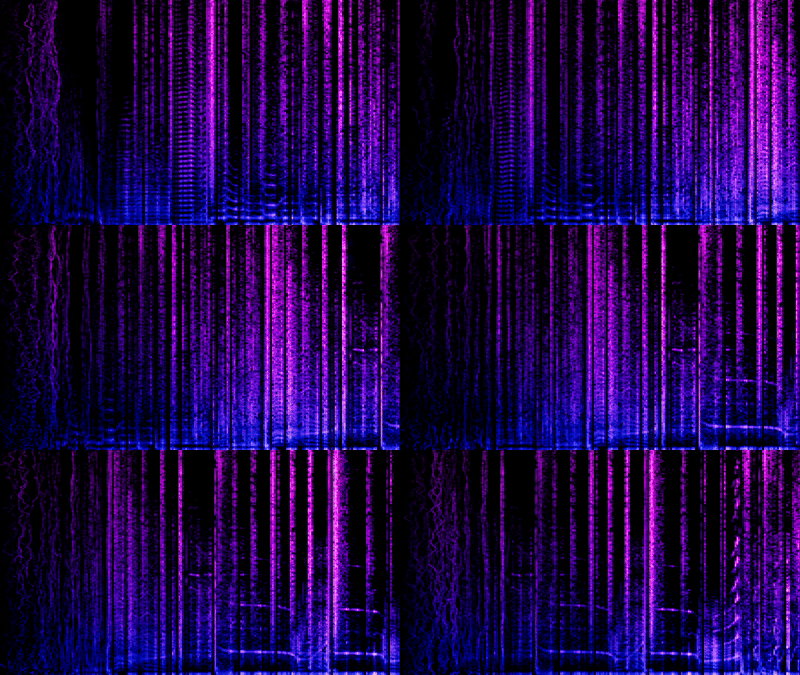
NEW Vibe: Spectrogram
We also added a brand new Vibe: Spectrogram.
As someone who has stared at a lot of spectrograms over the years… this is honestly the most beautiful and interesting spectrogram visualizer I (Kate) have ever seen (especially on a high-resolution display). It shows the little details in music so beautifully, and Nick added a few finishing touches that are totally mesmerizing.
NEW: Interactivity (in select Vibes)
We also added the first hints of interactivity to a few Vibes:
Eyeballs: Vibey (the music‑puppeted eyeballs) follows your cursor while you move it over the window. Click/hold to “vacuum” particles in the stargate curtain.
FFT Ring: Click and/or drag to change the color scheme.
Discs + Fire: Click to send a ball of energy through the discs/fire.
We will continue to expand playful, intuitive interactivity throughout Vibralizer as it develops.
Plus: fixes & polish
This demo update also includes a bunch of smaller improvements:
Retuned Vibey to not look so sleepy for some tracks
Fixed HDR display issues in the FFT ring
Fixed an issue where the HUD wouldn’t dismiss if the cursor moved off the window in a certain spot
Other bug fixes and stability improvements
We’ll keep iterating throughout Next Fest, so feel free to chat with us in our Steam Community or join our Discord.
Privacy note
As always, Vibralizer processes audio entirely on-device. We don’t collect audio data, media info, or personal information through the app — ever. Just because YOU can see what track is playing in Vibralizer doesn’t mean we (or anyone else) can!
Try the updated demo + tell us what you think
✅ Download the updated demo
🌟 Wishlist Vibralizer to stay up-to-date with future development
💬 Share feedback / bugs / ideas here: https://steamcommunity.com/app/4270240/discussions/0/758428562866832344/
For example, tell us which music player you’re using (Spotify/Tidal/YouTube via Chrome/etc.) and whether the playback controls work for you.
Thanks for checking out Vibralizer, and happy Next Fest! We'll be broadcasting Vibralizer Radio all week. Come vibe with us!
— Kate & Nick