
An enemy spots your party, tells a nearby ally, and sends it searching around the last place you were seen. That is much more interesting when you can actually tell what happened.
The recent Dungeon Flop V3 work has brought KLEP into mob behavior. Today's addition makes that behavior easier to read during play.
What KLEP adds
KLEP is my rule-based AI system. Keys represent facts; Locks test conditions; priorities choose an eligible behavior. In Dungeon Flop, those behaviors are editable JSON recipes with a visual designer. This is game logic running locally, with no language-model service needed to make enemy decisions.
Mobs can use their available abilities, interact with equipment, and temporarily remember sightings. Nearby allies can share those sightings through Keys. A reported position can become stale: hearing an alert does not give an enemy permanent knowledge of where you are.
Core now includes eight learning recipes with matching demo mobs: sentry, hunter, bodyguard, medic, artillery, scavenger, alarm scout, and relay guard. There is also a private testing arena and a host-only inspector for examining decisions. KLEP currently controls mobs; custom mobs without an assigned recipe retain the existing AI.
Read the enemy at a glance
The new build adds eight small icon designs for:
- Spotting a visible opponent.
- Sharing or hearing an alert.
- Searching a remembered position.
- Retreating.
- Engaging an enemy, including moving into attack range.
- Preparing or casting an owned power.
- Collecting or equipping gear.
- Holding position or formation.
A main icon shows the current action. A smaller badge marks a recent sighting or an actual alert exchange. Communication only flashes when a report really changes hands. Optional labels distinguish preparing a power from casting it, and sharing an alert from hearing one.
These cues are synchronized for the host and joining players. They respect fog of war and do not reveal hidden mobs, target identities, or remembered locations. The full decision inspector remains host-only.
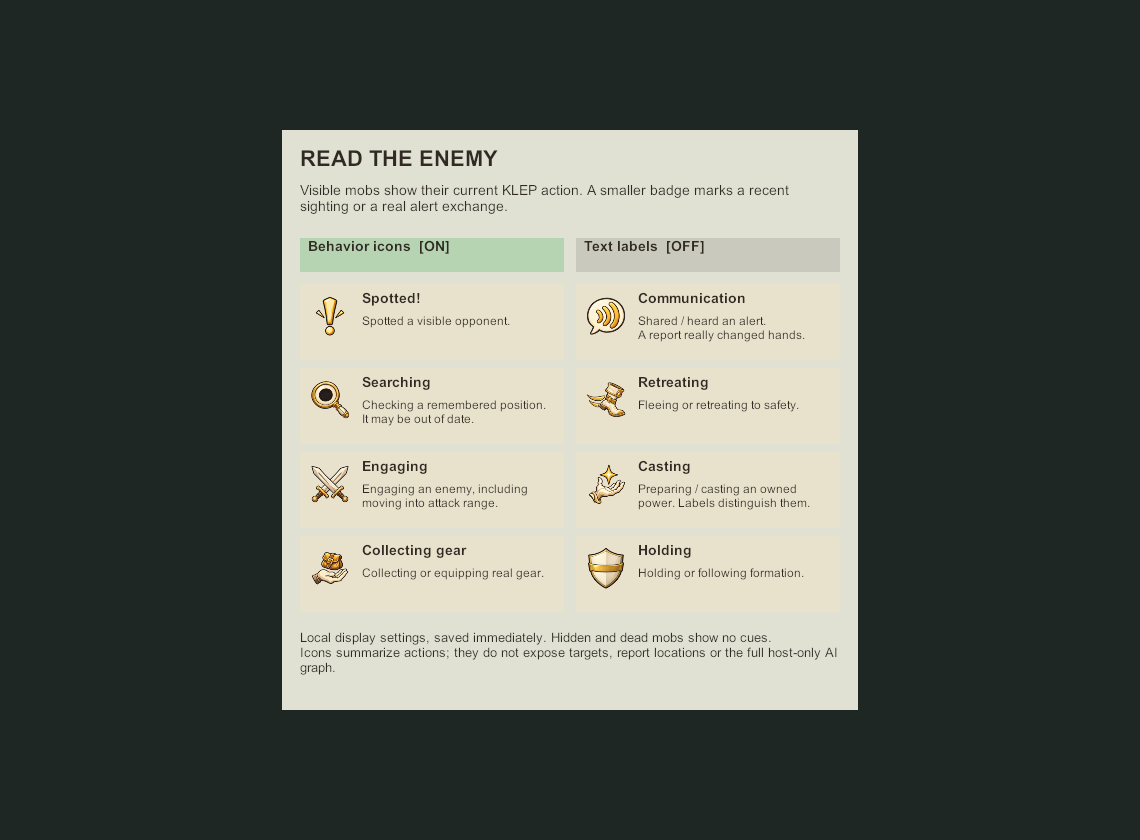
The in-game icon legend and local display settings.
Keep the screen readable
Open Options > Enemy Behavior Icons in the lobby or during play for the illustrated legend. Icons start enabled; text labels start disabled. Both are local settings and save immediately.
The recent host performance controls also let you tune decision frequency, distant thinking through an optional activity bubble, sighting broadcasts, and detailed history. They help tune AI workload; they are not a guarantee of performance on every machine.
Where things stand
This is a development update. The new Windows build is prepared for Steam upload; Dungeon Flop is still Coming Soon and the game build remains in Valve's review queue.
The latest automated Unity checks passed: 515 tests, zero failures, and zero Unity error logs. Those include fog visibility and network-state serialization checks. Live remote multiplayer testing is still needed.
The icon artwork was AI-generated. KLEP's runtime decisions come from the authored rules.
For the editing and testing workflow, see the KLEP Mob AI guide. For a deeper look at the underlying toolkit, see KLEP V2.0 on GitHub; its broader features are not all implemented in Dungeon Flop.
I want these cues to help you understand a fight without opening a debugging window. When you get to play, tell me which icons are clear, which are confusing, and whether they get in the way. Dungeon Flop is planned as a free release, and that feedback will help shape the next pass.