
Hi everyone,
Since the last devlog we turned to the part of the game you touch before anything else: the interface. Every menu in SHALTER-03 has been rebuilt from the ground up.
Every Menu, Rebuilt The main menu, the pause screen, the settings, the server browser and room creation are all new. One consistent dark look, text that stays readable at every resolution, and menus that answer you with sound.
Settings Worth Opening The settings screen keeps its four tabs, but what is inside them has grown:
Game - language, field of view, mouse sensitivity, invert Y
Video - resolution, window mode, FPS cap, V-Sync, graphics API, brightness, a quality preset plus every individual quality setting, upscaling, frame generation and NVIDIA Reflex
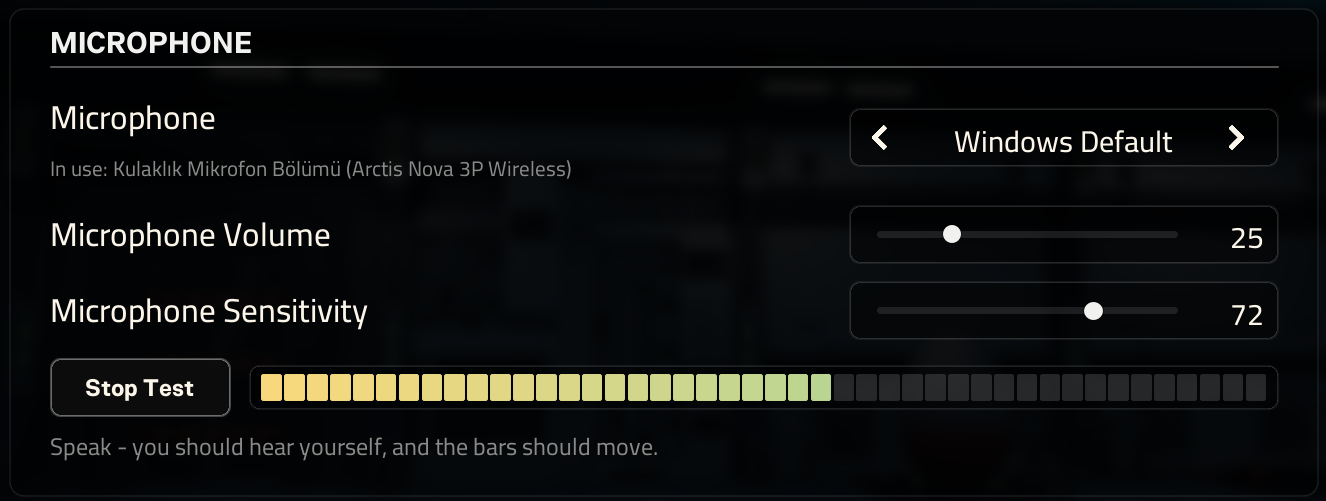
Audio - master, music, effects and voice volumes, a per-player voice mixer, microphone selection and a live mic test
Controls - full rebinding, with keyboard and controller shown side by side
Nothing is applied behind your back: your changes wait for Apply, and Cancel puts everything back the way it was.
DLSS, FSR and Reflex The DLSS and FSR integrations were updated, so upscaling and frame generation run better and look cleaner than before - and NVIDIA Reflex has been added, for lower input lag on the cards that support it.
Full Controller Support The whole game can now be played on a gamepad, menus included. Each row is a single stop, left and right change the value, and the shoulder buttons switch settings tabs - with the interface telling you so instead of leaving you to guess. Button prompts follow your own controller's naming.
Multiplayer Friends-only rooms now appear in your friends' server browser, rooms can be password protected, and the browser has a LAN toggle and a refresh that really refreshes.
Your Microphone, Your Choice Voice chat used to go out through whatever microphone Windows handed us. If that was an old headset or something no longer plugged in, nobody heard you - and nothing on screen said why. You now pick the microphone yourself in Settings > Audio, and the game shows you which one it is really using.
Next to it sits a real microphone test: press it, talk, and you hear yourself while a level bar moves with your voice. Volume and sensitivity take effect while the test is running, so you can hear and see what they do - including when your voice is too quiet to be sent at all.
The Wire Puzzle on a Controller Plugs can be picked up, moved and connected with the stick. The selected wire pulses in its own colour, the screen names it, and every button you can press is listed at the bottom of the screen.
The New Mechanics, Now in Real Maps The systems from the last devlog have left their test rooms: sound, resonance, pressure, wind and the rest are being placed, combined and tuned inside the puzzle maps themselves. Much of this stretch went into level design - which mechanic meets you where, and in what order.
Every Language, 100% Translated Traditional Chinese has been added, and all 14 languages are now fully translated - not just the menus, every line in the game. The font system behind them was rebuilt as well, so Chinese, Japanese, Korean, Cyrillic and every other alphabet we ship renders correctly wherever it appears.
Fixes
Confirmation popups could stop responding after the first use
Voice could be picked up from a microphone you no longer use, with nothing on screen saying so
A teammate's voice slider could have no effect for that one player
What's Next?
Controller polish across gameplay, not just the menus
Voice chat quality and stability
An observer mode - groundwork for something we will show later
Performance and optimization
Thank you for the feedback and the patience - a lot of this update came straight from it.
See you in the next devlog!