
Due to the correction of the cloud save path, please back up your saves for future replacement. Here's how:
1.After saving your game, exit the game.
2.In your Steam library, right-click on the game icon -> Manage -> Browse local files. This will open the game's folder. Locate the "SavesDir" folder inside, right-click to copy it, and then paste it to your desktop (or any location outside the game folder) to create a backup.
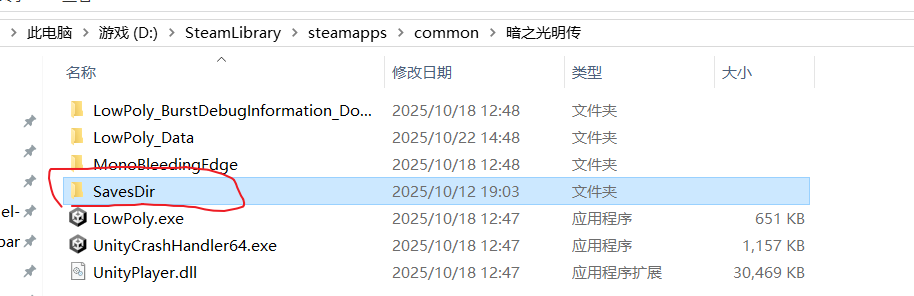
3.After the update, the cloud save path has been changed to:
C:/Users/XXXXXX/AppData/LocalLow/SoulOfPSP/暗之光明传
(or C:/Users/XXXXXX/AppData/LocalLow/SoulOfPSP/暗之光明传)
Note: "XXXXXX" represents your username, for example, Administrator.
If the path does not exist, please create a new folder named "SoulOfPSP" in the LocalLow directory, then create a subfolder named "暗之光明传" inside it.
4.Copy the previously backed up "SavesDir" folder into
C:/Users/XXXXXX/AppData/LocalLow/SoulOfPSP/暗之光明传.
The save path should now be:
C:/Users/Administrator/AppData/LocalLow/SoulOfPSP/暗之光明传/SavesDir
Done.