
Special Missions
Asmodeus's Special Missions will become playable.
"Evangelist"
"Expendables"
Please check in-game for details.
Unlocking Meetings and Repayment Perks
You will be able to unlock content that requires clearing Special Missions.
Please check in-game for details.
QoL Improvements
Inventory Display
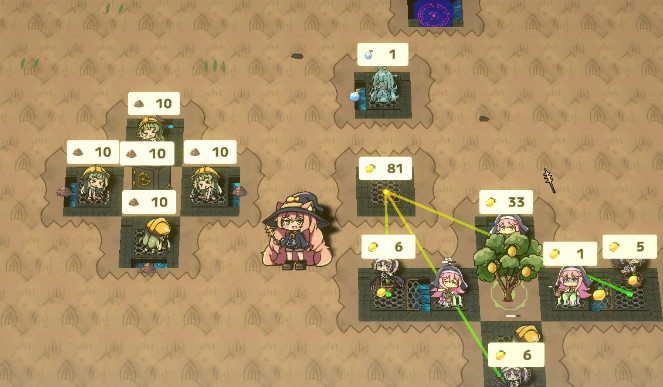
While you hold the shortcut key, items stored by familiars and equipment, along with other information, will be displayed.
The default key is [Alt]; this feature is unavailable while the map is displayed.
What Is Displayed
Items stockpiled by Mining Goblins and Farming Alraunes
Crafted items stockpiled by crafting familiars
Displayed even when the count is 0
Items stored at Delivery Raven entrances and exits, and items in transit
Up to 3 item types with the highest counts are displayed
The number of item releases remaining in safes
This is not the number of items released. Increases to the number of items released from effects such as "Grand Ultimate Fist" are not reflected here.
Changes to Initial Map Layouts
Loading Optimizations
We have optimized mining point generation and the map information display in the upper left.
This speeds up map loading and reduces the load that occurred on some systems immediately after starting a game.
Map Seeds
Maps generated in-game are now determined by seed values, allowing you to play with a specified seed. You can use this to practice on a particular map, for example.
A separate seed is set for each land in Develop Factory mode and each Special Mission.
All seeds are rerolled after a victory or defeat outside "New Recruit Training".
Actions such as "Back to Title" do not reset them.
What Stays the Same with the Same Seed
The same seed generates the same map only when all of the following match:
Seed value
Game version
Sponsor lineup
Which Repayment Perks are unlocked and enabled
When the conditions above match, map generation produces the same results for the following:
The biome of each land
The types and positions of mining points in each land
The unique objects randomly selected next to the starting location (when the same sponsors are selected)
Unique objects randomly selected later (only when play conditions match, such as purchasing lands in the same order)
You can view the current seed on the difficulty selection screen. Use "Copy" to copy it to the clipboard, and "Paste" to enter a seed from the clipboard.
When you start a game after entering a seed with "Paste", details such as the Special Mission and starting location are loaded from the map seed.
Seeds for missions and other content you have not unlocked cannot be used.
Bug Fixes
Fixed an issue where clicks passed through the background of tutorial hint windows and placed familiars.
Other Changes
Pressing Ctrl/Shift/Alt no longer interrupts movement
Changed the appearance of each safe
Revised the contract shown before the tutorial
Added a preview of Asmodeus's full repayment perk
Revised the Farming Alraune manual
Other texture and localization fixes
That's all for this update.
With this patch, all planned content additions are complete for the "Deadly Sin of Lust" update season.
Enjoy a new gameplay experience with Asmodeus and Farming Alraune now fully realized!
We are also hard at work on content for the "Deadly Sin of Gluttony" update season, scheduled for release this winter. Stay tuned for upcoming announcements!