
It has been almost a week since AE was released, and we've spent that time reading your feedback. This update brings fixes for the issues you surfaced, plus a few new QoL ideas we came up with while fixing them.
Time to drive
We noticed that some players were a bit confused by the "pack up and leave" notification. It was always completely fine to just press "Escape" and "Exit", even with a few seconds still left on the clock. Leaving early doesn't hurt you in any way: everything you've already collected is yours, and the only things you forfeit are the artifacts still in the ground.
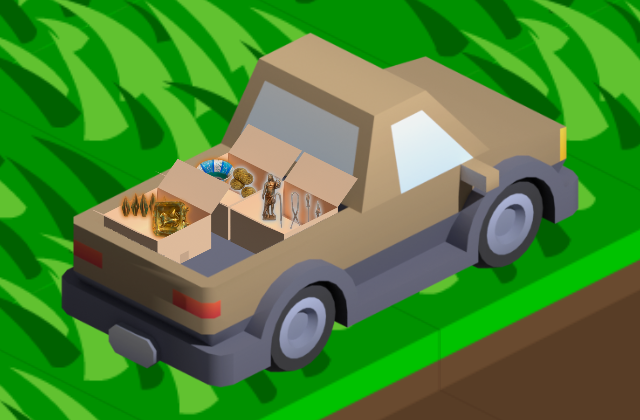
So we parked a pick-up truck next to the dig site, and you can click it to leave. Don't worry, you'll get a confirmation dialog, same as when you exit through the menu.
We also adjusted the tutorials to make it clear that leaving early is totally fine, and that the pick-up is the easiest and, honestly, the most fun way to leave a dig site.
As soon as we saw the pick-up at the dig site, we got the idea to load it up with your finds. Now, as soon as you pick up an artifact, it gets loaded into a box on your truck bed. Artifacts from different eras are packed in different boxes, so you can tell at a glance how many artifacts from how many eras you've got. And once you hover over the truck, all the boxes are packed and ready to go.
Bulldozer
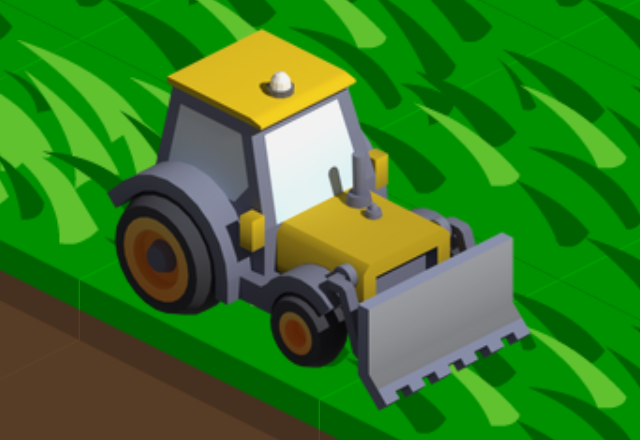
While we were looking for a nice pick-up model, we found a beautiful Bulldozer in the same set. We're not sure how we missed it during development and settled for something less fun. Now that's fixed, and both vehicles look great.
We also fixed several Bulldozer-related bugs and added the ability to queue the Bulldozer while you're still digging. You can start breaking that pesky rock in your way and tell the Bulldozer to start while the pickaxe does its work. The Bulldozer starts as soon as the rock is gone.
Completion marks
We already had completion marks next to era names in the journal, but they were slightly useless. For one, they were only visible in the journal, and only on the era page and in the era index. On top of that, they only marked set completion. There was no easy way to know if you had perfected an era or earned Purist on it; the only way was to check achievements or artifact records.
Now the completion checkmark comes in 4 variations:
-
 No checkmark - there are still artifacts in that era that you haven't seen
-
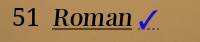 Blue checkmark - you've collected all artifacts of that era, but some of them in less than perfect condition
-
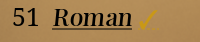 Yellow checkmark - you've collected all artifacts of that era in perfect condition
-
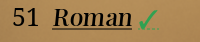 Green checkmark - you've collected all artifacts of that era in perfect condition, and dug up at least one of each from a dig site in perfect condition. Getting the same artifacts from Strongboxes doesn't stop you from achieving this, as long as you dig them up eventually. Also, this isn't expected of you in any way: the game's goal is to collect all artifacts in perfect condition, and Purist is just a nod to our most dedicated players.
There are handy tooltips on the checkmarks to remind you which one is which.
On top of that, the completion mark, in all its colorful glory, is now also shown on the location page in the journal. So when you're choosing which dig site to play, you can press "?" next to its name to open its journal page and quickly see whether you've collected all of its eras.
And last but not least, we added the same checkmarks to the era markers on the dig site walls. They update as soon as you pick up an artifact, so if you complete an era mid-run, you'll see it straight away and can switch to less gentle but faster tools for the rest of that layer.
Speaking of era markers, another QoL addition: when a layer has no tiles left, its marker is removed, so you no longer have to look at columns of markers on an almost empty dig site.
Feedback Button
We're still happy to hear from you, but "Leave Feedback" no longer has to be so big and omnipresent. It's still there, just as a small icon now:

Use it if you get into a pickle: something is stuck, not loading, or the game is just being weird. It used to be big and in your face because it was the only easy way to reach us. Now there are plenty of other ways: Community Hub, Steam Support, Our Email, X.
Main Menu Diorama
We love our Main Menu Dioramas and the surprise of seeing which one pops up each time we visit the menu. But it turns out that's bad for muscle memory when the button you're reaching for is in a different place every time you open the menu. We were also told that the containers bobbing up and down on the flooded Diorama trigger motion sickness for some of our players. Sorry about that.
We always had an "AE with Simple Menu" launch option for debug/compatibility reasons, but there was no way to stop the Dioramas from randomizing. Now that's fixed: everyone keeps one Diorama, and can switch to another using the newly added button in the bottom-left corner of the Main Menu:

It cycles through the available Dioramas, so you can pick the one you like most. We also threw the Simple Menu into the mix, so you can make it your default too if you prefer.
Fixes
Other small fixes:
- Fixed the unlock condition of all 12 Purist achievements.
- Fixed some sounds failing to load during play. The whole Upbeat and Lyric albums failed to load, so the game fell back to the Time Pressure soundtrack. Ambient sounds were missing too, so you were all missing out on the amazing sounds of flies buzzing and goats screaming while you dig. Horrific! But worry no more, that's fixed, and you won't be so lonely at a dig site anymore.
- Fixed the "?" on sold-out and locked tool cards in the shop opening the wrong journal page. It's now hidden on those cards.
- Various smaller UI fixes.