
Mon Général!
In Grand Tactician: Napoleonic Wars, army hierarchy plays a big role in the campaigns. It determines the chain of command, but also command and control and logistics are built around the hierarchy. The basic functionality is similar to Grand Tactician: The Civil War, but there are a few changes in the mechanics and the UI has been adjusted to, what we hope is, a more intuitive functionality.
Operational Flexibility
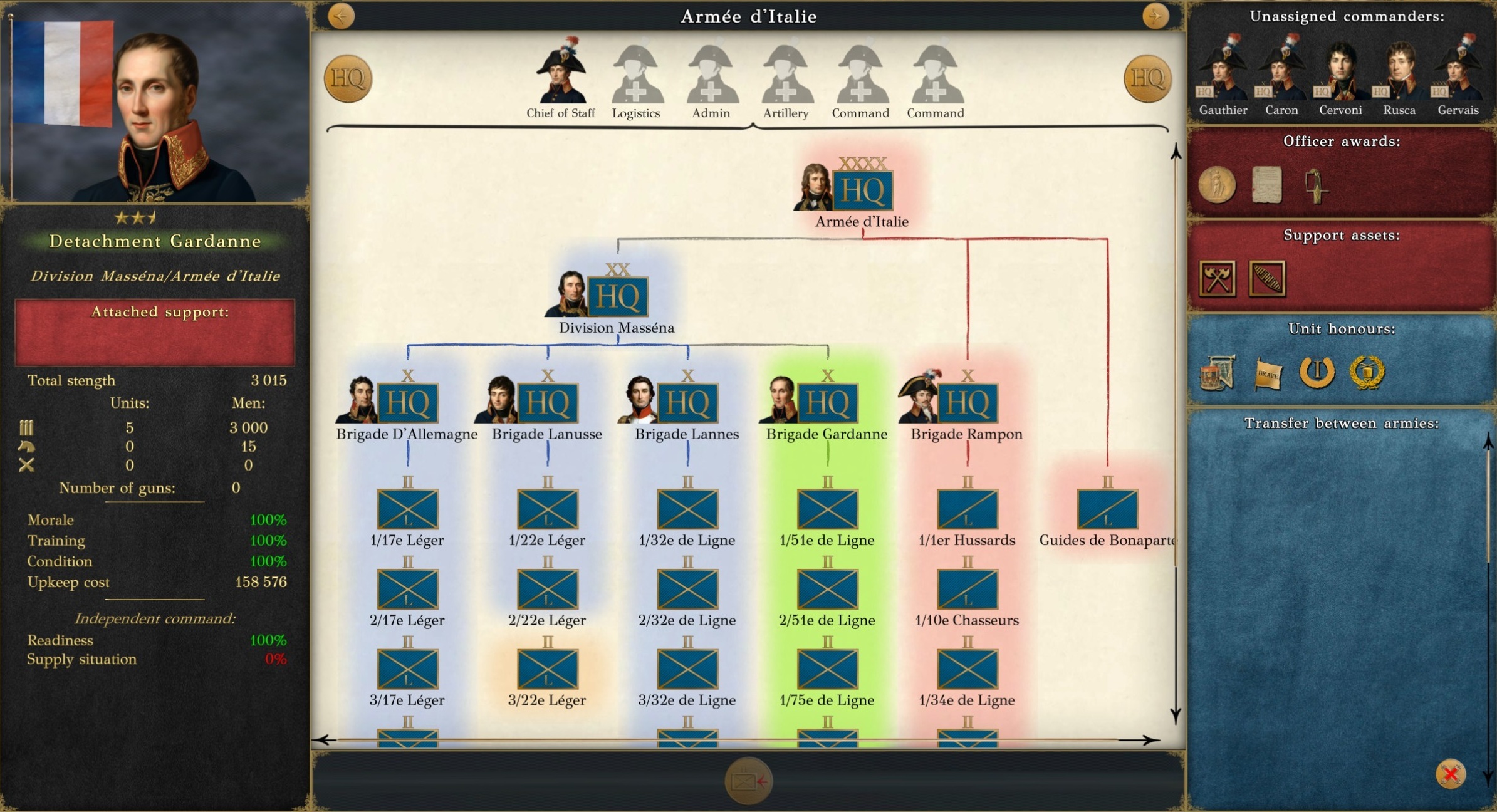
When opening the management view, as a veteran of The Civil War, probably the first thing that jumps up is the coloured backgrounds seen in the hierarchy – in the above image blue, red, green, orange. These are the maneuver elements on the campaign map, the columns and detachments. In The Civil War, the maneuver elements always followed hierarchy. This time around it’s more flexible. It’s up to you what kind of maneuver elements you’d like to use!
These (let’s call them from now on) Detachments can be built around a Headquarters (HQ), or even single units. They retain the chain of command: in the image’s example, Detachment Gardanne (green, a single brigade of Division Masséna, which is part of Napoleon’s Armée d’Italie) receives its orders through the Division HQ, if not specifically detached from the division and placed directly under the Army HQ. Same is true with logistics and supplies: the army’s supply trains feed the army from available magazines, including the detachments. With chain of command and logistics comes distance based realities that need to be taken into account: order delays and the logistical capacity & reach.
The end result is different from The Civil War in that all the detachments, including garrisons, remain as part of the army hierarchy. This simplifies management as there is no need to cycle through tens of separate independent units.
Streamlined UI
As with officer management, which we showcased in July, in army management the controls have their focus on drag-and-drop functionality. When moving units within the army hierarchy, similar transfer delays take effect as in The Civil War, depending on distance of the different detachments on the campaign map. In addition to moving units and groups within the hierarchy, you can also move them between detachments even if they would not follow a strict hierarchical structure: two brigades from different divisions can be combined into a detachment if needed for any reason, and so on...
When moving units and groups between armies, in The Civil War the OOB view is split in two, which makes scrolling a bit tedious. In the Napoleonic Wars, we’ve added a “clipboard” functionality. You drag and drop units (or commanders) from one army to the clipboard, then select another army and then drag and drop what is needed from the clipboard to that army.
The Reworked “Perks”
In The Civil War, when a unit or group has generated sufficient experience, it can be appointed with what are called “perks”. The idea behind this system was to allow customization of units, so not every infantry brigade is the same. Once a perk is assigned, it can’t be changed, though it can be leveled up.
In the adjusted Napoleonic Wars system the “perks” have been changed into Support Assets. These are the non-battle units and elements that make the armies more effective in their operations. Unlike before, the assets are finite, and can be re-assigned during the campaign: if the pontoon train is needed elsewhere, it can be detached from its current supported organization and moved to another.
Single units on the other hand can be awarded with Battle Honours, that will increase their effectiveness and Esprit de Corps, the so-called “unit spirit”. These battle honours are won through successful battles like the decorations available to officers, and it’s up to you which unit you shall reward.
In the following video, you’ll see an example of how the management works. Don’t pay too much attention to the sample organization there, it’s built for internal system testing. As you are reading this, the actual OOBs for the Italian Campaign of 1796-97 are being built. More about them later!
Cheers,
Grand Engineer Corps