
Hi everyone!
As release approaches, I've been working on making the game as digestible to new players as possible, and as part of that work, I've given a nice fresh coat of paint to some of the harder to read/parse elements of the game UI as part of this week's demo update.
First of all, the biggest change you'll see in the demo is on the calendar UI! You'll now see right on each day how well you did, or how much you'll need to pay in rent, as a nice reminder. The type of each day is now also displayed in smaller text at the bottom of each day on the calendar, and the appearance of each day should be a lot more distinct if it isn't the current day, or is a day in the past.
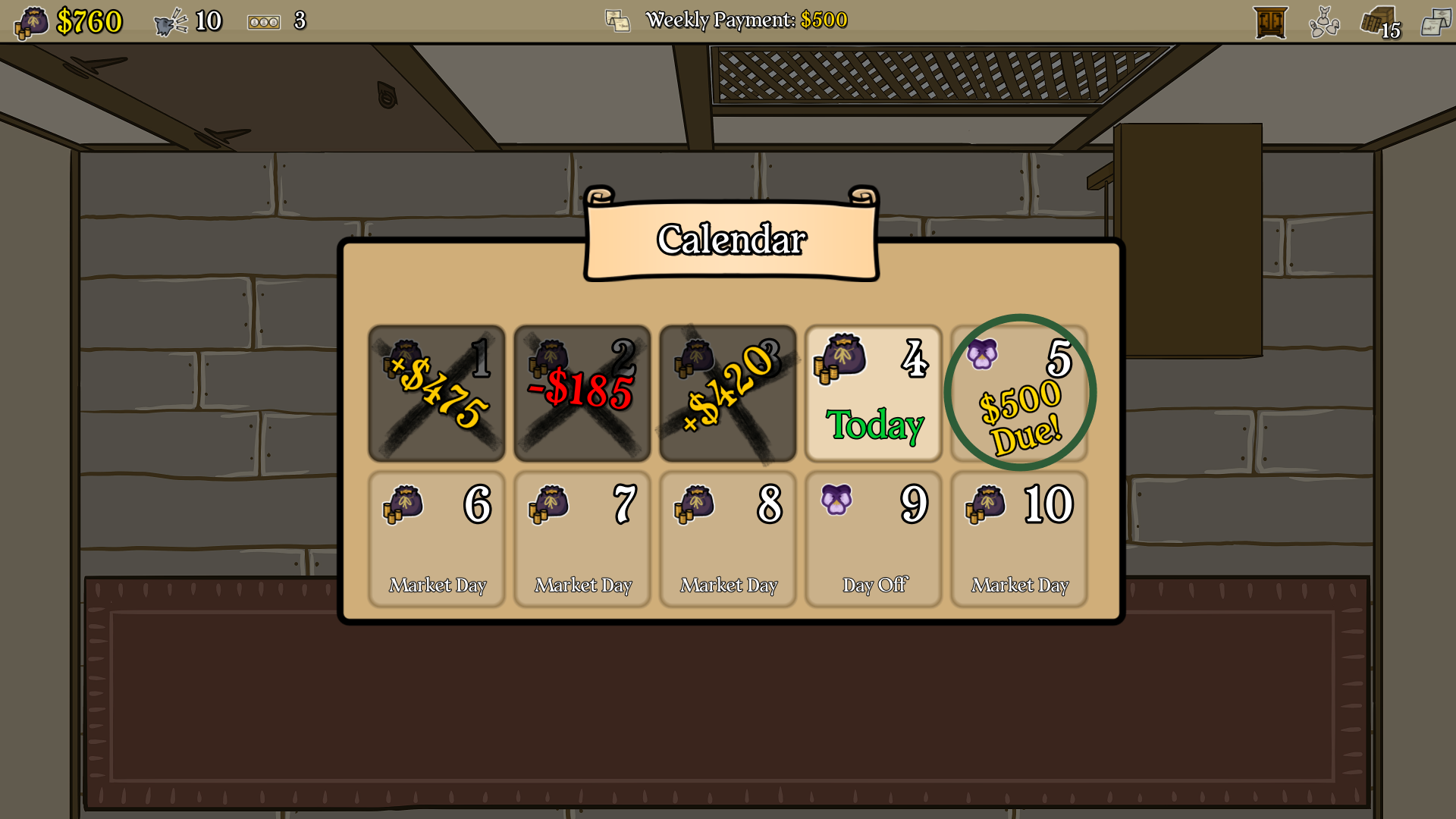
I think this a lot easier to read at a glance, and even in my personal testing, I found that having the previous daily totals displayed there was pretty fun.
You might also notice that the topbar UI is a lot easier to read now. I've gone an coloured in the background on it, and kinda subtly resized the stuff in there to be not quite so small. I got a lot of good feedback that it was kinda easy to miss the stuff up there, so this should make it easier to see/read in general.
Another nice little bit of UI polish in this update is a small but noticable background on Customers' Patience value. I think it might have been a bit hard to visually differentiate the counter/hourglass against the shop background, and it was kinda weird that part of customer card's UI was kinda "hanging off" the top of it. So now, it's got more of a tab kinda look. Check it out: 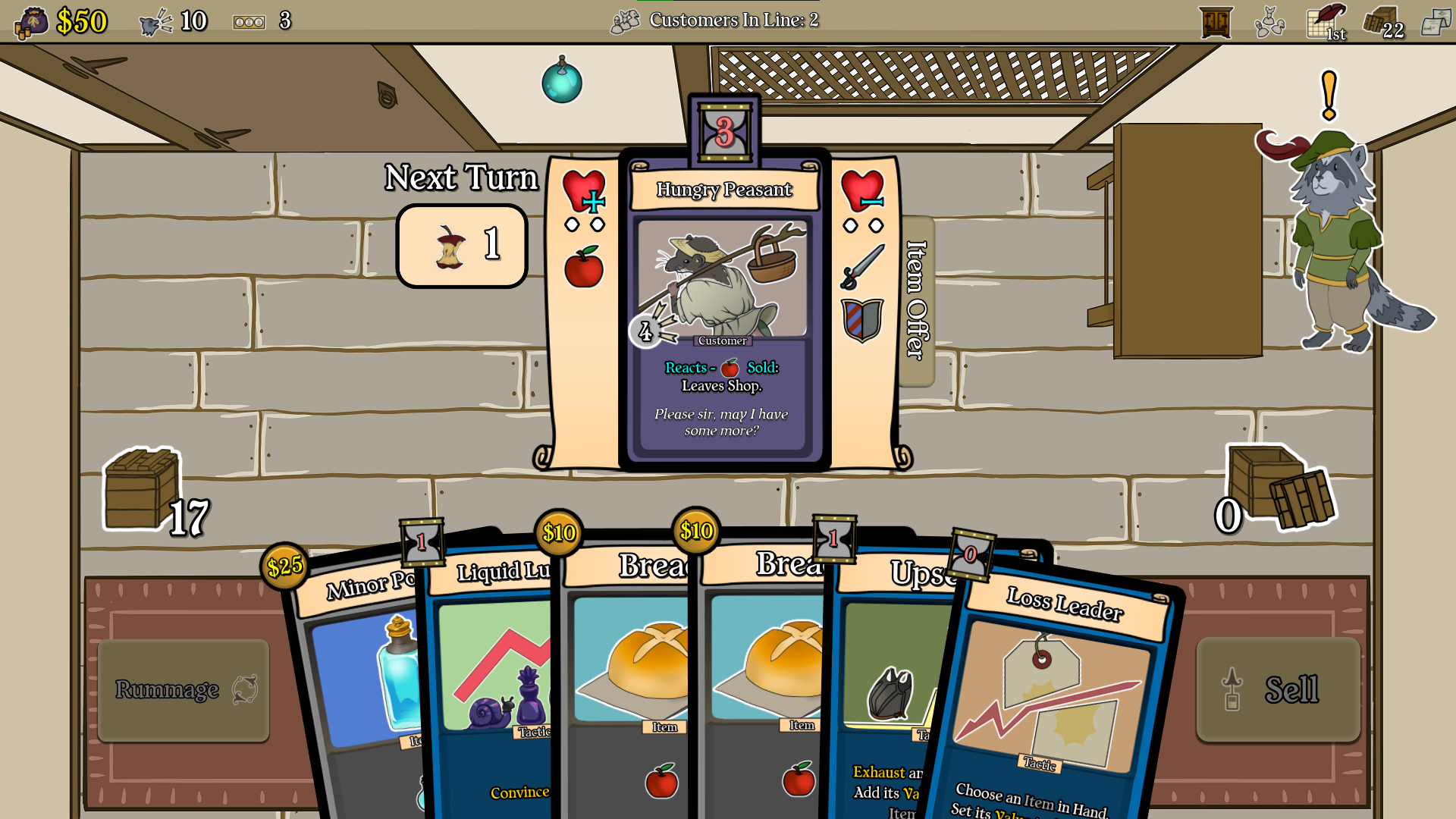
There a bunch more little tweaks and bugfixes in the patch notes, which'll be at the bottom of this post.
As for devlog/roadmap stuff, I'm getting pretty excited! The full release is just over a month away, which is kinda surreal to think about, since this is my first real game up on Steam. I hope everyone who grabs it enjoys it, or at least complains to me in ways I can at least fix up/tweak, haha. The rest of the month is going to be stability testing and UI tweaks like the ones from today to make the game as easy to understand as possible. As part of that, the next update will likely have a good number of tutorialization updates. There's the tooltip popup system in place now, but I feel like that's kind of just a lot of text, and a more guided tutorial might be something I can squeeze in before the full release. But, we'll see!
Anyway, on to the patch notes. As always, notes marked with an * are a direct result of player feedback, so keep the feedback coming!
Demo v0.28.0
---------
Gameplay: Evened out the potential items that can appear in the "Incredible Deals" item crate in the supple shoppe and customer litter actions
Gameplay: Crafting can now only be performed with Items. (Fallback for effects that Craft and use non-items will still produce Trash)
Gameplay/Art: For the purposes of determining your shop type, as long as you have at least 2 of any item typed decoration, you'll get a non-plain background now
Art/UI: Completed days on the calendar now have their X-mark rotated a bit more randomly, and are displayed in black instead of red
Art: A few minor art cleanups (re-centering to fit card frames, etc.)
Art: Added an improved icon for the Trashy Topup item crate and customer litter action intents
Tutorial Tooltips: A few updates to clarify some early tooltip popups/make them more readable
UI: On the calendar, only the current day is displayed in bright parchment. Days in the future are now a bit dimmer, since they're not the current day. Rent days now also have a more prominent green circle around them.
UI: Updated the scene transition fader to show the loading screen when starting a new run
UI: Added a background to the next customer in line that appears when you hover/focus that UI item in the topbar, to improve readability
UI: Updated the loading screen to have the game logo bounce a bit, so you know the game isn't frozen
UI*: Added a background to customer cards' patience display for better readability
UI: Resized and colored in the topbar, as well as the stuff in it for improved readability
UI: Added a text display of the day type to days on the calendar
UI: Added a display of the day's profits to completed days on the calendar
UI*: Added a display of how much rent is due at the end of a week to the day on the calendar, instead of just "Payment Due"
UI: When upgrading cards in your daily inventory, only non-upgraded cards will be shown
Bugfix: Fixed the Sell Decoration panel in the decoration inventory never being shown
Bugfix: Fixed a few miscellaneous strange behaviours related to selling decorations
Bugfix: Fixed incorrect display of decoration names when getting a decoration bonus during an item sale
Bugfix: Fixed an issue with controllers where you could sell an item and buy an item from a customer at the same time by pressing both the sell and buy buttons at once
Bugfix: Centered a misplaced UI rotation center point on deck pile opener buttons
Bugfix: Fixed the decoration inventory not allowing you to de-select the topbar buttons when using a controller
Bugfix: Fixed a number of menus remaining open when restarting a run via the R key
Bugfix: Fixed some dimmer misalignment with the customer pool viewer
Bugfix: Fixed the Customers in Line display appearing when not viewing the sales room floor in some cases
Bugfix: Fixed Welcome In not being playable on the first Customer of a day during a Shopping Holiday current event
Bugfix: Fixed Dumpster Dive being tagged as Food (this could cause confusing gameplay effects with crafting and certain customers like the Boarbarian)
Bugfix: Fixed a run start choice to gain a restockable 2-typed item causing instances of 2-typed items to be always restockable
Bugfix: Fixed a similar bug with the Restockable Trash from a run start event causing all trash to always be restockable
Bugfix: Fixed crafting with a non-item not always creating Trash
Text: Minor text cleanups here and there (missing text colours, typos, etc.)
Text: Clarified the Shy Turtle's reaction description a bit
Text: Fixed a misleading tooltip in the daily inventory when getting a tutorial popup
Misc: Added a few item type tags to some decorations