
Host your own zone — the Subspace Reticulum Zone Server is here
The Zone Server is now available as a standalone download for Subspace Reticulum, packaged as a windowed operator suite.
You can host over Steam. No public IP. No port forwarding.
No firewall rules. Pick the Steam transport, save, launch — your zone shows up in the in-game zone browser, and players connect through Steam's relay network.
Hosting a zone over Steam
1. Install and open the Zone Server
It installs from your Steam Library under Tools, and launches into the Zone Hosting Suite. The
Active Deployment card is the complete saved state of your zone: name, capacity, map, mode, the route
players take to reach you, and a live preflight check.

2. Open Review & Save Configuration
Everything about the zone lives behind this one button including identity, connectivity, mode rules, population, arenas, access and the full gameplay tuning editor. Set your Zone name, Player capacity,
Public arena map and mode here first.

3. Setup ▸ Connectivity ▸ Transport → Steam GameServer
Open the Transport dropdown and choose Steam GameServer — listed, direct + relay routing.
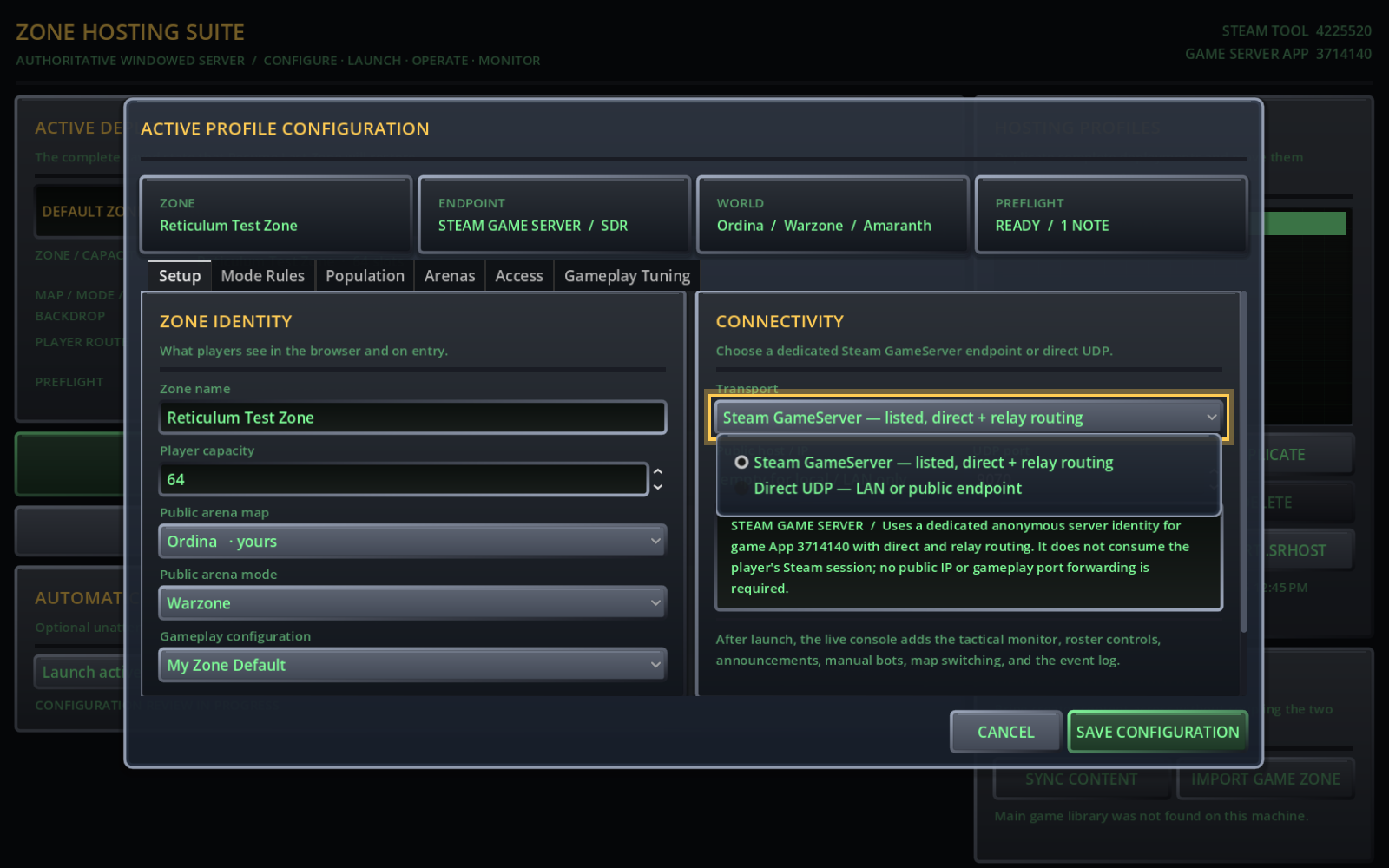
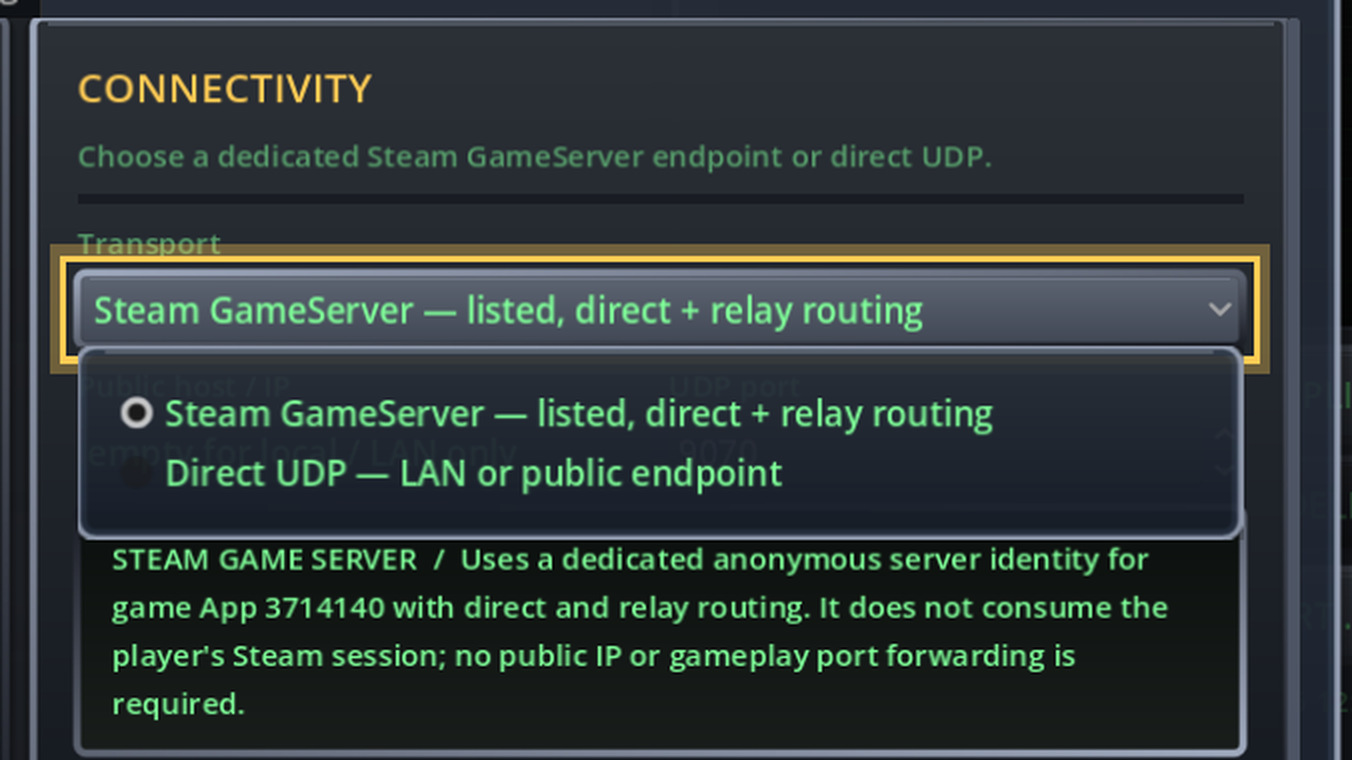
The moment you pick it, the public host and UDP port fields grey out. You do not need them any more and the endpoint readout confirms what is about to happen:
STEAM GAME SERVER / Uses a dedicated anonymous server identity and does not consume the player's Steam session; no public IP or gameplay port forwarding is
required.
Note the summary strip at the top: ENDPOINT now reads STEAM GAME SERVER / SDR, and preflight
drops an operator note, because the "you are only reachable on this machine" warning no longer applies.

4. Access ▸ Authentication Policy ▸ Steam identity → Directory validates Steam tickets
Switch to the Access tab and set Steam identity to Directory validates Steam tickets.


This is the production setting. Joining players prove their Steam identity with an auth ticket, and your
zone hands that ticket to the master directory to verify. Players arriving over the Steam relay are already identified by the transport itself, so most sign-ins never need a Web API round trip at all.
While you are on this tab, put your callsign in Owner. The owner gets full in-game admin; sysops get the admin suite and authorized ? commands. New callsign proof-of-work stays at 20 bits by default, which taxes fresh-account spam without ever charging your regulars.
5. Save Configuration
Preflight runs the whole launch before anything is written to disk, so a typo can never leave half a
rejected configuration behind. Back on the launcher, Player route now reads
Steam GameServer · SDR.

6. Resume Last Zone
That starts the authoritative zone and drops you into the live operations console. Your zone logs on with
its own anonymous Steam server identity, registers with the zone directory, and appears in the in-game zone browser for everyone else. Players join straight through Steam's relay.
Public endpoint in the console header is the proof it took identifying with a Steam server ID and a virtual port.


What the Zone Server does
Connectivity
Steam GameServer: a dedicated anonymous server identity with direct and relay routing. It does
not consume your Steam session, so you can host and play on the same account at the same time.
Direct UDP: the storefront-independent fallback for a VPS or a LAN. Set a public host and forward
the port and the suite will tell you exactly what it needs.
Listed in the zone directory either way, so people can find you from the game's browser.
Players never need your map. Custom maps stream to clients in-band from the zone and are cached
per-zone.
Arenas
One zone, many arenas. Saved arenas boot with the zone and are exempt from the empty-room reaper.
Per-arena map, mode, bot limits and lock-on-start.
Prefix an arena with # for a private, join-by-name room.
The live operations console
Authoritative tactical map of the running simulation. Click a ship to select the player.
Live roster: reassign frequency and ship without interrupting the connection, move to spec, kick.
Broadcast to the selected arena or the whole zone.
Change map and mode on a running arena.
Authored mode rules apply live and persist per arena.
The complete gameplay settings editor, open while the zone is up.
Metrics for players, arenas, bots, network and simulation tick, plus a retained event log.
Bots
Automatic population keeps a zone feeling alive: minimum and maximum per arena, a persistent recurring pilot pool, a schedule seed and a timezone for the activity window.
Deploy bots by hand with a chosen ship, decision policy and difficulty.
Optional distributed bot compute coming soon.
Rules and tuning
Pick a Gameplay Configuration for the zone and tune it in the built-in editor.
Authored game modes expose operator parameters in the mode's own inputs, scoped to the arena you are editing.
Identity, staff and persistence
Callsign profiles are keypair-authenticated, with optional Steam ticket validation on top.
Configurable proof-of-work for new callsign registrations; existing callsigns never pay it.
Owner and sysop roster, updated live for connected players.
Player records persist per callsign on your server.
Deployments you can move
.srhost hosting profiles capture a complete deployment. The zone configuration, its Gameplay Configuration reference, persistent arenas, bot limits and mode parameters. Duplicate them, export them, carry them to another machine.
The Game Content Bridge [Sync Content] copies maps, modes, bot content, tilesets and Gameplay Configurations from your main game install, and Import Game Zone turns the zone you have been running in-game into a hosting profile.
Automatic start launches your active profile on boot with a visible cancel window.
Set up a zone, put it in the browser, and tell people where to find you. We will see you out there.
Have fun fighting.