

Hello everyone!
0.2.0 is the biggest update I've worked on yet, which is why it's been a bit since I last had one of these big update posts to share lol. There's a lot here, and I'm excited to walk you through it.
Welcome to the whole 0.2.0 update! The lettered builds were how we playtested this release, so this announcement brings the entire update together, including the changes and fixes made along the way. If you've been away for a while, there's a lot to come back to—and this time, bring some friends.
Co-op and Multiplayer

Adventure together: character looks and the local Player 2 class picker.
- A major co-op reliability pass improves hosting, joining, reconnecting, connection feedback, and recovery after interrupted synchronization.
- Local Player 2 gets a class picker when joining, with an option to copy Player 1. The second display opens during gameplay rather than taking over the menus.
- Partners reveal the shared map and illuminate the world with their lanterns and light-radius equipment. Environmental damage is handled for each player.
- Guest movement reconciliation and snapshot delivery have been reworked to reduce repeated position corrections, bursty updates, and delayed movement.
- Remote fist and tool attacks keep their correct timing. Each player's punches retain their own active hand, swing cadence, and animation.
- Fixed inventory transfers, sorting, partial stack drops, equipment synchronization, shared chest materials, and crafting overflow handling.
- Consumables apply their personal effects to the correct player. Throwable ownership and aiming received fixes.
- Linked chest actions synchronize through the host. Simultaneous interactions and world events arriving during joining are handled more consistently.
- Furnace and butcher output stays in the station tray when collection overflows. Loading furnaces and upgrading workbenches now updates shared chest materials for guests.
- Guests use the host's exact dropped-item positions. Reconnecting players with the same display name can reclaim distinct seats.
- Steam join cancellation, retries, authentication callbacks, and error messages received fixes.
- Larger loadouts and inventory messages received fixes, alongside stronger validation of join passwords, player actions, and guest equipment data.
- Lobby rosters scroll, and controller players have an on-screen keyboard for chat and join fields. Leaving a lobby and kicking players require confirmation.
- Online co-op remains in active testing. The host leaving still ends the session.
Before you party up, make sure everyone has updated to 0.2.0d. Reports from your sessions help guide the next fixes.
Forge, Armor and Equipment
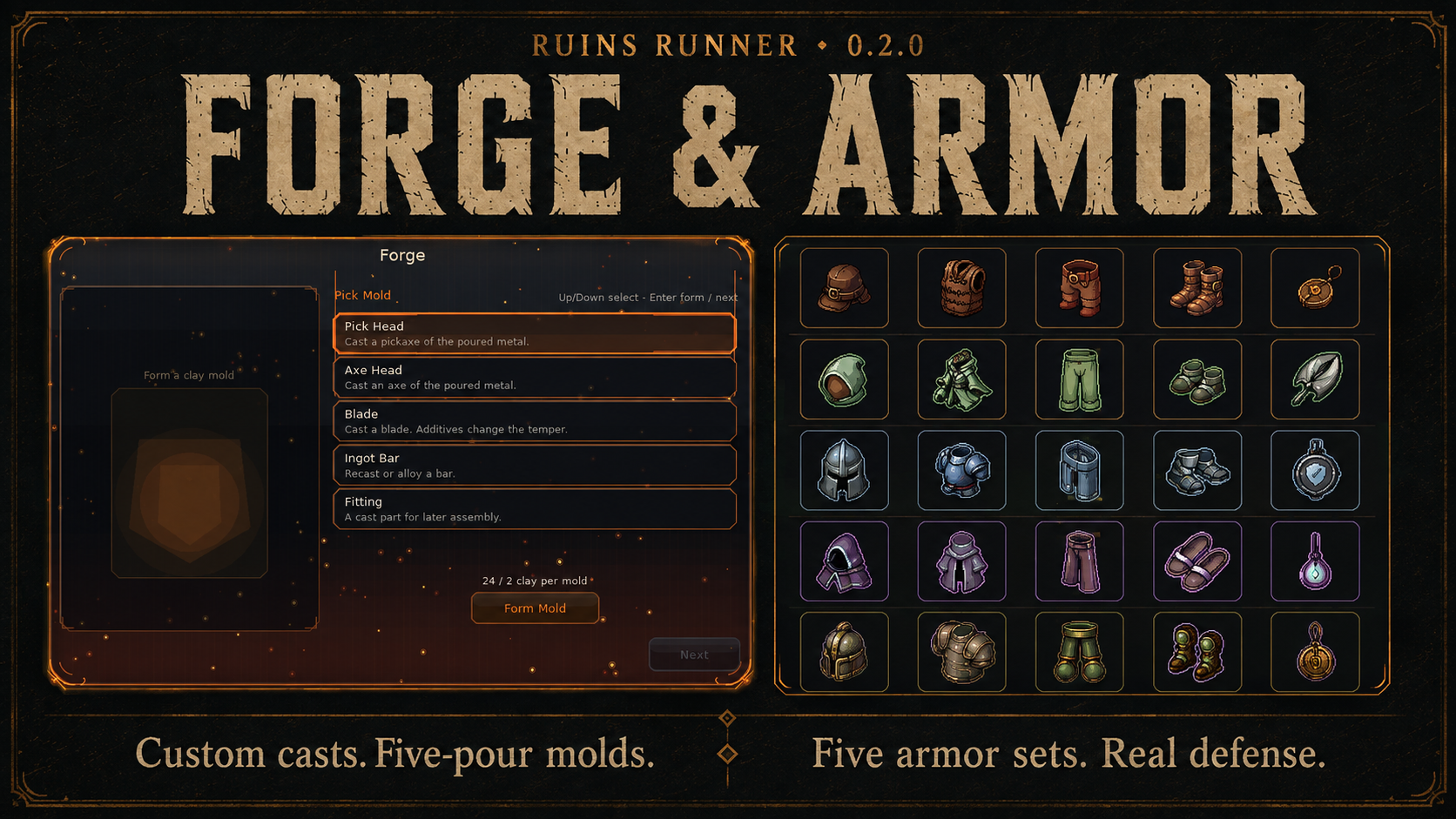
The Forge workflow and five armor sets.
For anyone who has not tried the Iron Forge, this is where you make custom weapons and tools by adding materials into the mix to change what comes out.
- The Iron Forge's guided three-step workflow has received further ingredient-preview, navigation, and controller polish.
- Clay molds now last five pours and display their remaining uses. Spent molds cannot be poured again.
- Name your casts, save naming presets, and reuse them for later equipment. Duplicate names receive numbered suffixes, and additive tags remain visible.
- Flower powders can be mixed in as Forge additives.
- Lower-body equipment is split into separate leg and boot slots, with matching pieces and recipes across armor sets.
- Five armor sets expand the roster: Hearthguard Watch, Galeweave Stride, Bastion Bulwark, Riftsilk Cascade, and Vaultwarden Oath.
- Armor has Light, Medium, or Heavy weight classes and a Defense stat. Defense reduces incoming damage on a diminishing curve and appears in tooltips, recipe comparisons, and stat breakdowns.
- Added missing armor aura profiles and refreshed gold ore, ingot, and nugget artwork. The gold crafting path includes pickaxes, axes, hoes, and sickles.
- Equipment and attack-speed migrations preserve older saved loadouts through the leg/boot split and weapon cadence changes.
Attacks, Enemies and Status Effects

Weapon cadence feature illustration.
- Weapons use their own swing speed for held auto-attacks and charged heavy attacks. Tooltips show the weapon's cadence.
- Directional swing trails and tool-specific sweeps received visual and sound polish; impact blood and floating combat text were refined.
- Damaging hostile statuses tick more gently and cannot take the player's final point of health. Other damage can still kill you.
- Status durations are reduced in the starter area and early Depths, movement penalties are softer, and death clears active statuses and their effects.
- HUD status chips show active effects and countdowns. Status clearing and enemy death cleanup received fixes.
- Ground fire damages enemies, NPCs, and animals, with reactions to the flames.
- Enemy spawning, searchable corpse handling, and corpse settling received polish, including spawning enemies offscreen.
- Leaving gameplay during a spawn or death animation clears its letterbox bars. The Character Overview uses the same paper-doll rendering path as the world.
39 New Elemental Spells

17 Pyro, 10 Cryo, and 12 Shock spells, with examples from each school.
- The Elemental Spell Arsenal adds 17 Pyro, 10 Cryo, and 12 Shock spells: 39 elemental spells in total.
- Burn, chill, and shock targets, deploy barriers and constructs, and send chain lightning through a fight.
- Spells have distinct cast styles, visual effects, and audio cues.
Huge thanks to cagdas devrim for the concept ideas behind the arsenal. Enjoy being a wizard!
Research and Crafting Progression
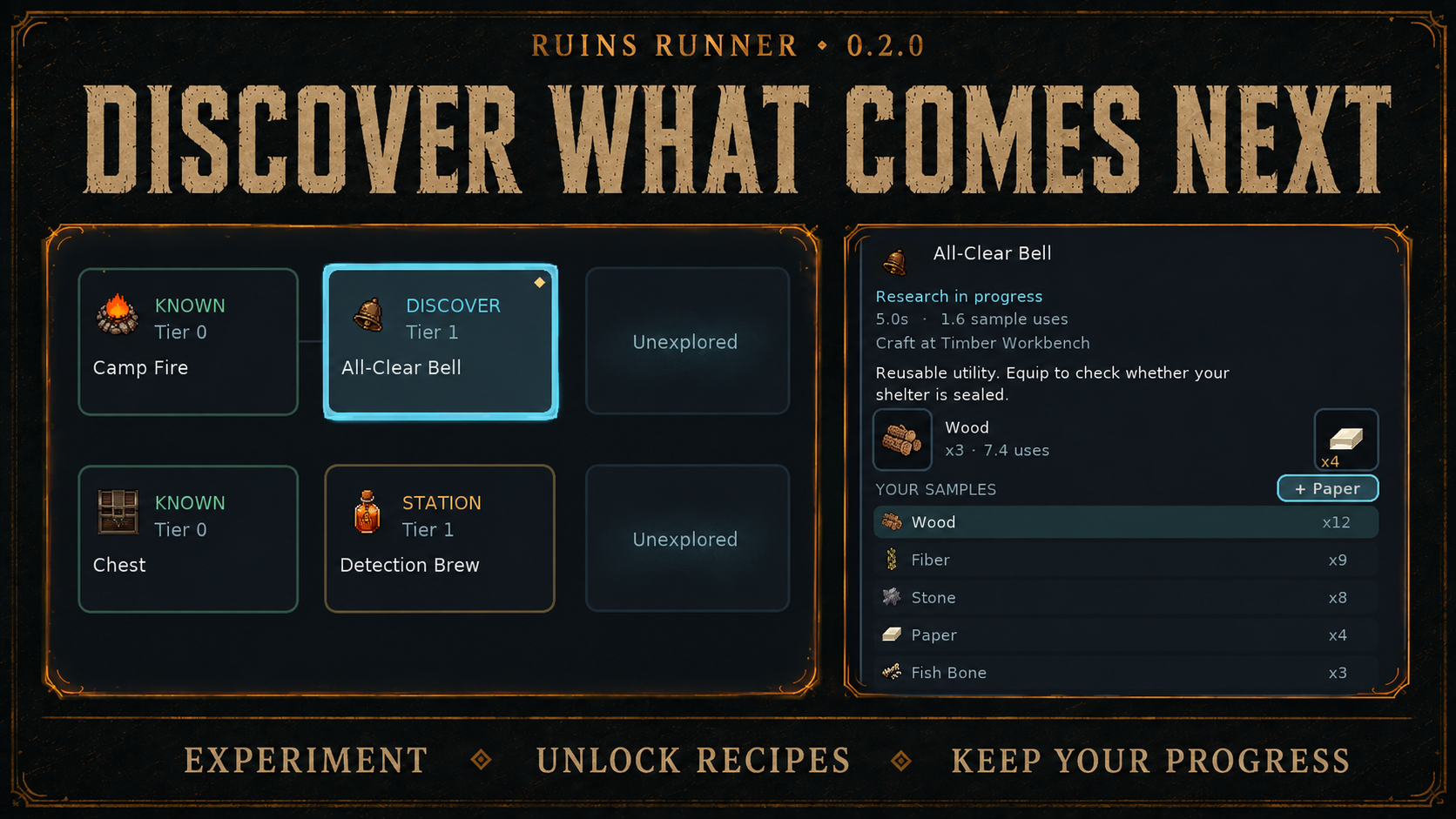
Research Bench discovery and sample-input details.
- The Research Bench unlocks recipes by experimenting with material samples, giving crafting a discovery path instead of revealing everything at once.
- Explore material branches and inspect known recipes, the next available discoveries, and workstation requirements. Later discoveries stay hidden until you reach them.
- The bench now puts the recipe tree at the center of the workspace, alongside sample and paper inputs. Browsing a discovery does not replace your active project; starting or switching research is an explicit action.
- Research shows progress and time remaining, supports suspending and resuming, and retains progress when you leave.
- Optional paper makes research 1.6 times faster and uses 20% less sample, consuming one sheet per discovery. Unused sample units can be removed.
- Assign an NPC researcher to continue unattended work at half the player's speed.
- Crafting's Current Tech view and material branch browser help plan unlocks. Research itself is performed at the Research Bench.
- Recipe search includes ingredients and stations, with clearer categories, station grouping, comparisons, and recipe badges. Clear New acknowledges new recipes in bulk.
- Cooking, grindstone, workbench, Forge, Arcane Altar, and NPC service menus received clearer ingredients, costs, hints, and keyboard/controller navigation.
Storage, Beds and Building

Basic and quality beds alongside settlement blueprints.
- Link chests into shared storage networks and deposit items across connected storage. Links persist with the world and have visual feedback in the world.
- Grind flower petals into dyes and powders at the new Mortar & Pestle, and use dyes to recolor chests.
- Build with wooden or iron mallets to reinforce newly placed walls and doors. Reinforced durability survives saving and loading, and reinforced walls have a visible stud and label.
- Beds let you sleep through the night and set a respawn point. Shared homes support a bed for each player.
- Town planning groups blueprints into Residential, Production, Defense, Civic, and Infrastructure, with costs and building-tool integration.
- The utility belt has a dedicated tool row, frees up hotbar space, and received fixes for inserting items, cycling, and HUD behavior. Its default keyboard binding is X.
- Hotbar slots also hold stacks. Pickups and crafted output can use the hotbar when the backpack fills.
- Dropped items wait until nearby collectors step away before becoming collectible again, preventing immediate unwanted pickup.
Skills, Sigils and Travel
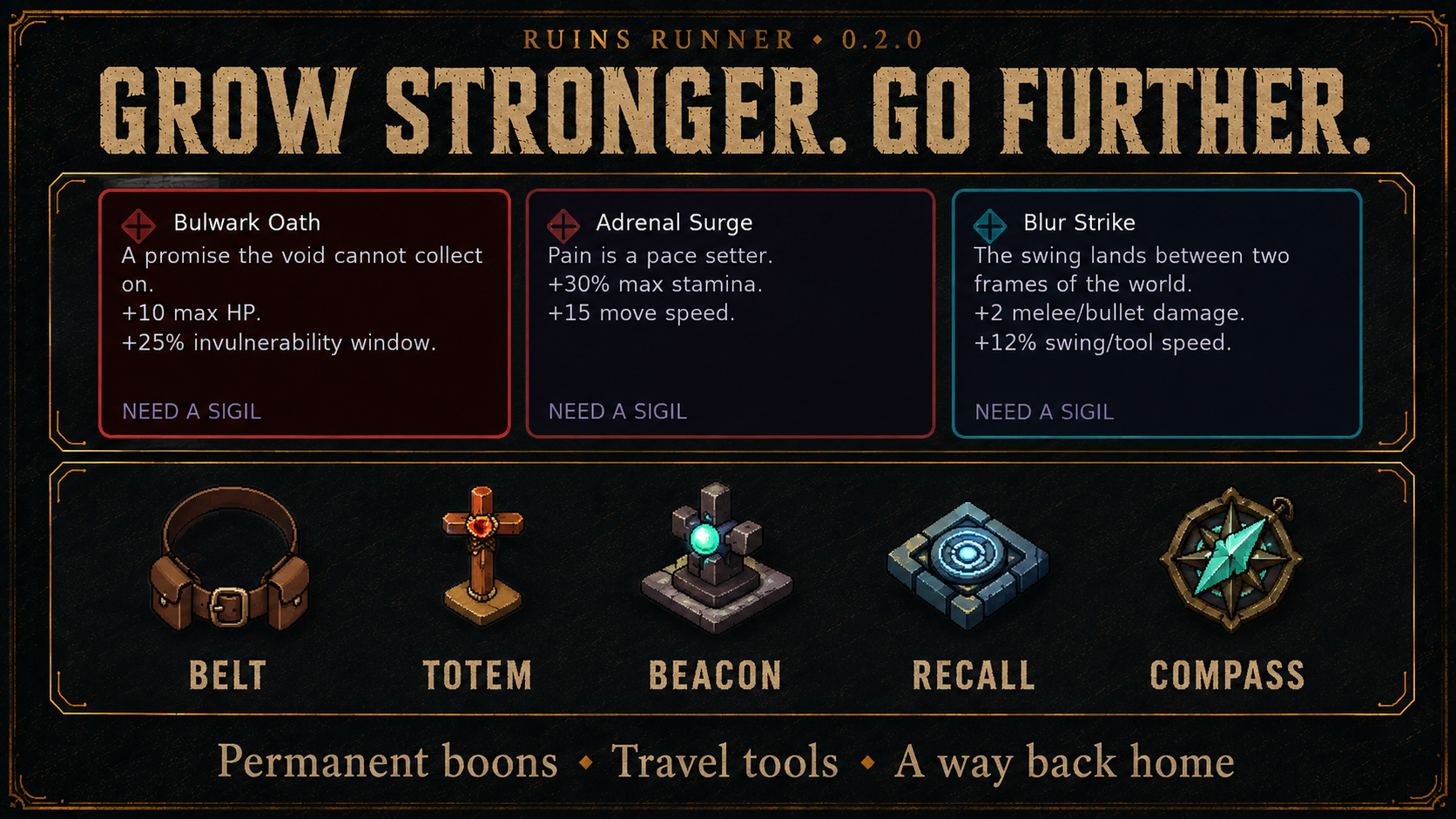
Capstone boon choices and the travel toolkit.
- The constellation skill tree has mastery forks and improved fitting at different resolutions.
- Capstone fork choices earn Sigils to spend on permanent boons for survivability, movement, loot, and combat. Older saves receive credit for capstone choices already made.
- First-time area sigil claims award rune infusion and bank free Arcane Altar binds.
- The Tracker's Totem points toward living bosses.
- The Waystone Beacon and Recall Sigil provide a return-point and recall pairing, with a passive waystone compass shard for navigation.
- Travel gear has dedicated engraved icon artwork.
Story, Dungeons and Settlements
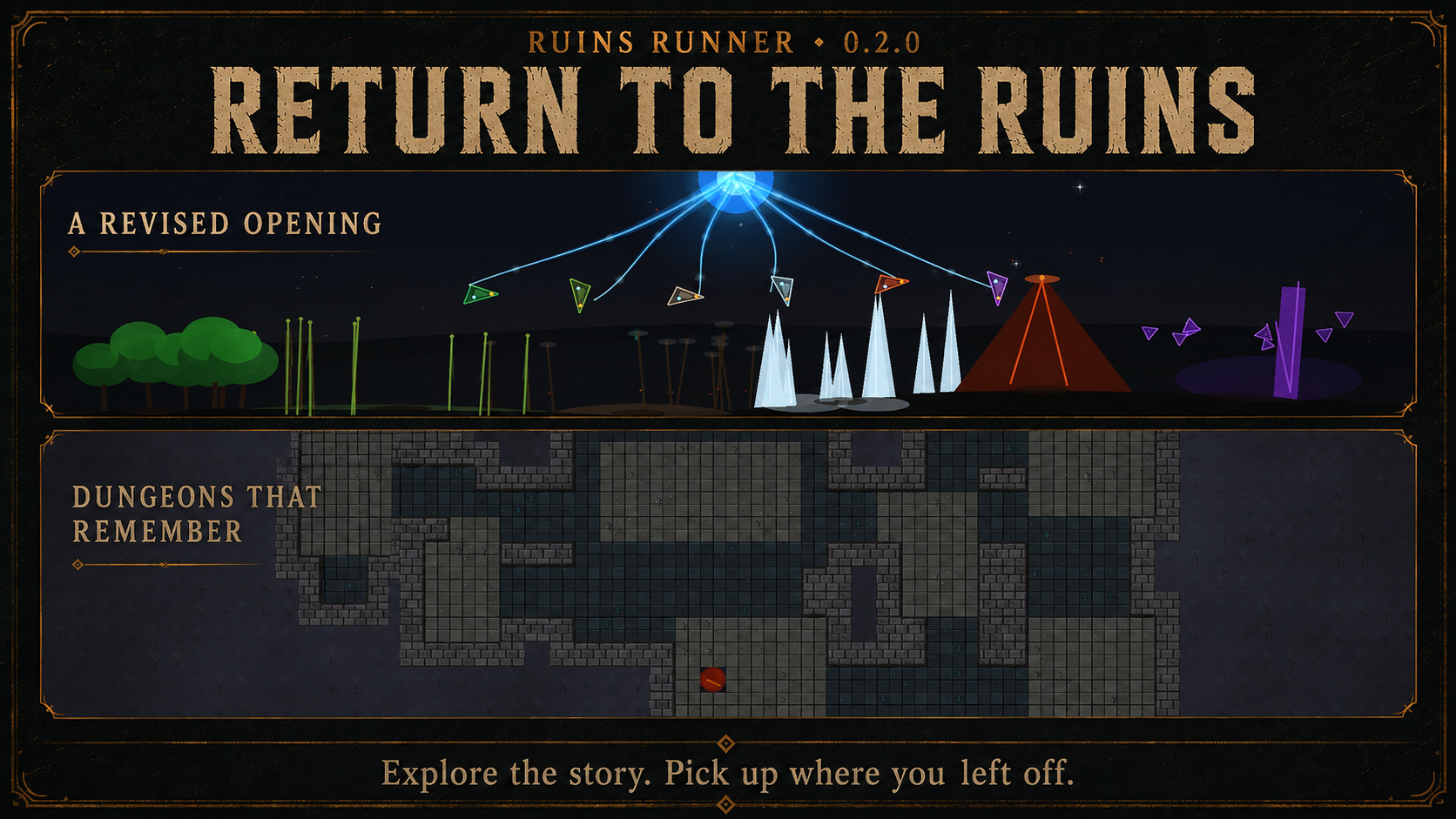
The revised opening and vault environments.
- The opening now centers on the New Order's rift and the Fountain of Life, with revised captions, dialogue, and varied starting scenery.
- Partly cleared dungeons remember dug walls, opened chests, scattered loot, enemies, and stairs when you leave and return, including across save/load. Cleared dungeons can reset for another run.
- Royal boss tombs have revised layouts and their own visual theme, with wall torches and gas lights.
- Ruin cellars use worn flagstone and cracked mosaic accents; vaults have distinct masonry.
- Roads have biome-specific art and smoother edge blending. Settlement interiors, courtyards, building entrances, wall rims, and the mage tower received layout and dressing work.
- NPC door-closing and escort behavior received fixes to help followers move through entrances. NPC station-facing and full-name display were polished during this update cycle.
- Indoor lighting fixes address hard rectangular night-light boundaries and incorrect occlusion where overworld roofs are not drawn.
Create Studio and Character Style

Enemy Studio feature illustration and character customization. Create remains a work in progress.
- Enemy Studio lets you author enemy stats and behavior, preview them live, and load them into Create packs as spawnable types, including roaming, night-only aggression, and fleeing behavior. It remains a work in progress.
- The studio uses an Assets column, Files strip, and docked inspector with resize handles and swappable edges.
- Save and switch named layout presets, preview their zones before applying them, and retain them between sessions. Create Dark and Create Light provide grey panel themes.
- Applying a house preserves placed POI children. Selection favors the smallest footprint, erasing removes one item at a time, and hierarchy selection opens the corresponding workbench entry.
- POI inspectors gained position controls, enemy and prop inspection improved, and brush tiers stay within valid limits.
- Expanded body, head, and paint choices render consistently in class select, the paper doll, and the world, and persist across saves.
I still make a lot of the game's content outside Create Studio, so expect some rough edges while I keep building it out.
Menus, Controls and Reference

Current pickaxe, axe, sickle, and hoe artwork in wood, iron, gold, and crystal.
- The Collection tab and tool codex make equipment easier to browse. The backpack and crafting layout received further cleanup.
- The tabbed info screen offers searchable recipes, live stats, combat mechanics, and onboarding/reference pages, with better scrolling on small windows.
- The main menu previews the world, and the transition from boot to gameplay received polish.
- Save deletion, settings resets, leaving lobbies, and player kicks use confirmations. Popups retain keyboard focus.
- Shop and lobby scrolling, join-menu layout, appearance grids, HUD text, controller focus, and intro skip timing received fixes.
- Typed word seeds resolve consistently. Texture-backed item icons no longer disappear just because they lack a procedural painter.
- Adjust overall day length and individual dawn, day, dusk, and night durations live from the pause menu.
- The patch-notes viewer has a wrapping thumbnail gallery, enlarged image viewing, and clearer headings and captions.
- Ruins Runner now has its own game and Windows executable icon.
World Art, Saving and Performance
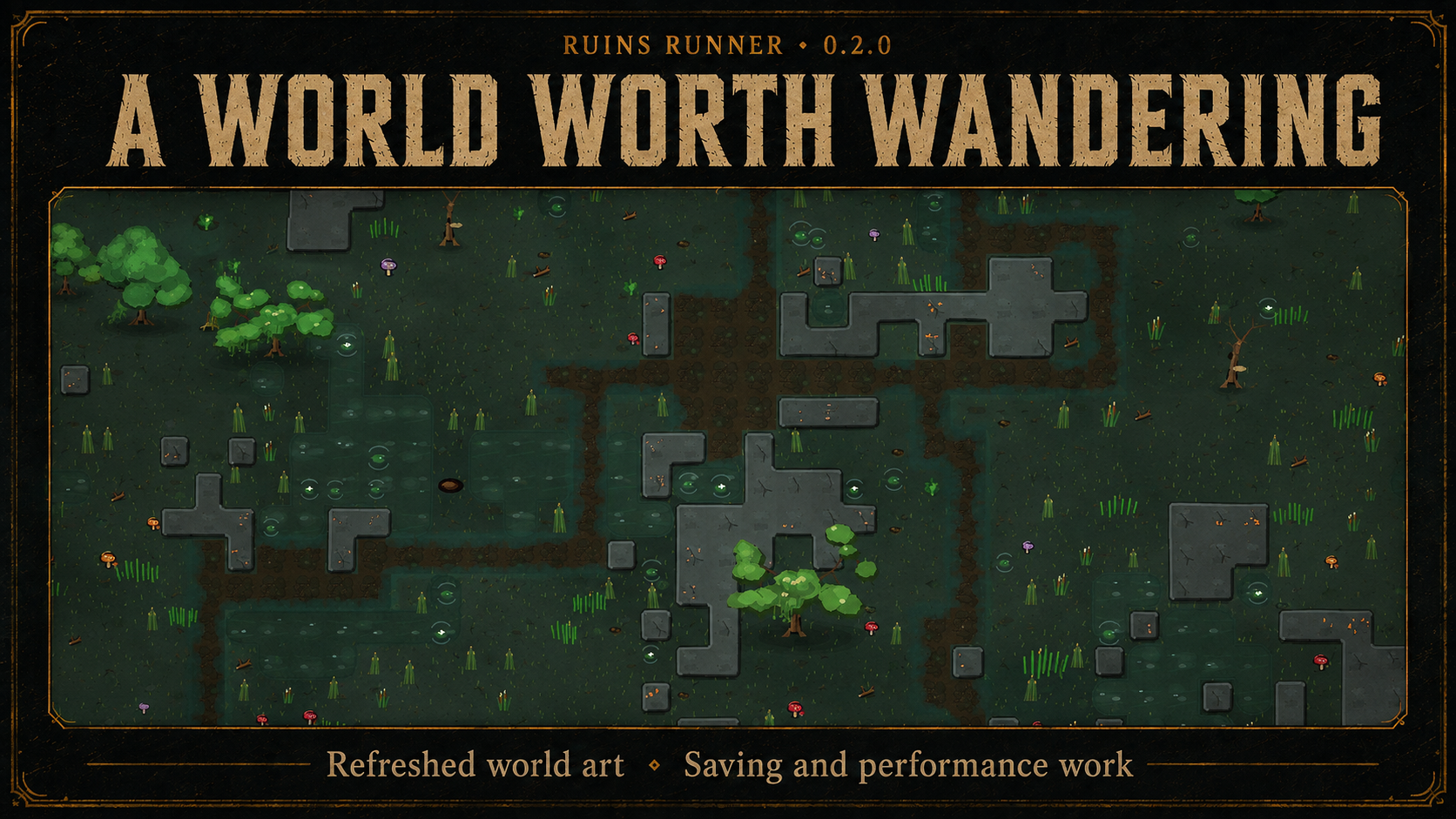
Forest paths, foliage, and terrain from the overworld.
- Refreshed foliage, flowers, logs, mushrooms, crystals, ruin props, barrels, crates, containers, roads, stations, and equipment icons.
- World streaming uses chunk residency and a recent-visit cache to manage nearby areas and avoid unnecessary reload work.
- Road generation, decoration collection, object preparation, and terrain work are split into smaller pieces, with cancellation of obsolete preparation work.
- Minimap segments and neighboring views are cached and pre-baked. Particle pooling, HUD caching, batched shadows, and decoration/grass rendering reduce repeated work and allocations.
- Large world saves use batched/binary sidecar data and skip redundant encoding and writes; loading can yield while decoding large data.
- Memory cleanup covers sky, minimap, grass, and decoration resources to improve long-session stability.
- Graphics performance options, a live profiler, and performance captures help diagnose problems. Performance work continues; results depend on the world and hardware.
Thank you, truly
Thank you for supporting me and playtesting my wacky game. Your feedback, ideas, and help keep me moving forward, and a lot of what's in this update grew out of those conversations.
Please keep sending bugs and telling me what you'd like to see. I can't promise every idea will make it in, but I want to keep building something you'll enjoy just as much as I do.
And to everyone helping out: I would not be this far without you.
Grab a friend, try a new build, and let me know how your next adventure goes.
See you all in the ruins!