
Hey Backyard Chefs!
Our new major update is LIVE NOW! 🎉
There’s more room for the farm and restaurant you’ve been picturing, and more help to keep them running. Expand into four new plots of land, stock up with two new larger storage shelves, leave animal care to the new Rancher, and let your Waiters collect money from tables. Staff management is smoother too, with more flexible assignments, smarter task handling, staff customization with new appearance options, and a refreshed Management Screen to help you see what’s working and what needs attention.
Building and decorating should feel smoother as well, and yes, you can finally move the big tree. 🌳 You can also customize your keybindings for keyboard/mouse and controller.
And controller support is finally here for Xbox and DualSense, while Steam Deck now runs at 60 FPS with an improved handheld experience.
🐄 Meet the Rancher

The dining room is full, and the chickens need feeding. You don’t have to handle both.
Complete the Rancher research to hire your newest crew member. They’ll feed your animals, collect what they produce, and bring it to your shelves.
They’ve got the barn shift covered while you keep the restaurant cooking.
🌱 A Lot More Room to Grow
 If your restaurant and farm have started feeling a little cramped, you’re going to like this one.
Expand into four new plots of land, giving you much more room to spread out, build bigger farms, create larger restaurants, reorganize your production areas, or finally start that unnecessarily huge business you’ve been planning. 👀
You can keep your current save, too. Your existing land and placed items stay exactly where they are, and the new plots are simply available to purchase.
👕 Staff Customization & Daily Bonuses

Apparently running a restaurant wasn’t enough. Now we’re doing fashion too.
Customize your staff from head to toe, choosing their clothing colors, bottoms, shoes, skin tone, eyebrows, and beard or mustache options. Or just hit Randomize when you’re feeling experimental... or too lazy to choose. Rotate the character preview to see the results from every angle before applying them.
Want a shared look for the whole crew? Apply matching top and bottom clothing colors to all your current staff and anyone you hire in the future.
You can also reward your team with Daily Bonuses to help them move and work faster, with the option to renew them automatically each day.
🎮 Controller Support Is Finally Here
Pick up an Xbox or DualSense controller and get cooking, farming, and building. Controller support now covers gameplay, tablet apps, staff management, building, painting, and menus.
🕹️ A Better Steam Deck Experience
 Farm to Table now runs at 60 FPS on Steam Deck, with work on handheld performance, controls, and UI navigation to make playing on the go more comfortable.
Supported text fields open Steam’s on-screen keyboard.
🏠 Smoother Building & Decorating
Building and redesigning your space should now feel smoother, clearer, and a lot less restrictive.
When something can’t be placed or moved, you’ll now see what’s blocking it while you build, making it much easier to understand what needs to change.
You can also change or add flooring without moving your furniture out of the way. Tables, chairs, and other items stay where they are while you work on the floor beneath them.
🌳 Yes. You Can Finally Move the Big Tree.
We know.
You asked.
A lot.
The big tree can be moved now. 🌳👀
🪙 Waiters Can Collect Money From Tables
Your Waiters can now take care of payments too. Unlock Waiter Payment Collection and they’ll pick up money left on tables for you.
That means fewer laps around the restaurant collecting money and more time to focus on... literally anything else.
📦 Bigger Storage Options
Those tiny storage shelves weren’t going to survive forever.
We’ve added two new high-capacity shelves, giving larger farms and restaurants much more room to keep ingredients, produce, and supplies organized.
📊 See What Makes Your Restaurant Work
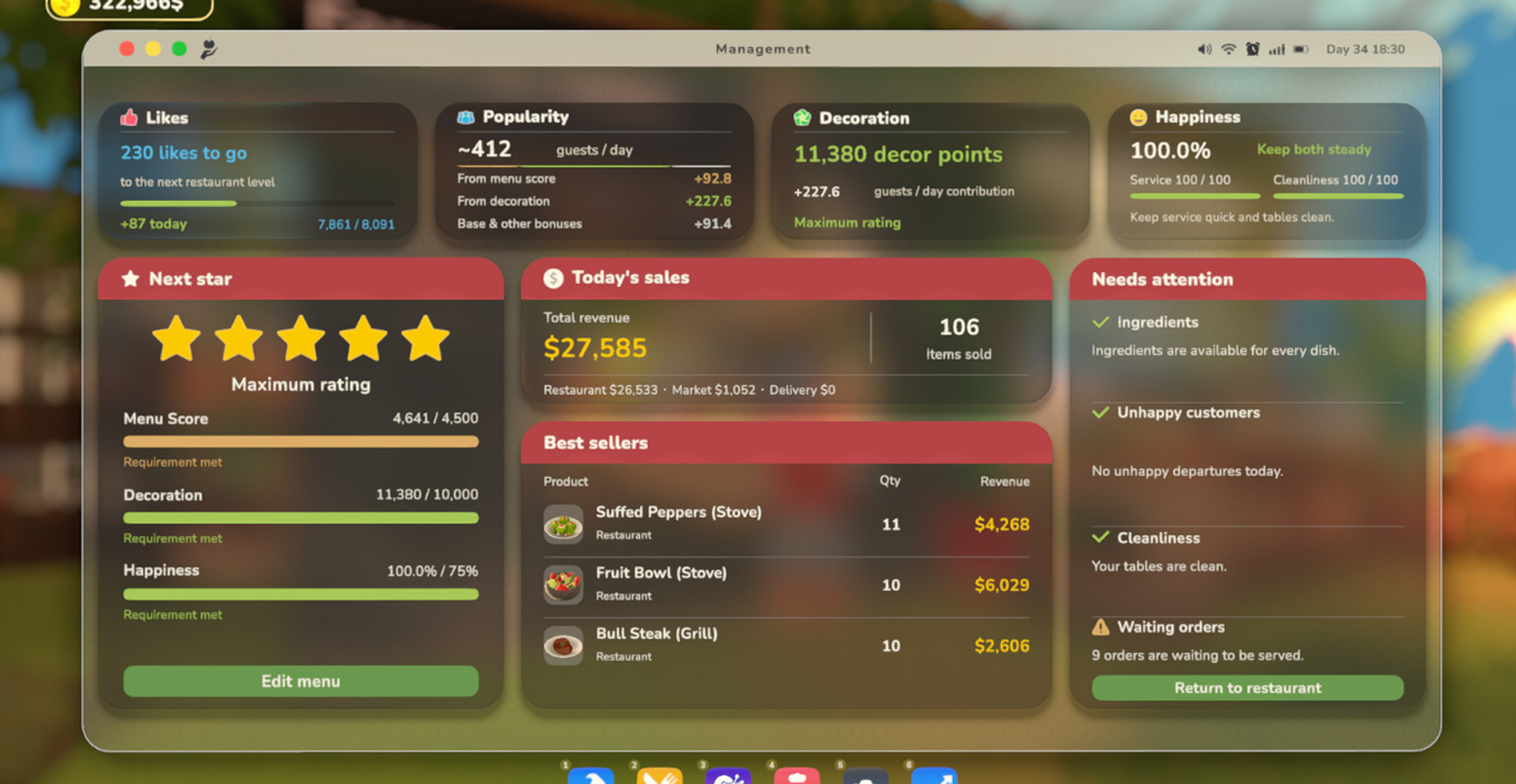
What’s standing between you and your next restaurant star? The refreshed Management Screen shows which goals you’ve met and what still needs work, so you know where to focus next.
See how your menu and decorations contribute to your expected daily guests, discover your best-selling products, and track the day’s revenue across your restaurant, market, and deliveries. You can see both how many of each product you’ve sold and how much revenue it brought in.
When service gets busy, the Needs Attention panel helps you keep an eye on ingredient availability, waiting orders, table cleanliness, and unhappy departures. See what’s going well and where things need a little help, all from your tablet.
🎨 A More Satisfying Way to Paint

Painting has a new feel with a hold-to-paint interaction, complete with a roller animation, sounds, and visual effects as you work.
You can also preview your selected finish before applying it, and the pattern-selection panel has been simplified to make choosing a new look easier.
⚙️ A Smoother Day at the Restaurant
This update also brings performance improvements, especially on Low and Medium settings, with less rendering, pathfinding, and task-selection work in busy scenes.
We’ve addressed specific staff problems, too, including Chefs stopping checks for new orders and Farmers or Waiters getting stuck on unreachable targets instead of moving on to other available work.
You’ll find the full feature details, research requirements, quality-of-life changes, and bug fixes below.
⌨️ Custom Keybindings Are Here
 You can now rebind both keyboard/mouse and controller controls to suit the way you play.
The new keybinding system shows your selected action and current binding, remembers your position in each controls list, and lets you clear bindings with Delete or X/Square.
🔭 What’s Next?
This update is a big step forward, but there’s plenty more we want to build on from here.
👥 Co-op Multiplayer
Multiplayer remains one of our biggest priorities. We’re aiming to start testing multiplayer before the end of the year. We’ll share more as we get closer to testing.
🍳 More Recipes & More Ways to Cook
Upcoming updates will put more focus on expanding recipe variety, along with introducing new cooking stations and more ways to prepare dishes. We want your kitchen to offer more choices in both what you cook and how you cook it.
🪴 More Decorations & Variety
We’ll also continue expanding the decoration side of the game with new furniture, decorative items, and more visual variety, giving you more ways to make your farm and restaurant feel like your own.
📋 Full Patch Notes
✨ New Features & Additions
Rancher: Each Rancher can be assigned up to eight livestock buildings. Staff capacity research also unlocks additional Rancher hiring slots.
Land expansion: Each new plot unlocks at level 25 and costs 25,000.
Controller support: Controller support also extends to Settings. Navigation, selection, and confirmation have been updated across building, painting, camera, staff management, and research.
Steam Deck on-screen keyboard: Supported text fields include restaurant names, decorative sign text, pet names, staff names, recipe names, and the Twitch channel field. Cancelling text entry leaves the existing text unchanged.
Waiter table money collection: Payment collection can be enabled or disabled from the staff screen. Serving food and cleaning take priority over collecting money.
Management screen: The refreshed screen also shows likes, popularity, decoration score, and customer happiness. Actual cleanliness and customer satisfaction with cleanliness are displayed separately.
Needs Attention: You can also see why unhappy customers left, including missing ingredients, running out of time while waiting for service, an empty menu, or being sent away.
Daily staff bonuses: Daily Bonuses unlock with the final staff capacity research. A bonus costs an extra 50% of a worker’s base daily wage and provides a 30% increase to movement and work speed until the next in-game day. Bonuses can be given to one worker or all current workers in the same role. Turning automatic renewal off does not cancel a bonus already paid for that day.
Custom keybindings: The binding window also displays the remaining time while rebinding a control.
Storage shelves:
Large Shelf: Holds 72 items across 12 crates × 6 items, unlocks at level 15, and costs 2,000.
High-Capacity Shelf: Holds 192 items across 8 crates × 24 items, unlocks at level 25, and costs 6,000.
🏠 Building & Gameplay Changes
Placement & Moving
Clearer building restrictions: Placement restriction messages no longer require a confirmation press to remain visible. They update as conditions change and include a reminder when land must be unlocked before building.
Floors & Furniture
When a floor is moved or sold, furniture height automatically adjusts to the flooring remaining underneath.
Added a confirmation before a floor change removes an attached wall, door, or window. The “Don’t show again this session” option applies only to the current play session.
Floors beneath working stations cannot be moved or sold while the station is in use. An on-screen message identifies the station blocking the action.
Painting
Painting takes a 1.5-second hold across four roller strokes. Releasing early reverses the progress and leaves the previous paint unchanged.
Added dedicated sounds for individual roller strokes and painting completion.
Updated the painting panel’s control hints and text.
Storage Use
Staff prioritize crates labeled for the product they are putting away. If no suitable labeled space is available, they look for unlabeled storage.
Staff can drop off as much as a shelf has room for, even if it cannot hold everything they are carrying.
Added short animations when crates appear and are removed.
Crops & Research Progression
Updated crop unlock levels: Carrots now unlock at level 6 instead of 3, and corn at level 8 instead of 5. Prices are unchanged.
Revised research progression: Waiter Payment Collection now follows the first Farmer research and is required for Stove II. The first additional staff capacity upgrade follows Stove II, with Rancher research after it. Another branch now follows Market → Dairy → second staff capacity upgrade → second construction upgrade. The first Tool Shop upgrade now follows the Tomato Presser.
⚙️ Performance Improvements
Reduced the performance cost of shadows, vegetation, water, and decorative effects on Low and Medium graphics settings. UI blur is processed more efficiently at high resolutions.
Reduced memory usage for some environmental textures and improved how required texture detail is loaded.
Optimized grass cutting, land updates, painted surfaces, and environmental vegetation rendering.
✨ Quality-of-Life Improvements
Display & Graphics Settings
Display settings now have their own tab. Resolution, monitor selection, window mode, refresh rate, FPS limit, VSync, and field of view are grouped together.
Graphics options can be adjusted individually. Customize texture quality, shadow quality and distance, vegetation density, ambient occlusion, anti-aliasing, and resolution scale. Changing an option switches the preset to Custom, and your preferences are saved.
Render scale slider: Adjust render scale from 50% to 100% in 5% steps. Anti-aliasing options are now Off, 2×, and 4×.
Graphics presets preserve display preferences. Switching quality presets no longer changes your VSync, FPS limit, or refresh rate selections.
Adjustable HUD size: Added Small, Medium, and Large options. The order bar adjusts to the available space, with extra orders shown as +N. Large HUD mode displays up to five order cards at once.
HUD transparency options: Choose Off, Medium, or High to reduce HUD transparency. Supported information panels, notifications, and control hints become more distinct while preserving the research indicator’s pink appearance. The default glass effect has also been refreshed.
Larger interaction icon: Choose 1×, 2×, or 3× size for the interaction cursor icon. The default is 1×.
Cleaner quest display: Once the final quest completion animation ends and no new quests remain, the quest area and its heading are hidden.
Controllers & Menus
Separate conversation controls: Talking to staff and NPCs, and greeting customers and shoppers, now uses E by default. Serving food remains on left-click. Change the conversation control through the Additional Interaction binding.
Independent controller camera sensitivity: Adjust controller camera sensitivity separately from mouse settings. The adjustable range is 25%–200%.
Device-specific button prompts: Interaction, quest, tablet, and photo camera prompts now match keyboard and mouse, Xbox, or PlayStation controls. The Building Modes tutorial also reflects your device and custom bindings, with controller versions added for relevant tutorial images.
Controller tablet navigation: Use LB/RB or L1/R1 to switch between apps, move the right stick horizontally to switch tabs within an app, and use the D-pad or left stick to navigate its contents.
Clearer menu selection: Selection outlines fit buttons more closely, and selected items remain visible in scrollable lists. Added missing controller navigation for staff, research, management, and new settings rows.
More consistent scrolling: Adjusted scrolling speeds across settings, building, recipe, research, and staff screens. Fixed small scroll movements snapping back in the building list.
Updated main menu information panel: The update and roadmap sections can now be viewed together.
Loading waits for the world to be ready: The loading screen now stays visible until your save and world objects are fully restored, with controls becoming available once loading is complete.
More interaction sounds: Added pickup and drop sounds for plates, trays, crates, flower baskets, and fish buckets, alongside additional sound feedback when navigating and confirming actions in controller menus.
Recipes & Staff Management
Staff assignment behavior: Assignments can be changed while staff are working or carrying items. Farmers and Ranchers safely leave removed assignments, while Chefs and Waiters finish work already underway. A Waiter with no remaining assignments will not take on new work.
Easier recipe access: Press once to open a recipe’s details. Press the same recipe again quickly to add it to or remove it from the daily menu. Works with mouse and controller.
Cleaner recipe groups: Empty recipe groups no longer show headings.
Refreshed staff screen: Role groups, portraits, wages, and options to customize, rename, or dismiss staff are presented in a clearer layout. Some default staff names have also been updated.
Dismissal confirmation: Added a confirmation window to help prevent accidental staff dismissals. The window shows the worker’s name. Back cancels the action, and Cancel is selected first when using a controller.
🐛 Bug Fixes
Controls & UI
Fixed building, research, and photo camera tutorial quests only progressing when specific keyboard keys were used. They now progress when the relevant screen is opened.
Fixed movement and camera controls interrupting each other when using a DualSense controller.
Fixed controller building placement staying at the old mouse position. Placement now uses the target at the center of the screen.
Fixed in-game interactions remaining locked after exiting the photo camera with Esc.
Fixed the field of view setting not being applied to the camera.
Fixed the main menu background appearing black or frozen at certain graphics quality levels.
Fixed controller navigation following the wrong settings tab order and skipping some settings rows.
Added a new keybinding system for keyboard/mouse and controller controls. It includes support for notification and painting controls, updates on-screen prompts when bindings are changed, and handles binding conflicts directly within the controls menu.
Fixed graphics presets applying incorrect anti-aliasing and render scale values. High uses 100% render scale, and Medium uses 90%. Ultra uses 4× anti-aliasing, High uses 2×, and Medium and Low have it disabled.
Fixed an incorrect or missing recipe icon when opening the dish information screen for the first time.
Fixed staff card tooltips appearing behind other cards and an unwanted separator appearing beside staff names.
Fixed research stars overflowing their cards.
Building & Storage
Fixed a neighboring wall’s space being incorrectly treated as empty when moving a wall.
Fixed objects remaining interactable before their selling animation finished, which could incorrectly affect the refund.
Fixed objects overlapping multiple obstacles appearing placeable after only one obstacle was cleared.
Fixed selection unexpectedly closing after a failed placement, along with errors when moving certain objects.
Prevented other objects beneath a moving object from being selected, highlighted, or showing tooltips. Also fixed the Move prompt appearing while placing a new object.
Fixed wall lamps and other wall-mounted objects facing the wrong direction from certain viewing angles. Corrected collisions with neighboring walls and delayed updates to placement validity indicators.
Fixed incorrect placement bounds preventing wall lamps and photo frames from being placed in apparently clear spaces.
Fixed products appearing distorted when transferred from the new high-capacity shelf, and some labels pointing to the wrong crate.
Fixed spoilage warning errors when crates and fish buckets were removed.
Prevented crates containing items being transferred or reserved for a task from being incorrectly treated as empty and removed.
Fixed painting also recoloring the edges of walls, doors, and windows. White edges are now preserved.
Fixed surface appearance becoming corrupted when starting a new preview immediately after finishing a paint job.
Staff & Restaurant
Fixed ingredients collected by Chefs being undercounted, leaving some shelves marked as in use.
Fixed Chefs sometimes stopping checks for new orders when no Waiters were in the restaurant.
Fixed Farmers and Waiters getting stuck on unreachable targets and overlooking other tasks they could complete.
Fixed staff task changes incorrectly completing the previous task or leaving it unavailable to other staff.
Fixed interrupted Waiter deliveries leaving prepared food reserved and unavailable to other Waiters. Food can now be reassigned without the player needing to pick it up and put it back down.
Fixed opening assignment management interrupting and restarting a worker’s current task.
Fixed issues with Waiters finding and collecting table money after loading a save.
Money waiting on a table is now collected first if a floor change would affect the height of the table or a chair.
Fixed cleanliness incorrectly showing 100% despite dirty tables. Removed the extra 20 points from the calculation, and table changes now update the value immediately. Also fixed the grace period repeatedly restarting and delaying the effect of cleanliness on customer happiness.
Visuals & Audio
Fixed selection outline thickness on objects such as crates and plates changing based on the previously selected object.
Fixed targeting the restaurant name or open/closed sign highlighting the entire tree.
Fixed some grass remaining visible after being cut.
Fixed the order card's missing model.
Fixed broken water visuals in the fish bucket and fishing photo caused by missing material references.
Fixed a Waiter’s selected mustache not appearing during gameplay.
Fixed weather and ambient sounds ignoring the Environment volume setting. Rain and wind, now follow that setting.
💚 Thank You, Backyard Chefs!
Thank you for sharing your feedback, reporting bugs, and helping us shape Farm to Table throughout Early Access. There’s still more we want to bring to the table, and we can’t wait to see what you build with the extra room.
See you at the restaurant! 🍽️
Furkan & Sevval @indieGiant
💬 Enjoying Farm to Table?
Leaving a Steam review means a lot to us. Your feedback helps us understand what you love, what we can improve, and where we should take Farm to Table next. 💚