
New: In-Game Sprite Editor
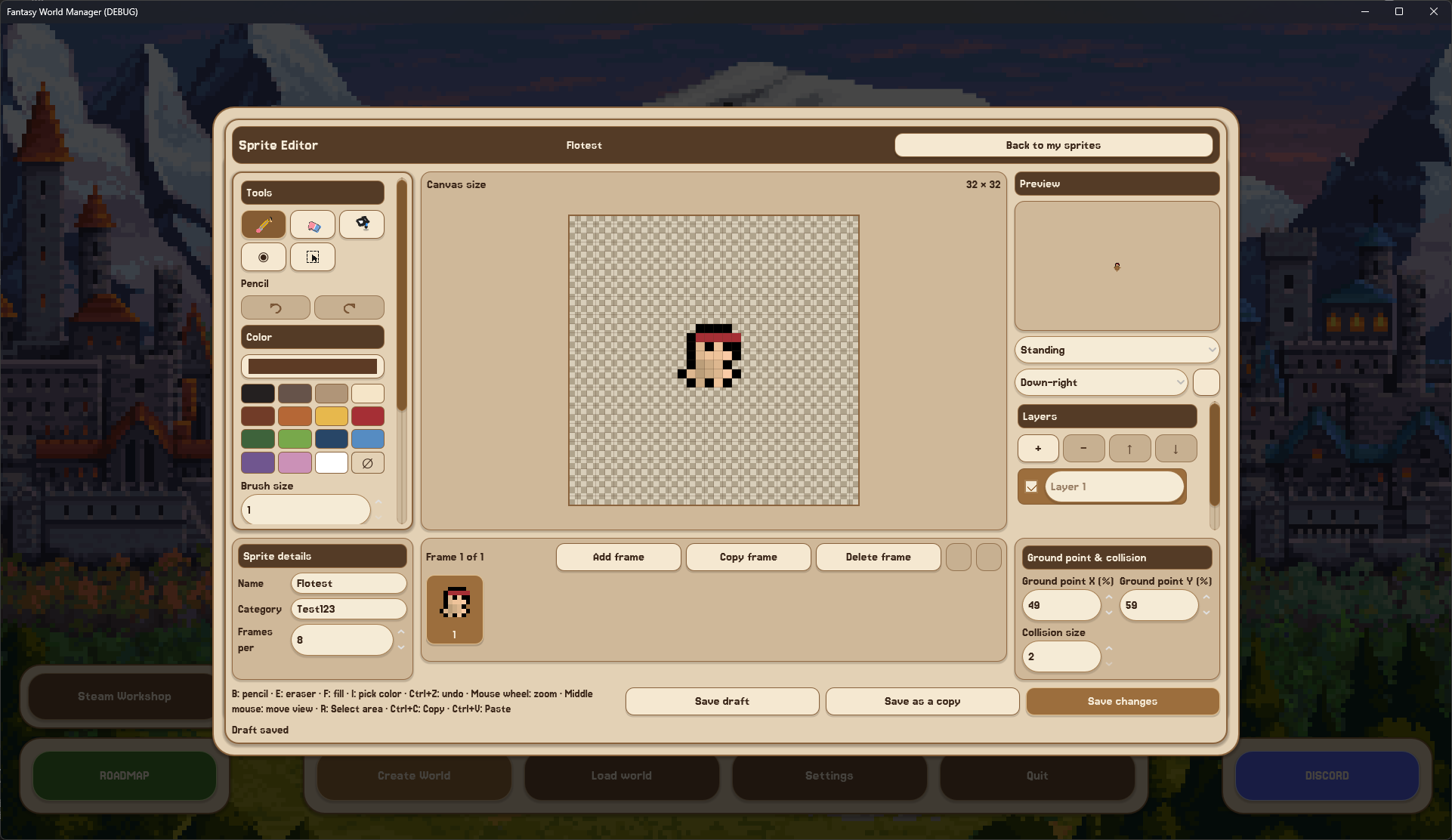
Create and animate your own characters directly inside FWM!
Draw with pencil, eraser, fill and color-picker tools.
Work with up to 8 layers, with visibility controls, reordering and editable names.
Select, move, copy and paste parts of your artwork between frames and layers.
Add, duplicate, reorder, delete and flip animation frames.
Adjust animation speed and preview different animations and directions.
Includes undo/redo, canvas zoom, a pixel grid and a previous-frame guide.
Continue working from automatically saved drafts.
Edit an existing local sprite or save your changes as a separate copy.
Available through Workshop → Sprites → My Sprites.
Custom Sprites
Import PNG sprite sheets and use them in the NPC, Monster and Animal editors.
Includes a downloadable template and clearer import instructions.
Only an idle pose is required; additional animations are optional.
Animations support different frame counts. Empty trailing frames are ignored automatically.
Separate animations are supported for woodcutting, mining and harvesting.
Custom sprites now preserve their original frame dimensions and transparent padding, without the previous display-size scaling.
Removing a custom sprite replaces its appearance with a placeholder without deleting the characters using it.
Steam Workshop
Added dedicated Worlds, Prefabs and Sprites tabs.
Custom sprites can be shared and downloaded through Steam Workshop.
Shared worlds and prefabs automatically include the custom sprites they use.
Redesigned the sprite library and related menus
Fixed upload problems affecting certain older and tutorial-derived worlds.
Improved upload error messages.
New: Hyperspeed
Added 10× and 20× to the regular speed controls.
Selecting Hyperspeed automatically switches to the world overview.
Zooming back in restores normal simulation speed.
Hyperspeed is unavailable inside editors and interiors.
Calendar progression and simulation stay synchronized, with battles continuing during fast-forward.
Event messages are grouped to reduce notification spam.
Creatures, Battles & Occupation
Monsters and animals now spawn more evenly across suitable areas of their zones.
Addressed creatures becoming stuck after combat or respawning.
Improved obstacle navigation, target switching and frontline reinforcement movement.
Fixed larger characters stopping outside attack range.
Improved patrol formations and recovery from stalled army movement.
Addressed cases where armies failed to return home or heroes failed to resume their activities after a war.
Occupying armies are no longer reassigned to another front before their occupation is resolved.
Factions can now defend with smaller soldier groups or available heroes alone.
Added recovery for affected fronts in existing worlds.
Corrected occupation timing after loading and during Hyperspeed.
Occupied zones now clearly show their occupying faction, separately from their owner.
Completed occupations no longer keep blinking with a full capture bar.
Improved occupation information in inspectors, the world overview and event messages.
Localization & Readability
Expanded and improved translations across supported languages, with particular attention to Chinese and Russian.
Improved wording throughout menus, settings, traits and inspectors.
Fixed font and layout issues that caused translated text to be clipped or difficult to read.
Added translations for the Sprite Editor, its controls and tooltips across all 30 supported languages.
Tutorial & Interface Fixes
Renaming the tutorial city no longer blocks tutorial progression.
Fixed overlapping tutorial controls and the Region close-button hitbox.
Removed unwanted hover sounds from affected controls.
Sprite previews remain visible while scrolling through settings.
Changing the ground point no longer makes an unsaved sprite disappear.
Improved frame thumbnails, panel spacing, scrollbars and inline layer renaming.
Fixed a color-picker error when closing the Sprite Editor.
These simulation fixes also benefit existing worlds no new world required!
I would also like to thank everyone has decided to buy the EA-Version and support the Developement, i know that especially the Simulation and general Interactions need alot of work and i promise that it will keep getting better!
Also thanks for all Reviews so far! Even tho the majority is positive, i know there is alot of work to be done, this is what Early Access is for! <3
-Flo