
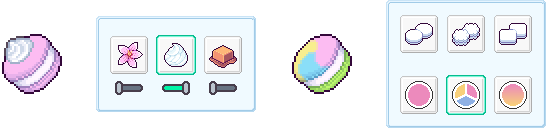
A feature to customize existing recipes has been added! Through recipe styling, you can choose colors, patterns, and various decorations to design your very own macarons.
You can place various decorations like jelly, chocolate, cream, and caramel on top of the coque, and select the color and brightness for each element. Customize your recipes by adding gradients or wave patterns to the coques. Once applied, your custom macaron designs will be instantly reflected on the display stands, in the recipe list, and in your favorites. Build your very own business with the products you designed yourself!
Additionally, the following changes have been made:
- Changed the tutorial order: The 'Exterior' tutorial, which previously appeared after the 'Labeling' tutorial, will now appear earlier, right after the 'Site Purchase' tutorial.
- When running a simulation, the inventory numbers of macarons registered on the store display will change to a checkmark. This checkmark will activate once the macaron delivery is confirmed.
- Fixed an issue where ingredients would not move properly if a conveyor was changed to a rotating type while items were moving on it.
- Added notification pop-ups for actions like favoriting or excluding items in the recent facility list.
- Moved the 'Arrage Mode' button to the top of the screen.
Please note that if you have already completed the demo version, you cannot access the recipe styling feature on that save file. However, I'm working on a way to allow players to skip the tutorial and experience all the content!